Table of contents
Open Table of contents
Article body
While writing a function today, I needed to exchange data with the server, so I used Ajax. Specifically, I used MiniUI’s Ajax API, which works similarly to jQuery’s.
Here is the original function:
function queryAgain(){
SLData.again = ‘again’;
var json=nui.encode({params:SLData});
var againData;
nui.ajax({
url: “com.vbm.fmis.gl.voucher.voucher.queryVoucherMain.biz.ext”,
type: ‘POST’,
data:json,
success: function (data) {
againData = data.vos;
},
error: function (jqXHR, textStatus, errorThrown) {
nui.alert(jqXHR.responseText);
}
});
return againData;
}
The function simply queries the data I need so that another function can use it. However, againData was always undefined, even though I confirmed that the server had returned data. I initially suspected an incorrect logic-flow configuration, but repeated checks found nothing wrong. I couldn’t understand the problem until a colleague helped me identify the cause.
The reason is the async option, which can be true or false. If omitted, it defaults to true. It determines whether the request is asynchronous or synchronous. With async set to true, the browser runs two threads in the explanation given here: one for the Ajax request and another for the code following it. With async set to false, the browser executes the Ajax success handler before continuing with subsequent operations.
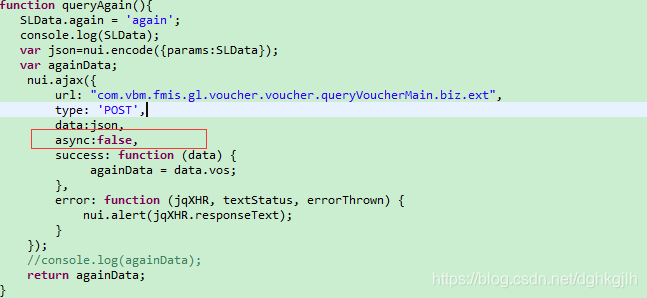
As you can see, I declared againData so that I could assign the response to it and return it for use in another function. Because I hadn’t set async to false, the browser returned againData before the assignment happened. That is why the returned value was always undefined.
Setting it to false resolved this issue:
When using Ajax, think through the intended execution flow first. The details matter.
Updated 2019-03-04: I made the same mistake a second time. See this post