Table of contents
Open Table of contents
Article body
Although this example uses a Mac, the same configuration principles apply on Windows.
Online guides generally describe two ways to deploy multiple instances on one machine:
-
One configuration file manages multiple MySQL instances.
-
Each instance has its own configuration file (my.cnf).
Deployment:
The official documentation describes the first approach. See the official multiple-instance deployment guide, which includes a sample configuration.
Essentially, configure each instance’s data directory, port, socket, user, and related settings in my.cnf. The following comes from the MySQL documentation:
# This is an example of a my.cnf file for mysqld_multi.
# Usually this file is located in home dir ~/.my.cnf or /etc/my.cnf

[mysqld_multi]
mysqld     = /usr/local/mysql/bin/mysqld_safe
mysqladmin = /usr/local/mysql/bin/mysqladmin
user       = multi_admin
password   = my_password

[mysqld2]
socket     = /tmp/mysql.sock2
port       = 3307
pid-file   = /usr/local/mysql/data2/hostname.pid2
datadir    = /usr/local/mysql/data2
language   = /usr/local/mysql/share/mysql/english
user       = unix_user1

[mysqld3]
mysqld     = /path/to/mysqld_safe
ledir      = /path/to/mysqld-binary/
mysqladmin = /path/to/mysqladmin
socket     = /tmp/mysql.sock3
port       = 3308
pid-file   = /usr/local/mysql/data3/hostname.pid3
datadir    = /usr/local/mysql/data3
language   = /usr/local/mysql/share/mysql/swedish
user       = unix_user2

[mysqld4]
socket     = /tmp/mysql.sock4
port       = 3309
pid-file   = /usr/local/mysql/data4/hostname.pid4
datadir    = /usr/local/mysql/data4
language   = /usr/local/mysql/share/mysql/estonia
user       = unix_user3

[mysqld6]
socket     = /tmp/mysql.sock6
port       = 3311
pid-file   = /usr/local/mysql/data6/hostname.pid6
datadir    = /usr/local/mysql/data6
language   = /usr/local/mysql/share/mysql/japanese
user       = unix_user4
For initialization of each instance’s data directory and root password before startup, see Initializing the MySQL data directory.
The basic steps are:
-
Create the instance’s data directory and give it the necessary read, write, and execute permissions.
-
Initialize the database; MySQL generates a random password.
Problem:
Following the documentation step by step should work. However, at the final step, starting the instances repeatedly reported that an instance directory was “not writable.” I suspected permissions, but even after granting chmod -R 777 on the directory, it still reported no write permission. I searched online for a long time. Someone had reported this on the official site, but there was no answer. Eventually, I abandoned the first
approach. If you know the cause, please leave a comment—thanks. I later wondered whether it was a user-group issue, although the permissions were already 777.
The second approach is straightforward. For example, let mysql3306 be the source instance and mysql3309 the destination.
Deployment steps:
Preparation: make a few changes to the existing mysql3306 configuration.
Changes to my.cnf:
[client]
port=3306
socket=/tmp/mysql.sock1
password=12345

[mysqld]
port=3306
socket=/tmp/mysql.sock1
key_buffer_size=16M
max_allowed_packet=8M
datadir=/usr/local/mysql3306/data
basedir=/usr/local/mysql3306
pid-file = /usr/local/mysql3306/data/3306.pid

[mysql]
no-auto-rehash
connect_timeout=2

[mysqlhotcopy]
interactive-timeout

[mysqldump]
quick
The main changes are:
-
Add socket under both client and mysqld and specify its path. Each MySQL instance needs a distinct socket.
-
Configure datadir, basedir, and pid-file under mysqld. All three must differ between instances.
Modify the MySQL startup script mysql.server, located under ${MYSQL_INSTALL_PATH}/support-file/, as follows:
Under “Set some defaults,” there are several paths: basedir, bindir, sbindir, and libexecdir.
Set these to match the configuration above. If in doubt, refer to the script below.
#!/bin/sh
# Copyright Abandoned 1996 TCX DataKonsult AB & Monty Program KB & Detron HB
# This file is public domain and comes with NO WARRANTY of any kind

# MySQL daemon start/stop script.

# Usually this is put in /etc/init.d (at least on machines SYSV R4 based
# systems) and linked to /etc/rc3.d/S99mysql and /etc/rc0.d/K01mysql.
# When this is done the mysql server will be started when the machine is
# started and shut down when the systems goes down.

# Comments to support chkconfig on RedHat Linux
# chkconfig: 2345 64 36
# description: A very fast and reliable SQL database engine.

# Comments to support LSB init script conventions
### BEGIN INIT INFO
# Provides: mysql
# Required-Start: $local_fs $network $remote_fs
# Should-Start: ypbind nscd ldap ntpd xntpd
# Required-Stop: $local_fs $network $remote_fs
# Default-Start:  2 3 4 5
# Default-Stop: 0 1 6
# Short-Description: start and stop MySQL
# Description: MySQL is a very fast and reliable SQL database engine.
### END INIT INFO

# If you install MySQL on some other places than /usr/local/mysql, then you
# have to do one of the following things for this script to work:
#
# - Run this script from within the MySQL installation directory
# - Create a /etc/my.cnf file with the following information:
#   [mysqld]
#   basedir=<path-to-mysql-installation-directory>
# - Add the above to any other configuration file (for example ~/.my.ini)
#   and copy my_print_defaults to /usr/bin
# - Add the path to the mysql-installation-directory to the basedir variable
#   below.
#
# If you want to affect other MySQL variables, you should make your changes
# in the /etc/my.cnf, ~/.my.cnf or other MySQL configuration files.

# If you change base dir, you must also change datadir. These may get
# overwritten by settings in the MySQL configuration files.

basedir=
datadir=

# Default value, in seconds, afterwhich the script should timeout waiting
# for server start.
# Value here is overriden by value in my.cnf.
# 0 means don't wait at all
# Negative numbers mean to wait indefinitely
service_startup_timeout=900

# Lock directory for RedHat / SuSE.
lockdir='/var/lock/subsys'
lock_file_path="$lockdir/mysql"

# The following variables are only set for letting mysql.server find things.

# Set some defaults
mysqld_pid_file_path=
if test -z "$basedir"
then
  basedir=/usr/local/mysql3306
  bindir=/usr/local/mysql3306/bin
  if test -z "$datadir"
  then
    datadir=/usr/local/mysql3306/data
  fi
  sbindir=/usr/local/mysql3306/bin
  libexecdir=/usr/local/mysql3306/bin
else
  bindir="$basedir/bin"
  if test -z "$datadir"
  then
    datadir="$basedir/data"
  fi
  sbindir="$basedir/sbin"
  libexecdir="$basedir/libexec"
fi

# datadir_set is used to determine if datadir was set (and so should be
# *not* set inside of the --basedir= handler.)
datadir_set=

#
# Use LSB init script functions for printing messages, if possible
#
lsb_functions="/lib/lsb/init-functions"
if test -f $lsb_functions ; then
  . $lsb_functions
else
  log_success_msg()
  {
    echo " SUCCESS! $@"
  }
  log_failure_msg()
  {
    echo " ERROR! $@"
  }
fi

PATH="/sbin:/usr/sbin:/bin:/usr/bin:$basedir/bin"
export PATH

mode=$1    # start or stop

[ $# -ge 1 ] && shift

other_args="$*"   # uncommon, but needed when called from an RPM upgrade action
           # Expected: "--skip-networking --skip-grant-tables"
           # They are not checked here, intentionally, as it is the resposibility
           # of the "spec" file author to give correct arguments only.

case `echo "testing\c"`,`echo -n testing` in
    *c*,-n*) echo_n=   echo_c=     ;;
    *c*,*)   echo_n=-n echo_c=     ;;
    *)       echo_n=   echo_c='\c' ;;
esac

parse_server_arguments() {
  for arg do
    case "$arg" in
      --basedir=*)  basedir=`echo "$arg" | sed -e 's/^[^=]*=//'`
                    bindir="$basedir/bin"
		    if test -z "$datadir_set"; then
		      datadir="$basedir/data"
		    fi
		    sbindir="$basedir/sbin"
		    libexecdir="$basedir/libexec"
        ;;
      --datadir=*)  datadir=`echo "$arg" | sed -e 's/^[^=]*=//'`
		    datadir_set=1
	;;
      --pid-file=*) mysqld_pid_file_path=`echo "$arg" | sed -e 's/^[^=]*=//'` ;;
      --service-startup-timeout=*) service_startup_timeout=`echo "$arg" | sed -e 's/^[^=]*=//'` ;;
    esac
  done
}

wait_for_pid () {
  verb="$1"           # created | removed
  pid="$2"            # process ID of the program operating on the pid-file
  pid_file_path="$3" # path to the PID file.

  i=0
  avoid_race_condition="by checking again"

  while test $i -ne $service_startup_timeout ; do

    case "$verb" in
      'created')
        # wait for a PID-file to pop into existence.
        test -s "$pid_file_path" && i='' && break
        ;;
      'removed')
        # wait for this PID-file to disappear
        test ! -s "$pid_file_path" && i='' && break
        ;;
      *)
        echo "wait_for_pid () usage: wait_for_pid created|removed pid pid_file_path"
        exit 1
        ;;
    esac

    # if server isn't running, then pid-file will never be updated
    if test -n "$pid"; then
      if kill -0 "$pid" 2>/dev/null; then
        :  # the server still runs
      else
        # The server may have exited between the last pid-file check and now.
        if test -n "$avoid_race_condition"; then
          avoid_race_condition=""
          continue  # Check again.
        fi

        # there's nothing that will affect the file.
        log_failure_msg "The server quit without updating PID file ($pid_file_path)."
        return 1  # not waiting any more.
      fi
    fi

    echo $echo_n ".$echo_c"
    i=`expr $i + 1`
    sleep 1

  done

  if test -z "$i" ; then
    log_success_msg
    return 0
  else
    log_failure_msg
    return 1
  fi
}

# Get arguments from the my.cnf file,
# the only group, which is read from now on is [mysqld]
if test -x "$bindir/my_print_defaults";  then
  print_defaults="$bindir/my_print_defaults"
else
  # Try to find basedir in /etc/my.cnf
  conf=/etc/my.cnf
  print_defaults=
  if test -r $conf
  then
    subpat='^[^=]*basedir[^=]*=\(.*\)$'
    dirs=`sed -e "/$subpat/!d" -e 's//\1/' $conf`
    for d in $dirs
    do
      d=`echo $d | sed -e 's/[ 	]//g'`
      if test -x "$d/bin/my_print_defaults"
      then
        print_defaults="$d/bin/my_print_defaults"
        break
      fi
    done
  fi

  # Hope it's in the PATH ... but I doubt it
  test -z "$print_defaults" && print_defaults="my_print_defaults"
fi

#
# Read defaults file from 'basedir'.   If there is no defaults file there
# check if it's in the old (depricated) place (datadir) and read it from there
#

extra_args=""
if test -r "$basedir/my.cnf"
then
  extra_args="-e $basedir/my.cnf"
fi

parse_server_arguments `$print_defaults $extra_args mysqld server mysql_server mysql.server`

#
# Set pid file if not given
#
if test -z "$mysqld_pid_file_path"
then
  mysqld_pid_file_path=$datadir/`hostname`.pid
else
  case "$mysqld_pid_file_path" in
    /* ) ;;
    * )  mysqld_pid_file_path="$datadir/$mysqld_pid_file_path" ;;
  esac
fi

case "$mode" in
  'start')
    # Start daemon

    # Safeguard (relative paths, core dumps..)
    cd $basedir

    echo $echo_n "Starting MySQL"
    if test -x $bindir/mysqld_safe
    then
      # Give extra arguments to mysqld with the my.cnf file. This script
      # may be overwritten at next upgrade.
      $bindir/mysqld_safe --datadir="$datadir" --pid-file="$mysqld_pid_file_path" $other_args >/dev/null &
      wait_for_pid created "$!" "$mysqld_pid_file_path"; return_value=$?

      # Make lock for RedHat / SuSE
      if test -w "$lockdir"
      then
        touch "$lock_file_path"
      fi

      exit $return_value
    else
      log_failure_msg "Couldn't find MySQL server ($bindir/mysqld_safe)"
    fi
    ;;

  'stop')
    # Stop daemon. We use a signal here to avoid having to know the
    # root password.

    if test -s "$mysqld_pid_file_path"
    then
      # signal mysqld_safe that it needs to stop
      touch "$mysqld_pid_file_path.shutdown"

      mysqld_pid=`cat "$mysqld_pid_file_path"`

      if (kill -0 $mysqld_pid 2>/dev/null)
      then
        echo $echo_n "Shutting down MySQL"
        kill $mysqld_pid
        # mysqld should remove the pid file when it exits, so wait for it.
        wait_for_pid removed "$mysqld_pid" "$mysqld_pid_file_path"; return_value=$?
      else
        log_failure_msg "MySQL server process #$mysqld_pid is not running!"
        rm "$mysqld_pid_file_path"
      fi

      # Delete lock for RedHat / SuSE
      if test -f "$lock_file_path"
      then
        rm -f "$lock_file_path"
      fi
      exit $return_value
    else
      log_failure_msg "MySQL server PID file could not be found!"
    fi
    ;;

  'restart')
    # Stop the service and regardless of whether it was
    # running or not, start it again.
    if $0 stop  $other_args; then
      $0 start $other_args
    else
      log_failure_msg "Failed to stop running server, so refusing to try to start."
      exit 1
    fi
    ;;

  'reload'|'force-reload')
    if test -s "$mysqld_pid_file_path" ; then
      read mysqld_pid <  "$mysqld_pid_file_path"
      kill -HUP $mysqld_pid && log_success_msg "Reloading service MySQL"
      touch "$mysqld_pid_file_path"
    else
      log_failure_msg "MySQL PID file could not be found!"
      exit 1
    fi
    ;;
  'status')
    # First, check to see if pid file exists
    if test -s "$mysqld_pid_file_path" ; then
      read mysqld_pid < "$mysqld_pid_file_path"
      if kill -0 $mysqld_pid 2>/dev/null ; then
        log_success_msg "MySQL running ($mysqld_pid)"
        exit 0
      else
        log_failure_msg "MySQL is not running, but PID file exists"
        exit 1
      fi
    else
      # Try to find appropriate mysqld process
      mysqld_pid=`pgrep -d' ' -f $libexecdir/mysqld`

      # test if multiple pids exist
      pid_count=`echo $mysqld_pid | wc -w`
      if test $pid_count -gt 1 ; then
        log_failure_msg "Multiple MySQL running but PID file could not be found ($mysqld_pid)"
        exit 5
      elif test -z $mysqld_pid ; then
        if test -f "$lock_file_path" ; then
          log_failure_msg "MySQL is not running, but lock file ($lock_file_path) exists"
          exit 2
        fi
        log_failure_msg "MySQL is not running"
        exit 3
      else
        log_failure_msg "MySQL is running but PID file could not be found"
        exit 4
      fi
    fi
    ;;
    *)
      # usage
      basename=`basename "$0"`
      echo "Usage: $basename  {start|stop|restart|reload|force-reload|status}  [ MySQL server options ]"
      exit 1
    ;;
esac

exit 0
Next, copy the 3306 instance:
-
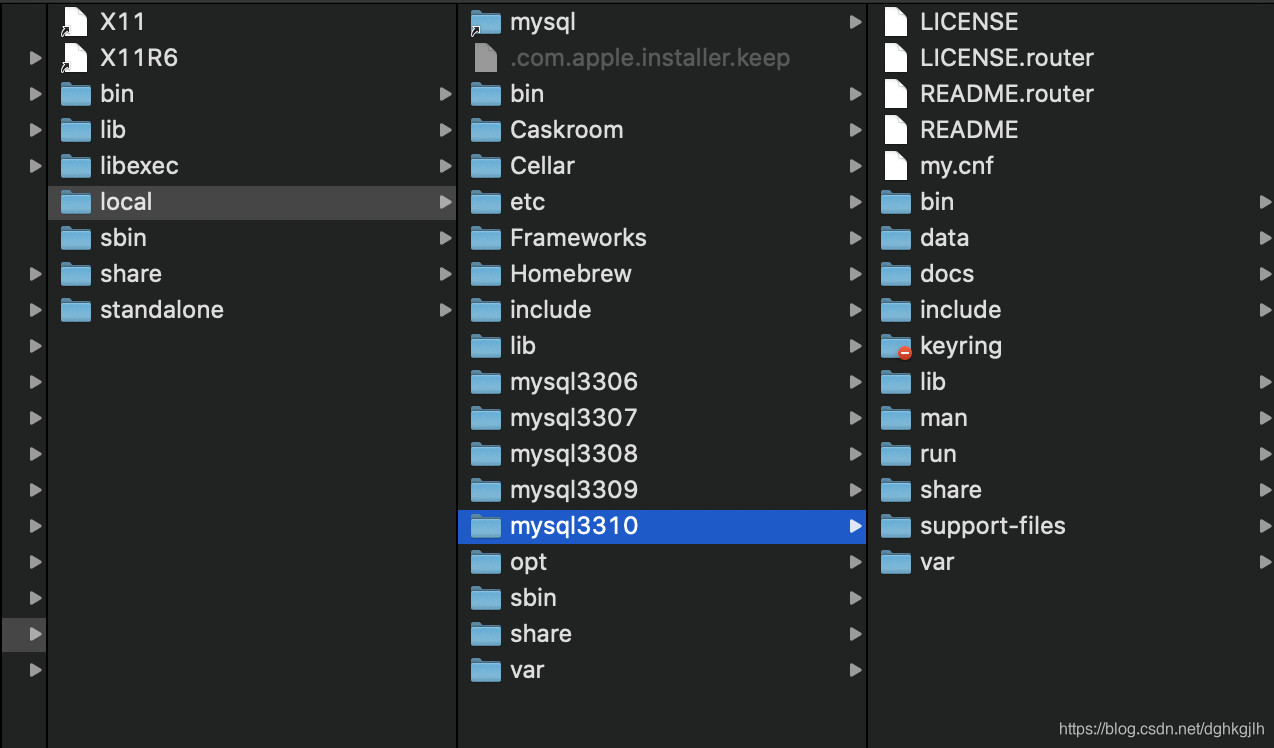
Create a main directory for the new MySQL instance, named mysql3309.
-
Copy the existing instance directory to mysql3309 with cp -pr:
sudo cp -pr mysql3306 mysql3309The p option preserves the source directory’s permissions; r recursively copies all subdirectories and files of the 3306 instance.
- After copying, delete the data directory and initialize a new one (as in step 2 of the first approach), obtaining a new root password for the instance.
Commands:
sudo rm -rf data
sudo mkdir data
Then initialize the data directory:
cd /usr/local/mysql3309
bin/mysqld --defaults-file=/usr/local/mysql3309/my.cnf --initialize --user=root
The command may report that data is not writable. Grant permissions:
sudo chmod 777 dataRun the initialization command again. On success, it reports:
2020-02-16T08:57:49.367713Z 0 [System] [MY-013169] [Server] /usr/local/mysql3309/bin/mysqld (mysqld 8.0.18) initializing of server in progress as process 18043
2020-02-16T08:57:49.370075Z 0 [Warning] [MY-010159] [Server] Setting lower_case_table_names=2 because file system for /usr/local/mysql3309/data/ is case insensitive
2020-02-16T08:57:49.370560Z 0 [Warning] [MY-010122] [Server] One can only use the --user switch if running as root
2020-02-16T08:57:50.926640Z 5 [Note] [MY-010454] [Server] A temporary password is generated for root@localhost: x1yDK_kTl%%5
The last line contains the temporary password for the new 3309 instance. Remember it.
- Modify the new instance’s my.cnf, primarily its port and related information:
[client]
port=3309
socket=/tmp/mysql.sock2
password=12345

[mysqld]
port=3309
socket=/tmp/mysql.sock2
key_buffer_size=16M
max_allowed_packet=8M
datadir=/usr/local/mysql3309/data
basedir=/usr/local/mysql3309
pid-file = /usr/local/mysql3309/data/3309.pid

[mysql]
no-auto-rehash
connect_timeout=2

[mysqlhotcopy]
interactive-timeout

[mysqldump]
quick-
If sudo /usr/local/mysql3309/support-files/mysql.server start still cannot start it, modify /usr/local/mysql3309/support-files/mysql.server as described in the preparation section. You can copy the 3306 script and adjust it.
-
Start the 3309 instance with:
cd /usr/local/mysql3309
cd support-files
sudo mysql.server start
If startup fails because subdirectories in data are not writable, grant permission:
sudo chmod -R 777 /usr/local/mysql3309/dataRun the startup command again to start the 3309 instance.
After startup, the configured socket is visible under /tmp.
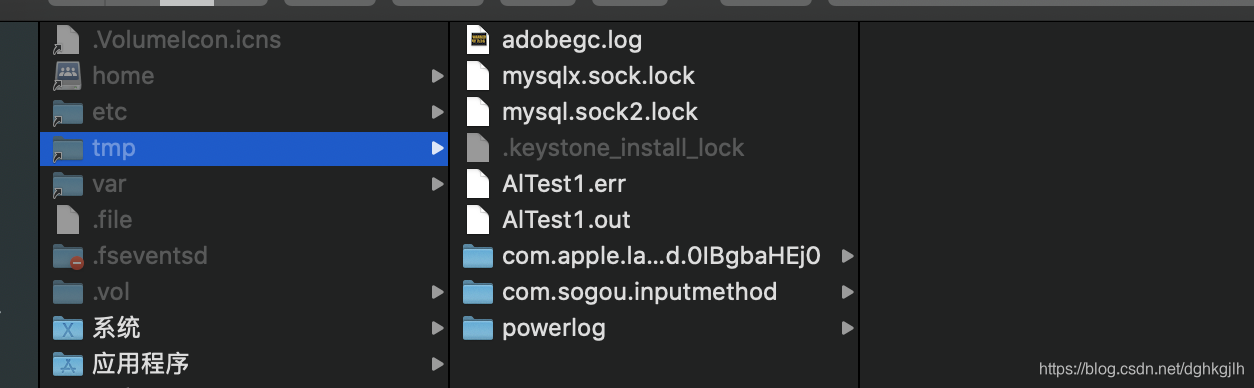
- Connect to the 3309 instance. Specify the socket configured above:
mysql -uroot -p -S /tmp/mysql.sock2Enter the temporary password to log in, then change it. The following command comes from the MySQL documentation:
ALTER USER 'root'@'localhost' IDENTIFIED BY 'root-password';There is a small pitfall: after changing the password, command-line login works, but Navicat may report:
Authentication plugin 'caching_sha2_password' cannot be loadedMySQL 8 changed its authentication rules. To revert to the pre-MySQL-8 method, connect to MySQL and run these three commands:
ALTER USER 'root'@'localhost' IDENTIFIED BY '12345' PASSWORD EXPIRE NEVER;
ALTER USER 'root'@'localhost' IDENTIFIED WITH mysql_native_password BY '12345';
FLUSH PRIVILEGES;
Replace 12345 with your chosen password. I used 12345 here. After this change, Navicat connects successfully.
This completes deployment of multiple MySQL instances on one Mac.
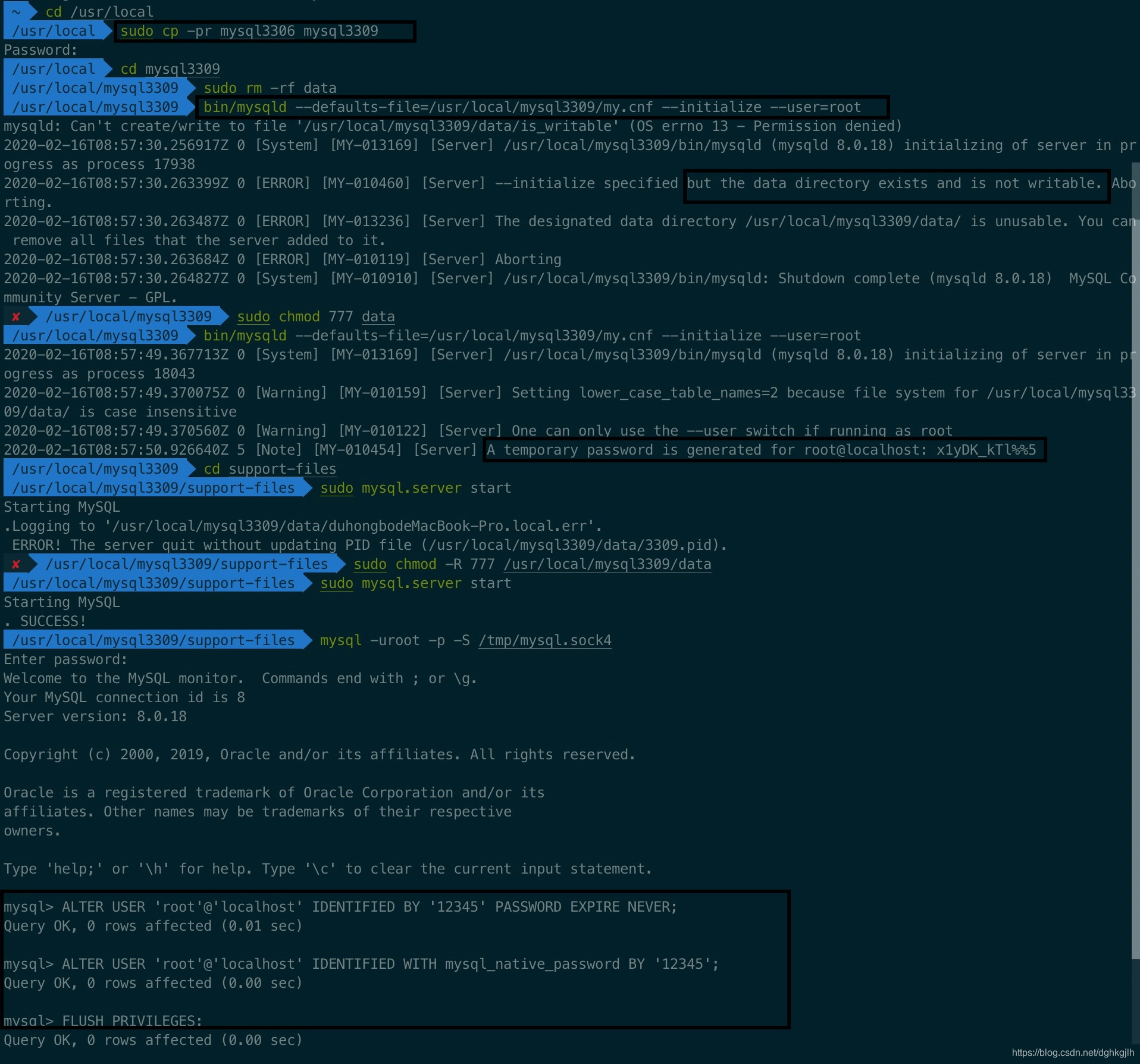
Finally, here is an image of the full process:
One last shortcut, if the steps above feel too cumbersome:
Try changing the installation path in the MySQL installer to the desired new instance path, then click init to let the installer initialize it, as shown below.
The screenshot below is the MySQL 8 configuration panel.
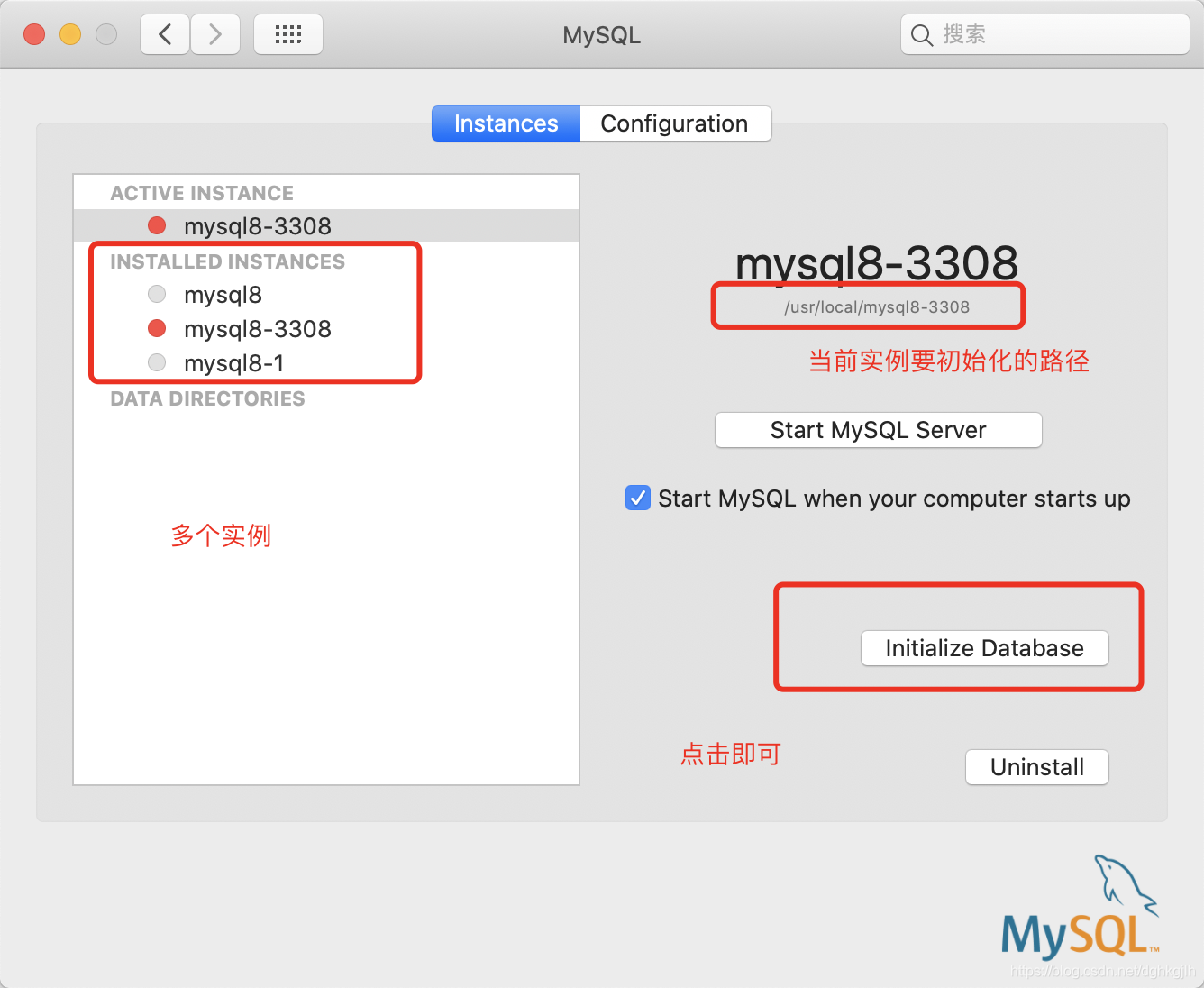
Repeat these steps for as many instances as needed. To start them, enter each instance directory and run the same command used to start a single instance.