Table of contents
Open Table of contents
Locks in Java (Part 1): Lock Categories
Lock information is stored in the object header’s Mark Word.
Lock levels:
Unlocked < biased lock < lightweight lock < heavyweight lock
Lock flags are stored in the Mark Word of the object header.
One bit indicates whether the lock is biased: 0 for no, 1 for yes.
Two bits indicate the lock state:
- 01, with 25/31 bits holding the object hashcode and the bias bit set to 0 -> unlocked
- 01, with 23/54 bits holding the current thread ID and the bias bit set to 1 -> biased lock
- 00 -> lightweight lock
- 10 -> heavyweight lock
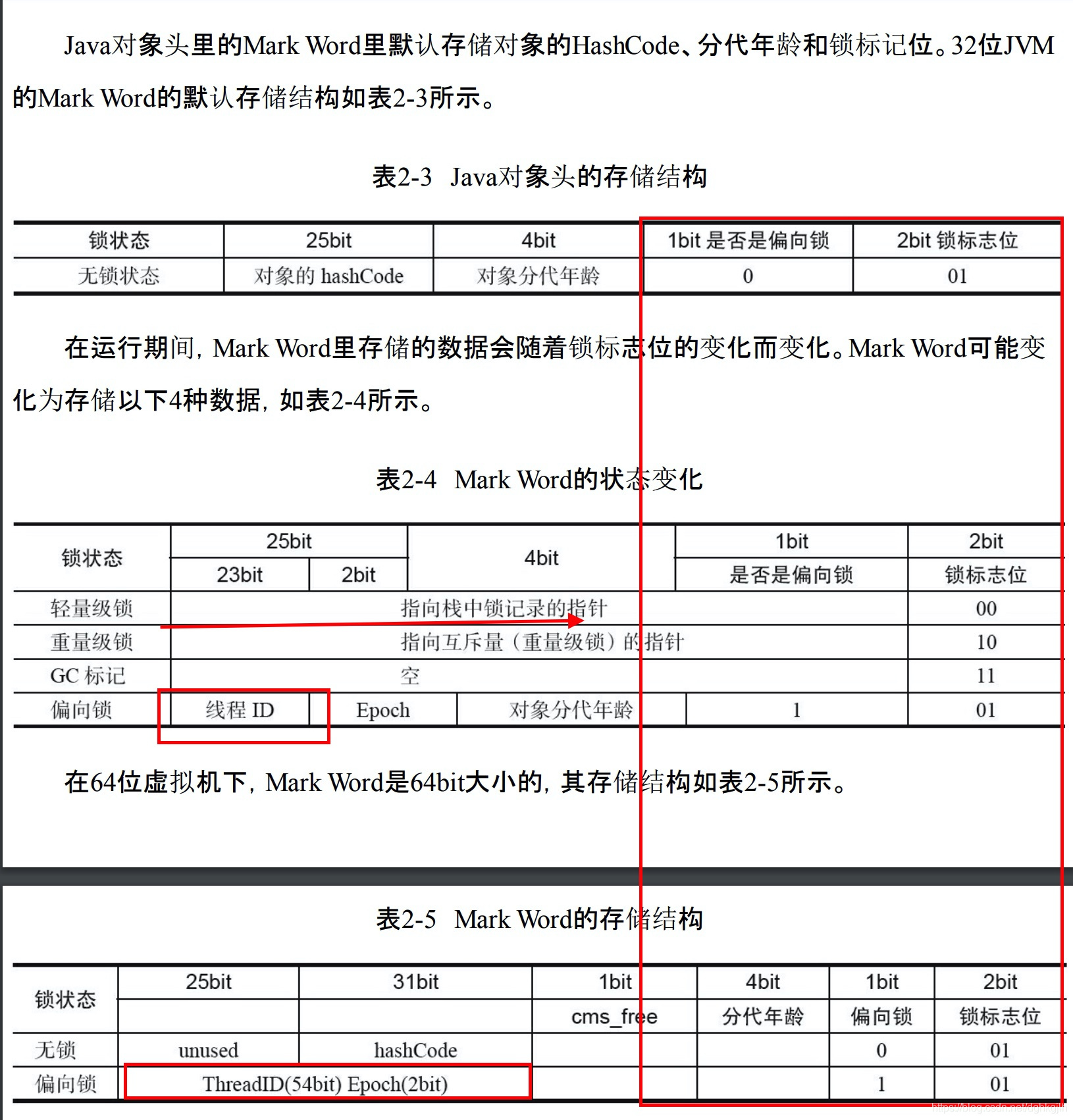
Biased Locks
The assumption, supported by extensive research by the HotSpot authors, is that an object A is usually accessed repeatedly by thread B. Acquiring and releasing a lock on every access is unnecessary overhead. Instead, once B acquires the lock, keep it biased toward B, since other threads rarely need it.
Acquiring a Biased Lock
- Check whether the object header’s Mark Word contains the current thread ID. If not, compete using CAS and replace the Mark Word with one containing that ID, as highlighted above.
- A successful replacement means the lock is acquired; execute the synchronized code.
- It is not released after execution. On a later access, if the Mark Word thread ID matches the current thread, use the lock directly.
Contention
- While step 2 executes, a second thread enters and tries to access the synchronized code. It checks the Mark Word and finds a different thread ID.
- Check whether the bias flag is 0 (biasable). Here it is 1, already biased toward another thread. Try CAS to change the thread ID to the current thread. If that fails, revoke the bias.
Revoking a Biased Lock
When two threads compete for a biased lock, the original owner releases it or promotes it according to the situation.
- Begin revocation at a global safepoint, where no bytecode executes.
- Suspend biased-lock owner B and check whether it is alive. If not, set the Mark Word to unlocked and bias it toward the new thread.
- If B is alive but has finished the synchronized section, restore the unlocked state and resume the thread.
- If B is alive and still executing the synchronized section, promote the biased lock to a lightweight lock.
Promoting a Biased Lock to a Lightweight Lock
- Create a lock record in B’s stack frame.
- Copy the Mark Word to the lock record.
- Point the lock record’s owner at the locked object.
- Use CAS to change the Mark Word to a pointer to the stack lock record.
- After success, resume the thread. Both B and C now see a lightweight lock.
- B holds the lightweight lock, and the Mark Word lock bits are 00.
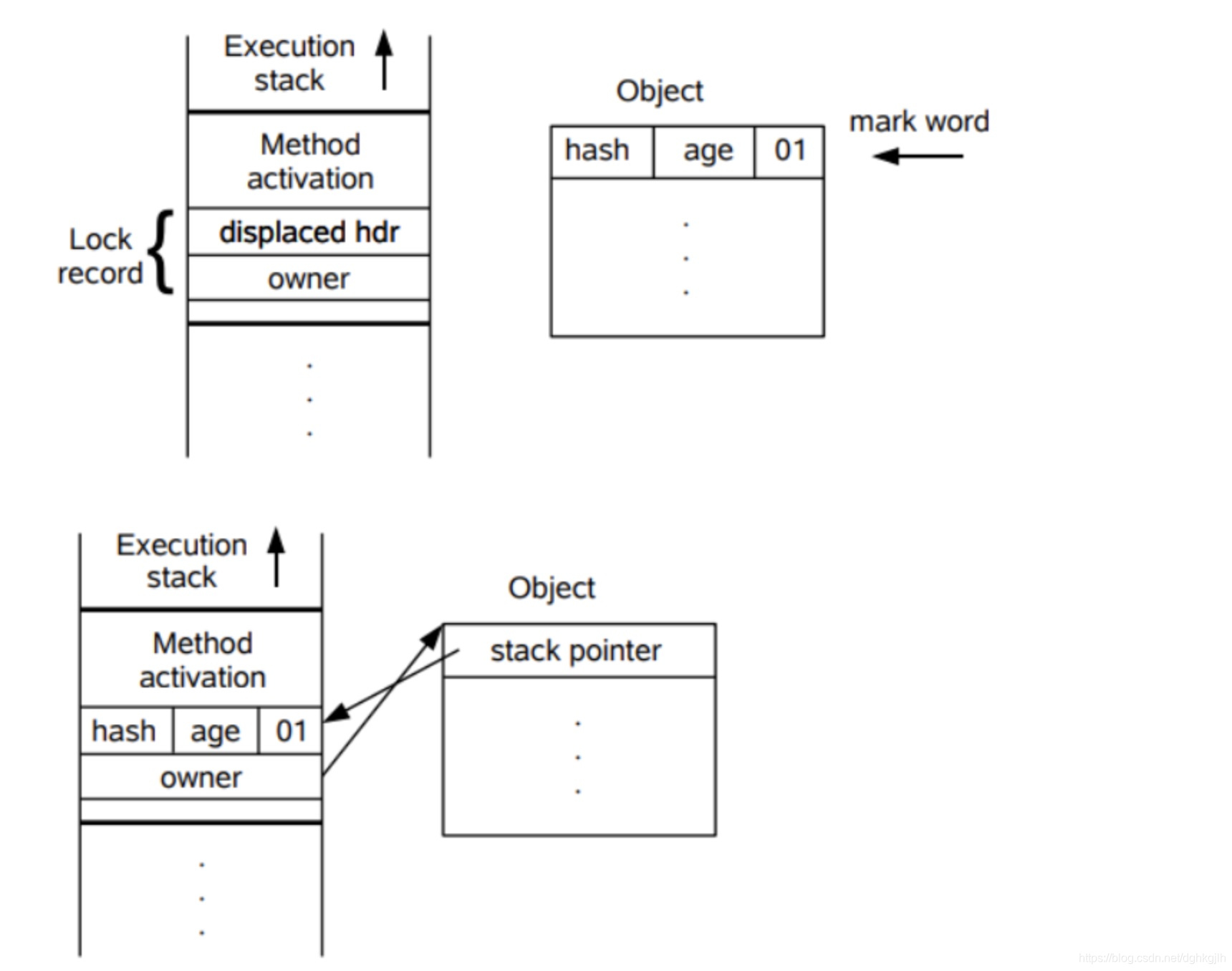
Inspecting Biased Locks with JOL
    @Test
    @SneakyThrows
    public void assertBiasedLock() {
        System.out.println("JVM started");
        TimeUnit.SECONDS.sleep(6);
        ThreadEntity threadEntity = new ThreadEntity();
        ClassLayout layout = ClassLayout.parseInstance(threadEntity);
        System.out.println("6 seconds after JVM startup");
        System.out.println(layout.toPrintable());
        synchronized (threadEntity){
            System.out.println("Executing synchronized block");
            System.out.println("Thread ID: "+Thread.currentThread().getId());
            System.out.println(layout.toPrintable());
        }
        System.out.println("Synchronized block finished");
        System.out.println(layout.toPrintable());
    }
Execution result:
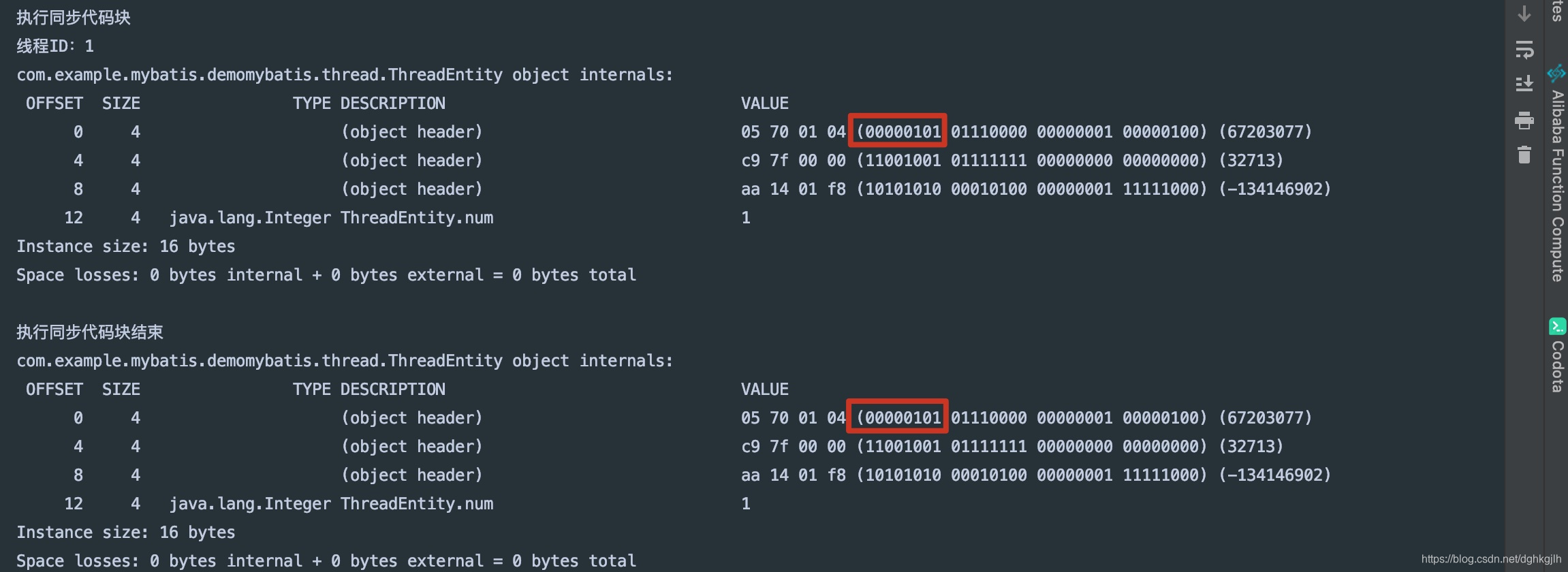
The lock flags are 101, and remain 101 after the synchronized block. The bias is not released.
Questions and Answers
-
Why wait 6 seconds?
Answer: biased locking activates a few seconds after application startup, so wait briefly to observe it.
Enable/disable biased locking
-XX:+/- UseBiasedLocking
-
Why are the lock flags in the first group of 8 bits? In a 64-bit JVM, are they not the last three bits?
Answer: Mark Word occupies 8 bytes, so the first 8 bytes contain its information. The relevant concept is big-endian and little-endian storage, which means reading the first two lines from right to left here.
Big-endian and little-endian describe byte ordering in memory. Little-endian stores the low-order byte at the lowest address, followed by higher-order bytes. Big-endian stores the high-order byte at the lowest address, followed by lower-order bytes.
For example: The decimal value 9877 in little-endian form: High address <- - - - - - - - Low address 10010101
[high-order byte]00100110[low-order byte]In big-endian form: High address <- - - - - - - - Low address 00100110[low-order byte]10010101[high-order byte]See this post for details.
Lightweight Locks
After biased locking is promoted or disabled, contention first uses lightweight locking. When should biasing be disabled? If you know multiple threads will compete, disabling it avoids the promotion overhead.
Lightweight locking is also called nonblocking synchronization or optimistic locking here because threads are not suspended; they spin while waiting for serialized execution.
Lightweight locks spin, consuming CPU, whereas blocked threads do not. Spinning is used because lightweight locks target cases where the synchronized section executes quickly.
Acquiring a Lightweight Lock
- Create a lock record and copy the Mark Word into it.
- Use CAS to replace the Mark Word with a pointer to B’s lock record, as in the initial diagram.
- If successful, the lightweight lock is acquired and the flags become 00.
Contention
- While B executes the synchronized section, C also tries to enter. It performs steps 1 and 2, but its CAS to replace the lock-record pointer fails, so C spins.
- If B finishes after C spins a few times, B uses CAS to restore the object header, and C immediately obtains the lock.
- If B still has not finished after several spins, C changes the Mark Word to a heavyweight-lock state.
Releasing the Lock
- After B finishes, it replaces the Mark Word pointer to its lock record with the original unlocked header, 001. If this CAS succeeds, no contention occurred.
- If it fails—for example, after step 3 above—the lock flags already indicate a heavyweight lock. The lock inflates, and C blocks instead of continuing to spin.
- B releases the lock after completing the synchronized section and wakes blocked threads, which compete again.
Inspecting Lightweight Locks with JOL
    @Test
    public void assertThinLock() {
        ClassLayout layout = ClassLayout.parseInstance(entity);
        System.out.println(layout.toPrintable());
        synchronized (entity){
            System.out.println("Executing synchronized section");
            System.out.println(layout.toPrintable());
        }
        System.out.println("Synchronized section finished");
        System.out.println(layout.toPrintable());
    }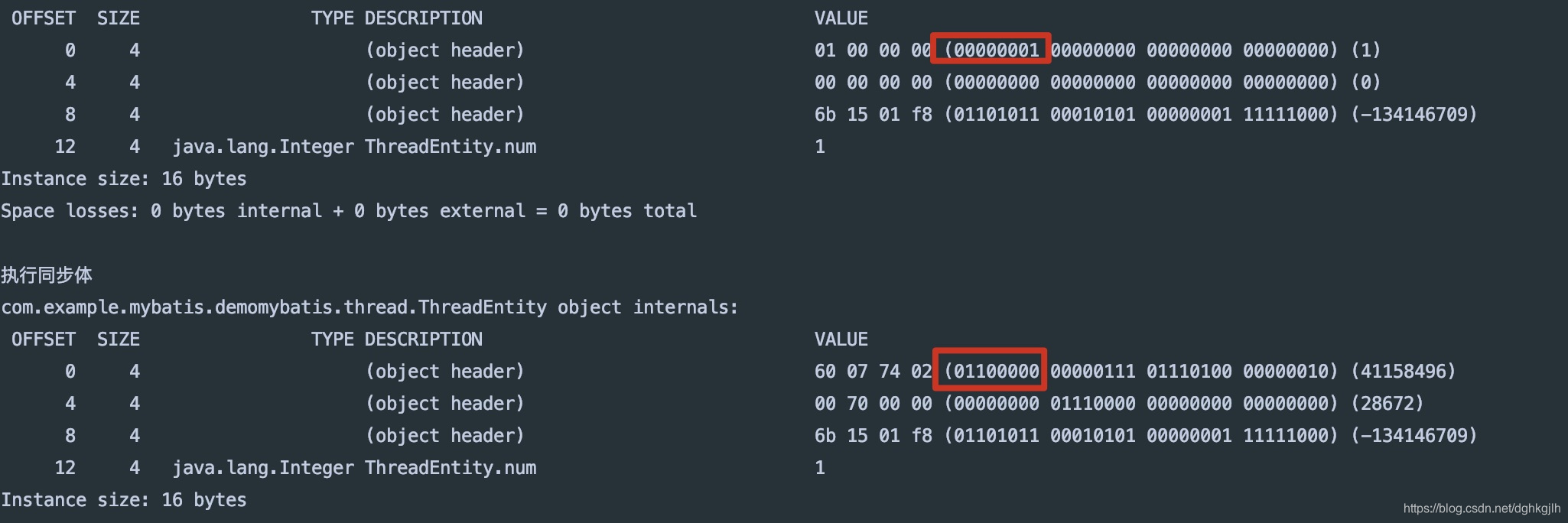
The object starts unlocked, and the flags become 00 inside the synchronized section.
Questions and Answers
-
Is the spin count fixed?
Answer: -XX:PreBlockSpin can configure it. You can also look into adaptive spinning.
-
When are lightweight locks suitable?
Answer: when response time matters and the synchronized section is very fast.
Heavyweight Locks
Once a lightweight lock becomes heavyweight, it does not return to the lightweight state.
A mutex (heavyweight lock) is also called blocking synchronization or pessimistic locking.
Inspecting Lock Inflation with JOL
    @Test
    @SneakyThrows
    public void assertThinLockToFatLock() {
        ClassLayout layout = ClassLayout.parseInstance(entity);
        System.out.println("Initial object header");
        System.out.println(layout.toPrintable());
        Thread thread = new Thread(() ->{
            synchronized (entity){
                try {
                    TimeUnit.SECONDS.sleep(4);
                }catch (InterruptedException exception){

                }
            }
        });
        thread.start();
        TimeUnit.SECONDS.sleep(1);
        System.out.println("Object header before contention");
        System.out.println(layout.toPrintable());
        synchronized (entity){
            System.out.println("Object header while the main thread executes the synchronized section");
            System.out.println(layout.toPrintable());
        }
    }
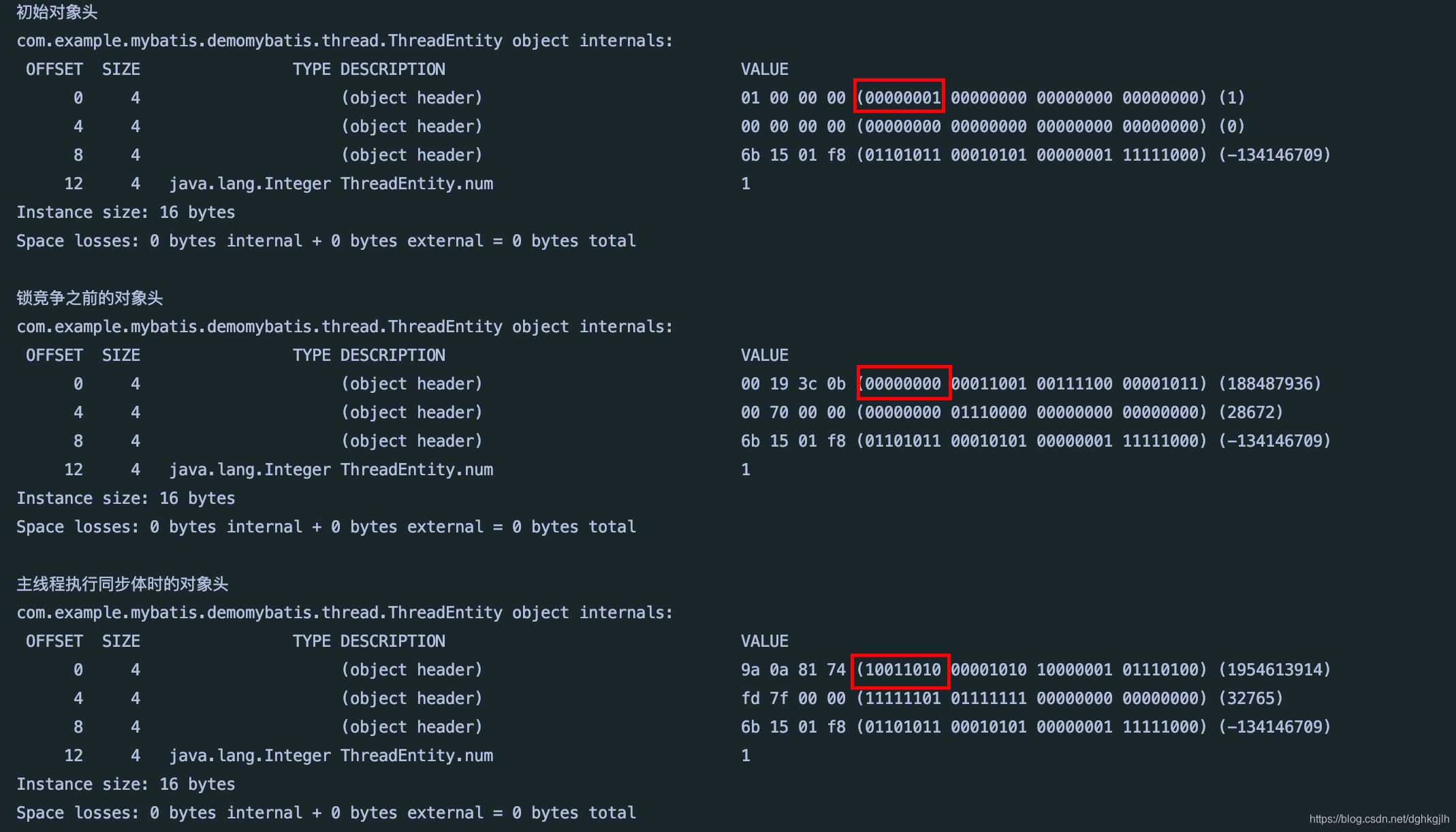
The child thread runs first and is the only thread competing for entity, so the lock is lightweight, 00. One second later, the main thread runs, but the child still holds the lock while sleeping. When the main thread eventually obtains it, the lock has become heavyweight, 10.
Questions and Answers
-
Why are heavyweight locks expensive?
Answer: when a lock is heavyweight, threads waiting for it are blocked. Blocked threads do not consume CPU, but blocking or waking a thread requires operating-system help and a transition from user mode to kernel mode. That transition is costly and may take longer than the application code itself. This explains the high overhead of heavyweight locking.
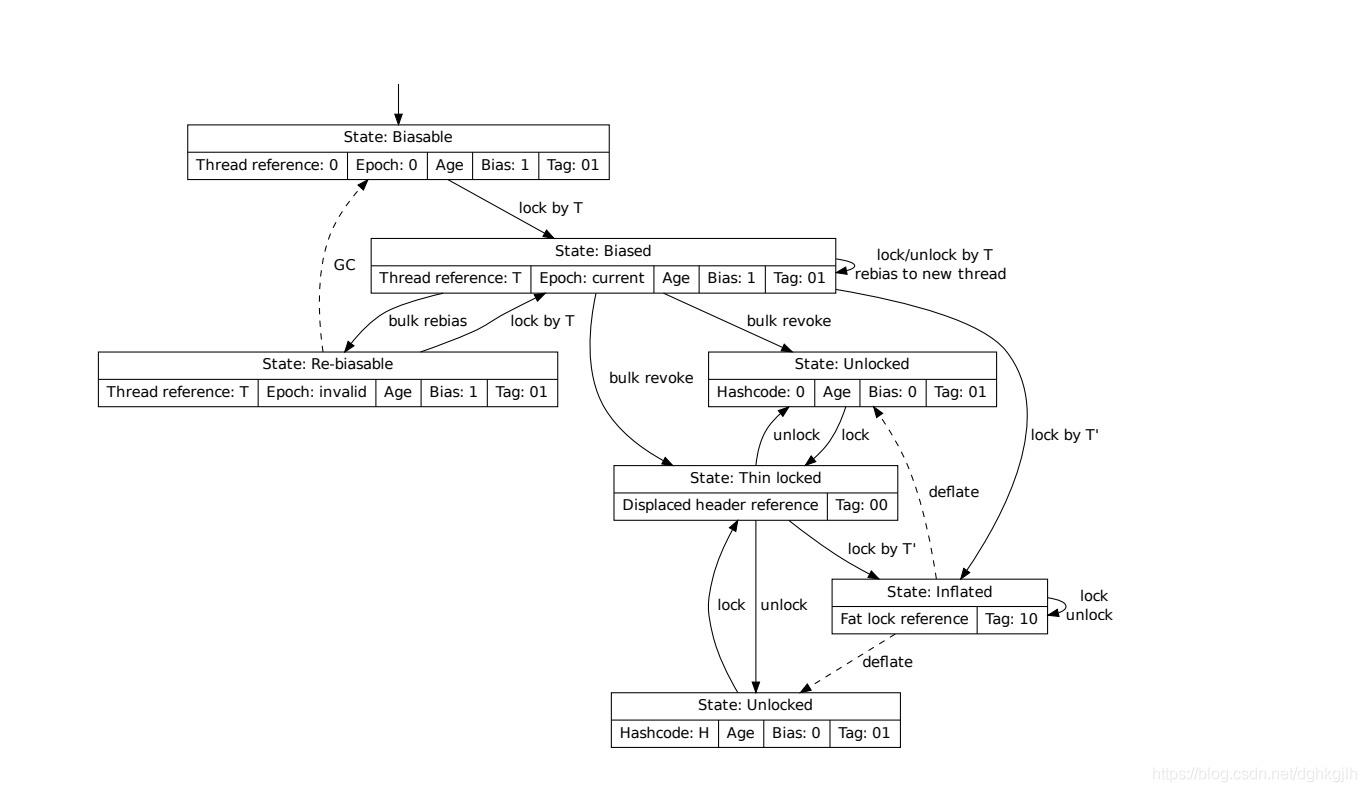
Full Lock-Promotion Lifecycle
Notes
- Official Java concurrency tutorial: link
- Reference 1
- HotspotOverview
- Reference 2
- Reference 3
- Reference post 1
- Reference post 2
- Reference post 3
- Example code: GitHub