Table of contents
Open Table of contents
The Data Link Layer
Frame Structure
Frame encapsulation is performed by the data link layer—the network interface card.
Frame/frame length = header + IP datagram (IP packet) + trailer.
The upper limit on a frame’s data length—the IP datagram length, excluding the header and trailer—is called the Maximum Transmission Unit (MTU).
What Are SOH and EOT For?
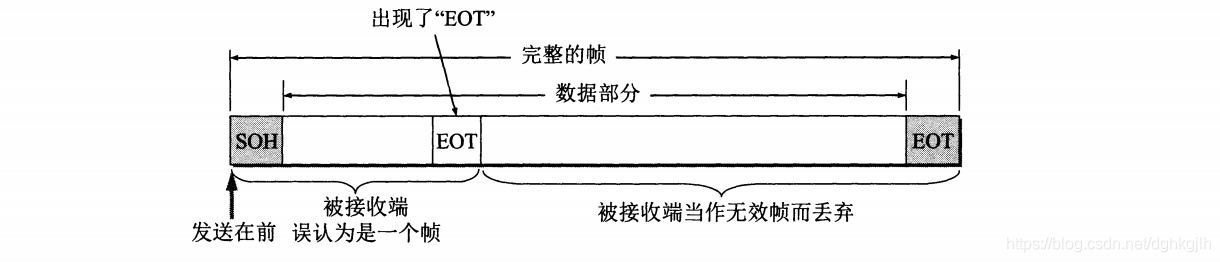
They determine whether a frame is complete.
Start Of Header (SOH) appears at the beginning of a frame: hexadecimal 01, binary 00000001.
End Of Transmission (EOT) appears at the end of a frame: hexadecimal 04, binary 00000100.
If a problem occurs during transmission, the receiver may get a frame without its trailer. A retransmitted frame may already have arrived, leaving
A- and A-B. The receiver can tell that A- is unusable: it precedes the complete frame A-B, so part of A- must have been lost in transit.
If the transmitted data is:
00000001 + 0110 1111 0110 1011 + 00000100 = header + ok + trailer,
the data frame is valid.
A Special Case
If a data byte happens to be 00000100, the receiver could mistakenly treat it as the end of the frame and discard the remaining portion because it cannot find another SOH marker.
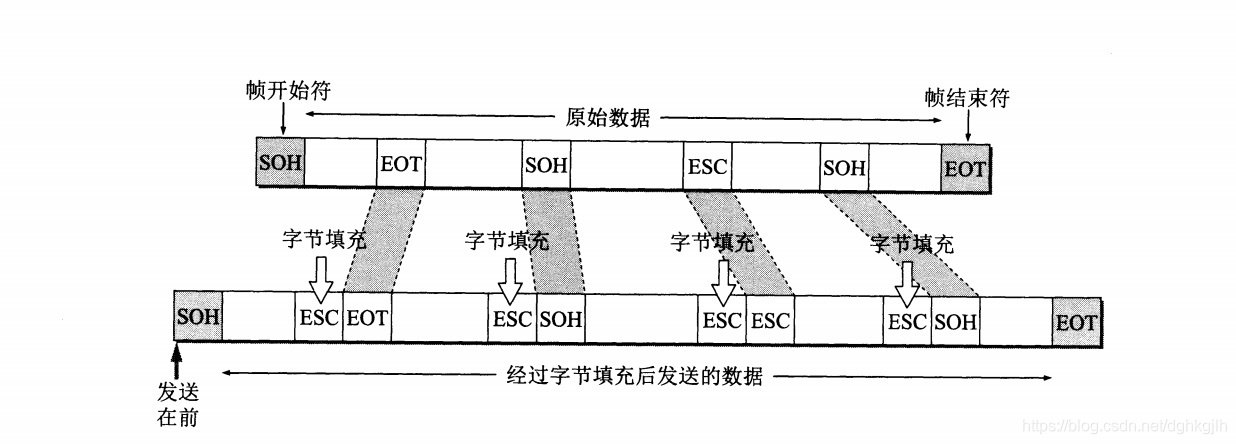
As with regular expressions, prefix binary values that have special meanings with an escape character, ESC. At the data link layer, this is called byte stuffing.
Its binary value is 0001 1011.
The process is:
Sender: when the data link layer receives an IP datagram from the network layer, it begins encapsulating a frame. If the datagram contains binary values with special meanings (the values for SOH and EOT), they are escaped.
Receiver: when the data link layer receives a frame, it decapsulates it by removing the header and trailer, then removes the escape characters from the IP datagram.
How Can We Check Whether Frame Data Has Been Lost?
SOH and EOT can indicate whether the overall frame is complete. At the physical layer, however, bits are transmitted one by one. How can we check that the data remained intact and error-free? If the original data is 100110, the receiver should also receive 100110, rather than 101110 or 100010. Changes between 0 and 1 are called bit errors.
Cyclic Redundancy Check (CRC)
Prerequisite: define a divisor P.
Sender: an IP datagram from the network layer may be large. Because of the MTU limit, split it into groups for transmission, each with k bits. For 101001, k is 6 because each 0 or 1 is one bit. Append as many zeros as the redundancy-code length to the frame data—for example, three zeros produce 101001000—then divide by P. Stop when the remainder has one fewer bit than the divisor. Append that remainder as a marker to the normal frame data. If the remainder is 010, the frame data becomes 101001 (data) + 010 (redundancy code).
The remainder is called the redundancy code, or Frame Check Sequence (FCS).
Receiver: remove the frame header and trailer, then divide by P. If the remainder is 0, consider the frame data complete, with no loss or errors. Otherwise, consider it faulty.
CRC is implemented in hardware.
Why Can Frames Be Lost, Reordered, or Duplicated?
The possibility of these conditions shows that data-link protocols do not all provide reliable transmission. On links with poor communication quality, the data link layer also adds frame acknowledgment and retransmission mechanisms.
Adapters: Network Interface Cards
A computer connects to the outside network through an adapter.
An adapter is also called a Network Interface Card (NIC), or network card.
The network card has RAM and ROM components.
ROM stores the machine’s physical address.
RAM stores data to be transmitted or data received from the network.
The network card assembles and decapsulates frames.
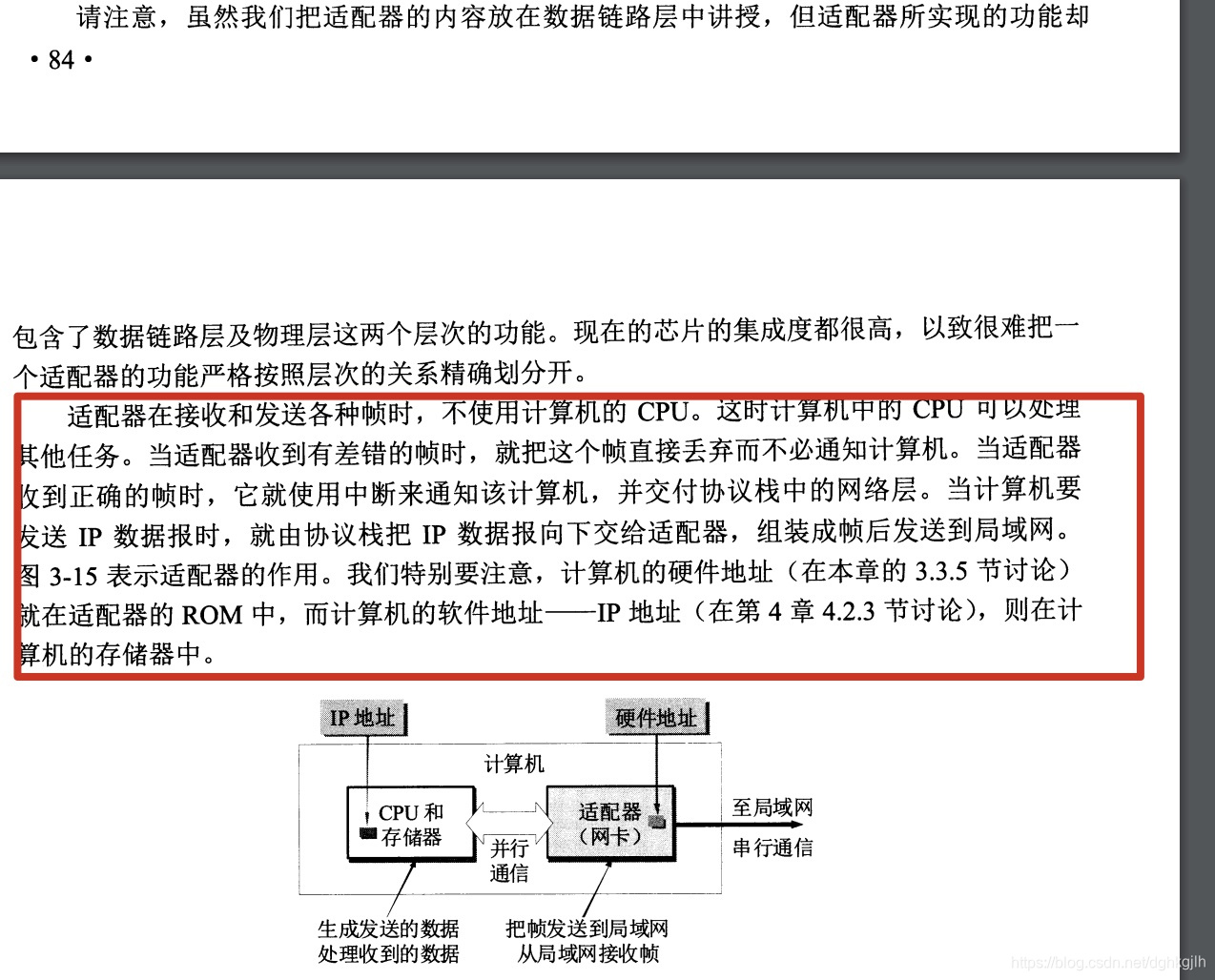
Modern motherboards include a network card. Older computers required a separate card. The adapter communicates with the host through the I/O bus. When installing an adapter, its driver must be installed in the operating system; the driver instructs it to send data onto the network.
MAC Addresses
A computer’s physical address is also called its MAC address. Hosts A and B must know each other’s physical addresses for link communication. The MAC address is stored in the network card’s ROM because it is fixed. ROM means Read Only Memory: fixed information can be stored there and read when needed. A host with multiple network cards has multiple MAC addresses. Replacing a card changes the corresponding physical address; merely moving a computer from Beijing to Shanghai does not. MAC addresses are assigned through a globally coordinated organization, and adapter manufacturers purchase allocations from it.
How a Network Card Sends Data Internally
- Starting from the header, the MAC module converts digital information bit by bit into electrical signals. The PHY, also called the MAU transceiver module, sends them. The conversion rate is the network transmission rate: converting and sending 10 Mbit of data each second gives 10 Mbit/s.
- The PHY (MAU) module converts the signals into a format suitable for the Ethernet cable and transmits them over it.
- Ethernet specifications define the signal formats for different cable types and speeds. The MAC module does not concern itself with these differences: it sends a generic signal that can be converted to any format to PHY (MAU), which converts it for transmission over the cable. Think of the PHY (MAU) module’s role as converting the format of signals generated by the MAC module.
The preceding paragraphs are quoted from the book How Networks Connect, Section 2.5.9, “Sending Network Packets to the Hub.”
Receiving Frames through the Adapter
When an adapter receives a MAC frame from the network, hardware checks its destination address. If it is addressed to this machine, it is accepted; otherwise, it is discarded.
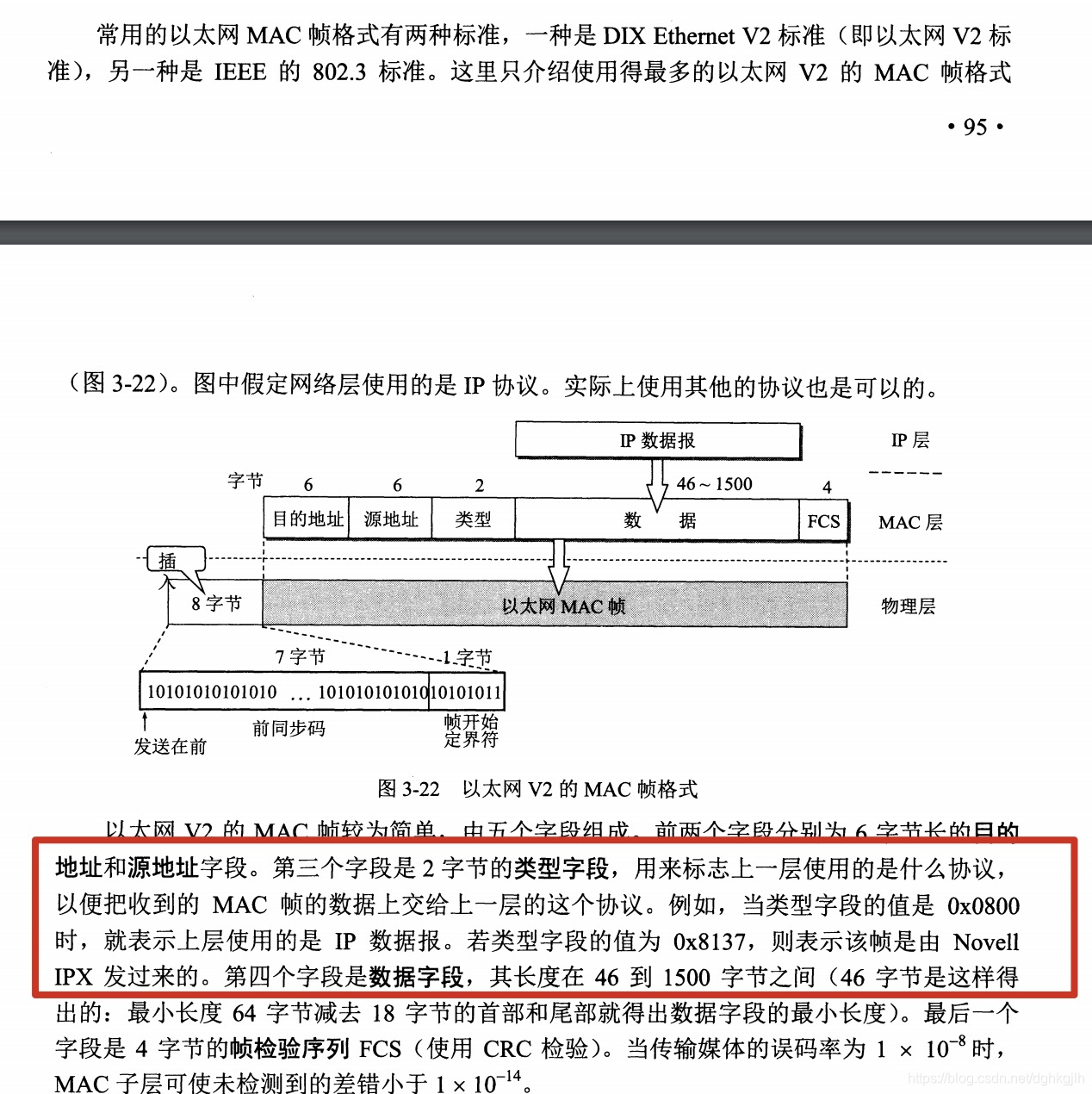
MAC frame = destination address (6 bytes) + source address (6 bytes) + type (2 bytes, identifying the upper-layer protocol) + data (46–1500 bytes) + FCS (4 bytes, redundancy code).
Minimum MAC frame length: 64 bytes = 6+6+2+46+4.
Modems
Concept: a device that converts one type of signal into another, such as digital signals into analog telephone signals.
Early broadband access—connecting a user by a physical line to an ISP’s network, or simply home broadband—used different frequency bands on telephone lines, reusing existing wiring. Low-frequency analog signals (0–4 kHz) carried telephone calls, while higher frequencies carried internet traffic. Converting digital to analog signals is the modem’s work.
For longer-distance transmission, optical fiber provides faster transmission.
Optical Modems
In the past, link communication between hosts—roughly, the wiring—usually used thick or thin copper cables. Signals attenuated over long distances and might become unrecognizable at the receiver, so repeaters were widely used. Optical fiber transmits light, with low delay and high bandwidth. But how are electrical signals converted to light at the sender and back to electrical signals at the receiver?
With optical modems.
Host A connects by a physical cable to optical modem A, which converts electrical signals into light. Because transmission happens bit by bit, it starts as high and low electrical levels representing 0 and 1. Modem A sends the light through fiber to modem B, which converts it back into electrical signals and forwards them by cable to host B.
The Complete Transmission Flow on a Broadcast Channel
Determining the Destination Host’s MAC Address
Before host A communicates with B, it checks whether B is on the current network. B’s adapter (adapters can filter frames) examines MAC frames received from the network, accepts those addressed to itself, and discards the others.
Unicast frame: one-to-one; the destination is this host.
Broadcast frame: one-to-all; the destination is every host on the network.
Multicast frame: one-to-many; addressed to only some hosts on the network.
Preparing to Send Data
-
The adapter encapsulates the IP datagram in a frame.
-
Check the channel to ensure no other host is sending data.
Channels generally include broadcast channels, where multiple hosts share one channel, and point-to-point channels.
Sending Data
- The adapter sends data while continuing to monitor the channel. If multiple hosts transmit on the bus simultaneously, a collision occurs: the signal voltage amplitude rises, and exceeding a fixed threshold indicates a collision.
- On detecting a collision, the adapter immediately stops sending, waits, and returns to Step 2 above to attempt transmission again.
The protocol used in the second and third steps is CSMA/CD: Carrier Sense Multiple Access with Collision Detection, used on broadcast channels.
The network above uses a bus topology; current networks use a star topology.
Why did this change happen?
Notes
-
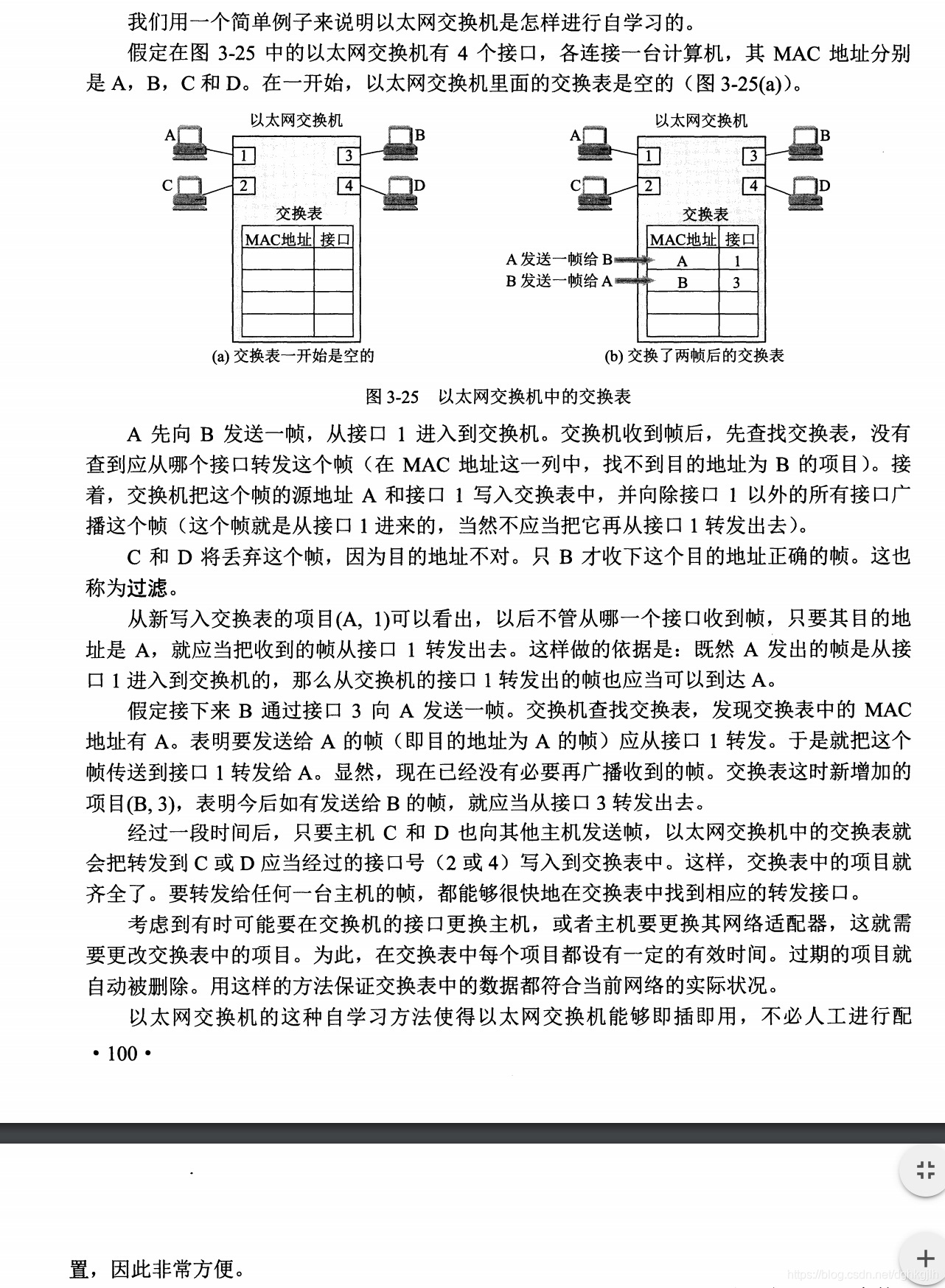
Ethernet switches’ self-learning capability.
-
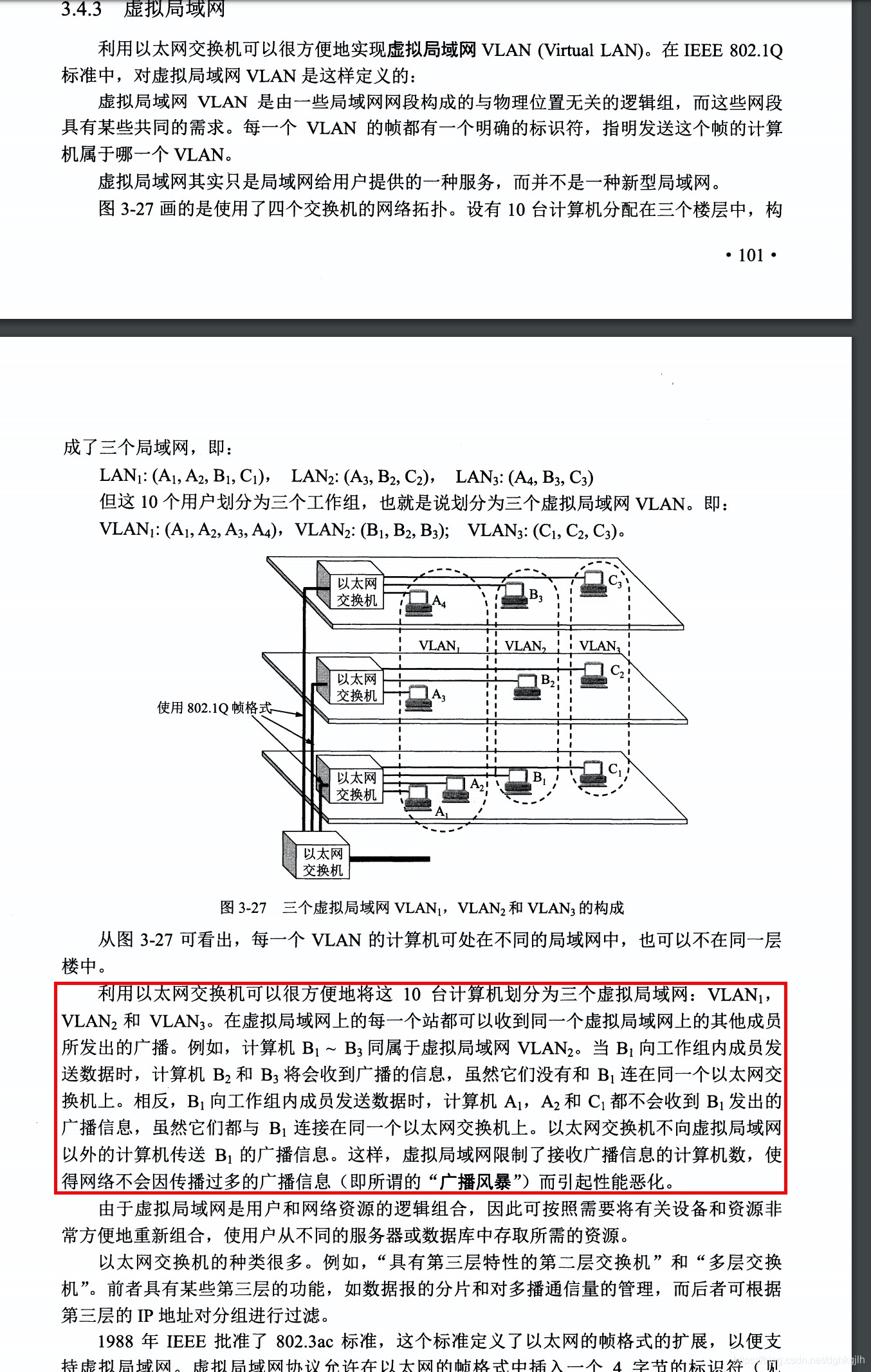
Building different networks with multiple switches.
-
What is twisted-pair cable for?
It reduces signal interference and is inexpensive. See Zhihu.
Network cable = twisted pair + RJ-45 connectors (the plugs at both ends).
-
How do hubs, switches, and routers differ?
See Zhihu.
-
Host A -> twisted pair -> router -> twisted pair -> modem A -> optical fiber -> modem B -> twisted pair -> router -> twisted pair -> host B.