Table of contents
Open Table of contents
Article body
The problem: here is the overall structure of a simple project:
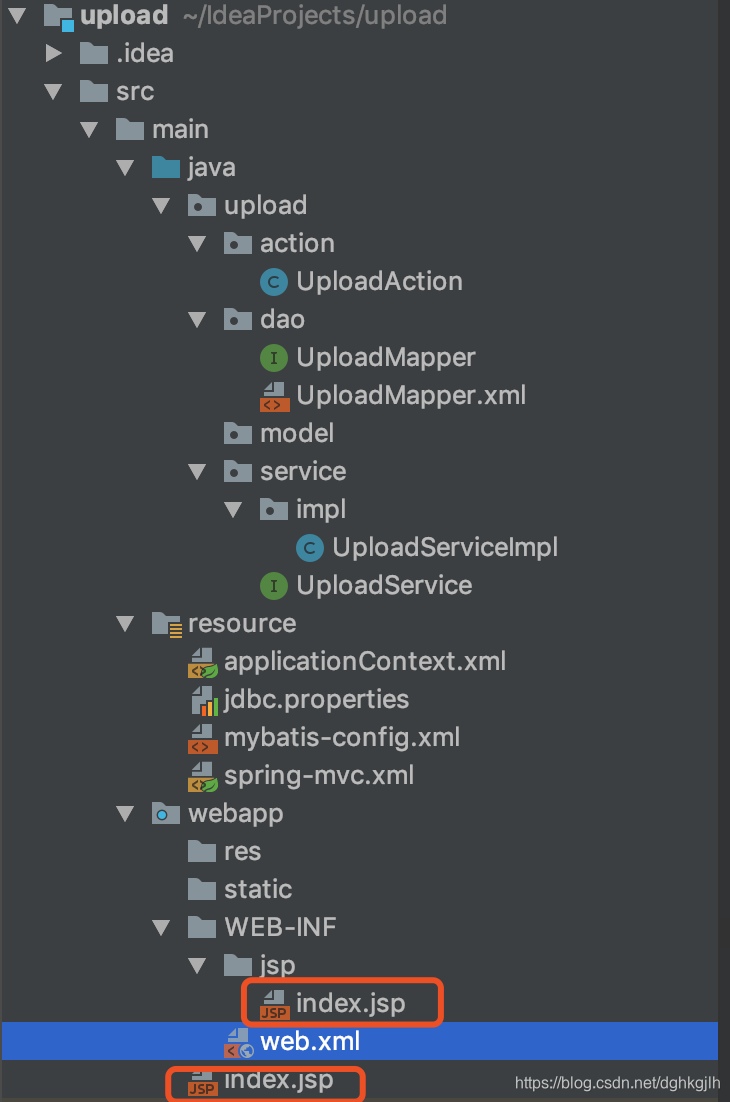
I wanted visiting the project, for example at http:localhost:8080, to go directly to index.jsp under WEB-INF rather than another default JSP.
I searched online for a long time. Most answers involved Tomcat’s XML configuration, welcome-file-list, or combining it with url-pattern, but none worked. Eventually, I stumbled on an approach that essentially makes another request. In index.jsp under WebContent, use the following: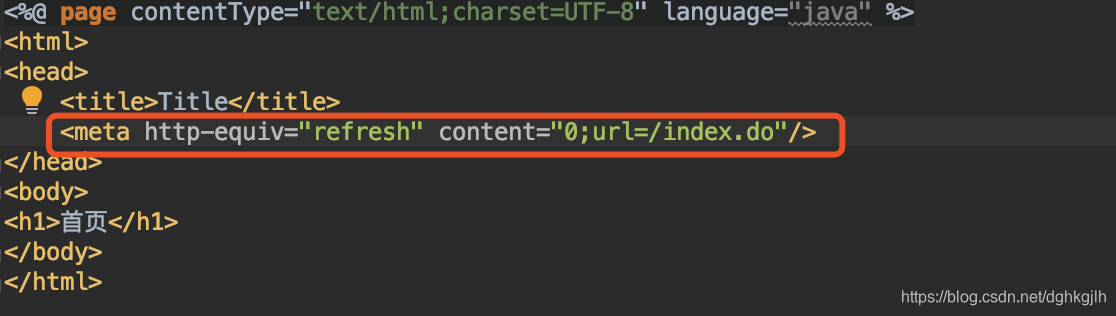
Configure the page to refresh immediately, using a URL mapped by the backend controller. This comes close to navigating directly, although sometimes the JSP that sends the request is still briefly visible. I ultimately used this approach because I could not find another solution.
You might ask: why not configure url_pattern to intercept *.jsp, so the first request can enter the controller directly?
I tried this too. The request was intercepted, but its URL became WEB-INF/Page/index.jsp. According to the explanations I found online, Tomcat looks for index.jsp when loading the home page, or loads the configured index.jsp if welcome-file is set. So I expected it to access index.jsp under WebContent rather than WEB-INF. I do not understand why this happened; if you know, please explain in a comment.
P.S. Another approach is to intercept HTML pages and use FreeMarker. Since this project uses JSP, I will not explore that here.
Further issues:
-
During troubleshooting, I also encountered a “could not wired” problem. Based on my experience, I assumed a package had not been scanned, but all the packages were covered. I later found that web.xml was missing the contextListener configuration. I still do not fully understand the underlying reason. Thanks to this blogger for sharing.
-
After configuring everything, accessing the correct path still did not enter the controller. Scanning had not been enabled in Springmvc.xml, even though I had configured scanning for all packages in Spring. For the distinction, see this blogger’s explanation; it makes the difference clear.
I had not paid much attention to this before, and debugging the resulting errors was frustrating. My takeaway: Spring MVC manages controllers, so let it scan the controller packages. Spring manages services and transactions, so let it scan those packages. Each should handle its own responsibilities.
-
I also encountered a static resource configuration issue. Access to static resources is generally configured through mvc:resources, although mvc:default-servlet-handler/ can also be used. The latter leaves identification and handling to Spring MVC itself, which can sometimes cause errors, so I do not recommend it.
-
The XML file also reported that a wildcard match was available, but no declaration could be found for the element ‘context:component-scan’. Thanks to this blogger for sharing.
Trying this exposed how much I still did not understand. It was quite a wake-up call.
Update: 2019-3-21
A correction: some of the analysis above was wrong. I had configured the DispatcherServlet url-pattern as *.jsp or *.do, which does not fit the RESTful style now commonly used. I changed url-pattern to / to intercept all requests, and configured static resource access in sprngmvc.xml. With @requestmapping(value = ”/”) on the controller, I could handle the default index request and use ModelAndView to return the web-inf/index page. As for the URL changing, I have forgotten why I wrote it that way at the time; I was probably confused. I recommend mapping all requests with /, which makes RESTful routing easier to implement.