Table of contents
Open Table of contents
Article body
I had wanted to implement image uploads for a while. Today I built a very simple version with just the core steps.
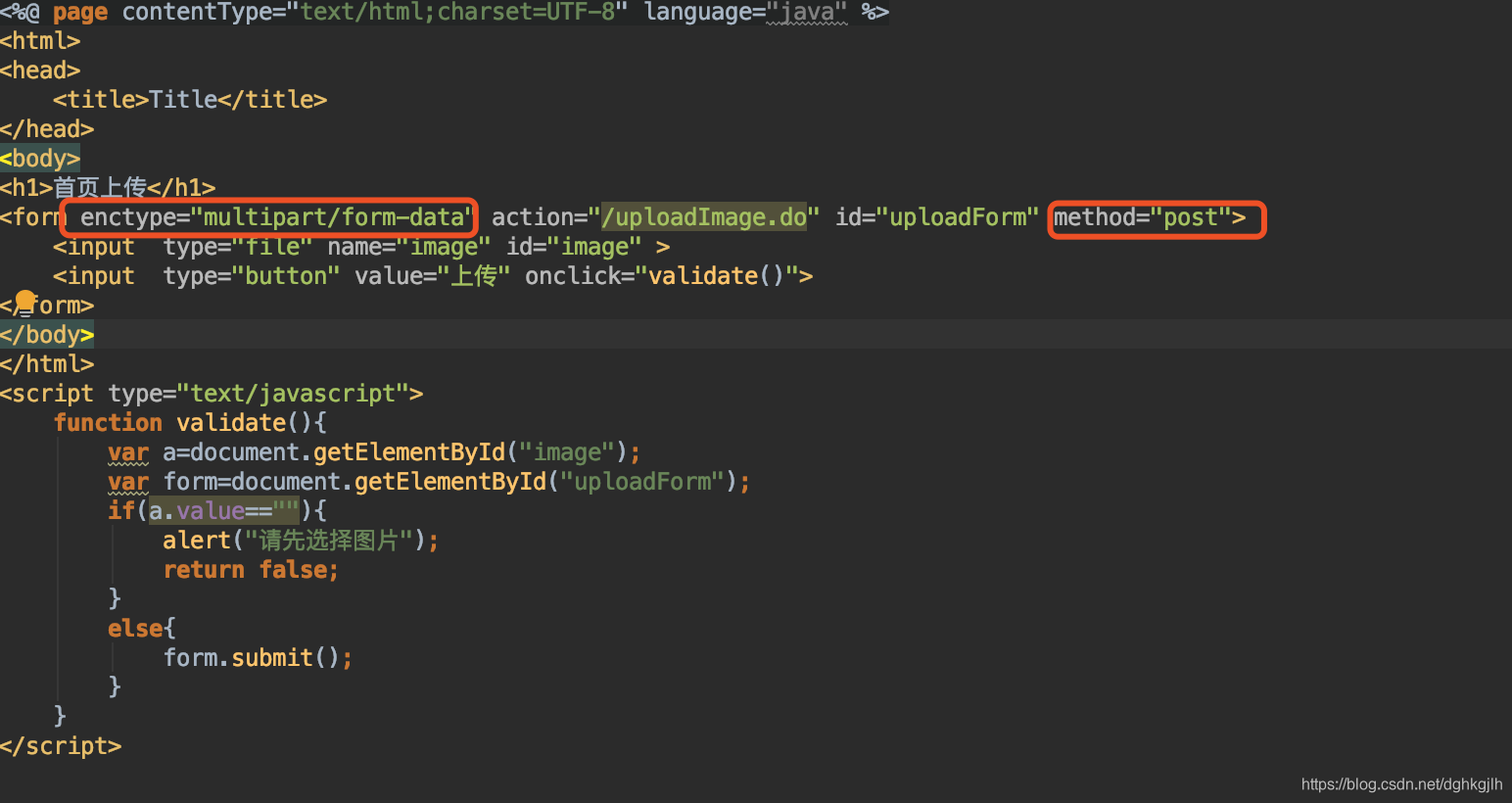
Two points to emphasize: the form’s enctype must be “multipart/form-data”, and its method must be post. Omitting method caused an HTTP 500 error during upload in my case—a problem I encountered firsthand.
Once the request reaches the controller, the core steps are:
Note: @RequestParam can be omitted with MultipartFile, but must be included with
CommonsMultipartFile. public String uploadImage(HttpServletRequest request,
@RequestParam("image") CommonsMultipartFile image) throws IOException { //1. Get
the name of the uploaded file String name = image.getOriginalFilename(); //2.
Create the image storage path on the server; here it is webapp/res/ String path
= request.getSession().getServletContext().getRealPath("res/"); //3. Create a
File at the destination, passing the path and name File file = new
File(path,name); //4. Copy the image to the File at the destination
image.transferTo(file); String after = path+name; //Store the file’s path in the
database rather than the image itself. return after; }
This is, of course, a minimal upload implementation. It includes no validation, including validation when saving files; you can extend it yourself. For multiple files, change CommonsMultipartFile to a CommonsMultipartFile[] array and repeat the operations above in a loop.
Update: 2019-10-27. Receiving multiple uploaded images directly as CommonsMultipartFile[] produces an error roughly like this:
"message":
"Failed to convert value of type 'java.util.LinkedList' to required type 'org.springframework.web.multipart.commons.CommonsMultipartFile[]'; nested exception is java.lang.IllegalStateException: Cannot convert value of type 'org.springframework.web.multipart.support.StandardMultipartHttpServletRequest$StandardMultipartFile' to required type 'org.springframework.web.multipart.commons.CommonsMultipartFile': no matching editors or conversion strategy found",
It seems the default conversion cannot handle this. If you know the precise reason, please explain in a comment. Using MultipartFile[] receives the files successfully, however.
Remember to add this to the Spring MVC configuration:
<bean
  id="multipartResolver"
  class="org.springframework.web.multipart.commons.CommonsMultipartResolver"
>
  <property name="maxUploadSize" value="10000000" />
</bean>
Also add these dependencies to the pom file:
<dependency>
  <groupId>commons-fileupload</groupId>
  <artifactId>commons-fileupload</artifactId>
  <version>1.3.1</version>
</dependency>

<dependency>
  <groupId>commons-io</groupId>
  <artifactId>commons-io</artifactId>
  <version>2.4</version>
</dependency>
That completes the minimal upload implementation.