Table of contents
Open Table of contents
Article body
The differences and performance comparison among Log4j2, JUL (java.util.logging), and Logback are outside the scope of this post. Interested readers can refer to the Performance section of the official documentation, which provides detailed data.
This post is not meant as an introduction to logging frameworks. If you’re completely new to logging, please refer to other articles online. For example, none of the following questions are within the scope of this post:
- Why use a logging framework instead of system output?
- The log levels of the various logging frameworks
- Integrating and configuring the various logging frameworks
Log4j2 and Slf4j
Anyone who has done real enterprise development knows that, to make it easier to switch logging frameworks down the road, slf4j is typically used as the facade for all logging frameworks. This guideline is even mentioned in the Alibaba Java coding guidelines (a style guide widely used in mainland China).
But times change — do we really have to stick to the old convention forever? The answer is obviously no. I’m sure this question has crossed every developer’s mind. So, with this question in mind, I went straight to Stack Overflow to see how developers discuss it:
- Is it worth to use slf4j with log4j2
- Can we use all features of log4j2 if we use it along with slf4j api?
Both of the questions above received very definite answers.
In short, the recommendation is to use Log4j2. Many of Log4j2’s important features (see the answer to the second question above) cannot be used through slf4j, and Log4j2 has basically already done everything slf4j does. So there’s no reason not to choose Log4j2.
Understanding Log4j2’s Architecture
When systematically learning a framework, understanding its architecture is very important. For basic or special configurations, you can consult the official documentation — there’s no need to memorize everything by rote or take all sorts of notes. Just familiarize yourself with the structure of the official documentation, and know which chapter to turn to when a need arises.
Log4j2 thoughtfully provides its architecture diagram; everything can be found in the Architecture section.
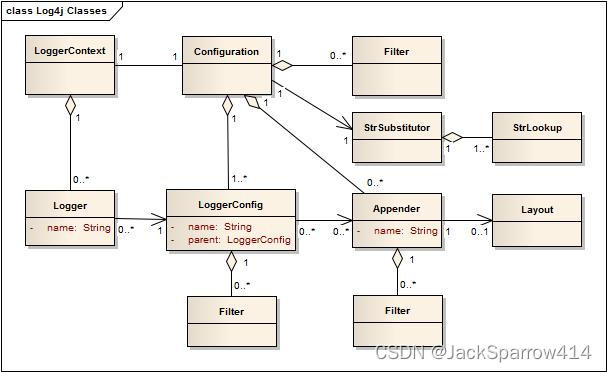 To understand the diagram above, you first need to know how UML class diagrams are expressed.
Getting to Know UML Class Diagrams
UML Class Diagram Example
classDiagram
class People
<<interface>> People
People : +setGender() String

class Human
<<abstract>> Human
Human : +height() Float
Human : +weight() Float
Human : +age() Integer
Human : +name() String

class Male{
-Long moustache
+Hand hand
+Foot foot
+getMoustache() String
+setMoustache() void
+height() Float
+weight() Float
+age() Integer
+nam() String
+setGender() String
}

class Hand{
+Male male
}

class Foot{
+Shoes shoes
}

 People <|..  Human
 Human <|-- Male
 Male -- Hand
 Foot <--  Male
 Foot o--  Shoes
Based on the UML class diagram example above, here’s a breakdown of each part:
The Main Notation of UML Class Diagrams
- A rectangle is divided into three compartments
- The first compartment is the class name
- The second compartment holds visibility, attribute name, and return type
- The third compartment holds visibility, method name (parameter list) : return type
There are four kinds of visibility:
+Public-Private#Protected~Package/Internal
The Most Common Relationships in UML Class Diagrams
- Realization, represented by a dashed line with a solid arrowhead; the arrow points to the interface being implemented
- Inheritance, represented by a solid line with a solid arrowhead; the arrow points to the class being inherited
- Unidirectional association (Association), represented by a solid line with an arrow. If one class knows about or references another class, while that other class doesn’t know about or reference it back, the two classes are in a unidirectional association. The arrow points to the class that is referenced or contained
- Bidirectional association (Link), represented by a single solid line. A bidirectional association means the two classes know of each other’s existence
- Aggregation, represented by a solid line with a diamond, used to express a part-whole relationship. The diamond points to the whole. In an aggregation, the part can exist independently of the whole
- Composition, represented by a solid line with a filled diamond, also used to express a part-whole relationship. The diamond points to the whole. In a composition, the part cannot exist independently of the whole
I recommend reading this article (in Chinese) as well as the UML section of the Visual Studio documentation.
Drawing UML Class Diagrams in Markdown
Refer to the class diagram section in the mermaid documentation — it’s very detailed. It can also serve as foundational material for learning UML class diagrams.
Understanding the Role of Each Component in Log4j2
Based on the official architecture diagram:
LoggerContext
The LoggerContext acts as the anchor point for the Logging system
Configuration
Every LoggerContext has an active Configuration.The Configuration contains (aggregation) all the Appenders, context-wide Filters, LoggerConfigs and contains the reference to the StrSubstitutor.
Logger
As stated previously, Loggers are created by calling LogManager.getLogger. The Logger itself performs no direct actions. It simply has a name and is associated (unidirectional association) with a LoggerConfig.
It’s configured inside the
<Loggers>
  <Root level="debug">
    <AppenderRer ref="Console"/>
  </Root>
  <Logger name="logName" level="info">
    <AppenderRef ref="Console"/>
  </Logger>
</Loggers>- The Root tag represents the project’s global log level. If nothing extra is declared in a Logger tag, all Loggers’ log levels are inherited from Root
- Logger specifies a log level for a specific logger
Both need to specify an AppenderRef. Why? Because as said above, an Appender represents where logs are actually output. Since you’ve written a log statement, you naturally have to specify where the log output goes — otherwise it won’t be output at all.
LoggerConfig
LoggerConfig objects are created when Loggers are declared in the logging configuration. The LoggerConfig contains a set of Filters that must allow the LogEvent to pass before it will be passed to any Appenders. It contains references to the set of Appenders that should be used to process the event
Filter
In addition to the automatic log Level filtering that takes place as described in the previous section, Log4j provides Filters that can be applied before control is passed to any LoggerConfig, after control is passed to a LoggerConfig but before calling any Appenders, after control is passed to a LoggerConfig but before calling a specific Appender, and on each Appender. In a manner very similar to firewall filters, each Filter can return one of three results, Accept, Deny or Neutral. A response of Accept means that no other Filters should be called and the event should progress. A response of Deny means the event should be immediately ignored and control should be returned to the caller. A response of Neutral indicates the event should be passed to other Filters. If there are no other Filters the event will be processed
Appender
The ability to selectively enable or disable logging requests based on their logger is only part of the picture. Log4j allows logging requests to print to multiple destinations. In log4j speak, an output destination is called an Appender.
In other words, an Appender represents the destination of log output.
Currently, appenders exist for the console, files, remote socket servers, Apache Flume, JMS, remote UNIX Syslog daemons, and various database APIs. See the section on Appenders for more details on the various types available. More than one Appender can be attached to a Logger
It’s configured inside the
Layout
The Layout is responsible for formatting the LogEvent according to the user’s wishes, whereas an appender takes care of sending the formatted output to its destination
All of the above content comes from the Architecture section.
Example Configuration
<?xml version="1.0" encoding="UTF-8"?>
<Configuration status="WARN">
    <Appenders>
        <Console name="Console" target="SYSTEM_OUT">
        <!-- onMatch matches the given level and above, so in order to output INFO, we DENY logs at WARN level and above here; conversely, onMismatch accepts them -->
        <!-- The Console Appender only outputs logs below WARN level -->
            <ThresholdFilter level="WARN" onMatch="DENY" onMismatch="ACCEPT"/>
            <PatternLayout pattern="%d{HH:mm:ss.SSS} [%t] %level %logger - %msg%n"/>
        </Console>
        <RollingFile name="MyFile" fileName="logs/app.log" immediateFlush="true"
                     filePattern="logs/$${date:yyyy-MM-dd}/app-%d{yyyy-MM-dd}-%i.log.gz">
            <!-- The RollingFile Appender only outputs logs at WARN level and above -->
            <ThresholdFilter level="WARN" onMatch="ACCEPT" onMismatch="DENY"/>
            <JsonTemplateLayout eventTemplateUri="classpath:EcsLayout.json"/>
            <Policies>
                <TimeBasedTriggeringPolicy/>
                <SizeBasedTriggeringPolicy size = "10KB"/>
            </Policies>
            <DefaultRolloverStrategy fileIndex="nomax"/>
        </RollingFile>
    </Appenders>
    <Loggers>
        <Root level="info">
        <!-- Output to different Appenders based on log level -->
            <AppenderRef ref="Console"/>
            <AppenderRef ref="MyFile"/>
        </Root>
        <Logger name="com.example.log4j2.controller" level="debug" additivity="false">
            <AppenderRef ref="MyFile"/>
        </Logger>
    </Loggers>
</Configuration>
Let’s focus on the configuration of the RollingFile Appender.
A RollingFileAppender requires a TriggeringPolicy and a RolloverStrategy. The triggering policy determines if a rollover should be performed while the RolloverStrategy defines how the rollover should be done
In plain terms: the triggering policy decides when to generate a rollover file, while the rollover strategy decides the %i policy of the generated rollover files.
-
Configure the Appender type as RollingFile with the name MyFile, which means it’s responsible for outputting logs to a file
-
Set the file name to logs/app.log
-
Set filePattern to year-month-day-%i.log.gz. Ending the file name with .gz enables compression
-
Configure the Filter as ThresholdFilter. The filter decides that only LogEvents meeting its condition can be processed by this Appender
-
Configure the Layout as EcsLayout.json. The Layout is responsible for formatting the log output
-
Configure two trigger policies: one time-based and one size-based. When configuring a size-based policy, the filePattern must contain %i
-
Configure the RolloverStrategy as DefaultRolloverStrategy with fileIndex set to nomax, which means %i starts at 1 and has no maximum value
inally, as of release 2.8, if the fileIndex attribute is set to “nomax” then the min and max values will be ignored and file numbering will increment by 1 and each rollover will have an incrementally higher value with no maximum number of files
In real-world development, setting it to nomax is better.
Specify the RollingFile Appender for a specific Logger.
additivity means that after the current Logger outputs, there’s no need to output again at its parent Logger. For a detailed explanation, see the Architecture section.
The configuration above doesn’t include the various oddball configurations found online, such as:
%-5level %logger{36}Configuring these is honestly unnecessary — just use the default configuration. Besides, after a while you’ll have no idea what they mean.
In the example above the conversion specifier %-5p means the priority of the logging event should be left justified to a width of five characters.
In other words, left-aligned with a width of 5 spaces.
Explanation from the Layout section.
And there’s even less need to know what the 36 is for — we only need to know that Log4j2 outputs the logger’s full name by default, and that’s it. If you really want to dig into it, refer to PatternLayout.
How Do We Hand UncaughtException Over to Log4j as Well?
In Java, UncaughtExceptions are output using System.err.print by default.
What is an UncaughtException? Simply put, it’s an UnCheckedException that isn’t handled with try-catch. You might ask: in a web application, doesn’t Spring have a global ExceptionHandler? But the actual situation might look like this:
new Thread(() -> {
   int a = 1/0;
}).start();
Code like this, which does business processing in a separate thread and doesn’t handle the UnCheckedException, will print the error directly to the console:
Exception in threadAs a result, the format of the logs we output is not entirely the one specified by Log4j. There’s also a slightly more complicated case: if we want all logs to go to a file instead of the console (very common in production environments), then for output through System.err/out we would lose that part of the logs.
The solution:
Implement the UncaughtExceptionHandler interface, and use Log4j to print the exception in that class:
public class GlobalUncaughtExceptionHandler implements Thread.UncaughtExceptionHandler {

    private static final Logger LOGGER = LogManager.getLogger();

    @Override
    public void uncaughtException(Thread t, Throwable e) {
        LOGGER.warn("DEV-18493: UnCaughtException", e);
    }
}
At the very first place where the application executes — usually some Listener:
Thread.setDefaultUncaughtExceptionHandler(new GlobalUncaughtExceptionHandler());For more details on how the JVM handles uncaught exceptions, please refer to this article (in Chinese) or the comments on Thread#setDefaultUncaughtExceptionHandler.
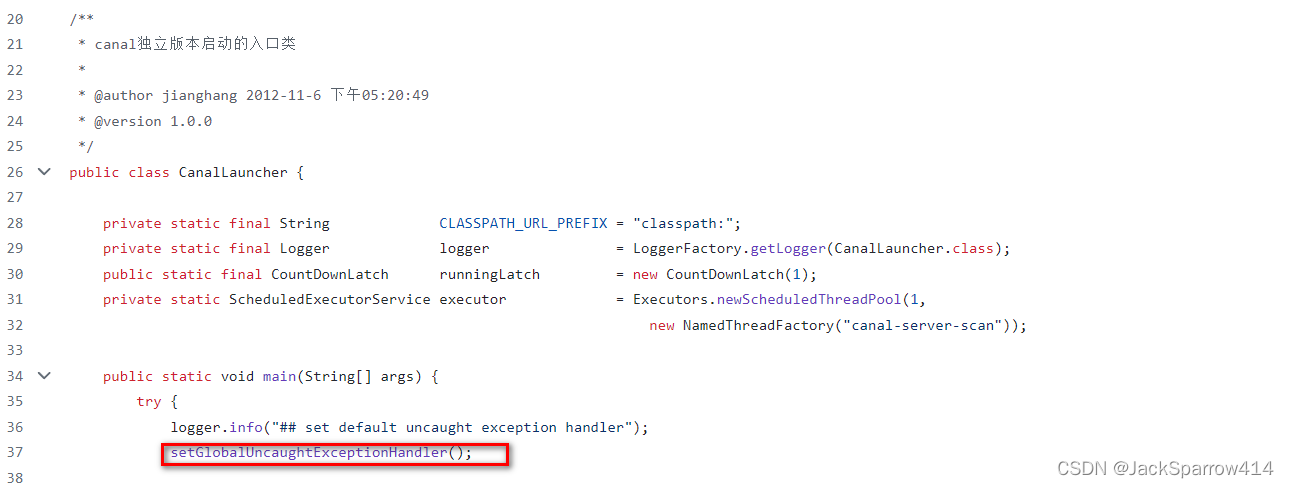
Examples of how other open-source libraries handle UncaughtException:
- org.apache.kafka.common.utils.KafkaThread#configureThread

- CanalLauncher under canal

Log4j2’s Various Bridges
In practice, before our project adopted Log4j2, multiple logging frameworks may have been in use, such as JUL and Apache Commons Logging. When we decide to switch to Log4j2, Log4j2 provides various bridges to minimize code changes, letting us output through Log4j2 without modifying the code.
- Apache Commons Logging bridge
- JUL bridge
Using Async Logging
Log4j2 achieves its highest performance after enabling async logging — performance can improve by tens of times.
Enabling Async Logging
Adding the Dependency
<!-- https://mvnrepository.com/artifact/com.lmax/disruptor -->
<dependency>
    <groupId>com.lmax</groupId>
    <artifactId>disruptor</artifactId>
    <version>3.4.4</version>
</dependency>
Startup Configuration
-Dlog4j2.contextSelector=org.apache.logging.log4j.core.async.AsyncLoggerContextSelectorHow to Confirm That Async Logging Is Enabled?
How to verify log4j2 is logging asynchronously via LMAX disruptor?
Also, configure the following at startup:
-Dlog4j2.debug=trueIf you see something like the following in the console:
Starting AsyncLogger disruptor…
it means async logging has been enabled successfully.
The official documentation strongly recommends against outputting location information when async logging is enabled. Location information refers to className, methodName, lineNumber, and so on. Outputting this information degrades performance by tens of times. So is there a roundabout way to still output the className? Yes, there is.
private static final Logger LOGGER = LogManager.getLogger();With this format, the Logger’s name is the className. This way, outputting loggerName is equivalent to outputting className.