Table of contents
Open Table of contents
Executing Lua Scripts in Redis
redis-cli --eval /tmp/script.lua mykey somekey , arg1 arg2Pay particular attention to the separator between keys and arguments: space + comma + space. Otherwise, invoking the script with redis-cli produces an error.
I recommend reading through the Redis CLI documentation. Familiarize yourself with common operations such as connecting with redis-cli, supplying a password, and specifying a Lua script.
Debugging Lua Scripts in Redis
You can use redis-cli to debug Lua scripts in Redis.
redis-cli --ldb --eval /tmp/script.lua mykey somekey , arg1 arg2The official documentation also explains debugging clearly.
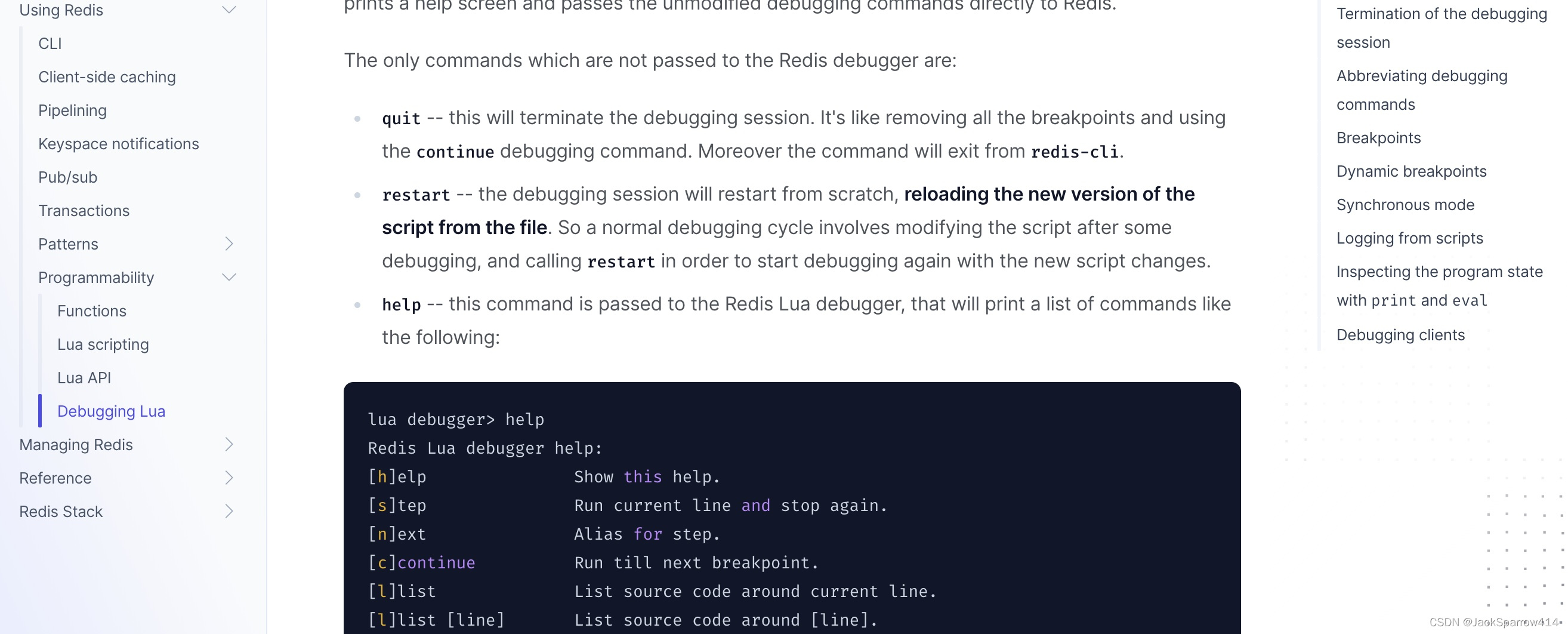
For more details, see the Lua debugging section of the Redis documentation.
We will implement four algorithms using a limit of at most 3 requests per minute.
Fixed Window
Take the one-minute interval 10:01:00–10:02:00 as an example. The key is userId:current window start, for example 8848:01.
local key = KEYS[1]
-- Use -1 if this key does not exist yet
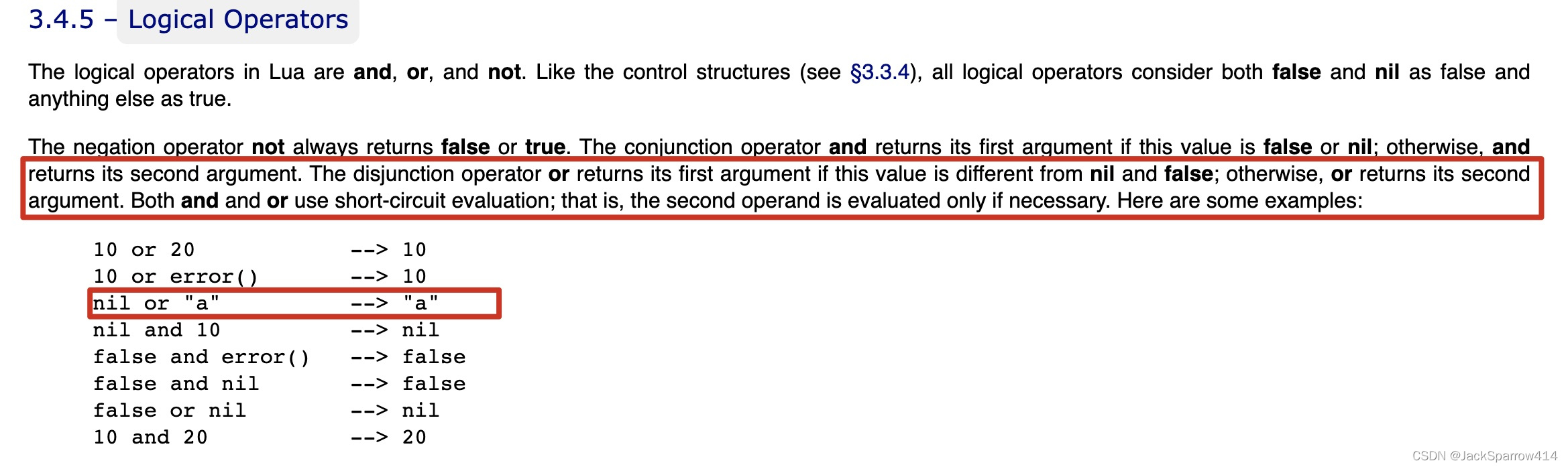
-- See the screenshot below for the use of or
local requests = tonumber(redis.call('GET', key) or '-1')
-- Maximum requests allowed in the fixed interval; 3 in this example
local max_requests = tonumber(ARGV[1])
-- Usually the fixed-window duration, such as 60s
local expiry = tonumber(ARGV[2])
-- When the window key does not exist or the request limit has not been reached
if (requests == -1) or (requests < max_requests) then
  -- Increment
  redis.call('INCR', key)
  -- Reset the key expiry to 60s from now
  redis.call('EXPIRE', key, expiry)
  return false
else
  return true
end
Key Parts of the Code
Suppose the first request arrives at 10:01:30. Since 8848:01 does not exist, the key is incremented by 1 and given an expiry 60s from now.
Some readers may question the final EXPIRE call. This is simply a different implementation approach. Another approach is to calculate the remaining time when the first request arrives, then only increment the counter for subsequent requests.
The implementation above simplifies the code. At 10:02, the key changes, so requests no longer read the 10:01 key. That earlier key is naturally deleted 60s after its expiry was last set.
Verification
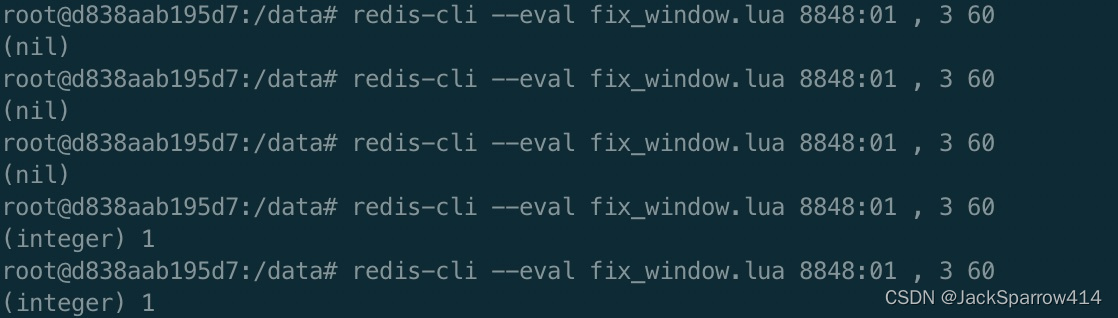 After the limit of 3 requests is reached, the result is true, which is converted to 1.
Sliding Window
A fixed window has a boundary problem: 2 requests at 10:01:59 and another 2 at 10:02:01 produce 4 requests in just 2 seconds, exceeding the limit of 3. Each group is valid in its own fixed window, but the behavior across the boundary is incorrect. A sliding window solves this problem.
local key = KEYS[1]
-- Current timestamp
local current_time = tonumber(ARGV[1])
-- Window size: 60 * 1000 in this example
local window_size = tonumber(ARGV[3])
-- 3 in this example
local max_requests = tonumber(ARGV[4])
-- Expiry cutoff: current time in milliseconds minus the window duration in milliseconds
local has_expired = current_time - window_size
-- Remove expired entries
redis.call('ZREMRANGEBYSCORE', key, 0, has_expired)
-- Get the current number of zset members
local current_num = tonumber(redis.call('ZCARD', key))
local next = current_num + 1
-- Return 0 when the rate limit is reached
if next > max_requests then
  return 0;
else
  -- Add a zset member whose value and score are both the current timestamp: [value, score]
  redis.call("ZADD", key, current_time, current_time)
  -- Reset the zset expiry on every access
  redis.call("PEXPIRE", key, window_size)
  return next
end
A sliding window can handle most real-world business scenarios. Why, then, do we need token-bucket and leaky-bucket algorithms? I looked into this online, and the most convincing answer I found was traffic shaping.
Token Bucket
In application development, a token bucket can limit requests from upstream callers to our server. Upstream includes direct browser requests and unknown requests from outside our system. Limiting the request rate helps prevent our server from being overwhelmed.
The token bucket involves two scripts:
- One adds tokens to the bucket at a specified rate.
- The other takes a token: if it succeeds, allow the request; otherwise, reject it.
Adding tokens
-- Current timestamp
local ts = tonumber(ARGV[1])
-- Set a 1s window
local min = ts -1
-- Set the token addition rate for multiple keys
for i,key in pairs(KEYS) do
    -- Remove expired tokens
    redis.call('ZREMRANGEBYSCORE', key, '-inf', min)
    redis.call('ZADD', key, ts, ts)
    redis.call('EXPIRE', key, 10)
end
Retrieving tokens
-- Current timestamp
local ts  = tonumber(ARGV[1])
local key = KEYS[1]
local min = ts -1
-- Remove expired tokens
redis.call('ZREMRANGEBYSCORE', key, '-inf', min)
-- Check the bucket size; allow the request if the bucket contains a value
return redis.call('ZCARD', key)
Leaky Bucket
A leaky bucket sends requests to a downstream service at a specified rate, avoiding errors from overloading that service. If more requests arrive during an interval than the fixed rate permits, they must queue and wait.
local ts  = tonumber(ARGV[1])
-- Calls per second, for example 4 per second, allowing 1 request every 250ms
local cps = tonumber(ARGV[2])
local key = KEYS[1]
local min = ts -1
redis.call('ZREMRANGEBYSCORE', key, '-inf', min)
local last = redis.call('ZRANGE', key, -1, -1)
local next = ts
if type(last) == 'table' and #last > 0 then
  for key,value in pairs(last) do
    -- Last member plus the interval determined by the fixed rate
    next = tonumber(value) + 1/cps
    break
  end
end
if ts > next then
  -- the current ts is > than last+1/cps
  -- we'll keep ts
  next = ts
end
-- If ts < next, next remains the last zset member timestamp + 1/cps
redis.call('ZADD', key, next, next)
-- Required waiting time
-- If ts > next, return 0: no wait is needed; call immediately
-- If ts < next, the next permitted time has not arrived; wait for next - ts
return tostring(next - ts)