Table of contents
Open Table of contents
Article body
Our company has a Word-to-image server, written in C# and deployed on Windows Server. To support a feature, I needed to call it from a Spring Cloud microservice using an HTTP client. The process was roughly as follows.
-
Send an asynchronous HTTP request from the microservice with three parameters: the Word document download URL, the callback path the conversion server uses to send the images to my microservice, and a path for Windows Server to confirm receipt.
-
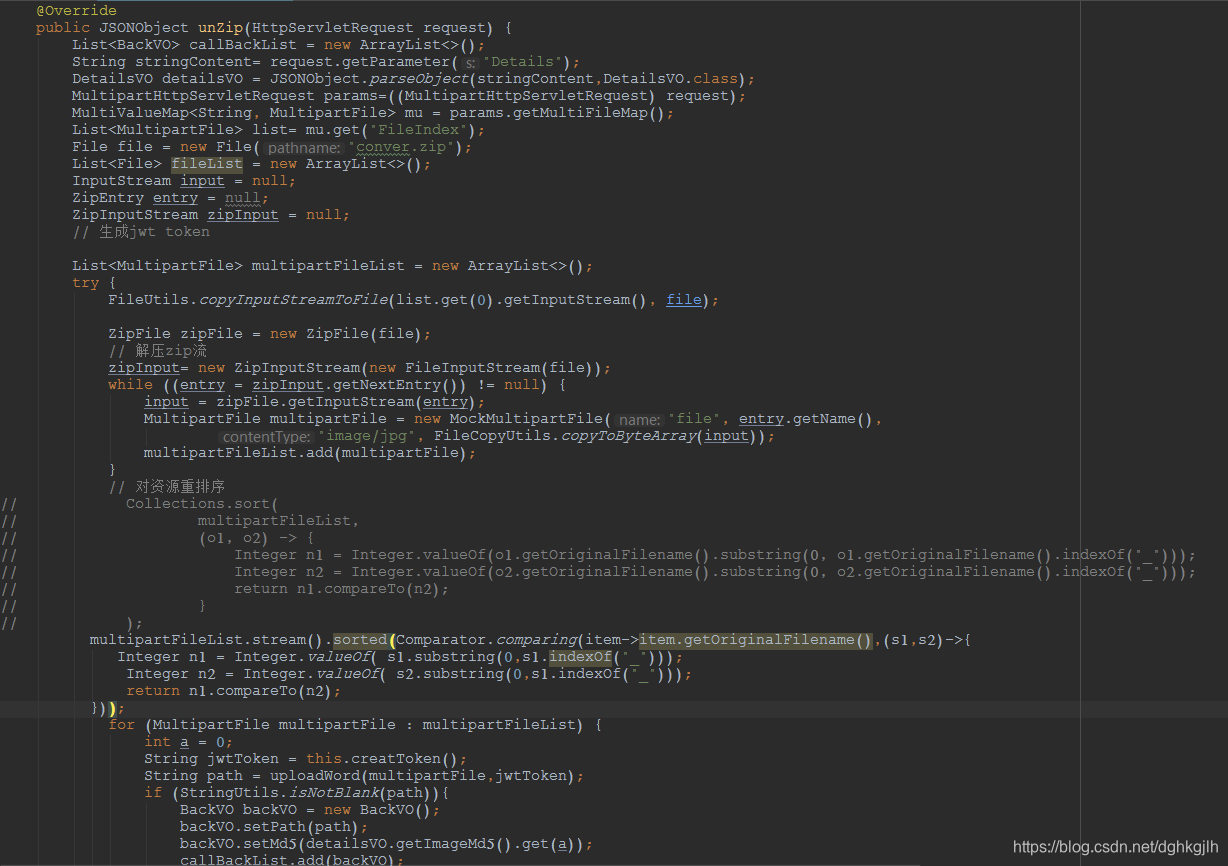
After the first request, Windows Server calls the microservice back using the second parameter and sends an archive of images. My code extracts and uploads them, then returns the uploaded URL of each image to the Windows side.
-
Finally, the Windows side performs a simple confirmation.
After implementing and testing this, I encountered the following problems.
- During the Windows callback, using an explicit host and port such as 127.0.0.1:8080 worked, but requests using the company domain failed validation.
Cause: when accessed through the domain, the company’s Spring Cloud gateway checks token validation for the path and whether it is on the allowlist, meaning it can be accessed without a token.
Solution: add the path to the URL allowlist.
- For Word documents with many pages, the Windows callback frequently returned 500, failing at step two. The circuit breaker interrupted the API call. I initially felt sure the file server was at fault, but step-by-step investigation showed otherwise.
Cause: my code performed three unnecessary operations. The file server accepts MultipartFile. I called getInputStream on ZipEntry, read that stream and wrote it to a temporary file, then read a stream from that file again. Looking back at this code, I could hardly believe how foolish it was. Breakpoints confirmed that this was where the time went: about 15 seconds for those three operations on 80 images. Worse, I used InputStream.read() to read one byte at a time. What a silly approach! Use InputStream.read(byte[],int off,int len) instead.
Solution: obtain the input stream with ZipEntry.getInputStream() and construct the MultipartFile directly from it. The callback stopped timing out.
- The images were eventually stored in the wrong order. Each page was an image, but the stored images were not arranged sequentially. At first I suspected the ZIP sent by Windows, but opening it showed the images in order. The Windows developer had even added sequence prefixes such as 1_ahdfahd.png and 2_fahdfald.png. The problem clearly lay on my side.
Cause: ZipInputStream.getNextEntry returned entries in the wrong order. My initial guess was that image sizes caused different transmission times: perhaps the first image was slow, and the Nth image had already arrived before the first finished, causing the disorder. That may be wrong, though, because the images in the locally received temporary archive appeared in the correct order. If anyone knows the reason, please leave a comment. Thanks.
Solution: simply sort by the image filename prefixes before uploading the batch.
- I reordered the image List by prefix using Collection.sort(List,Comparator), but some items were still out of order.
Cause: the code extracted the filename prefixes as strings, and string comparison uses ASCII code values, which left some items in the wrong order. Here is an explanation:
compareTo() returns an int. It first compares the corresponding characters (in
ASCII order). 1. If the strings are equal, return 0. 2. If the first characters
differ, stop comparing and return the difference between their ASCII values
(negative means the first string is smaller; positive means it is larger). 3. If
the first characters match, compare the second characters, and so on until one
string has been fully compared. Then compare the string lengths. Example: String
s1 = "abc"; String s2 = "abcd"; String s3 = "abcdfg"; String s4 = "1bcdfg";
String s5 = "cdfg"; System.out.println( s1.compareTo(s2) ); // -1 (Matching
prefix; s1 is shorter by 1) System.out.println( s1.compareTo(s3) ); // -3
(Matching prefix; s1 is shorter by 3) System.out.println( s1.compareTo(s4) ); //
48 (ASCII for "a" is 97 and for "1" is 49, so return 48) System.out.println(
s1.compareTo(s5) ); // -2 (ASCII for "a" is 97 and for "c" is 99, so return -2)
Solution: convert prefixes such as “1” and “2” to Integer before comparing them.
That was the debugging process. Although it only involved a few steps, I wasted a lot of time and could not help feeling rather useless. Part of the callback code is shown below. If you see ways to improve it, please leave a comment with your advice. I would be very grateful.