Table of contents
Open Table of contents
Article body
After writing code today, I encountered can not handler “CONTROLLER_NAME” to url path.
After resolving it, I realized how little I understood Spring MVC’s workings, so I decided to record my understanding. I had watched plenty of tutorials and read many explanations online, but hadn’t thought carefully about them in practice.
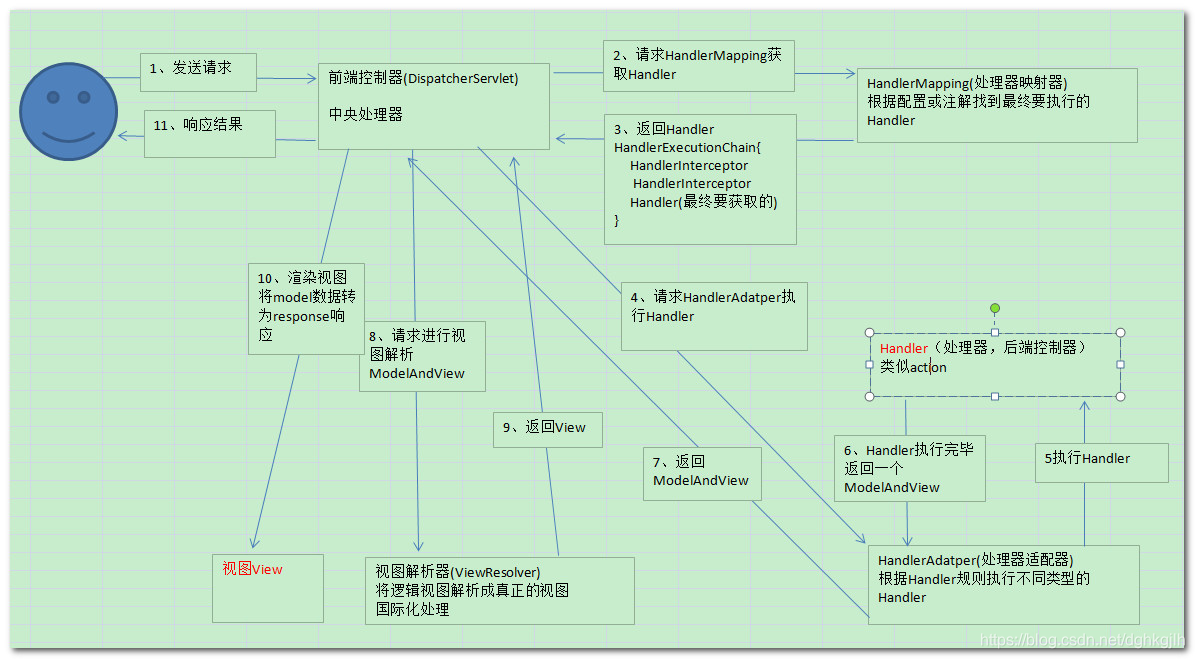
Here is my rough understanding of the request flow.
When the frontend requests data through a URL, Spring MVC’s DispatcherServlet receives the request first. It doesn’t handle every URL; the types it handles are configured in web.xml, which I won’t explain in detail here. DispatcherServlet is often described as the central dispatcher.
After receiving the requested URL, DispatcherServlet calls HandlerMapping. What does it do? It finds the name specified by the controller annotation in your code, matching that name to part of the requested URL so the corresponding method can be executed. A can not map handler error therefore indicates a problem with the mapping between the URL and your controller. Checking the URL or controller annotation should lead to the fix. Unfortunately, I’d forgotten these principles and spent a long time searching.
Once HandlerMapping finds the controller, its job is done and it reports the result to DispatcherServlet. Our busy dispatcher then calls HandlerAdapter. I used to wonder why it couldn’t simply invoke the method once the class was found. Other explanations helped me understand that HandlerAdapter also handles data binding and related operations. Finding the class alone isn’t enough. There are plenty of references on this; I don’t yet know the details of HandlerAdapter’s internal implementation.
Next, HandlerAdapter executes the controller method whose RequestMapping matches the URL. It usually returns a ModelAndView, although a VO may also be returned. Once this helper has finished, it reports back to DispatcherServlet and hands over the model and view.
DispatcherServlet barely gets a breather before another task arrives, so it calls ViewResolver: “This one is yours—take care of it.” ViewResolver, as its name suggests, resolves the view. It uses the view in the ModelAndView to find the corresponding JSP page, then reports completion to DispatcherServlet.
Finally, DispatcherServlet takes the JSP page and its data and returns them to the frontend. Phew—quite a workout.
That is the flow of a typical URL-based request. DispatcherServlet clearly plays a central role throughout.
The illustration below comes from this blogger’s explanation.