Table of contents
Open Table of contents
The Transport Layer
Communication Between Processes on Different Hosts
Although the network layer can deliver data to the destination host, the actual communication happens between specific processes on the hosts. How do we deliver the data to the correct process on the destination host?
At the operating system level, a process gets a process identifier, pid-xxxx. But process identifiers are not guaranteed to be the same across operating systems. Instead we use ports — the protocol port number. By using ports, we can find the process on the destination host that is using that port.
Multiplexing
Demultiplexing
Transport Layer Protocols
UDP — User Datagram Protocol
TCP — Transmission Control Protocol — is reliable, because the network layer below it does not guarantee reliable transmission.
TCP
TCP is a reliable connection. How does it achieve reliability?
TCP is byte-stream-oriented
The data that an application-layer program wants to send eventually becomes a byte stream and is passed down to the transport layer. The transport layer takes the received byte stream, adds a header, and encapsulates it into a TCP segment, which is passed further down to the network layer. At the network layer, the TCP segment gets an IP header added to form an IP datagram, and it continues down to the data link layer. If the length of the IP datagram exceeds the MTU (Maximum Transmission Unit) of the data link layer, the IP datagram has to be fragmented for transmission. At the data link layer, a frame header and a frame trailer are added, and the network interface card assembles it into a MAC frame. At the physical layer, the bits are sent out one by one.
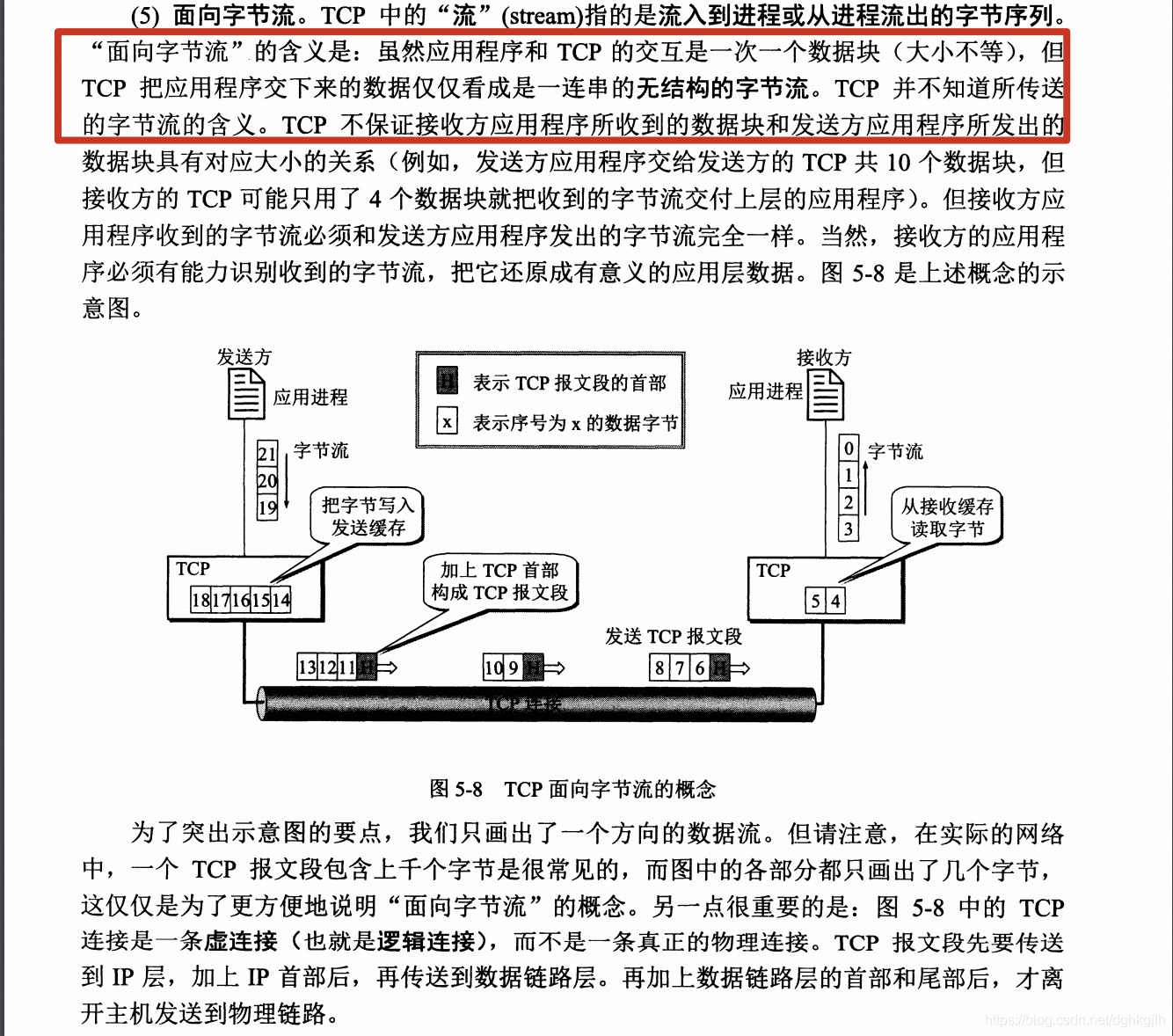
Both ends of a TCP connection have a buffer. When the application-layer process has data ready, it places the data into the send buffer, and the sender automatically sends the data out as appropriate. Likewise, after the receiver receives data, it places the data into the receive buffer, and the application-layer process reads the data from the buffer at the appropriate time.
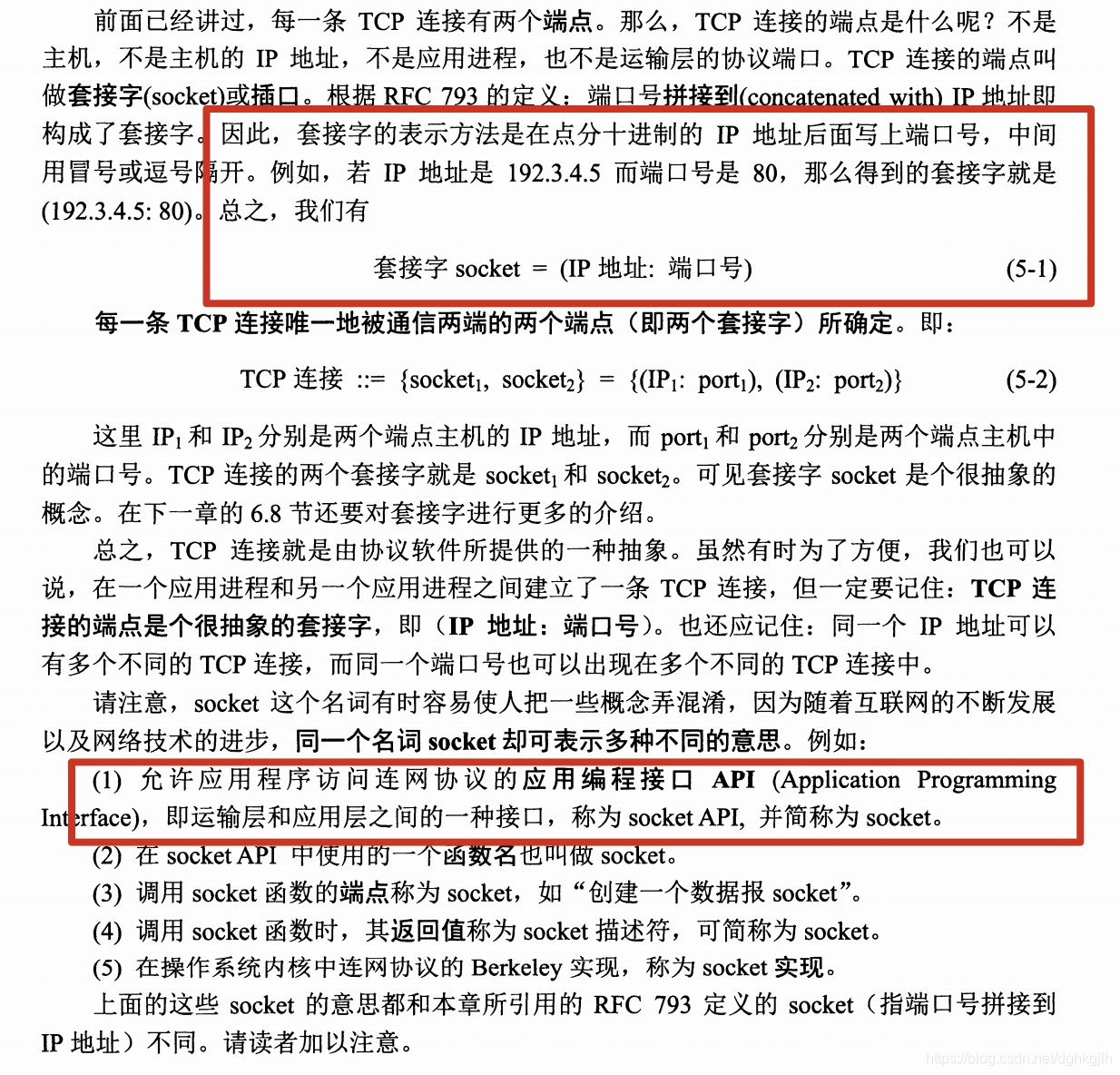
The application layer and the transport layer pass data to each other through an API interface
-
Reliable connection: communication between processes on two hosts must be acknowledged by both sides before it starts. The endpoints on the two sides are called sockets — that is, IP:Port constitutes a socket.
Socket = IP:Port
For example: 46.243.35.6:8999 represents a socket
A TCP connection is made up of two sockets
TCP connection = {socket1, socket2} = {(IP1:Port1), (IP2:Port2)}
-
Reliable data: the receiver checks the arriving data to make sure it is correct and error-free.
ARQ — Automatic Repeat reQuest
Automatic Repeat reQuest
The sending endpoint socketA sends data to endpoint socketB
- After socketA finishes sending a piece of data, it temporarily keeps a copy of the data just sent and starts a timer.
- socketB receives the data and replies to socketA, confirming that the data has been received.
- If socketA has not received socketB’s acknowledgment by the time the timer expires, it re-sends the data it just kept — this is retransmission.
- socketB already sent a response to socketA earlier, but due to network issues, or because the data was lost in the network, it may not have arrived within socketA’s timeout period. A then retransmits, which causes B to receive the same data as before. B discards this duplicate data and sends an acknowledgment to A at the same time, telling A that the data numbered 1 was already received.
- socketA receives B’s acknowledgment, learns that the data numbered 1 has been received, and continues sending the remaining data in sequence.
- If, in step 4, B’s acknowledgment was merely delayed by the network and arrives late — by which time A has already retransmitted — A discards it directly and waits for B’s acknowledgment of the retransmitted packet.
Sliding Window
Bytes are sent group by group. Based on the acknowledgment number plus the window value returned by the receiver, the sender can construct the sliding window.
If the acknowledgment number is 21 and the sliding window is 50, it means the receiver has already received the first 20 bytes, so the sender can send bytes with sequence numbers between 21 and 70. The size of the sliding window changes dynamically.
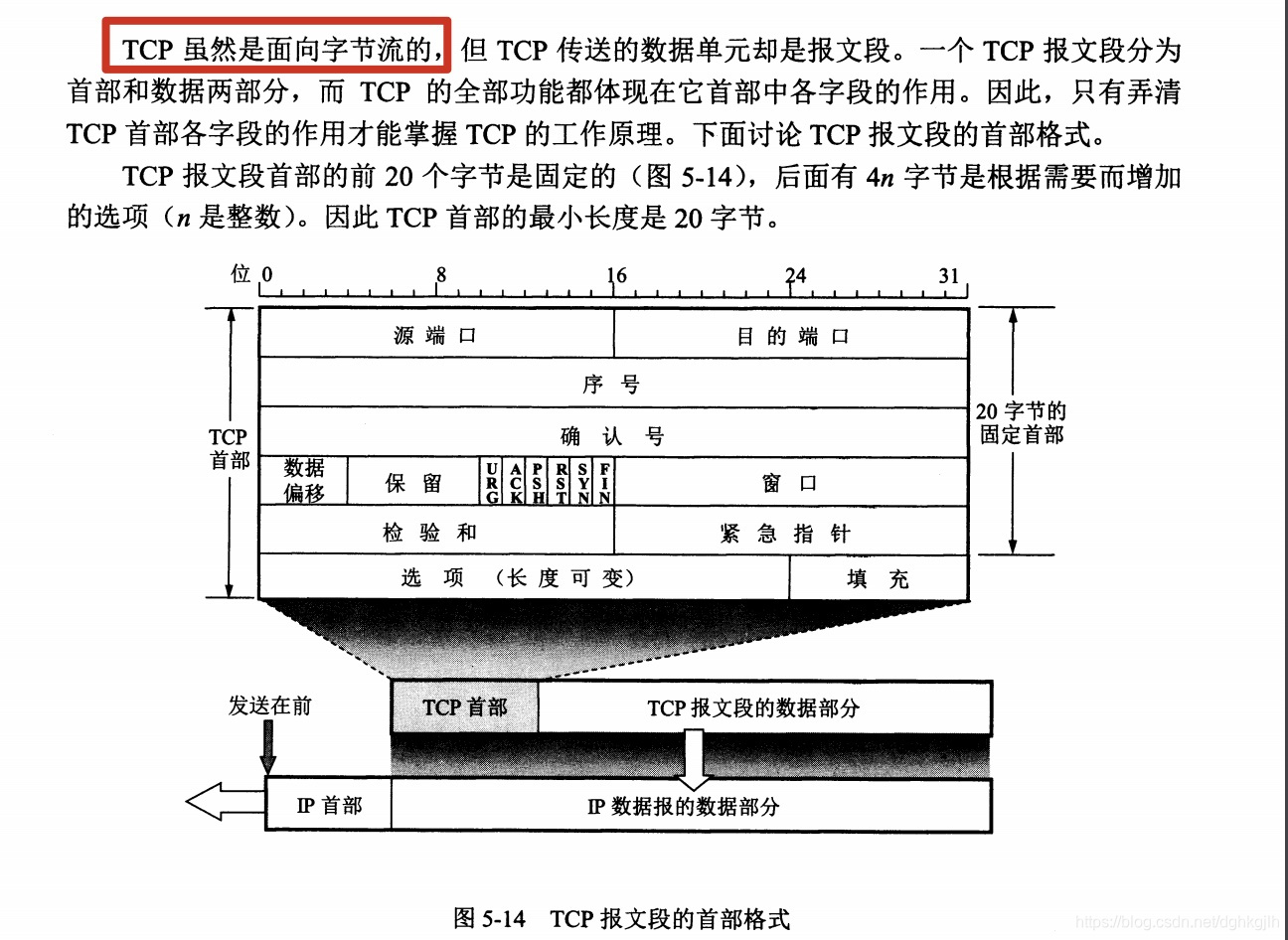
Segment Format
TCP segment format = header + TCP segment
TCP header (20 bytes) = source port (2 bytes) + destination port (2 bytes) + sequence number (4 bytes) + acknowledgment number (4 bytes) + ACK (1 byte) + PSH/push (1 byte) + RST/reset (1 byte) + SYN/synchronization (1 byte) + FIN/finish (1 byte) + window (2 bytes)
There are a few more fields not listed here
-
ACK — ACKnowledgement
Only when ACK = 1 is a segment considered an acknowledgment. When the two ends of a TCP connection are transferring data, every segment received must have ACK set to 1.
-
PSH — push
When the sending process wants an immediate response from the receiving process, the application-layer data is sent as soon as it enters the buffer rather than waiting for the buffer to fill up. The sender also sets PSH to 1; after the receiver receives the data and finds PSH is 1, it hands the data to the application process immediately, instead of waiting for the buffer to fill up before delivering it.
-
RST — ReSet
When RST = 1, it indicates that there is a problem with the TCP connection and the connection needs to be released and re-established. It is also set to 1 when an illegal segment is received.
-
SYN — SYNChronization
Setting it to 1 is the flag for requesting a connection. When first establishing a connection, the sender sets ACK = 0, SYN = 1. After the receiver receives it and agrees to establish the connection, it replies with SYN = 1, ACK = 1.
-
FIN — FINis
Setting it to 1 is the flag for requesting to release the connection.
-
Sequence number
TCP numbers every byte in order. The sequence number range is [0, 2^32 - 1]; once the maximum is reached, the next sequence number starts over from 0. For example: seq = 12.
-
Acknowledgment number
The sequence number of the first data byte of the next segment that the receiver expects to receive. For example, if B receives a segment from A with sequence number 100 and data length 200, then the acknowledgment number B replies to A with is 301 — that is, ack = 301. The formula for the acknowledgment number is:
If the sender’s sequence number is N, then the acknowledgment number returned by the receiver should normally be N+1
or
If the receiver’s sequence number is M, it means all data up to M-1 has been correctly received
-
Window
It is returned together with the acknowledgment number ack; both are returned by the receiver. The window value represents how much more data the receiver can still accept. For example, acknowledgment number ack = 301 and window value = 400 mean: starting from byte sequence number 301, my buffer space can still accept 400 bytes of data — send more slowly, or wait a while before sending.
-
Data offset — header length
It indicates how long the segment header is. The fixed length is 20 bytes; if there are additional values in the options field, the data offset value is greater than 20. The unit of data offset is 4-byte words, so the maximum value of the data offset is
1111 converted to decimal is $2^3 + 2^2 + 2 +1 = 15$; multiplied by 4, that is 60 bytes
Subtracting the fixed header length of 20, this means the options length of a TCP segment cannot exceed 40 bytes.
Congestion Control
Just being aware of it is enough.
The TCP Connection Establishment Process
Establish connection, transfer data, release connection
The Three-Way Handshake
A sends a SYN request to establish a connection: SYN = 1, initial sequence number seq = x. B agrees to accept the connection and replies to A with SYN = 1, ACK = 1 (meaning it was received), ack = x + 1 (the acknowledgment number), and seq = y. After A receives B’s response, it replies to B with ACK = 1, seq = x + 1, ack = y + 1. At this point the connection is established.
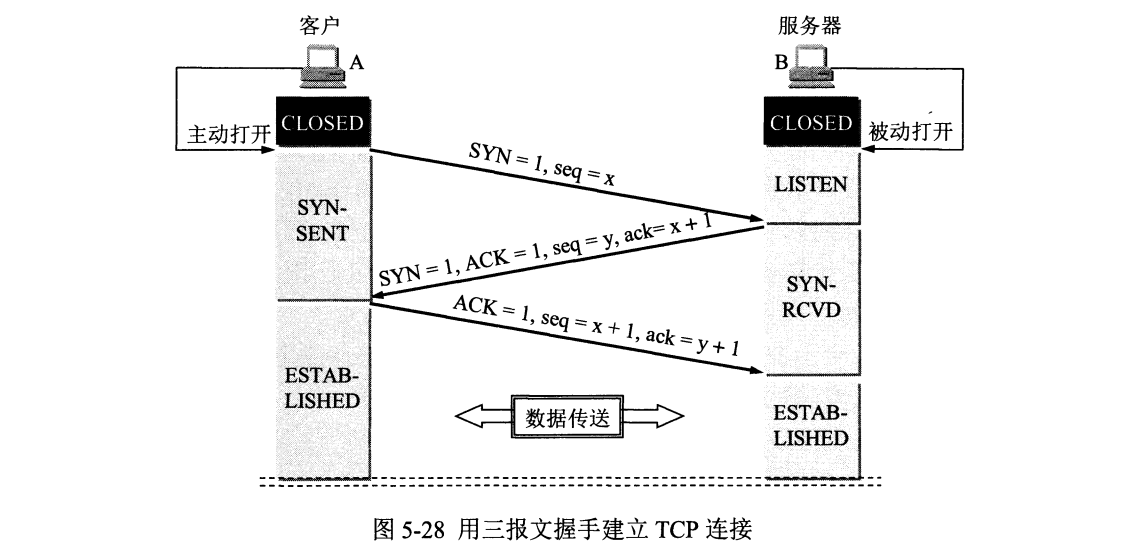
For the full analysis, see Analyzing the TCP Three-Way Handshake with Wireshark below
Why Does A Need to Acknowledge at the End?
Suppose A initially sent a request that, due to network issues, took a long time to reach B. A then initiated another connection request, established a normal connection with B, and the communication finished. At that point the initial request finally arrives at B. If there were no final handshake, B would confirm and the connection would be established directly. B would then keep waiting for A to send data, but A has already finished communicating — B would still believe the connection is valid and keep waiting for data from A.
With the final handshake, B sends an acknowledgment to A and waits for A’s reply. In this case A will not reply. Because it never receives the final acknowledgment, B considers the connection not successfully established.
Understanding the Relationship Between Firewall Inbound/Outbound Rules and the TCP Handshake
Here is a requirement: host A should be able to access host B, while host B cannot access host A. Can a firewall do this? The answer is yes. When host A’s firewall inbound rules restrict host B, then when host B tries to access host A, the packets it sends are indeed intercepted by A’s firewall, so the packets cannot reach A, and naturally B cannot access A. But when A accesses B, many students have this doubt: at this point the firewall does not intercept the packets A sends to B, but after B receives A’s packets, it sends reply packets back to A in response to the earlier packets — won’t those also be intercepted by host A’s firewall when they arrive at A? Then host A would never receive host B’s packets — wouldn’t the connection fail, making B unreachable?
In fact, the principle here needs some explanation: a TCP connection has a three-way handshake — request connection, agree to connect, connection established. The inbound and outbound rules each correspond to the connection request. Suppose both A and B have port 80 open, and B wants to access A’s port 80. Assume A’s firewall has an inbound rule that denies B access; the connection-request packets B sends to A are indeed intercepted by A’s firewall, so the packets cannot reach A, and naturally B cannot access A. But when A wants to access B, the connection-request packets A sends to B are not intercepted by A’s firewall, and after B receives the connection-request packets, the reply packets agreeing to the connection that B sends back to A are actually not intercepted by A’s firewall either — because A’s firewall only intercepts connection-request packets, not the subsequent reply packets. The same logic applies to outbound rules: the firewall also only intercepts connection-request packets. If at this point you remove B from A’s inbound rules and add B to the outbound rules, the result would be the situation where host B can access host A but host A cannot access host B, because A’s connection-request packets to B are intercepted.
The above answer comes from Zhihu (a Chinese Q&A platform)
The Four-Way Termination
Client A sends a FIN to request releasing the connection: FYN = 1, seq = u. Server B receives A’s request and replies with an acknowledgment: ACK = 1, ack = u + 1, seq = v. At this point there may still be data from B to A that has not finished being sent, so B keeps sending; after everything is finally sent, B also requests to release the connection: FIN = 1, seq = 2, ack = u + 1. A receives the final release request and replies with an acknowledgment: ACK = 1, seq = u + 1, ack = w + 1. Once B receives it, B enters the closed state. The connection is not yet released at this point — A enters the closed state only after the wait timer (2MSL; MSL is generally 2 minutes, so 2x2 = 4 minutes) expires.
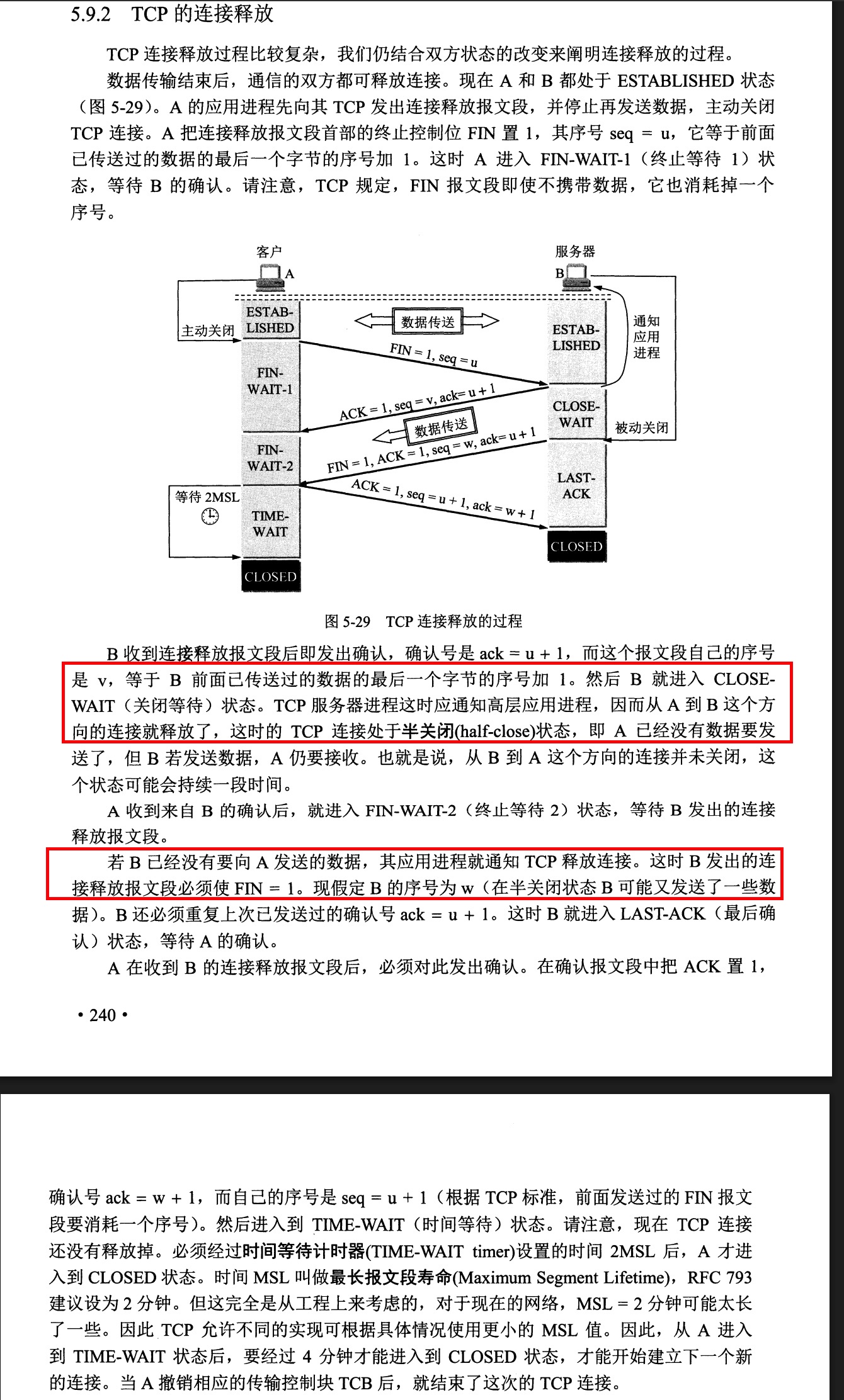 Note the following:
- CLOSE-WAIT is on the side that passively receives the connection close
- If the side that passively receives the close never calls the close method in its upper-layer application code, the TCP connection remains in a half-closed state. At the system or exception level this shows up as a large number of CLOSE-WAIT connections; at that point you should investigate the code to see whether a connection was forgotten somewhere and never closed
For the full analysis, see the four-way termination analysis below
Why Does A Wait for 2MSL?
MSL — Maximum Segment Lifetime. It guards against the case where B does not receive A’s final reply segment: in that case B retransmits, and A will receive it within this time window. This restarts the timer (4 minutes). If A had already closed early and could not reply when B retransmitted, B would be unable to close.
Why Does a Server Show a Large Number of TIME-WAIT Connections?
Looking at the four-way termination process, when the server is the side that actively closes the connection, it enters the TIME-WAIT state after the last ACK packet is sent. This is an unavoidable part of the process.
If a large number of TIME-WAIT connections appears, it means the server has many connections about to close — possibly because a large number of clients opened short-lived connections and disconnected immediately within a short period of time.
Why Does a Server Show a Large Number of CLOSE-WAIT Connections?
Looking at the four-way termination process, when the server is the side that passively closes the connection, it enters the CLOSE-WAIT state after receiving the client’s FIN packet and replying with ACK. Only after the upper-layer application closes the connection can the underlying OS truly release the resources and proceed to step 3.
If a large number of CLOSE-WAIT connections appears, it means the server has been slow to close connections — either there is too much data, or there is a bug in the code and connections are not being closed in time.
Capturing Network Packets with Wireshark to Analyze TCP
Download and Installation
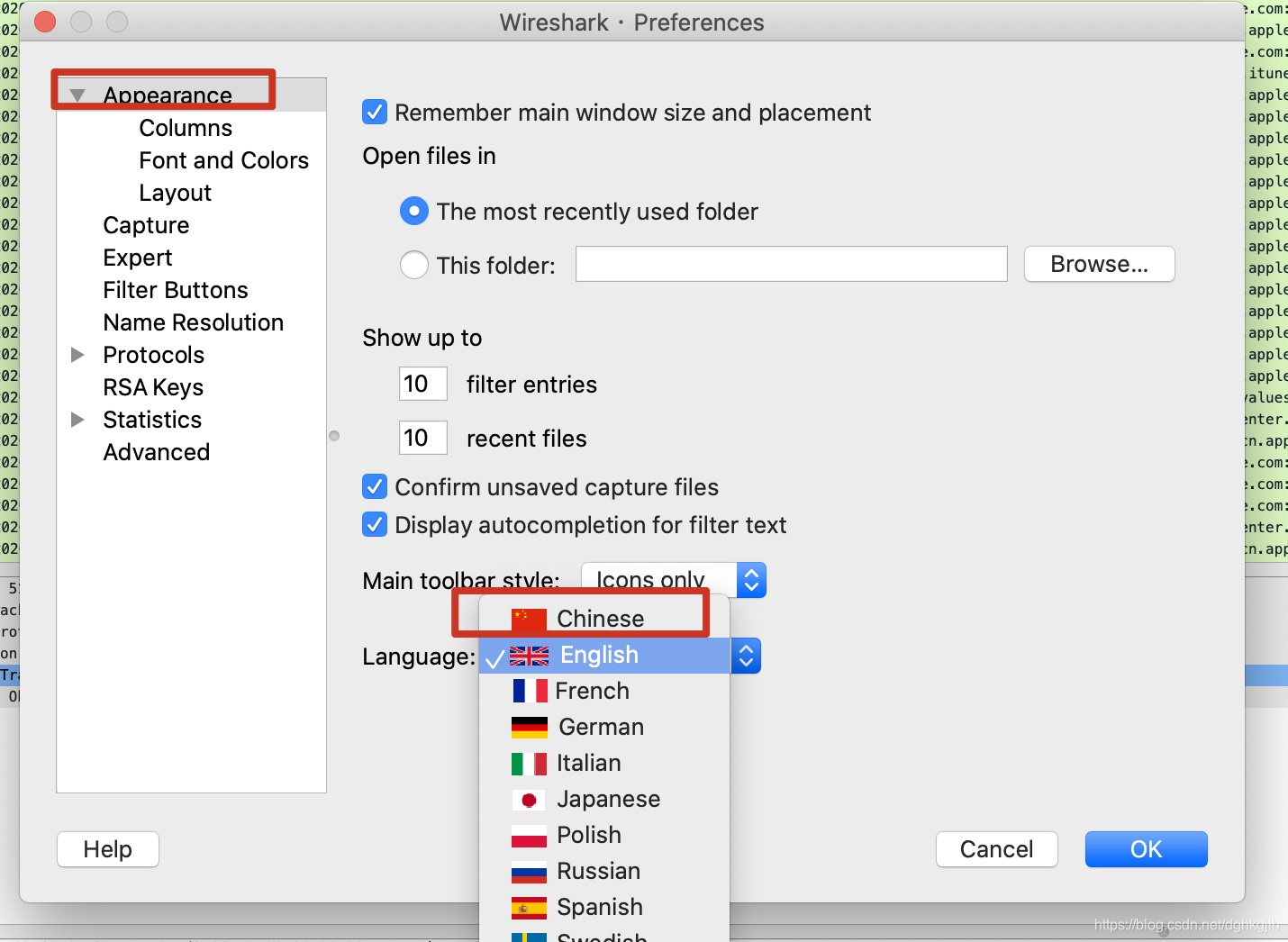
After installation, switch the language to Chinese
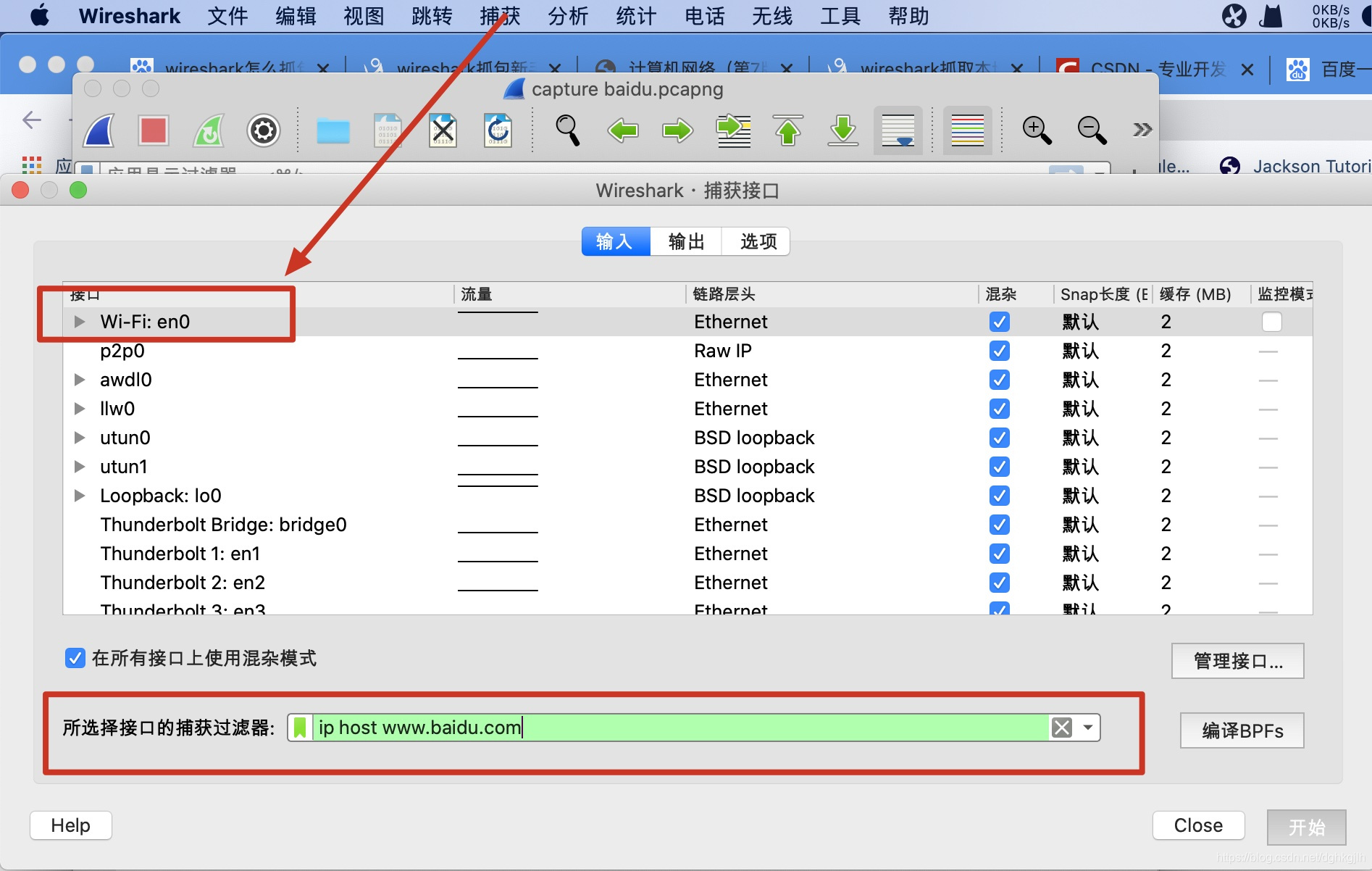
Setting the Capture Filter
Menu bar ----> Capture ----> find your network interface ----> set the capture filter ----> start capturing
Start Capturing
Before capturing, it is recommended to clear the browser cache so you can see the complete request process.
Enter www.baidu.com in the browser; the Baidu homepage (a Chinese search engine) opens automatically. At this point, look at the information captured by Wireshark
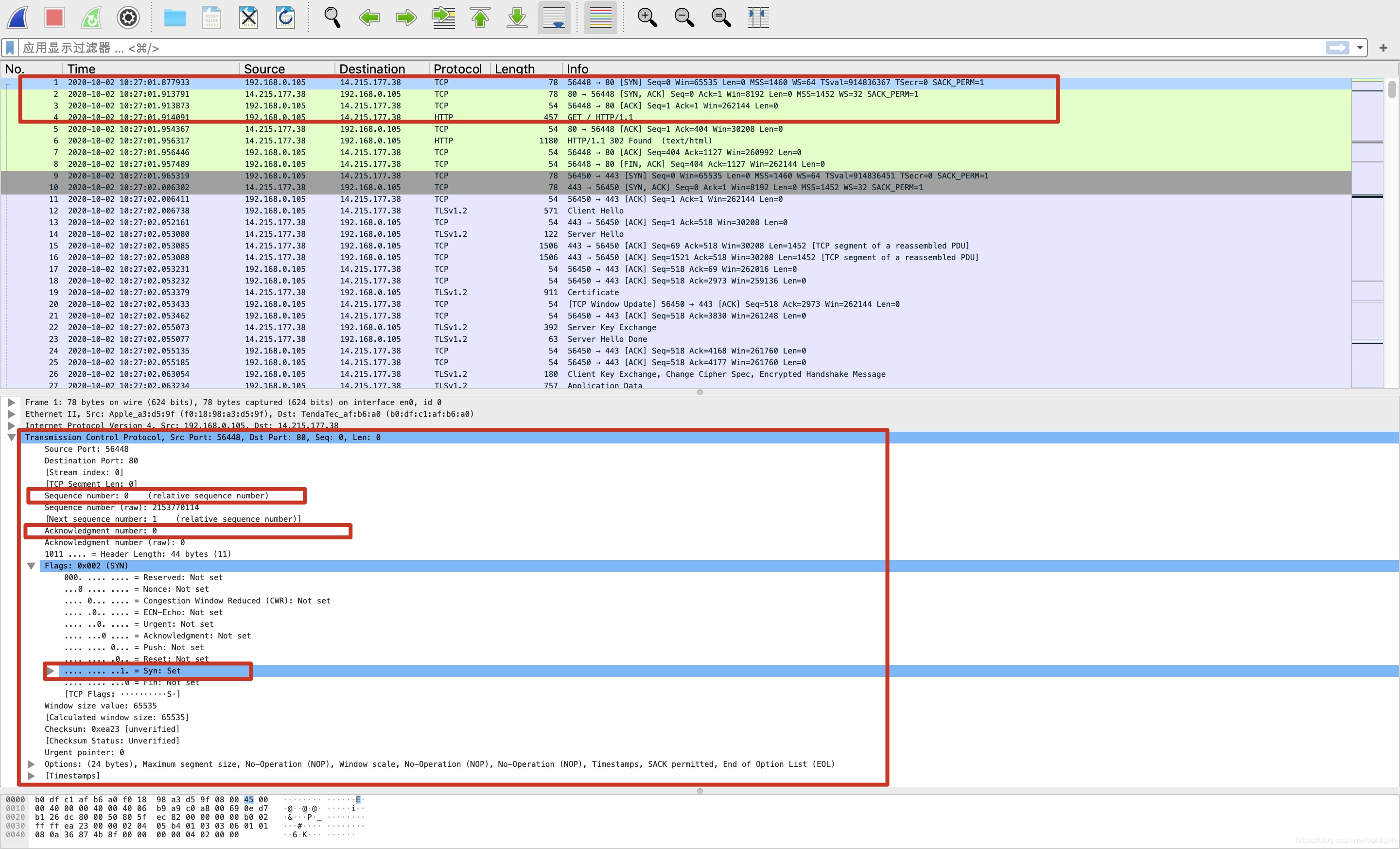 You can see that before the actual HTTP request is initiated, there are three TCP connection packets. Presumably, this is the TCP three-way handshake that happens before data is actually transferred. Let’s verify this next.
Analyzing the Three-Way Handshake
-
First, look at the structure of the whole segment
-
Source Port: 56448 — the source port
-
Destination Port: 80 — the destination port
-
Sequence number: 0 — the sequence number
-
Acknowledgment number: 0 — the acknowledgment number
-
Head Length: 1011 — the TCP segment header length (data offset); converted to decimal this is 11, and 11 x 4 = 44 bytes
-
The remaining flag bits each occupy one bit; at this point Syn is set to 1
Note: Head Length and the other flag bits together occupy 2 bytes; the full format is 1011 0000 0000 0010, as can be seen in the screenshot above
-
Window size value: 65535 — the window
-
Checksum: the checksum
-
Urgent pointer: the urgent pointer
-
Options: 24 bytes — the options field; 44 - 20 = 24. You can also see that the MSS maximum length is 1460 bytes
-
Timestamps: timestamps
You can see that this matches the TCP segment structure described above.
How can you see whether each field really occupies the number of bytes mentioned above?
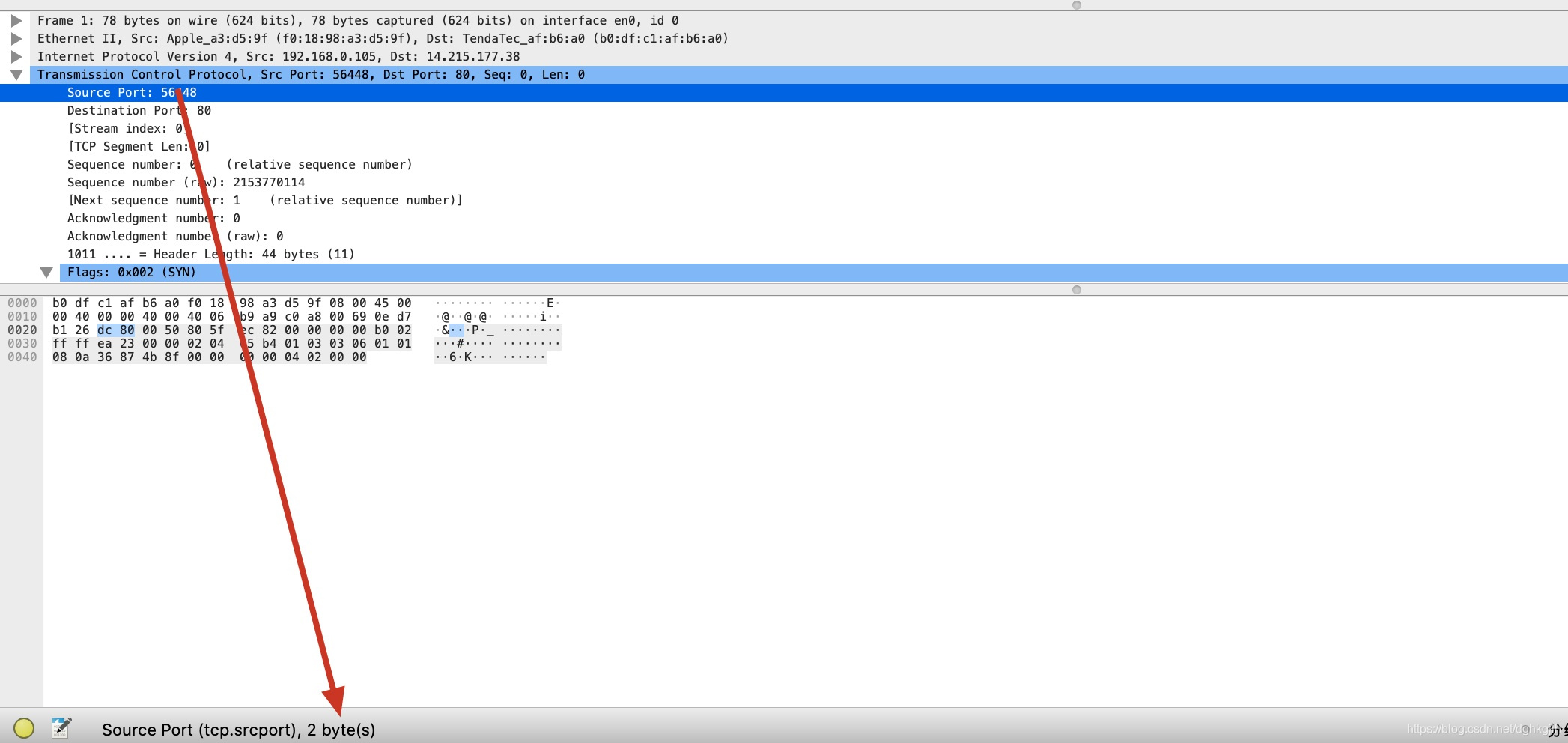
When you hover over each field, the number of bytes it occupies is shown automatically
-
-
In the first segment you can see the sequence number is 0, the acknowledgment number is 0, and Syn among the flag bits is 1. This matches the first step of the three-way handshake described above: the client sends a TCP segment with Syn set to 1, representing a request to establish a TCP connection with the server.
-
According to the above, the second TCP segment should be the server’s response to the client: the server’s flag bits will have Ack set to 1, meaning the server received the previous segment, and Syn set to 1, meaning it agrees to establish the connection; the server’s sequence number is 0 and its acknowledgment number is 1. Why is the acknowledgment number 1? As explained in the TCP segment format section above, 1 - 1 = 0, which means all data up to number 0 has been received. Let’s look at the second TCP segment.
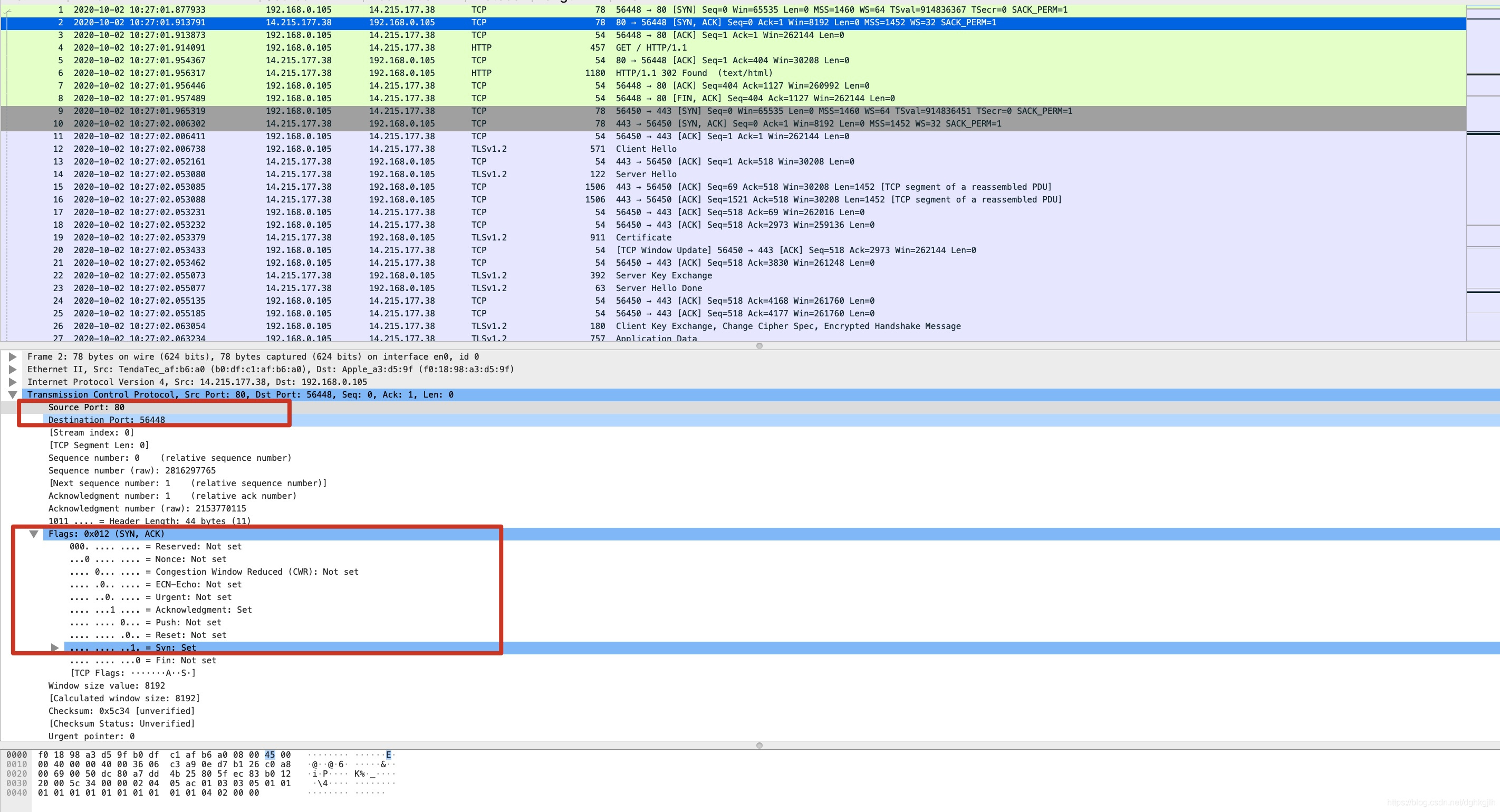
The source port and destination port have been swapped — it was indeed returned from the server’s port 80; the flag bits are also correct, and the acknowledgment number is correct too.
-
As for the final handshake, the information sent should be: sequence number 1, acknowledgment number 1, and flag bit ACK set to 1
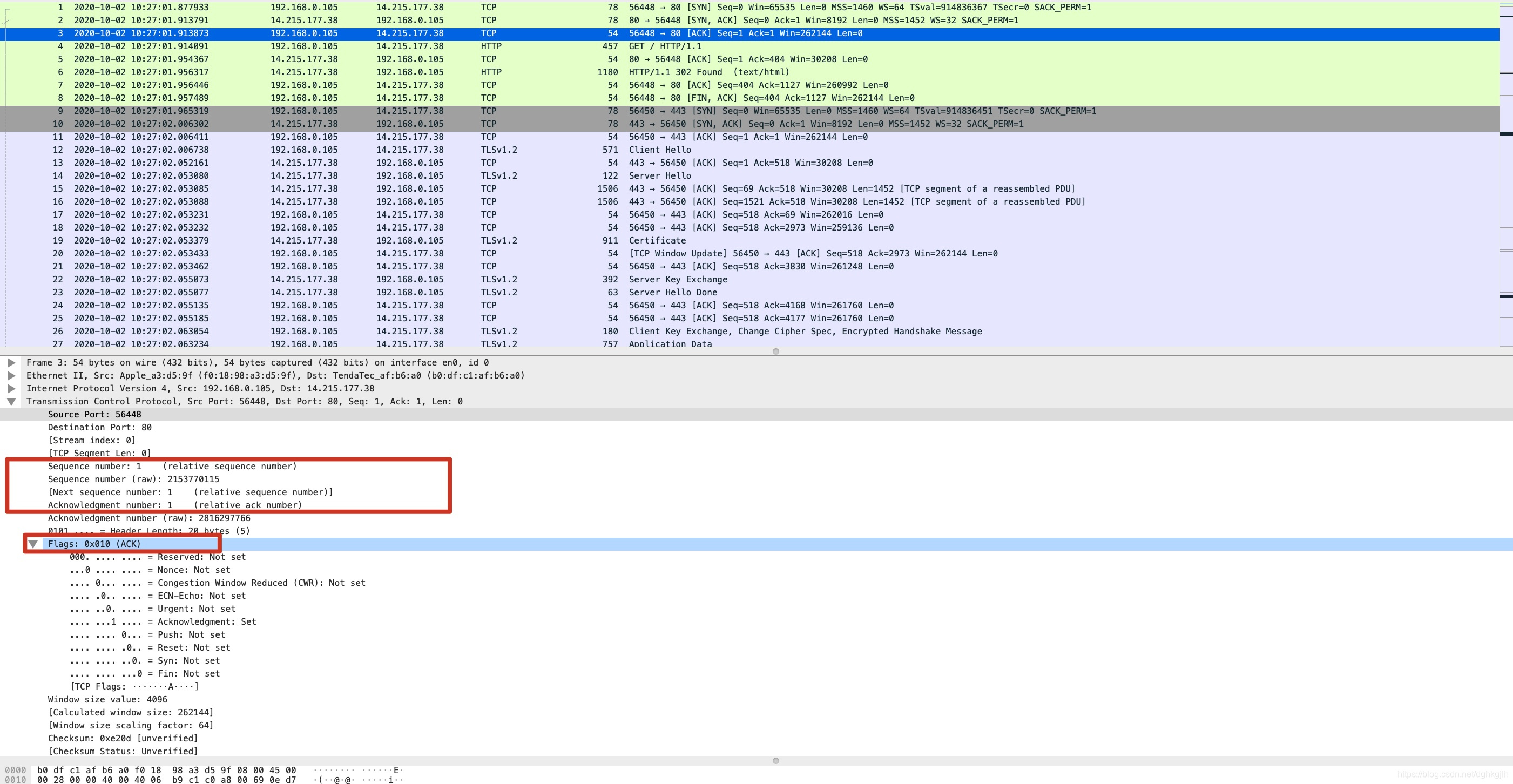
At this point, the TCP three-way handshake is complete. Only next is the actual HTTP request initiated.
-
The client initiates the HTTP request with sequence number 1, acknowledgment number 1, and ACK set to 1
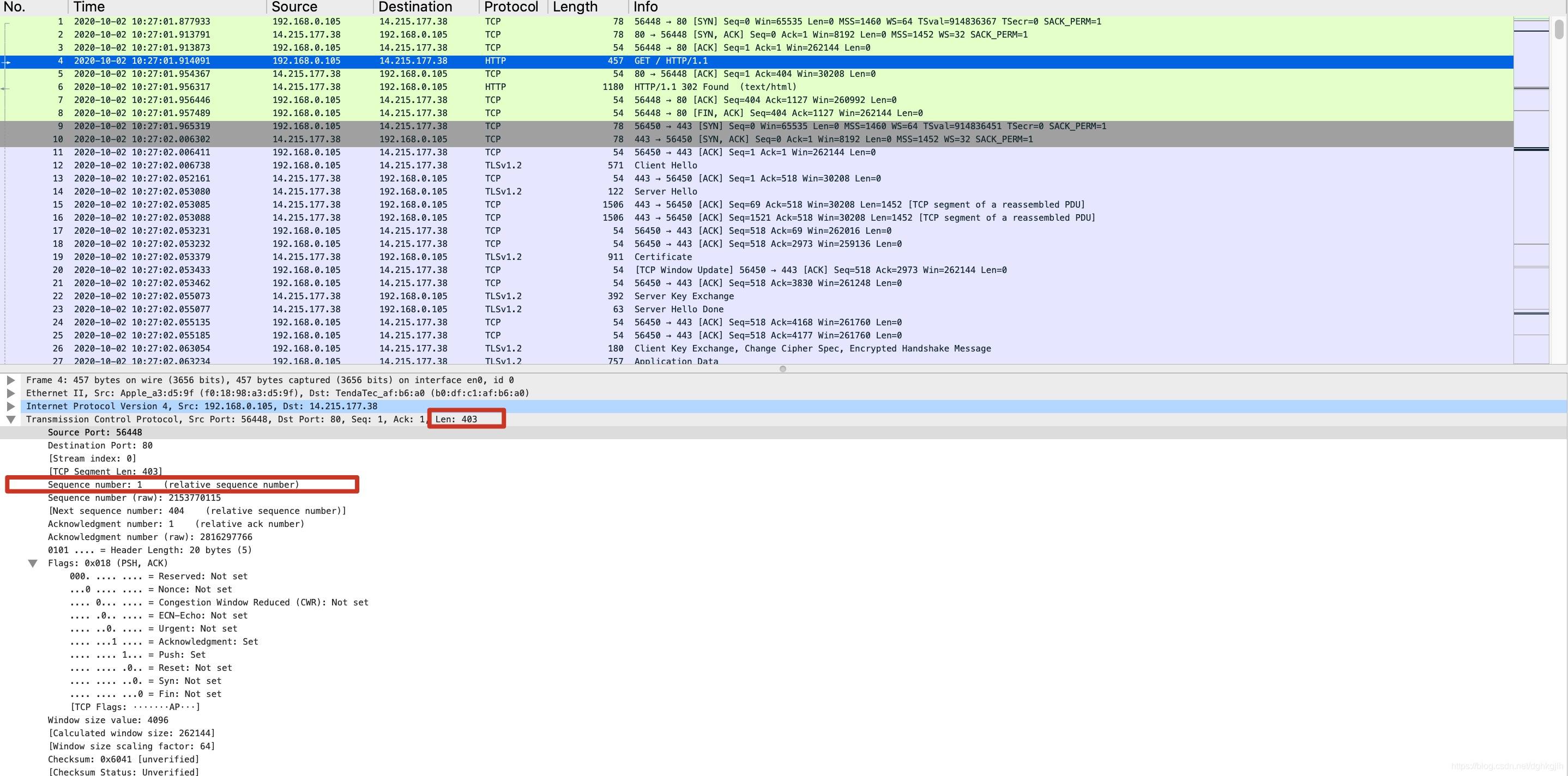
You can see the data byte length sent this time is 403. If the server received it normally, the server’s acknowledgment number should be 404, with ACK set to 1 and sequence number 1.
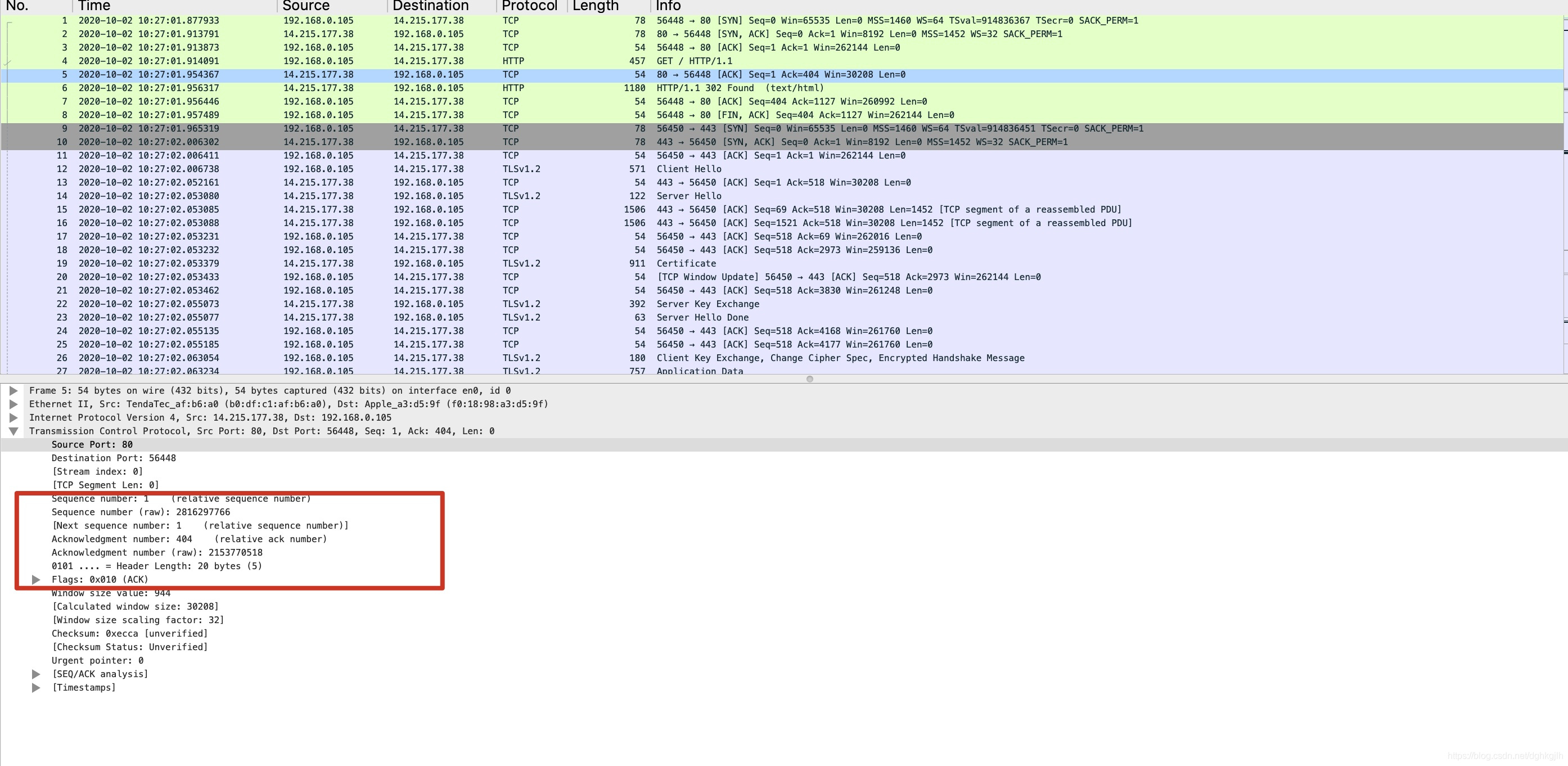
-
You can also see the 5-layer structure we talked about in any HTTP request
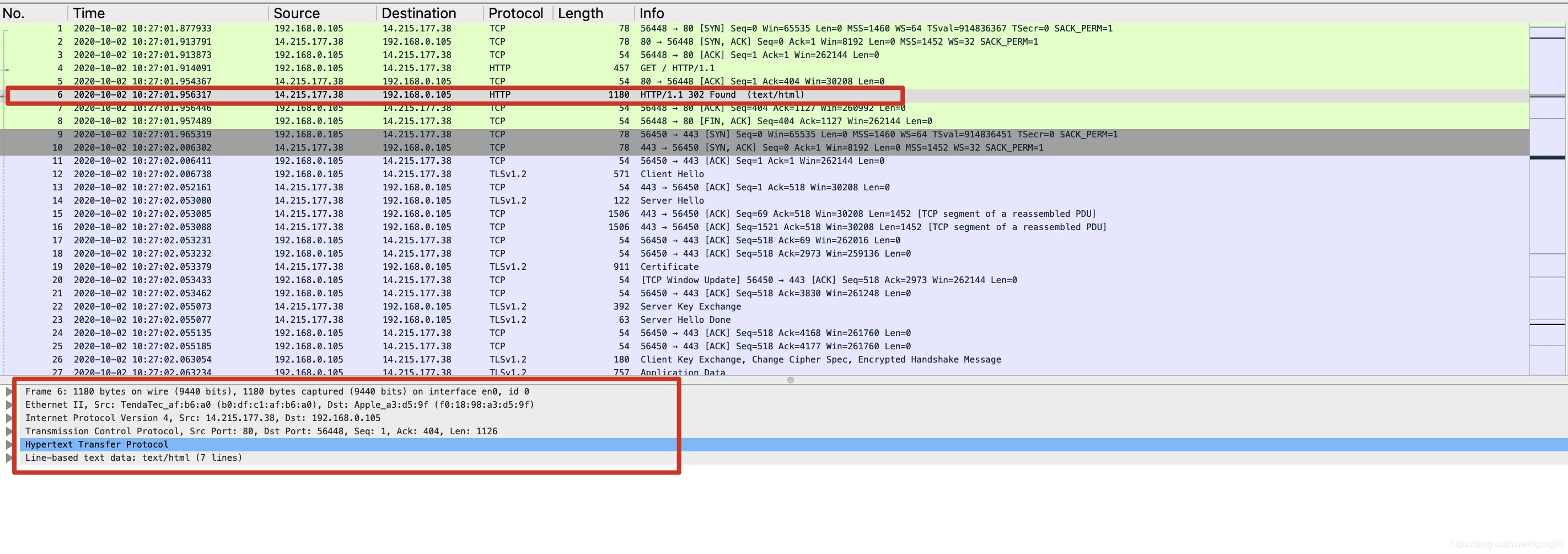
From bottom to top, they are: HTTP - TCP - IP - Ethernet - Frame
Analyzing the Four-Way Termination
Pick any TCP connection — here we use the TCP connection on port 56450
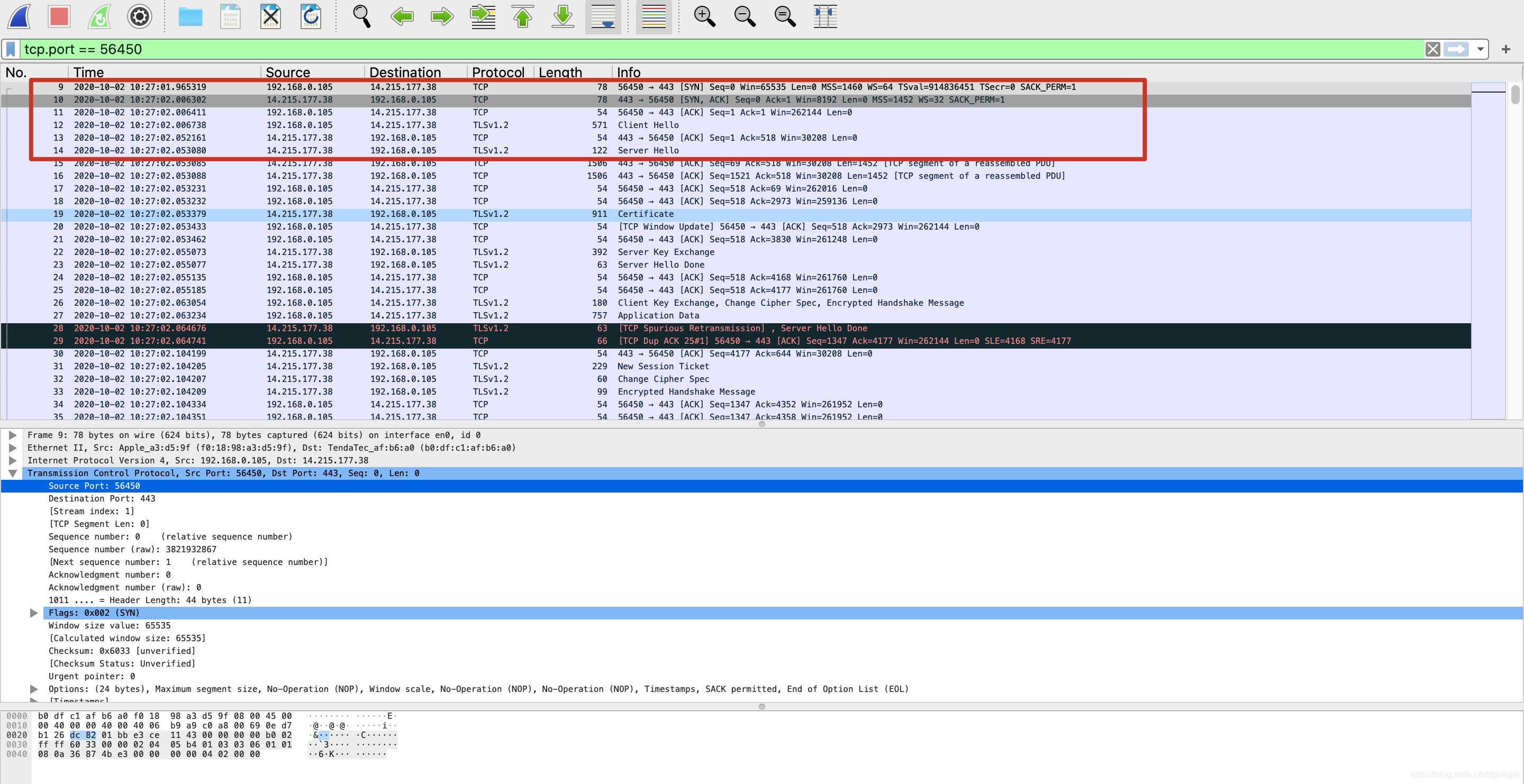
At the beginning, a TCP connection is established with port 443 of the Baidu server. You can see that after the connection is established, the TLS (Transport Layer Security) protocol is used to encrypt the information transmitted over TCP.
Find where the connection is released
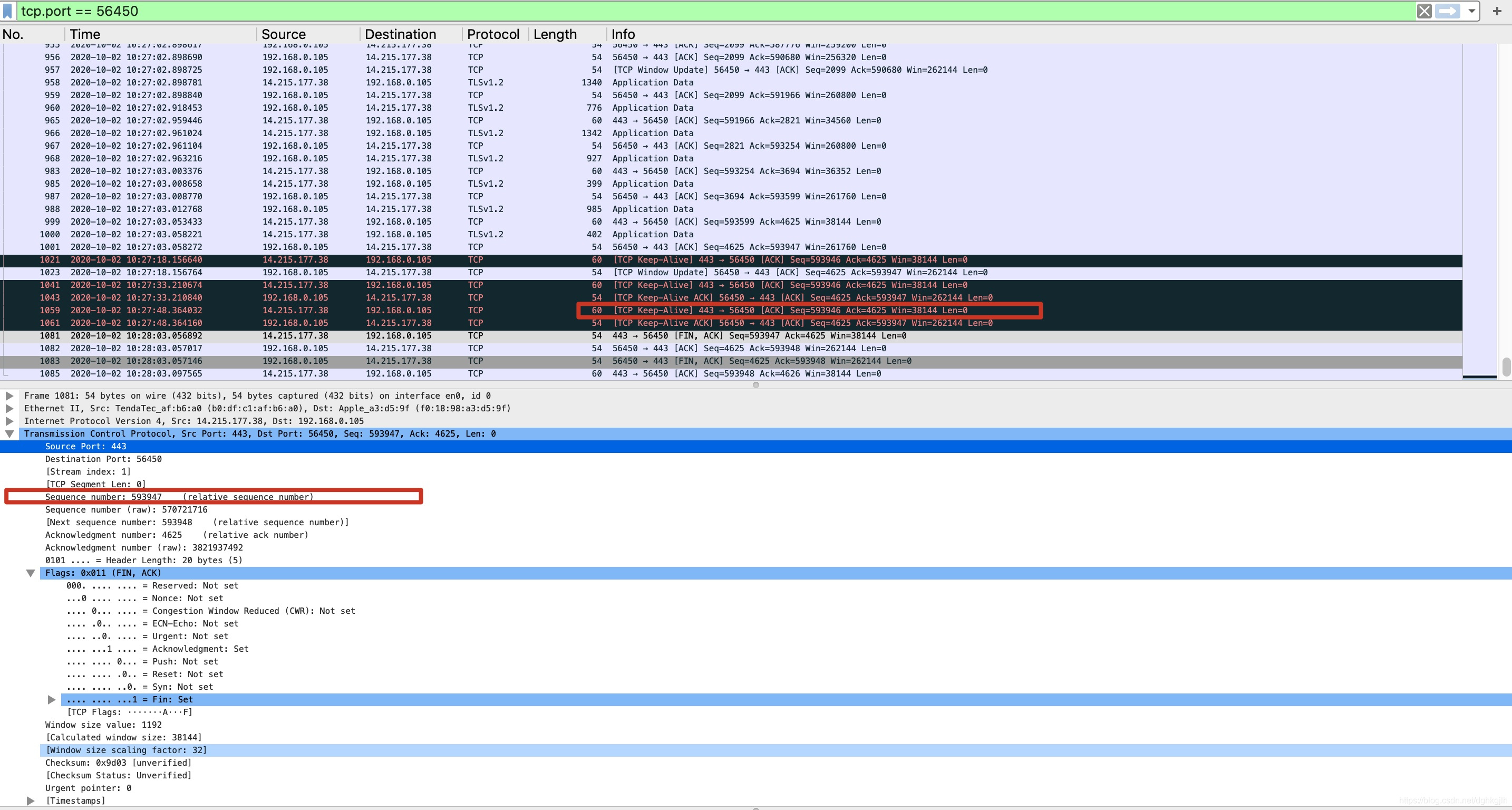
You can see:
- First, port 443 actively disconnects. The last sequence number 443 sent was 593946, so at this point, having decided to disconnect, it sends a TCP datagram to 56450 saying “I’m ready to disconnect on my side”; the sequence number of this TCP datagram is the last sent sequence number + 1, i.e. 593947, and the flag bit FIN is 1.
- At this point the local machine’s port 46450 receives it and acknowledges receipt. It replies to port 443 with sequence number 4625, ACK = 1, and acknowledgment number 593948 — meaning all numbered bytes up to 593727 have been received.
- After receiving the ACK, port 443 is now in the termination-wait state
- After some time — note, after a short while — the local machine sends a request to release the TCP connection to port 443: FIN = 1, ACK = 1, the acknowledgment number is still 593948, and the sequence number is 4625
- After 443 receives the release request, it replies: ACK = 1, the sequence number is still 593948, and the acknowledgment number is 4626
With that, the four-way termination is complete. Port 56450 closes as soon as it receives 443’s ACK acknowledgment. After waiting 2MSL, 443 enters the closed state.
56450 must receive the final ACK acknowledgment before it closes. Therefore 443 has to wait for a while — if it closed immediately after sending the ACK upon receiving the FIN TCP segment, then if a network problem occurred, the 56450 client would not receive the ACK acknowledgment, and 56450 would retransmit after a timeout. But at that point the TCP connection on port 443 would already be closed and unable to reply to 56450, so the client would be unable to close.
How to Quickly Find Where the Handshake Starts and Where the Termination Starts?
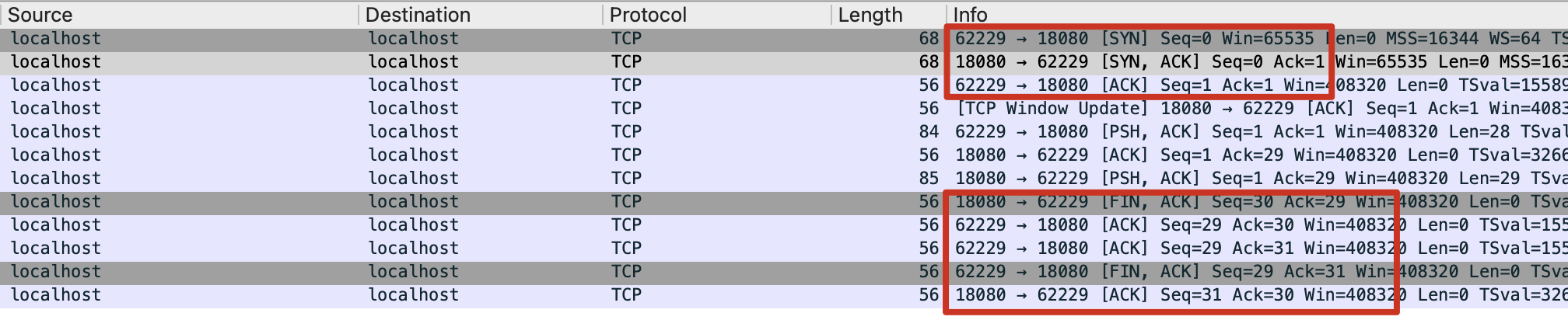
Based on the discussion above, just look at the control bits in the TCP header
- The first packet that initiates a connection has the SYN flag
- The first packet that closes a connection has the FIN flag and comes from the side that actively closes the connection; the third packet is also FIN and comes from the side that passively closes the connection