Table of contents
Open Table of contents
Article body
- For a two-dimensional array: int [] [] A = new int [a] [b];
This means the two-dimensional array contains a one-dimensional arrays, with b elements in each, as illustrated below.
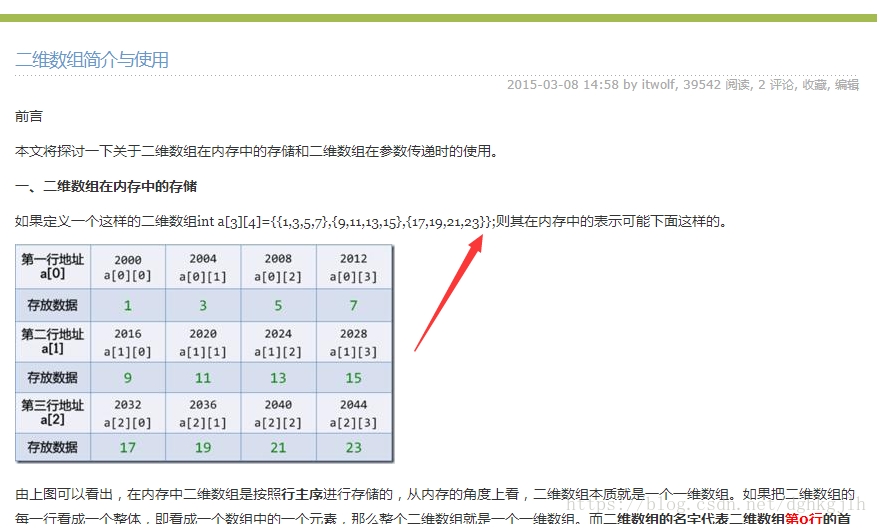
- We know that strings are immutable in Java. When we need mutable string content, we generally use StringBuffer or StringBuilder for concatenation. Concatenating strings with + in Java is very slow: it first allocates space for the new string and then copies the old string into that space.
To change the content, you can convert the string into a character array with char [] s = String.toCharArray(); and then modify an element with s [index] = ‘h’. Note the single quotes.
- Integer.parseInt(STRING,10/2/8/16); converts the input representation to decimal, parsing the string as a signed integer.
The important point is that this method parses the input string as an integer. The int range is limited, so an excessively large binary input causes a NumberFormatException.
- While practicing on LeetCode today, I saw a.charAt(index) - ‘0’ in someone else’s code and couldn’t understand it. After quite a bit of searching, here is the explanation:
In one sentence:
‘0’ is a character constant. Its ASCII value is 48 in decimal and 0x30 in hexadecimal. It can be used to convert a digit to a character: 2+‘0’->‘2’.
More details can be found in my personal bookmarks.
-
When declaring a primitive type such as int, double, float, char, short, or long, consider its range. If the declared type cannot accommodate the value eventually assigned, a NumberFormateException can easily occur. Keep that in mind.
-
For Java’s split function, we usually use the first form, spilt(”\|”), specifying the separator to match.
The second form is spilt(”\|“,NUMBER). The number specifies the number of parts. If it is 10 and more separators remain after the tenth part, those remaining separators are not processed.