Table of contents
Open Table of contents
Article body
- While writing dynamic SQL in a MyBatis configuration file today, I wrote:
<select id=getBgtCompanyList” parameterType=“com.ronhe.romp.bgt.bgtcompany.model.BgtCompanyModel” resultMap=“BgtCompanyResultMap”>
I confidently committed it to SVN. Later, a colleague found that the project wouldn’t start, and I had to go back and fix it. I’d caused trouble for everyone, so I didn’t have much to say…
Back to the problem: startup reported an error along the lines of id is an en type “select”, together with the line number in the XML file.
Sure enough, the quotes around id were incomplete. A reminder to be more careful.
Note: an id in this XML must be enclosed in quotes. Missing or incomplete quotes cause an error like the one above.
Updated 2018-12-10
- After writing code today, starting the project produced an error approximately reading: can not map handler “CONTROLLER_NAME” to url path.
After a lengthy search, I found two actions under the feature’s action package. I had given their controllers the same name, causing a conflict.
The error message actually explained the problem; I simply hadn’t read it carefully. It meant that the URL path could not be mapped successfully to a controller.
If you understand Spring MVC’s request flow, it is clear that this problem occurs in HandlerMapping.
If you’re interested in Spring MVC’s request flow, see this post
- Today I encountered another error caused by carelessness. Here is the screenshot:
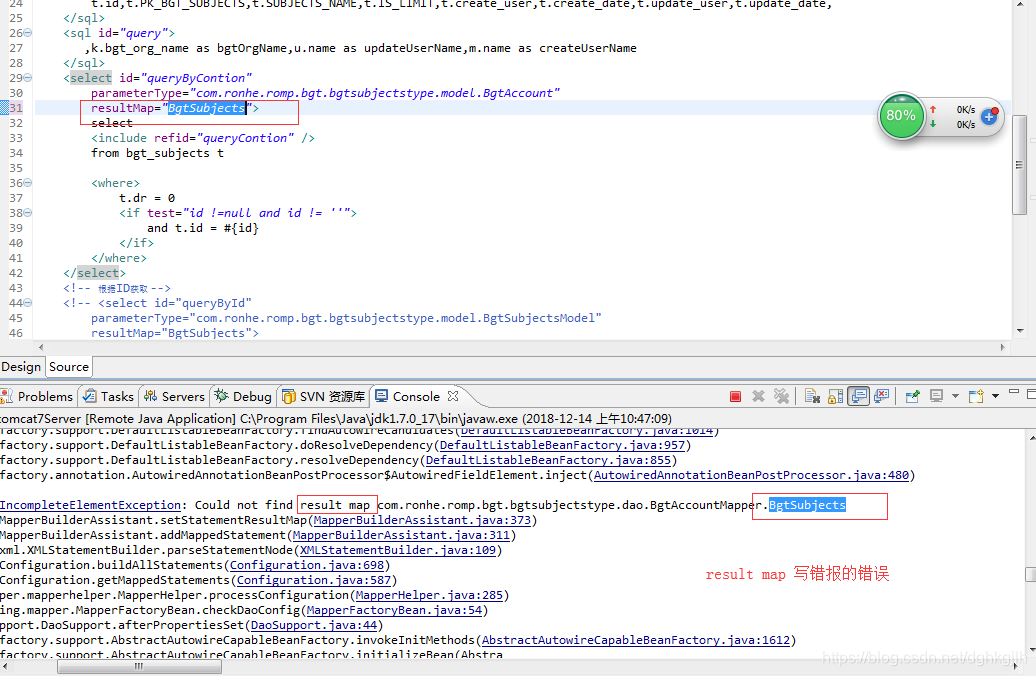
The error was clear: the result map referenced in the XML could not be found. On checking, I discovered that I had misspelled its name. Something to watch for in future development.
Steady, careful work is the foundation for progress.