Table of contents
Open Table of contents
Article body
Understanding Java NIO (Part 2): I/O Multiplexing and Reactor Servers in C introduced how to implement the Multi-Reactor pattern in C using epoll; this article implements it in Java. With the background from the previous post, writing the corresponding code in Java actually goes fairly smoothly—you just need to find the corresponding classes in Java.
Java NIO Prerequisites
I recommend reading this blogger’s NIO series of posts—they’re short and clear.
NIO involves several components: Channel, Buffer, and Selector.
Typically, all IO in NIO starts with a Channel. A Channel is a bit like a stream. From the Channel data can be read into a Buffer. Data can also be written from a Buffer into a Channel. Here is an illustration of that
Basic Buffer Usage
When you write data into a buffer, the buffer keeps track of how much data you have written. Once you need to read the data, you need to switch the buffer from writing mode into reading mode using the flip() method call. In reading mode the buffer lets you read all the data written into the buffer.
Once you have read all the data, you need to clear the buffer, to make it ready for writing again. You can do this in two ways: By calling clear() or by calling compact(). The clear() method clears the whole buffer. The compact() method only clears the data which you have already read. Any unread data is moved to the beginning of the buffer, and data will now be written into the buffer after the unread data
Selector Implementations on Each Operating System
For the Selector interface:
- On Linux, the implementation is EPollSelectorImpl, which ultimately calls epoll.
- On Windows, the implementation is WindowsSelectorImpl, which ultimately calls select.
- On macOS, the implementation is KQueueSelectorImpl, which ultimately calls kqueue.
More About Selector
The Role of wakeup
Simply put, its role is to wake up a Selector that is blocked waiting.
By default, if no channel has any events ready, the thread calling selector.select() will block (sleep) there indefinitely, doing nothing.
But in real-world complex applications, we sometimes need to interrupt this “sleep.”
Understanding the Behavior of wakeup() in Depth
wakeup() has the following characteristics:
- Waking up a blocked thread: If a thread is currently blocked in
selector.select()orselector.select(timeout)and another thread callsselector.wakeup(), the blocked thread will return immediately and stop waiting. - “Saving up” a wakeup in advance: If no thread is currently blocked in
select()when you callwakeup(), then the next thread that callsselect()will return immediately instead of blocking. It’s as ifwakeup()hands out a “skip-the-wait pass” in advance.
Why Do We Need wakeup()? (Common Use Cases)
In a simple single-threaded model, you may rarely need wakeup(). But once multithreading is introduced, it becomes indispensable. Here are the three most common scenarios:
Scenario 1: Registering a New Channel Across Threads
The internal operations of Selector involve some locking mechanisms. If one thread (thread A) is blocked in selector.select() while another thread (thread B) wants to register a new SocketChannel with this Selector:
- Thread B calls
channel.register(selector, ...) - Thread B then needs to call
selector.wakeup()to wake up thread A, so that it becomes aware of the newly registered channel.
Scenario 2: Gracefully Shutting Down the Server
When you want to stop the server, the event-loop thread may be blocked inside the select() method.
// The thread responsible for the event loop
while (isRunning) {
    selector.select(); // If there are no events, the thread gets stuck here
    // ... handle events
}

// Another control thread wants to shut down the server
public void stopServer() {
    isRunning = false;
    selector.wakeup(); // Forcibly wake the event-loop thread so it sees isRunning has become false and exits the loop gracefully
}
Scenario 3: Modifying Interest Events Across Threads (Interest Ops)
Sometimes a background thread processing data finds that data is ready to send, and it needs to change a Channel’s interest set from “read only” to “read and write.” After modifying the events, you usually need to call wakeup() to wake up the Selector, so it can immediately notice the change in the event registration and start listening for write events.
Implementing the Multi-Reactor Pattern in Java
For what the Multi-Reactor pattern is, see Understanding Java NIO (Part 2): I/O Multiplexing and Reactor Servers in C.
Design
Core Component Mapping (C vs. Java)
| C Component | Java NIO Counterpart | Notes |
|---|---|---|
epoll_fd | Selector | Java’s multiplexer. The main Reactor and each sub-Reactor each have their own independent Selector. |
server_fd (listening) | ServerSocketChannel | The channel dedicated to accepting new connections. |
client_fd (connection) | SocketChannel | The client connection channel, set to nonblocking mode (configureBlocking(false)). |
eventfd (wake-up bell) | selector.wakeup() | Just call this method and the thread blocked in select() wakes up immediately—no need for us to build a pipe by hand. |
fd_queue + mutex | ConcurrentLinkedQueue | A thread-safe lock-free queue. The main thread pushes the SocketChannel in here, and the sub-threads safely take it out. |
epoll_event.data | SelectionKey.attachment() | In Java, we can attach an attachment to each connection (such as a Connection context or a Buffer), which is very convenient. |
Architecture and Runtime Flow Design
The overall design is still the classic three-layer architecture: 1 Main Reactor + N Sub Reactors + a business thread pool.
1. Main Reactor (The Main Acceptor)
- Responsibility: runs in a single thread, holds its own dedicated
Selector, and registers only theOP_ACCEPTevent. - Actions:
- When a new connection arrives, call
serverChannel.accept()to obtain theSocketChannel. - Set it to nonblocking.
- Pick a Sub Reactor using round-robin.
- Put this
SocketChannelinto that Sub Reactor’s lock-free queue. - The key step: call the target Sub Reactor’s
selector.wakeup()to wake it up.
2. Sub Reactor (I/O Workers)
- Responsibility: N threads, each with its own dedicated
Selector, responsible for handlingOP_READandOP_WRITE. - Actions:
- Handling new connections: after being woken up, first check its own lock-free queue. If the main thread has pushed in a new
SocketChannel, take it out, register it with its ownSelector, and listen forOP_READ. - Reading data: once
OP_READis ready, use aByteBufferto read the data. After reading, wrap the data and theSocketChannelinto a Task and hand it to the Worker thread pool. - Sending data: once
OP_WRITEis ready, send out theByteBufferattached to the channel (the output buffer we designed ourselves). After sending, cancel theOP_WRITEregistration.
3. Worker Thread Pool (Business Processing Power)
- Responsibility: dedicated to computing business logic. We can directly use Java’s built-in
ExecutorService(such asThreadPoolExecutor). - Actions:
- Take data from the task queue and perform time-consuming computation (simulated).
- After the computation completes, write the result into the connection’s “output buffer.”
- Modify the connection’s registered interest set on the
Selectorto addOP_WRITE. - Call the owning Sub Reactor’s
selector.wakeup()again to tell the I/O thread to send the data.
The Key Difference: LT and ET Modes
In terms of architecture design, there is one extremely critical difference between Java NIO and C:
- Java NIO’s
Selectoris by default, and can only be, in LT (level-triggered) mode. - The standard JDK does not directly expose the underlying OS’s ET-mode switch (ET can only be enabled on a very small number of specific platforms or through Netty’s native libraries).
Suppose you wrote channel.register(selector, OP_READ | OP_WRITE) directly when registering the channel. Once the program runs, CPU usage may instantly spike to 100%. This is because a network channel is “writable” the vast majority of the time (as long as the underlying send buffer isn’t full). If you keep listening for OP_WRITE, the selector.select() method will keep returning immediately to tell you “you can write now,” causing the while loop to spin madly in a busy loop (see the Level-Triggered and Edge-Triggered Notifications section in the previous post).
The strategy: Even though it’s LT mode, we want “high performance without busy spinning”—no meaningless CPU consumption.
- Reading data: once read, hand it straight to the thread pool.
- Writing data: only when a Worker thread has actually produced a result do we dynamically add the write event via
key.interestOps(ops | SelectionKey.OP_WRITE). - Once all the data in the buffer has been sent, we immediately remove the
OP_WRITEevent. This solves the problem we discussed in the C implementation in the previous post: the constant extra system call overhead in LT mode.
Dynamically Adding/Removing Events with interestOps
Dynamically add an interest event:
key.interestOps(key.interestOps() | SelectionKey.OP_WRITE);Dynamically remove an interest event (using bitwise AND & and bitwise NOT ~):
key.interestOps(key.interestOps() & ~SelectionKey.OP_WRITE);Implementation
package nio;

import java.io.IOException;
import java.net.InetSocketAddress;
import java.nio.ByteBuffer;
import java.nio.channels.SelectionKey;
import java.nio.channels.Selector;
import java.nio.channels.ServerSocketChannel;
import java.nio.channels.SocketChannel;
import java.util.Iterator;
import java.util.Queue;
import java.util.concurrent.ConcurrentLinkedQueue;
import java.util.concurrent.ExecutorService;
import java.util.concurrent.Executors;

import lombok.extern.log4j.Log4j2;

@Log4j2
public class NioMasterSlaveReactor {

    private static final int PORT = 8080;
    private static final int SUB_REACTOR_COUNT = 2;   // Number of I/O workers
    private static final int WORKER_THREAD_COUNT = 4; // Number of business-processing workers

    // Business thread pool
    private static final ExecutorService workerPool = Executors.newFixedThreadPool(WORKER_THREAD_COUNT);

    public static void main(String[] args) throws IOException {
        log.info(">>> Starting the ultimate Java NIO architecture <<<");
        log.info("PORT: " + PORT + " | Main(1) + Sub(" + SUB_REACTOR_COUNT + ") + Worker(" + WORKER_THREAD_COUNT + ")");

        // 1. Initialize and start the Sub-Reactors
        SubReactor[] subReactors = new SubReactor[SUB_REACTOR_COUNT];
        for (int i = 0; i < SUB_REACTOR_COUNT; i++) {
            subReactors[i] = new SubReactor(i);
            new Thread(subReactors[i], "Sub-Reactor-" + i).start();
        }

        // 2. Initialize the Main Reactor (single thread)
        Selector mainSelector = Selector.open();
        ServerSocketChannel serverChannel = ServerSocketChannel.open();
        serverChannel.configureBlocking(false);
        serverChannel.bind(new InetSocketAddress(PORT));
        serverChannel.register(mainSelector, SelectionKey.OP_ACCEPT);

        int nextReactor = 0;

        // 3. Main Reactor main loop (dedicated to Accept)
        while (!Thread.currentThread().isInterrupted()) {
            mainSelector.select(); // Block waiting for new connections

            Iterator<SelectionKey> iterator = mainSelector.selectedKeys().iterator();
            while (iterator.hasNext()) {
                SelectionKey key = iterator.next();
                iterator.remove();

                if (key.isAcceptable()) {
                    SocketChannel clientChannel = serverChannel.accept();
                    if (clientChannel != null) {
                        clientChannel.configureBlocking(false);

                        // Distribute to Sub-Reactors in round-robin fashion
                        int target = nextReactor % SUB_REACTOR_COUNT;
                        nextReactor++;
                        SubReactor reactor = subReactors[target];

                        // Drop the new connection into the target Sub-Reactor's lock-free queue
                        reactor.newConnectionsQueue.offer(clientChannel);

                        // Core: wake up the Sub-Reactor's Selector (equivalent to write eventfd in C)
                        reactor.selector.wakeup();

                        log.info("[Main-Reactor] Accepted connection, assigned to Sub-Reactor-" + target);
                    }
                }
            }
        }
    }

    // --- Connection context ---
    static class Connection {
        SocketChannel channel;
        SubReactor subReactor;
        SelectionKey key;
        // Use a concurrent queue to hold pending outgoing packets, avoiding explicit locks
        Queue<ByteBuffer> outQueue = new ConcurrentLinkedQueue<>();

        public Connection(SocketChannel channel, SubReactor subReactor) {
            this.channel = channel;
            this.subReactor = subReactor;
        }
    }

    // --- Sub-Reactor (dedicated to I/O read/write) ---
    static class SubReactor implements Runnable {
        private final int id;
        public final Selector selector;
        // Holds new connections passed over by the Main Reactor
        public final Queue<SocketChannel> newConnectionsQueue = new ConcurrentLinkedQueue<>();

        public SubReactor(int id) throws IOException {
            this.id = id;
            this.selector = Selector.open();
        }

        @Override
        public void run() {
            while (!Thread.currentThread().isInterrupted()) {
                try {
                    // Block until there is a network event or the main thread calls wakeup()
                    selector.select();

                    // 1. Handle new connections passed over by the main thread
                    handleNewConnections();

                    // 2. Handle I/O events from connected clients
                    Iterator<SelectionKey> iterator = selector.selectedKeys().iterator();
                    while (iterator.hasNext()) {
                        SelectionKey key = iterator.next();
                        iterator.remove();

                        if (!key.isValid()) continue;

                        if (key.isReadable()) {
                            handleRead(key);
                        } else if (key.isWritable()) {
                            handleWrite(key);
                        }
                    }
                } catch (IOException e) {
                    e.printStackTrace();
                }
            }
        }

        private void handleNewConnections() throws IOException {
            SocketChannel client;
            while ((client = newConnectionsQueue.poll()) != null) {
                Connection conn = new Connection(client, this);
                // Register with its own Selector, listen for read events, and attach conn
                SelectionKey key = client.register(selector, SelectionKey.OP_READ, conn);
                conn.key = key; // Save the key reference for later event modifications
            }
        }

        private void handleRead(SelectionKey key) {
            Connection conn = (Connection) key.attachment();
            SocketChannel channel = conn.channel;
            ByteBuffer buffer = ByteBuffer.allocate(1024);

            try {
                int count = channel.read(buffer);
                if (count > 0) {
                    buffer.flip();
                    byte[] data = new byte[buffer.remaining()];
                    buffer.get(data);
                    String requestStr = new String(data).trim();

                    // After reading the data, wrap it into a task and submit it to the business thread pool
                    workerPool.submit(() -> processBusinessLogic(conn, requestStr));

                } else if (count < 0) {
                    // The client disconnected
                    log.info("[Sub-Reactor-" + id + "] Client disconnected");
                    key.cancel();
                    channel.close();
                }
            } catch (IOException e) {
                key.cancel();
                try { channel.close(); } catch (IOException ex) {}
            }
        }

        private void handleWrite(SelectionKey key) throws IOException {
            Connection conn = (Connection) key.attachment();
            SocketChannel channel = conn.channel;

            ByteBuffer buffer = conn.outQueue.peek();
            if (buffer != null) {
                channel.write(buffer); // Nonblocking write

                // If this packet is fully written, remove it from the queue
                if (!buffer.hasRemaining()) {
                    conn.outQueue.poll();
                }
            }

            // If the queue is empty, all data has been sent; cancel OP_WRITE to prevent a busy loop
            if (conn.outQueue.isEmpty()) {
                key.interestOps(key.interestOps() & ~SelectionKey.OP_WRITE);
            }
        }

        // --- Business logic processing (runs in the Worker thread pool) ---
        private void processBusinessLogic(Connection conn, String requestData) {
            try {
                // Simulate time-consuming business work
                Thread.sleep(100);

                // Prepare the response
                String responseStr = "[Worker Processed] " + requestData + "\n";
                ByteBuffer responseBuffer = ByteBuffer.wrap(responseStr.getBytes());

                // 1. Put the result into the connection's outbound queue
                conn.outQueue.offer(responseBuffer);

                // 2. Safely modify the Selector interest set across threads: add OP_WRITE
                conn.key.interestOps(conn.key.interestOps() | SelectionKey.OP_WRITE);

                // 3. Ring the Sub-Reactor's bell to remind it to send the data
                conn.subReactor.selector.wakeup();

            } catch (InterruptedException e) {
                Thread.currentThread().interrupt();
            }
        }
    }
}
Examples of NIO Usage in Other Frameworks
Apache HttpClient4
The Elasticsearch Java Client version 8.6 uses Apache HttpClient4 for its underlying communication.
-
All requests eventually reach org.elasticsearch.client.RestClient#performRequest, which internally calls Apache HttpClient4’s execute method.
-
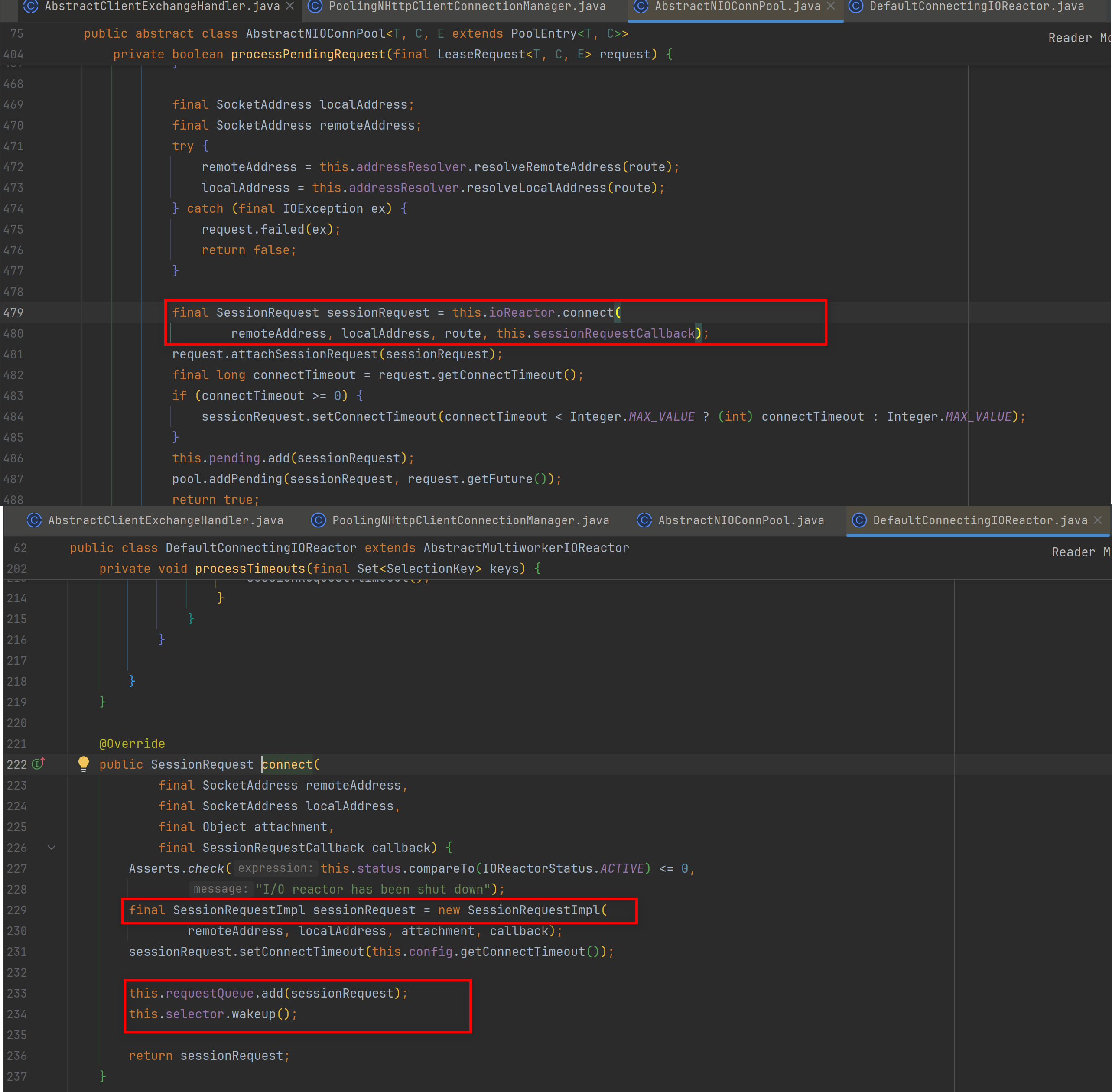
The execute method goes on to call org.apache.http.impl.nio.client.AbstractClientExchangeHandler#requestConnection, which in turn calls org.apache.http.impl.nio.conn.PoolingNHttpClientConnectionManager#requestConnection; that method calls the connection pool’s lease method, which ultimately calls processPendingRequest.
-
Inside it, DefaultConnectingIOReactor#connect is called to initiate the connection request: a SessionRequestImpl object is created, added to the requestQueue, and wakeup is used to wake the corresponding selector.
-
So how do the requestQueue and selector mentioned above work in the other method, processEvents?
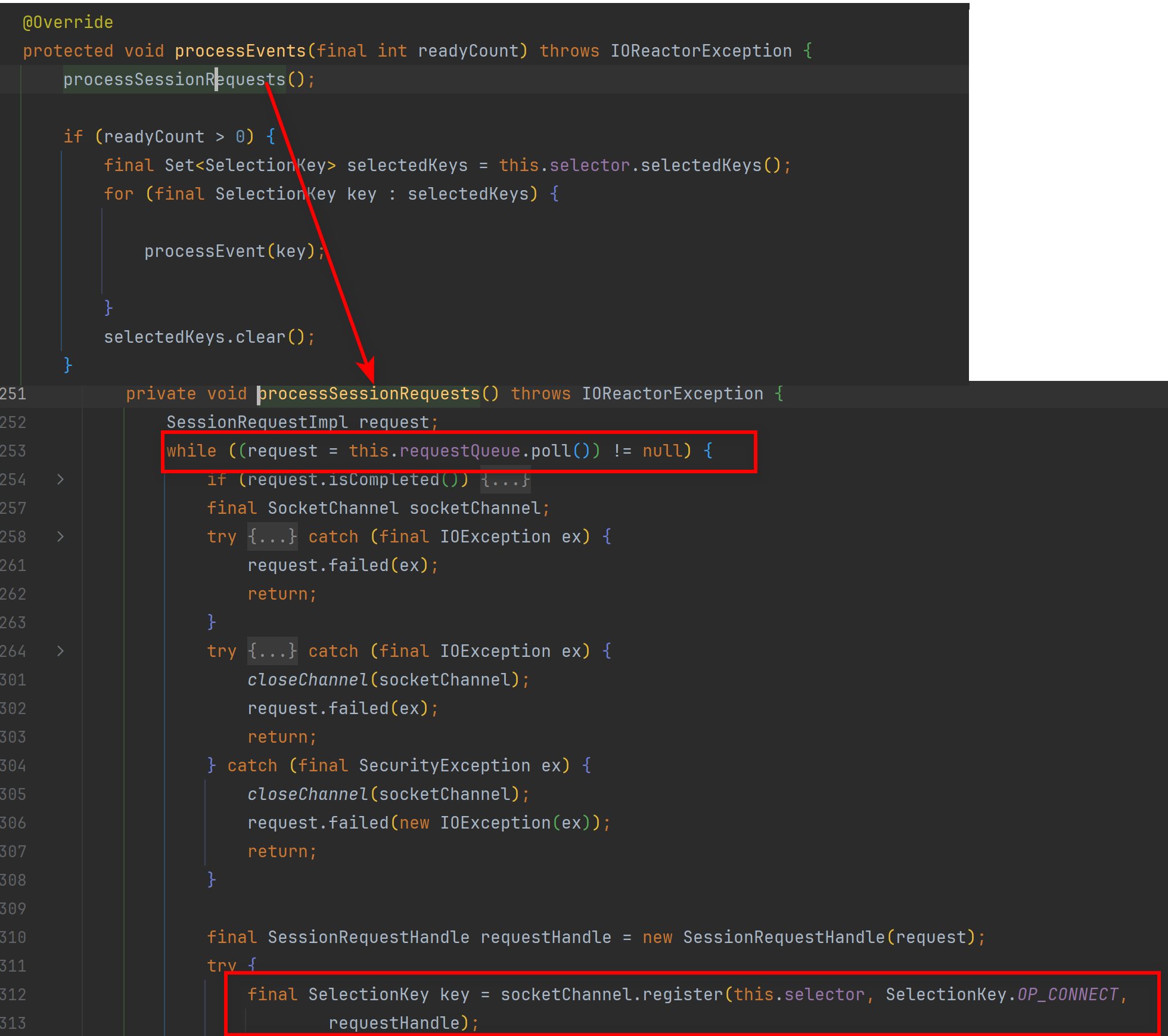 You can see that its implementation follows basically the same idea as our example code above.
 -
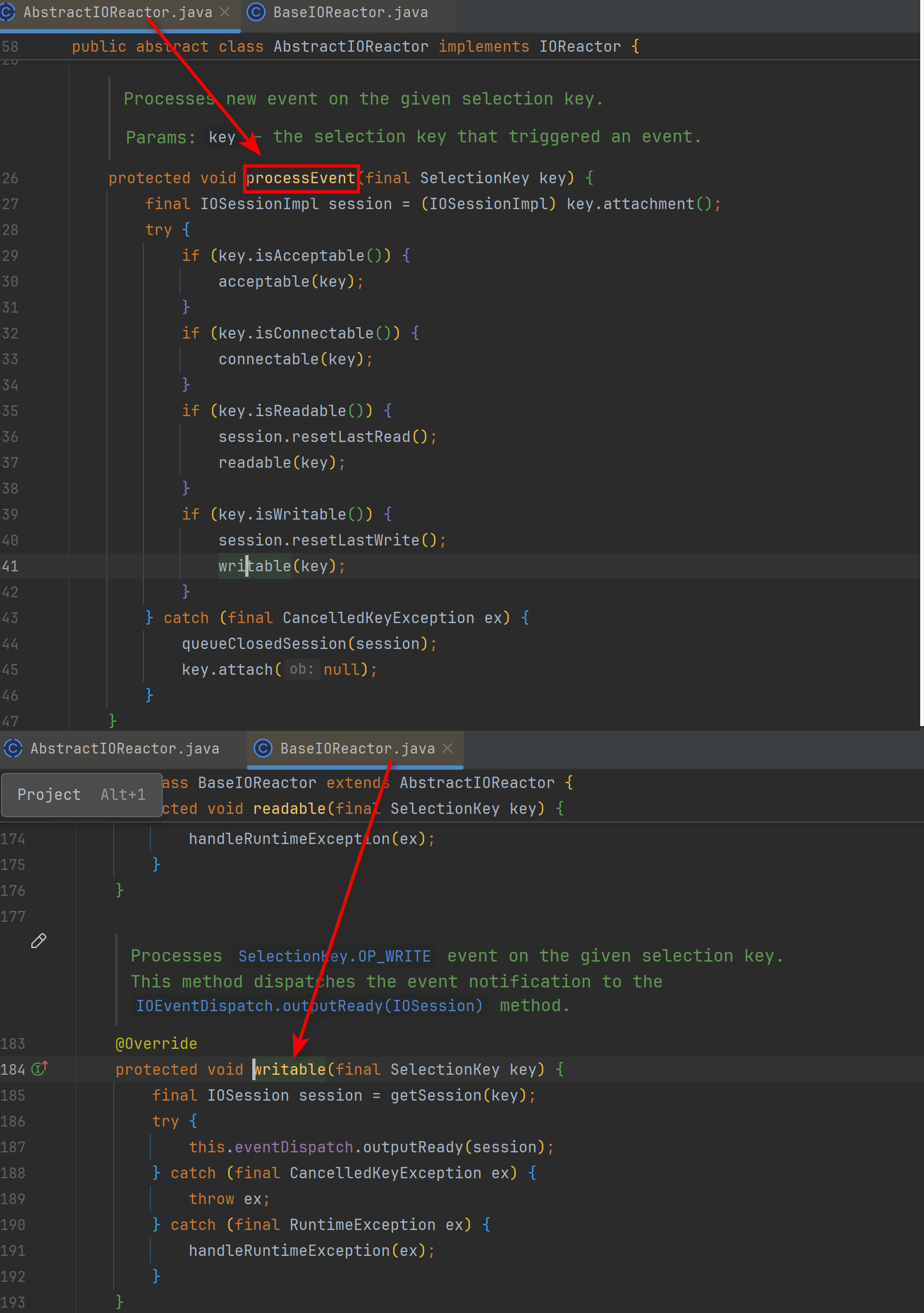
The other general I/O methods for reading and writing data are extended in BaseIOReactor, as shown below.
Kafka Java Client
- In the Kafka Java client, taking the producer as an example: when sending a message, org.apache.kafka.clients.producer.internals.Sender#wakeup is eventually called; internally, it ultimately calls org.apache.kafka.common.network.Selector#wakeup, and that method calls the Java NIO Selector’s wakeup method.
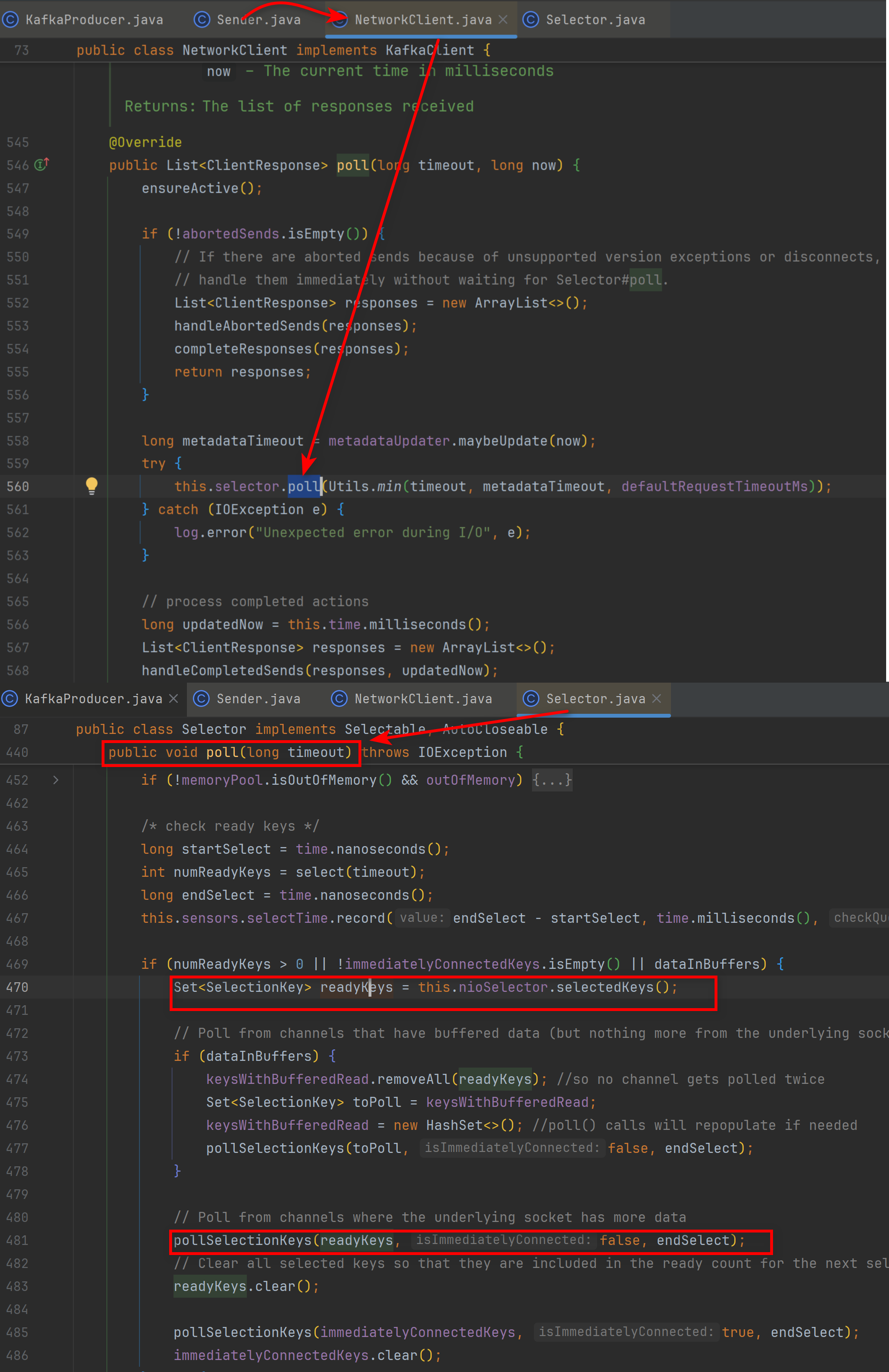
- The underlying selector-related methods are called in org.apache.kafka.clients.NetworkClient#poll, and NetworkClient#poll is in turn called in Sender.
- For the details of how data is read and written afterwards, interested readers can read the source code themselves.
Closing Notes
At this point, we have a basic yet comprehensive understanding of select and epoll in Linux, the behavior of the even lower-level file descriptors, the Reactor pattern and the Multi-Reactor pattern, and examples of using NIO in Java.