Table of contents
Open Table of contents
Background
Suppose we need different log formats in different environments, without using Spring profiles.
- In local development and test environments, we use PatternLayout and console output to make troubleshooting convenient.
- In production, logs are sent to ELK and viewed in Kibana. The format therefore needs to be easy for ELK to parse, so we use JsonTemplateLayout.
- We also need to consider whether this is a new or existing project, whether operations staff must help, and how long the deployment cycle takes.
Using SystemPropertyArbiter and JVM Startup Options
The official documentation proposes using an Arbiter.
<?xml version="1.0" encoding="UTF-8"?>
<Configuration status="debug">
<!-- Official documentation: https://logging.apache.org/log4j/2.x/manual/configuration.html#Arbiters-->
    <Appenders>
        <SystemPropertyArbiter propertyName="env" propertyValue="test">
            <Console name="Out" target="SYSTEM_OUT">
                <PatternLayout pattern="%d{yyyy-MM-dd'T'HH:mm:ss.SSSXXX} [%t] %level %logger - %msg%n"/>
            </Console>
        </SystemPropertyArbiter>
        <SystemPropertyArbiter propertyName="env" propertyValue="prod">
            <Console name="Out" target="SYSTEM_OUT">
                <JsonTemplateLayout eventTemplateUri="classpath:EcsLayout.json"/>
            </Console>
        </SystemPropertyArbiter>
    </Appenders>
    <Loggers>
        <Root level="info">
            <AppenderRef ref="Out"/>
        </Root>
    </Loggers>
</Configuration>
Set a system property at startup, for example:
java -jar Log4jApplication.jar -Denv=prodUsing Property Substitution and JVM Startup Options
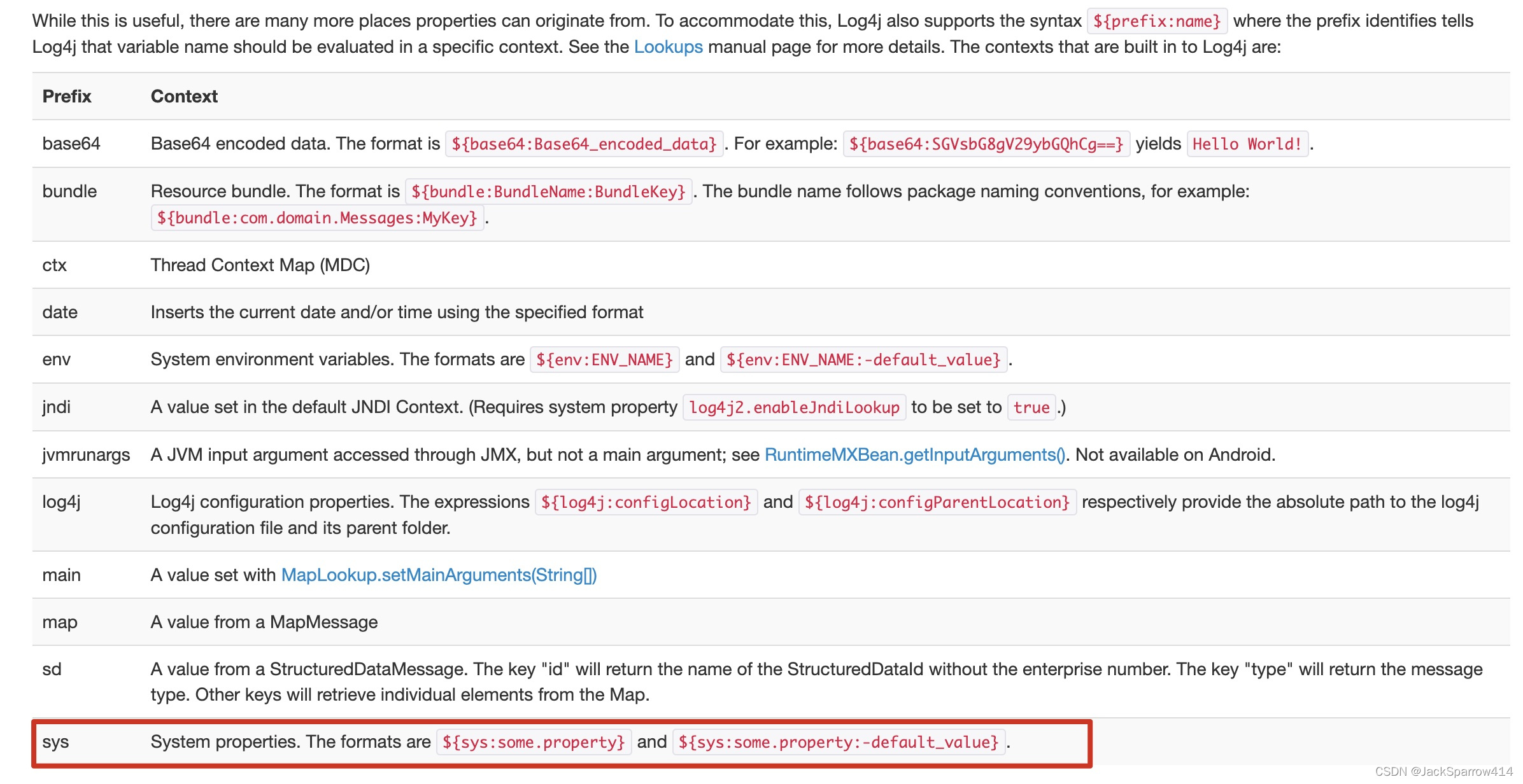
The officially supported Property Substitution can also achieve this.
<?xml version="1.0" encoding="UTF-8"?>
<Configuration status="debug">
    <Properties>
        <Property name="Console">Console_${sys:log4jLayOut:-test}</Property>
    </Properties>
    <Appenders>
        <Console name="Console_prod" target="SYSTEM_OUT">
            <JsonTemplateLayout eventTemplateUri="classpath:EcsLayout.json"/>
        </Console>
        <Console name="Console_test" target="SYSTEM_OUT">
            <PatternLayout pattern="%d{yyyy-MM-dd'T'HH:mm:ss.SSSXXX} [%t] %level %logger - %msg%n"/>
        </Console>
    </Appenders>
    <Loggers>
        <Root level="info">
<!-- ${name} syntax; official documentation: https://logging.apache.org/log4j/2.x/manual/configuration.html#property-substitution-->
            <AppenderRef ref="${Console}"/>
        </Root>
    </Loggers>
</Configuration>
In the Properties declaration above, the default value is test.
 Declare two appenders in advance and select one by its name.
Set a system property at startup, for example:
java -jar Log4jApplication.jar -Dlog4jLayOut=prodUsing a Custom Lookup Plugin
The two approaches above suit new projects and projects with short deployment cycles.
Both approaches require adding a JVM startup option, which operations staff handle. Although it is only one option, if there are many servers, the code must wait until that option is added to every server. This effectively means deploying twice.
In this situation, I wondered whether setting and looking up the system property could also be handled in code.
Fortunately, Log4j2 provides a plugin mechanism that allows custom extensions.
@Plugin(
    name="sys",
    category = StrLookup.CATEGORY
)
public class CustomerSystemPropertiesLookUp extends SystemPropertiesLookup {

    private static final String LOOK_UP_KEY = "log4jLayOut";

    @Override
    public String lookup(final LogEvent event, String key) {
        if (LOOK_UP_KEY.equals(key)) {
           return getValueBasedOnEnv();
        }else {
            return super.lookup(key);
        }
    }

    private String getValueBasedOnEnv() {
        String isTest = System.getProperty("isTest");
        return "true".equals(isTest) ? "test" : "prod";
    }
}
Here we override SystemPropertiesLookup. For a specific key, our custom method looks up the value; for other keys, the superclass lookup is used.
Looking at the code, you may wonder: does getValueBasedOnEnv not still read SystemProperties? Would we not still need to add JVM options?
Our project’s System.properties file already contains properties that distinguish test from production, so we use them directly. This example is simply intended to make the idea easier to understand.
Log4j2.xml configuration:
<?xml version="1.0" encoding="UTF-8"?>
<Configuration status="debug">
    <Properties>
        <Property name="Console">Console_${sys:log4jLayOut:-test}</Property>
    </Properties>
    <Appenders>
        <Console name="Console_prod" target="SYSTEM_OUT">
            <JsonTemplateLayout eventTemplateUri="classpath:EcsLayout.json"/>
        </Console>
        <Console name="Console_test" target="SYSTEM_OUT">
            <PatternLayout pattern="%d{yyyy-MM-dd'T'HH:mm:ss.SSSXXX} [%t] %level %logger - %msg%n"/>
        </Console>
    </Appenders>
    <Loggers>
        <Root level="info">
            <!-- ${name} syntax; official documentation: https://logging.apache.org/log4j/2.x/manual/configuration.html#property-substitution-->
            <AppenderRef ref="${Console}"/>
        </Root>
    </Loggers>
</Configuration>
Using ScriptAppenderSelector
ScriptAppenderSelector documentation
When the configuration is built, the ScriptAppenderSelector appender calls a Script to compute an appender name. Log4j then creates one of the appender named listed under AppenderSet using the name of the ScriptAppenderSelector
Log4j only builds the one selected appender from the configuration tree, and ignores other AppenderSet child nodes
- This example uses Groovy. Add the groovy-jsr223 dependency.
- log42.xml
<?xml version="1.0" encoding="UTF-8"?> <Configuration status="debug"> <Appenders> <ScriptAppenderSelector name="SelectIt"> <Script language="groovy" name="selectScripts"><![CDATA[ var result; if (System.getProperty("os.name").equalsIgnoreCase("Windows")) { result = "Null"; } else { result = "Console"; } return result; ]]> </Script> <AppenderSet> <Console name="Console" target="SYSTEM_OUT"> <PatternLayout pattern="%d{yyyy-MM-dd'T'HH:mm:ss.SSS'Z'} [%t] %level %logger - %msg%n"/> </Console> <Null name="Null" /> </AppenderSet> </ScriptAppenderSelector> </Appenders> <Loggers> <Root level="info"> <AppenderRef ref="SelectIt"/> </Root> </Loggers> </Configuration> - Set the JVM startup option -Dlog4j2.Script.enableLanguages=groovy.
Notes
- Stack Overflow answer: How do I conditionally add log4j2 appender depending on java system property?
- Source repository: the example configurations are in different commits. Check the commit history to find them.