Table of contents
Open Table of contents
Using Formik for React Forms and Yup for Frontend Validation
Recommended Reading
I highly recommend the official Formik tutorial, which covers everything you need to start using Formik. This article simply records my learning process. For more detail, please refer to the official documentation.
A Simple Form Submission
Starting Code
The code comes from the starter example provided in the official documentation.
Define each form field in initialValues.
import React from "react";
import ReactDOM from "react-dom";
import { useFormik } from "formik";
import "./styles.css";

const SignupForm = () => {
  const formik = useFormik({
    // Initialize each form field here
    initialValues: {
      firstName: "",
      lastName: "",
      email: "",
    },
    // The values argument contains all values in the form
    onSubmit: values => {
      alert(JSON.stringify(values, null, 2));
    },
  });
  return (
    // onSubmit calls Formik handleSubmik, which in turn calls the onSubmit function in useFormik
    <form onSubmit={formik.handleSubmit}>
      <label htmlFor="firstName">First Name</label>
      <input
        id="firstName"
        name="firstName"
        type="text"
        // onchange calls Formik handelChange
        onChange={formik.handleChange}
        // The current value of the form field
        value={formik.values.firstName}
      />
      <label htmlFor="lastName">Last Name</label>
      <input
        id="lastName"
        name="lastName"
        type="text"
        onChange={formik.handleChange}
        value={formik.values.lastName}
      />
      <label htmlFor="email">Email Address</label>
      <input
        id="email"
        name="email"
        type="email"
        onChange={formik.handleChange}
        value={formik.values.email}
      />
      <button type="submit">Submit</button>
    </form>
  );
};

function App() {
  return <SignupForm />;
}

const rootElement = document.getElementById("root");
ReactDOM.render(<App />, rootElement);
Form Validation
Validate the values entered into the form. Validation returns an errors object. The Submit button becomes available for submission only when all validation checks pass.
import React from "react";
import ReactDOM from "react-dom";
import { useFormik } from "formik";
import "./styles.css";

// The argument contains the value of every form field
const validate = values => {
  const errors = {};
  if (!values.firstName) {
    errors.firstName = "Required";
  } else if (values.firstName.length > 15) {
    errors.firstName = "Must be 15 characters or less";
  }

  if (!values.lastName) {
    errors.lastName = "Required";
  } else if (values.lastName.length > 20) {
    errors.lastName = "Must be 20 characters or less";
  }

  if (!values.email) {
    errors.email = "Required";
  } else if (!/^[A-Z0-9._%+-]+@[A-Z0-9.-]+\.[A-Z]{2,4}$/i.test(values.email)) {
    errors.email = "Invalid email address";
  }
  // Return an errors object
  return errors;
};
const SignupForm = () => {
  const formik = useFormik({
    initialValues: {
      firstName: "",
      lastName: "",
      email: "",
    },
    // Pass in validate
    validate,
    onSubmit: values => {
      alert(JSON.stringify(values, null, 2));
    },
  });
  return (
    <form onSubmit={formik.handleSubmit}>
      <label htmlFor="firstName">First Name</label>
      <input
        id="firstName"
        name="firstName"
        type="text"
        onChange={formik.handleChange}
        value={formik.values.firstName}
      />
      // Display validation messages according to whether each property of the
      formik.error object has a value
      {formik.errors.firstName ? <div>{formik.errors.firstName}</div> : null}
      <label htmlFor="lastName">Last Name</label>
      <input
        id="lastName"
        name="lastName"
        type="text"
        //
        onChange={formik.handleChange}
        value={formik.values.lastName}
      />
      {formik.errors.lastName ? <div>{formik.errors.lastName}</div> : null}
      <label htmlFor="email">Email Address</label>
      <input
        id="email"
        name="email"
        type="email"
        onChange={formik.handleChange}
        value={formik.values.email}
      />
      {formik.errors.email ? <div>{formik.errors.email}</div> : null}
      <button type="submit">Submit</button>
    </form>
  );
};

function App() {
  return <SignupForm />;
}

const rootElement = document.getElementById("root");
ReactDOM.render(<App />, rootElement);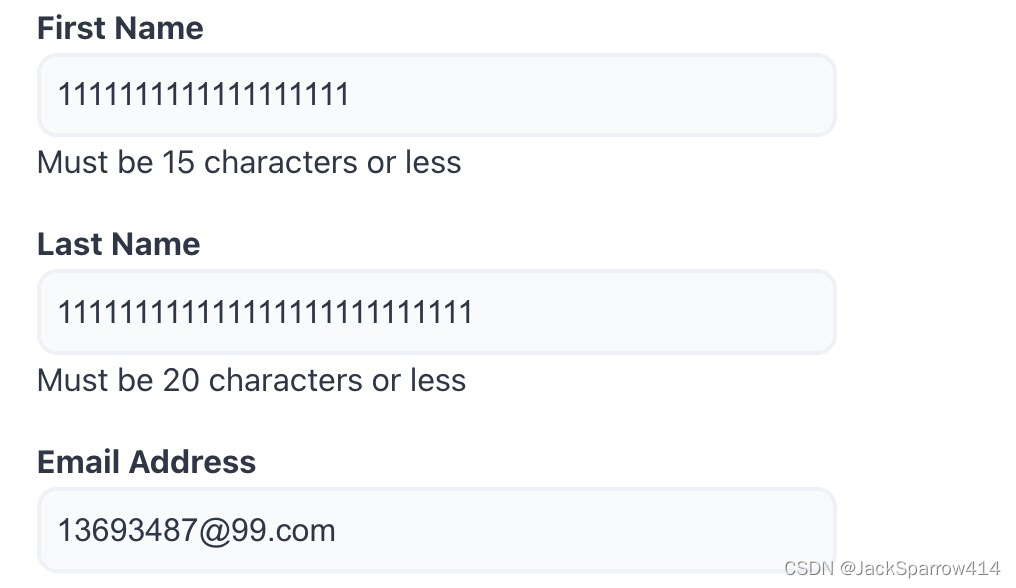
Improving the Error Display for Users
As shown above, all failed validation checks are displayed at once. We want to check each field as soon as the user finishes entering it. Combine touched with onBlur to do this.
import React from "react";
import ReactDOM from "react-dom";
import { useFormik } from "formik";
import "./styles.css";

const validate = values => {
  const errors = {};

  if (!values.firstName) {
    errors.firstName = "Required";
  } else if (values.firstName.length > 15) {
    errors.firstName = "Must be 15 characters or less";
  }

  if (!values.lastName) {
    errors.lastName = "Required";
  } else if (values.lastName.length > 20) {
    errors.lastName = "Must be 20 characters or less";
  }

  if (!values.email) {
    errors.email = "Required";
  } else if (!/^[A-Z0-9._%+-]+@[A-Z0-9.-]+\.[A-Z]{2,4}$/i.test(values.email)) {
    errors.email = "Invalid email address";
  }

  return errors;
};

const SignupForm = () => {
  const formik = useFormik({
    initialValues: {
      firstName: "",
      lastName: "",
      email: "",
    },
    validate,
    onSubmit: values => {
      alert(JSON.stringify(values, null, 2));
    },
  });
  return (
    <form onSubmit={formik.handleSubmit}>
      <label htmlFor="firstName">First Name</label>
      <input
        id="firstName"
        name="firstName"
        type="text"
        onChange={formik.handleChange}
        onBlur={formik.handleBlur}
        value={formik.values.firstName}
      />
      //Use forkmik.touched to check whether this field has an error
      {formik.touched.firstName && formik.errors.firstName ? (
        <div>{formik.errors.firstName}</div>
      ) : null}
      <label htmlFor="lastName">Last Name</label>
      <input
        id="lastName"
        name="lastName"
        type="text"
        onChange={formik.handleChange}
        onBlur={formik.handleBlur}
        value={formik.values.lastName}
      />
      {formik.touched.lastName && formik.errors.lastName ? (
        <div>{formik.errors.lastName}</div>
      ) : null}
      <label htmlFor="email">Email Address</label>
      <input
        id="email"
        name="email"
        type="email"
        onChange={formik.handleChange}
        onBlur={formik.handleBlur}
        value={formik.values.email}
      />
      {formik.touched.email && formik.errors.email ? (
        <div>{formik.errors.email}</div>
      ) : null}
      <button type="submit">Submit</button>
    </form>
  );
};
function App() {
  return <SignupForm />;
}

const rootElement = document.getElementById("root");
ReactDOM.render(<App />, rootElement);
Using the Third-Party Validation Library Yup
The official documentation strongly recommends the Yup validation library, which provides ready-made validation rules.
npm install yup --saveimport React from "react";
import ReactDOM from "react-dom";
import { useFormik } from "formik";
import "./styles.css";
import * as Yup from "yup";
const validate = values => {
const errors = {};
if (!values.firstName) {
errors.firstName = "Required";
} else if (values.firstName.length > 15) {
errors.firstName = "Must be 15 characters or less";
}
if (!values.lastName) {
errors.lastName = "Required";
} else if (values.lastName.length > 20) {
errors.lastName = "Must be 20 characters or less";
}
if (!values.email) {
errors.email = "Required";
} else if (!/^[A-Z0-9._%+-]+@[A-Z0-9.-]+\.[A-Z]{2,4}$/i.test(values.email)) {
errors.email = "Invalid email address";
}
return errors;
};
const SignupForm = () => {
const formik = useFormik({
initialValues: {
firstName: "",
lastName: "",
email: "",
},
// Define validationSchema
validationSchema: Yup.object({
firstName: Yup.string()
.max(15, "Must be 15 characters or less")
.required("Required"),
lastName: Yup.string()
.max(20, "Must be 20 characters or less")
.required("Required"),
email: Yup.string().email("Invalid email address").required("Required"),
}),
onSubmit: values => {
alert(JSON.stringify(values, null, 2));
},
});
return (
<form onSubmit={formik.handleSubmit}>
<label htmlFor="firstName">First Name</label>
<input
id="firstName"
name="firstName"
type="text"
onChange={formik.handleChange}
onBlur={formik.handleBlur}
value={formik.values.firstName}
/>
{formik.touched.firstName && formik.errors.firstName ? (
<div>{formik.errors.firstName}</div>
) : null}
<label htmlFor="lastName">Last Name</label>
<input
id="lastName"
name="lastName"
type="text"
onChange={formik.handleChange}
onBlur={formik.handleBlur}
value={formik.values.lastName}
/>
{formik.touched.lastName && formik.errors.lastName ? (
<div>{formik.errors.lastName}</div>
) : null}
<label htmlFor="email">Email Address</label>
<input
id="email"
name="email"
type="email"
onChange={formik.handleChange}
onBlur={formik.handleBlur}
value={formik.values.email}
/>
{formik.touched.email && formik.errors.email ? (
<div>{formik.errors.email}</div>
) : null}
<button type="submit">Submit</button>
</form>
);
};
function App() {
return <SignupForm />;
}
const rootElement = document.getElementById("root");
ReactDOM.render(<App />, rootElement);Simplifying the Code
Use getFieldProps with input, select, and textarea elements.
import React from "react";
import { useFormik } from "formik";
import * as Yup from "yup";

const SignupForm = () => {
  const formik = useFormik({
    initialValues: {
      firstName: "",
      lastName: "",
      email: "",
    },
    validationSchema: Yup.object({
      firstName: Yup.string()
        .max(15, "Must be 15 characters or less")
        .required("Required"),
      lastName: Yup.string()
        .max(20, "Must be 20 characters or less")
        .required("Required"),
      email: Yup.string().email("Invalid email address").required("Required"),
    }),
    onSubmit: values => {
      alert(JSON.stringify(values, null, 2));
    },
  });
  return (
    <form onSubmit={formik.handleSubmit}>
      <label htmlFor="firstName">First Name</label>
      <input
        id="firstName"
        type="text"
        // Replace onChange, onBlur, value, and checked
        {...formik.getFieldProps("firstName")}
      />
      {formik.touched.firstName && formik.errors.firstName ? (
        <div>{formik.errors.firstName}</div>
      ) : null}

      <label htmlFor="lastName">Last Name</label>
      <input id="lastName" type="text" {...formik.getFieldProps("lastName")} />
      {formik.touched.lastName && formik.errors.lastName ? (
        <div>{formik.errors.lastName}</div>
      ) : null}

      <label htmlFor="email">Email Address</label>
      <input id="email" type="email" {...formik.getFieldProps("email")} />
      {formik.touched.email && formik.errors.email ? (
        <div>{formik.errors.email}</div>
      ) : null}

      <button type="submit">Submit</button>
    </form>
  );
};