Table of contents
Open Table of contents
Background
In Python (Part 1): A WeChat Mini Program Bot for Scheduled Purchases and Initial Project Setup, I accessed the target site’s APIs. The site did little to protect API requests: anyone who could capture traffic could construct valid requests from the observed format. APIs this easy to analyze put all the pressure on the backend. Over the past two years, I have occasionally wondered how to make backend API analysis harder for scrapers. I also sometimes noticed encrypted-looking request bodies in the browser developer tools of large sites such as Alibaba Cloud. This seemed a good opportunity to implement a simple example and understand the basic workflow.
Note: in theory, any frontend protection can be defeated. Our goal is to make API analysis harder, using techniques such as JavaScript obfuscation and moving code to WASM.
JavaScript Obfuscation
First, obfuscate JavaScript with javascript-obfuscator. Since the frontend uses Vite, use vite-plugin-javascript-obfuscator).
import { defineConfig } from "vite";
import react from "@vitejs/plugin-react";
import obfuscator from "vite-plugin-javascript-obfuscator";

export default defineConfig({
  plugins: [
    react(),
    // Obfuscate only during build; keep dev readable for debugging
    obfuscator({
      apply: "build",
      options: {
        compact: true,
        // Control-flow flattening and string extraction are the main ways to increase reverse-engineering cost
        controlFlowFlattening: true,
        controlFlowFlatteningThreshold: 0.5,
        stringArray: true,
        stringArrayEncoding: ["base64"],
        stringArrayThreshold: 0.75,
        splitStrings: true,
        splitStringsChunkLength: 10,
        // The following options add substantial size/performance costs or can break code; leave them off in this demo
        deadCodeInjection: false,
        renameGlobals: false,
        selfDefending: false,
        sourceMap: false,
      },
    }),
  ],
  server: {
    port: 5173,
    proxy: {
      "/api": "http://localhost:8080",
    },
  },
  // Preview does not reuse server configuration; configure its proxy separately
  preview: {
    proxy: {
      "/api": "http://localhost:8080",
    },
  },
});
Before Obfuscation
Open http://localhost:5173/ locally.
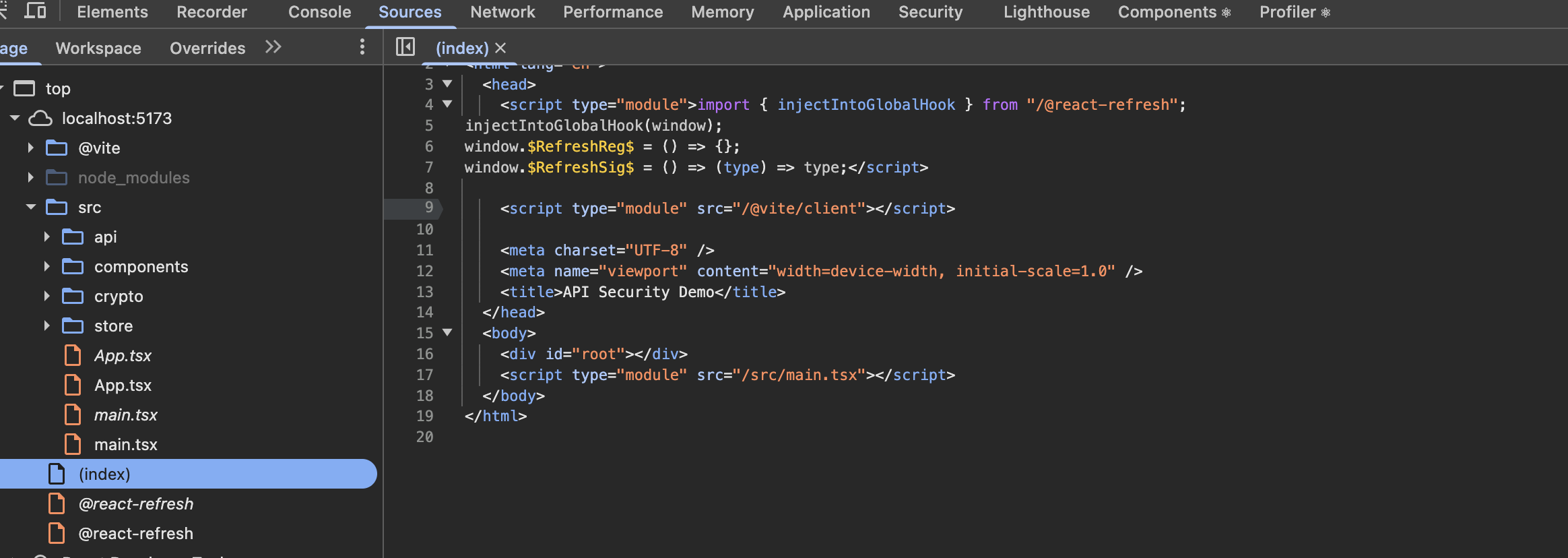 Press F12 to see all frontend source code.
After Obfuscation
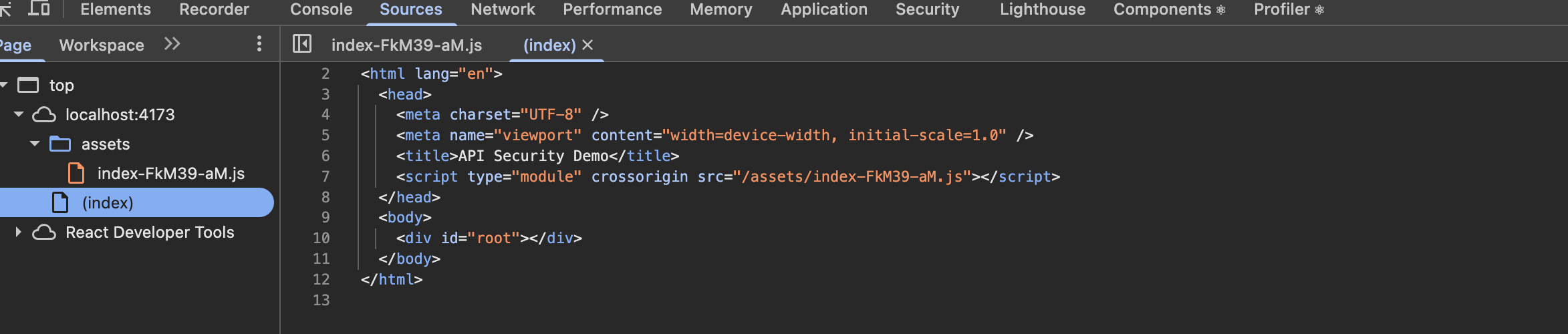 The index page references only one obfuscated JavaScript file.
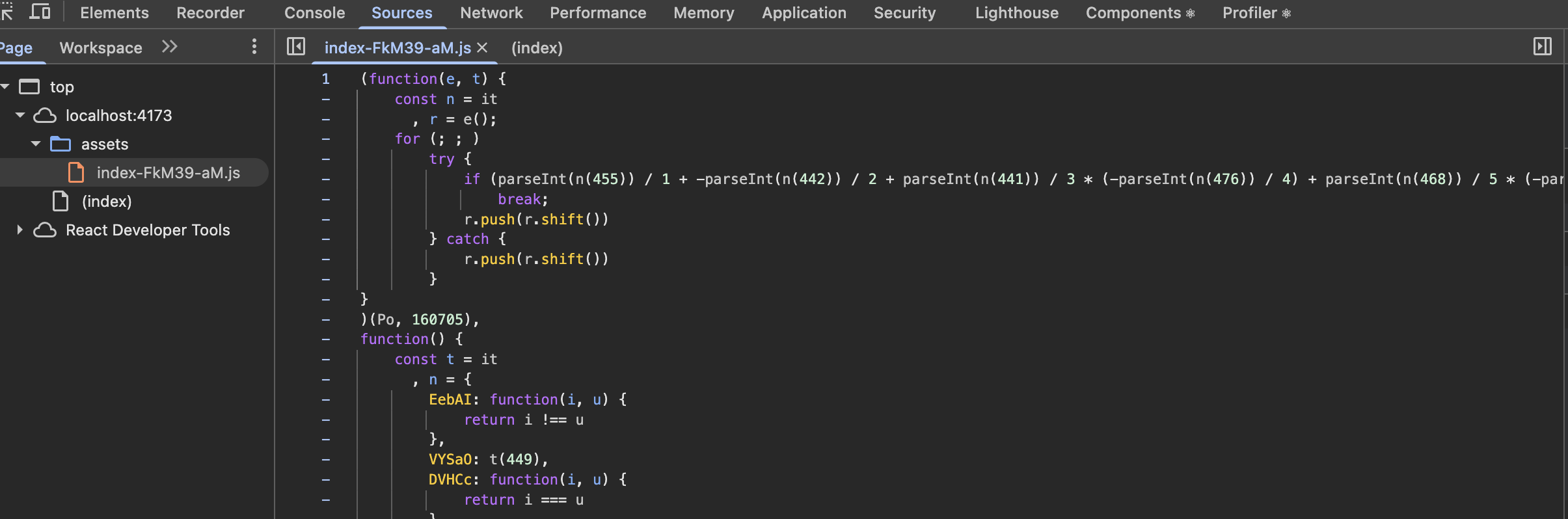 The contents of this file are very difficult to read, in stark contrast to the unobfuscated version.
Compression and Obfuscation When Publishing a WeChat Mini Program
Mini Programs provide basic compression and obfuscation and advanced code hardening, both of which make reverse engineering harder.
Request-Body Encryption
Key Exchange
I chose symmetric encryption for request bodies. The frontend generates the key, with a different key for every session. Since the frontend generates it, it must communicate it to the backend. This key-exchange phase uses asymmetric encryption.
The flow is:
- The backend generates an RSA key pair and stores the private key on the server.
- The frontend calls
GET /api/auth/public-keyto obtain the public key. - The frontend uses the browser’s crypto.subtle.generateKey method to generate an AES-GCM key.
- It encrypts this key with the public key and sends it to
POST /api/auth/session-key. The backend decrypts it with the private key and associates the resulting key with the session, so it can decrypt later requests from that session.
Encryption Format
The format is:
[ IV (12 bytes) ] + [ Ciphertext ] + [ Tag (16 bytes) ]- IV means Initialization Vector. It is essentially a random value; backend developers can think of it as similar to “salting.”
- The ciphertext is produced by encrypting
JSON.stringify(plainTextJsonBody)with the symmetric key just negotiated. - Web Crypto automatically appends the tag to the ciphertext when the relevant crypto methods are called.
- Finally, Base64-encode the result. This additional encoding is needed because AES-GCM output (
iv + ciphertext + tag) consists of arbitrary bytes (0–255), while JSON strings must be valid Unicode text. Placing raw bytes directly into JSON can cause invalid UTF-8 and parsing failures, or control characters can break the JSON structure. Any text-processing stage—gateway, logging, or proxy—can corrupt the data. Base64 represents arbitrary bytes using 64 text-safe characters, allowing binary data to survive text protocols.
Encrypting and Decrypting Request Bodies on the Frontend
Because this encryption applies to all APIs, interceptors handle it centrally at the lowest level of backend requests and responses. The core encryption/decryption methods in aes.ts are:
/**
 * AES-GCM encryption, mirroring backend AesService:
 * 1. Generate a random 12-byte IV (standard GCM IV length; it need not be secret)
 * 2. Encrypt with AES-GCM; Web Crypto appends the 128-bit authentication tag to the ciphertext
 * 3. Concatenate iv + ciphertext(+tag)
 * 4. Base64-encode the entire result
 *
 * btoa accepts only a "binary string" (each character code point must equal a byte value, 0–255),
 * so first use String.fromCharCode to convert Uint8Array to a string byte by byte.
 * The spread syntax is unsuitable for very large arrays (stack overflow); request bodies are small here, so no special handling is needed.
 */
export async function encryptAes(
  plainText: string,
  key: CryptoKey
): Promise<string> {
  const iv = crypto.getRandomValues(new Uint8Array(IV_LENGTH));
  const encoder = new TextEncoder();
  const cipherBuffer = await crypto.subtle.encrypt(
    { name: AES_ALGORITHM, iv },
    key,
    encoder.encode(plainText)
  );
  const combined = new Uint8Array(iv.length + cipherBuffer.byteLength);
  combined.set(iv);
  combined.set(new Uint8Array(cipherBuffer), iv.length);
  return btoa(String.fromCharCode(...combined));
}

/**
 * AES-GCM decryption, the reverse of encryptAes:
 * 1. Decode Base64 with atob, then restore each character to a byte (matching String.fromCharCode during encoding)
 * 2. The first 12 bytes are the IV; the rest is ciphertext(+tag)
 * 3. crypto.subtle.decrypt validates the tag internally; tampered ciphertext throws an exception without returning plaintext
 */
export async function decryptAes(
  encryptedBase64: string,
  key: CryptoKey
): Promise<string> {
  const combined = Uint8Array.from(atob(encryptedBase64), c => c.charCodeAt(0));
  const iv = combined.slice(0, IV_LENGTH);
  const cipherText = combined.slice(IV_LENGTH);
  const decrypted = await crypto.subtle.decrypt(
    { name: AES_ALGORITHM, iv },
    key,
    cipherText
  );
  return new TextDecoder().decode(decrypted);
}
Encrypted request and response data structures look like this:
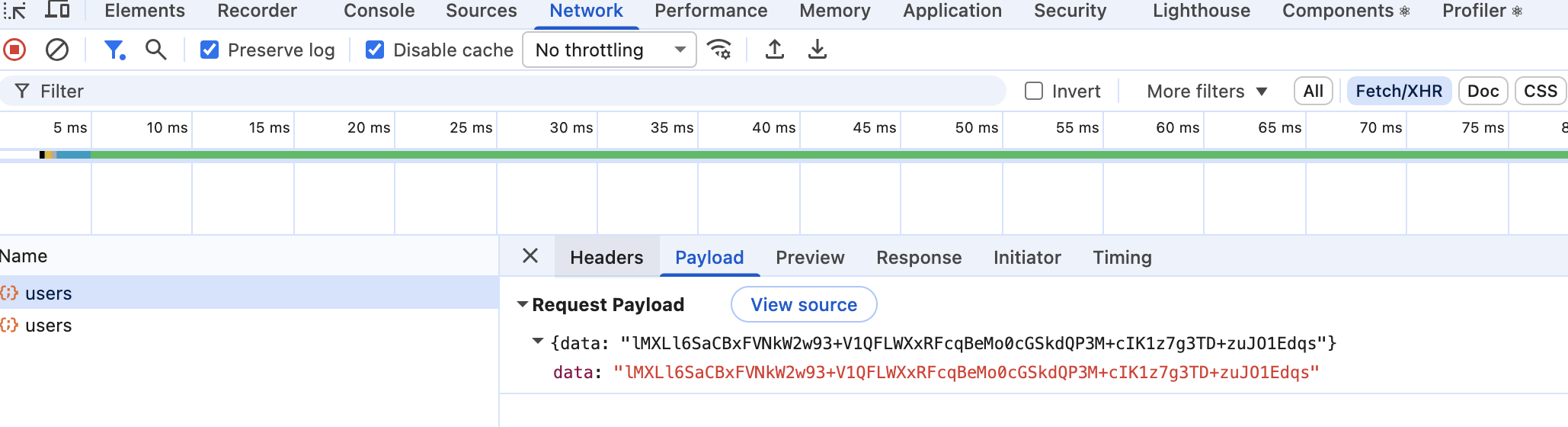
Encrypting and Decrypting Request Bodies on the Backend
The corresponding backend class is AesService.java. Its core logic is:
@Service
public class AesService {
    private static final String ALGORITHM = "AES";
    private static final String TRANSFORMATION = "AES/GCM/NoPadding";
    private static final int GCM_IV_LENGTH = 12;
    private static final int GCM_TAG_LENGTH = 128;

    public String encrypt(byte[] key, String plainText) throws Exception {
        byte[] iv = new byte[GCM_IV_LENGTH];
        new SecureRandom().nextBytes(iv);

        Cipher cipher = Cipher.getInstance(TRANSFORMATION);
        GCMParameterSpec spec = new GCMParameterSpec(GCM_TAG_LENGTH, iv);
        cipher.init(Cipher.ENCRYPT_MODE, new SecretKeySpec(key, ALGORITHM), spec);

        byte[] cipherText = cipher.doFinal(plainText.getBytes(StandardCharsets.UTF_8));
        byte[] combined = ByteBuffer.allocate(iv.length + cipherText.length)
                .put(iv)
                .put(cipherText)
                .array();
        return Base64Util.encode(combined);
    }

    public String decrypt(byte[] key, String encryptedBase64) throws Exception {
        byte[] combined = Base64Util.decode(encryptedBase64);
        ByteBuffer buffer = ByteBuffer.wrap(combined);
        byte[] iv = new byte[GCM_IV_LENGTH];
        buffer.get(iv);
        byte[] cipherText = new byte[buffer.remaining()];
        buffer.get(cipherText);

        Cipher cipher = Cipher.getInstance(TRANSFORMATION);
        GCMParameterSpec spec = new GCMParameterSpec(GCM_TAG_LENGTH, iv);
        cipher.init(Cipher.DECRYPT_MODE, new SecretKeySpec(key, ALGORITHM), spec);
        byte[] plain = cipher.doFinal(cipherText);
        return new String(plain, StandardCharsets.UTF_8);
    }
}
Request Signing
Signature Format
Signature input raw =
      [ METHOD (uppercase) ]\n
      [ Request URI (including the /api prefix) ]\n
      [ canonicalBody (sorted, compact JSON; "" for GET/empty bodies) ]\n
      [ timestamp (epoch seconds as a string) ] \n
      [ nonce (randomUUID) ]
The signature uses the symmetric key negotiated above. Add the following custom request headers:
X-Nonce: a93aa270-a06f-4d41-bfbc-e05d7f751c64
X-Session-Id: b3594ca0-71d8-41bf-b702-2977b9fed8c3
X-Sign: E6eTcLGbEajIpPu4sgu75mjXvzKwNcB/NvAQCNcEuNU=
X-Timestamp: 1785452663
Generating the Signature on the Frontend
export async function computeHmac(
  keyData: ArrayBuffer,
  method: string,
  url: string,
  body: unknown,
  timestamp: string,
  nonce: string
): Promise<string> {
  const hmacKey = await crypto.subtle.importKey(
    "raw",
    keyData,
    { name: "HMAC", hash: "SHA-256" },
    false,
    ["sign"]
  );
  const bodyPart = canonicalizeBody(body);
  const raw = `${method.toUpperCase()}\n${url}\n${bodyPart}\n${timestamp}\n${nonce}`;
  const encoder = new TextEncoder();
  const signature = await crypto.subtle.sign(
    "HMAC",
    hmacKey,
    encoder.encode(raw)
  );
  return btoa(String.fromCharCode(...new Uint8Array(signature)));
}
Validating the Signature in a Global Backend Filter
To validate a signature, regenerate it with the same key and format, then compare the results. Since this must work together with decryption, it is implemented in a global filter:
- Check that all four custom headers exist; reject the request if any are missing.
- Check that the timestamp falls within the allowed window; reject it if X-Timestamp differs too much from the current server time.
- Check whether the nonce has already been used to prevent replay attacks; reject it if so.
- Decrypt the request body and recompute the signature using the defined format; reject it if they differ.
@Component
@Order(1)
public class CryptoFilter implements Filter {
    private static final long TIMESTAMP_WINDOW_SECONDS = 300;
    private static final String PUBLIC_KEY_PATH = "/api/auth/public-key";
    private static final String SESSION_KEY_PATH = "/api/auth/session-key";

    private final AesService aesService;
    private final SignService signService;
    private final SessionService sessionService;
    private final NonceService nonceService;
    private final ObjectMapper mapper;

    public CryptoFilter(AesService aesService, SignService signService,
                        SessionService sessionService, NonceService nonceService) {
        this.aesService = aesService;
        this.signService = signService;
        this.sessionService = sessionService;
        this.nonceService = nonceService;
        this.mapper = new ObjectMapper();
    }

    /**
     * Main security-validation and encryption/decryption flow (@Order(1), all /api/** requests):
     * 1. Allowlist: /api/auth/public-key and /api/auth/session-key (no session exists during key exchange, so signatures cannot be checked)
     * 2. Validate in order: all security headers present (X-Session-Id/X-Sign/X-Timestamp/X-Nonce)
     *    → sessionId valid and unexpired → timestamp within ±300 seconds → nonce unused
     *    → AES-GCM request-body decryption (GCM tag validation; tampering fails) → recompute and compare HMAC signature
     * 3. After all checks pass, markUsed(nonce), then use CryptoRequestWrapper to replace the request stream with plaintext JSON.
     *    Controllers receive @RequestBody normally and are unaware of the security layer.
     * 4. CryptoResponseWrapper captures the plaintext response, encrypts it with AES, and outputs a two-level wrapper:
     *    ApiResponse.ok(EncryptedPayload), i.e. {code, message, data: {data: "base64 ciphertext"}}
     * Any failed check returns 401 + plaintext ApiResponse.error immediately (error responses are not encrypted).
     */
    @Override
    public void doFilter(ServletRequest request, ServletResponse response, FilterChain chain)
            throws IOException, ServletException {
        HttpServletRequest httpRequest = (HttpServletRequest) request;
        HttpServletResponse httpResponse = (HttpServletResponse) response;
        String path = httpRequest.getRequestURI();

        if (path.equals(PUBLIC_KEY_PATH) || path.equals(SESSION_KEY_PATH)) {
            chain.doFilter(request, response);
            return;
        }

        String sessionId = httpRequest.getHeader("X-Session-Id");
        String sign = httpRequest.getHeader("X-Sign");
        String timestamp = httpRequest.getHeader("X-Timestamp");
        String nonce = httpRequest.getHeader("X-Nonce");

        if (sessionId == null || sign == null || timestamp == null || nonce == null) {
            writeError(httpResponse, 401, "Missing security headers");
            return;
        }

        byte[] aesKey = sessionService.getKey(sessionId);
        if (aesKey == null) {
            writeError(httpResponse, 401, "Invalid or expired session");
            return;
        }

        if (!validateTimestamp(timestamp)) {
            writeError(httpResponse, 401, "Request timestamp out of range");
            return;
        }

        if (nonceService.isUsed(nonce)) {
            writeError(httpResponse, 401, "Replay attack detected: nonce reused");
            return;
        }

        String encryptedBody = readBody(httpRequest);
        String plainBody;
        if (encryptedBody == null || encryptedBody.isBlank()) {
            plainBody = "";
        } else {
            try {
                plainBody = aesService.decrypt(aesKey, parseData(encryptedBody));
            } catch (Exception e) {
                writeError(httpResponse, 401, "Failed to decrypt request body");
                return;
            }
        }

        try {
            String computedSign = signService.computeSign(aesKey, httpRequest.getMethod(), httpRequest.getRequestURI(), plainBody, timestamp, nonce);
            if (!computedSign.equals(sign)) {
                writeError(httpResponse, 401, "Invalid signature");
                return;
            }
        } catch (Exception e) {
            writeError(httpResponse, 401, "Signature computation failed");
            return;
        }

        nonceService.markUsed(nonce);

        CryptoRequestWrapper requestWrapper = new CryptoRequestWrapper(httpRequest, plainBody);
        CryptoResponseWrapper responseWrapper = new CryptoResponseWrapper(httpResponse);

        chain.doFilter(requestWrapper, responseWrapper);

        String captured = responseWrapper.getCapturedBody();
        try {
            String encryptedResponse = aesService.encrypt(aesKey, captured);
            String output = mapper.writeValueAsString(ApiResponse.ok(new EncryptedPayload(encryptedResponse)));
            httpResponse.setContentType("application/json;charset=UTF-8");
            httpResponse.getOutputStream().write(output.getBytes(StandardCharsets.UTF_8));
        } catch (Exception e) {
            writeError(httpResponse, 401, "Failed to encrypt response");
        }
    }

    /**
     * Extract the ciphertext field from an encrypted request: body is {"data": "<base64 ciphertext>"}.
     * Parse the data Base64 string and pass it to AesService.decrypt; return an empty string if body is empty or data is null.
     */
    private String parseData(String body) throws IOException {
        if (body == null || body.isBlank()) {
            return "";
        }
        EncryptedPayload payload = mapper.readValue(body, EncryptedPayload.class);
        if (payload.data() == null) {
            return "";
        }
        return payload.data();
    }

    /**
     * Read the original request body as a string (concatenate lines without line breaks).
     * Read it before decryption: CryptoRequestWrapper subsequently replaces the original stream with plaintext.
     */
    private String readBody(HttpServletRequest request) throws IOException {
        StringBuilder sb = new StringBuilder();
        try (java.io.BufferedReader reader = request.getReader()) {
            String line;
            while ((line = reader.readLine()) != null) {
                sb.append(line);
            }
        }
        return sb.toString();
    }

    /**
     * Validate the timestamp to prevent replay: timestamp is epoch seconds and must differ from current server time by no more than
     * ±300 seconds; nonnumeric values fail. The window allows reasonable frontend/backend clock differences.
     */
    private boolean validateTimestamp(String timestamp) {
        try {
            long ts = Long.parseLong(timestamp);
            long now = Instant.now().getEpochSecond();
            return Math.abs(now - ts) <= TIMESTAMP_WINDOW_SECONDS;
        } catch (NumberFormatException e) {
            return false;
        }
    }

    /**
     * Unified error response: write the HTTP status and plaintext ApiResponse.error JSON directly (unencrypted,
     * because failed validation has not established that the frontend holds the session key, so encrypted errors may not decrypt properly).
     */
    private void writeError(HttpServletResponse response, int code, String message) throws IOException {
        response.setStatus(code);
        response.setContentType("application/json;charset=UTF-8");
        String output = mapper.writeValueAsString(ApiResponse.error(code, message));
        response.getOutputStream().write(output.getBytes(StandardCharsets.UTF_8));
    }
}
Signing Without Encryption
Both encryption and signing above rely on JavaScript obfuscation. If obfuscation is good enough to make reverse engineering sufficiently difficult, confident developers may choose signing alone. Even if the request format is known, an attacker who cannot find the signing algorithm faces greater difficulty scraping, while the backend avoids unnecessary encryption/decryption logic.
Use in Production
This code only demonstrates basic signing and encryption scenarios. It is far from sufficient for production and has much room for improvement, for example:
- Dynamic obfuscation: change variable names, execution paths, and obfuscation techniques in the delivered JavaScript every time the user refreshes, greatly increasing reverse-engineering difficulty for script kiddies.
- WebAssembly: write the core signing algorithm in C++/Rust and compile it to
.wasm. Reverse-engineering WASM is much harder than JavaScript. - Make a tradeoff and find a balance between security and performance.
Notes
- Complete example: source code