Table of contents
Open Table of contents
Background
In the post Kafka (Part 2): Designing a Messaging System to Decouple Email Delivery, I described how we split the email system out of our business systems. After the messaging system went live, and as more and more email-sending scenarios were integrated into it, the following problem appeared:
- With continuous refactoring, the unified JSON message format occasionally needed small adjustments, such as adding a few fields. The business systems and the messaging system share the same JSON message format. At the time, the corresponding message-format Java classes used strict JSON annotations and had not been annotated with
@JsonIgnoreProperties(ignoreUnknown = true), and although the messaging system had updated its code — meaning it had the latest message-format Java classes — the update had not been deployed to the production environment in time - Meanwhile, producers on some business-system servers that were already using the new message format had sent new messages into partition A
- When the messaging system, acting as the consumer, polled messages, deserialization threw an error, causing the thread that was polling to exit with the exception
- After one consumer thread exited, the number of consumer threads was now smaller than the number of partitions, so one consumer was necessarily reassigned two partitions, one of which was the partition containing the extra fields. The next consumer thread then polled messages from that same partition A, hit the same deserialization error, and exited as well
- In the end, every consumer thread subscribed to this topic had exited, the messaging system was paralyzed, and messages piled up in Kafka
We had configured alert emails to the relevant people for abnormal consumer-thread exits. Fortunately, the problem was discovered in time; once we found the root cause, we immediately deployed the latest code to the messaging system and restarted it, which fixed the problem.
In day-to-day development, I also saw similar problems in the test environment. Because we were planning to roll out Kafka to more suitable scenarios at scale, different teams were testing in the test environment, and some developers wrote test messages directly into the topic reserved for the messaging system. This likewise caused the messaging system’s consumer threads to exit one by one due to deserialization failures.
Both problems are the same kind of problem: the message format was not strictly constrained, or compatibility was not handled properly, which produced a poison message — a Poison Pill. That is a message that a consumer can never process successfully no matter what it does; it is consumed and fails again and again, blocking normal message processing. In severe cases it causes every consumer thread to exit, paralyzes the messaging system, and backs up messages — and restarting the system multiple times does not help.
Solving Poison-Pill Messages
When the messaging system first went live, we designed a retry-with-limited-attempts scheme, but that scheme does not work for poison-pill messages. The failure happens during deserialization inside the consumer’s poll() method; when the exception is thrown at that point, the code cannot get key information such as the message id, so there is no way to skip the poison message or remove it from the topic.
When a deserializer fails to deserialize a message, Spring has no way to handle the problem, because it occurs before the poll() returns
The English quote above is from the official spring-kafka documentation.
Spring’s ErrorHandlingDeserializer
For poison-pill messages, spring-kafka’s solution is a custom ErrorHandlingDeserializer. The general idea is that it adds a wrapper layer before deserialization:
byte[]
  │
  ▼
ErrorHandlingDeserializer
  │
  └──────► JsonDeserializer
                 │
                 ▼
             ObjectMapper
                 │
                 ▼
              User
It catches deserialization errors and, if deserialization fails, does some handling such as returning a null object, so the consumer thread does not exit directly because of a deserialization failure:
public User deserialize(
        String topic,
        Headers headers,
        byte[] data) {

    try {
        return delegate.deserialize(topic, headers, data);
    }
    catch (Exception e) {
        // Handle the deserialization exception
        // Put the exception information into the headers
        return null;
    }
}
Avro Schema
The spring-kafka solution is certainly good, but the awkward part is that our technology stack does not use any Spring framework at all, so the Spring ecosystem is not available to us. At first I planned to implement a simple ErrorHandlingDeserializer of my own, but as I kept investigating I found that the big-data ecosystem has long had a similar solution: define the message format in advance — this act of constraint is called a schema — and when the schema changes, use policies in a Schema Registry to perform compatibility handling and checks. Together, these two measures can greatly reduce the probability of poison-pill messages.
Message-format constraints also genuinely help when teams consume each other’s messages in the future. They prevent the scenario where team A, which maintains a topic, suddenly changes the data format while team B, which also consumes data from the same topic, cannot update its code in time and team B’s business breaks.
Among the options, Avro has a relatively close relationship with Kafka, so we finally chose Avro as the framework for message-format constraints. As for the fact that, once Avro is introduced, the presence of a schema makes the message body much smaller than the original JSON structure and therefore saves disk space on the Kafka servers — our message volume has not reached a massive scale yet, so we do not care much about that improvement for now.
Migrating the Message Structure from JSON to Avro
Migrating Java Classes to Avro Schema
The first step is to convert the Java classes that used to represent messages into .avsc files. For this step you can use the relevant code in Avro’s Java library to directly generate an initial version, and then check whether anything needs to be adjusted:
Schema schema = ReflectData.get().getSchema(UserInfo.class);
System.out.println(schema.toString(true));
For the concrete types available in Avro, see the official documentation.
Using Nested Structures in Avro Schema
For complex classes, we may split them into several classes used in combination, and Avro schema supports the same kind of composition. For example:
{
  "type": "record",
  "name": "CallbackMetaData",
  "namespace": "com.message.common.dto",
  "doc": "Callback message metadata; after the messaging system consumes an email message successfully, it calls back the business system with this message",
  "fields": [
    {
      "name": "messageId",
      "type": ["null", "string"],
      "default": null
    },
    {
      "name": "serverId",
      "type": ["null", "string"],
      "default": null,
      "doc": "Hostname of the business server, InetAddress.getLocalHost().getHostName()"
    },
    {
      "name": "className",
      "type": ["null", "string"],
      "default": null,
      "doc": "Fully qualified name of the callback target class"
    },
    {
      "name": "instanceJsonStr",
      "type": ["null", "string"],
      "default": null,
      "doc": "JSON string of the instance corresponding to className, serialized by Jackson"
    },
    {
      "name": "methodName",
      "type": ["null", "string"],
      "default": null,
      "doc": "Name of the callback target method"
    },
    {
      "name": "arguments",
      "type": { "type": "array", "items": "string" },
      "default": [],
      "doc": "List of callback method arguments; Avro does not support arbitrary types, so each element is the Jackson-serialized JSON string of one argument"
    }
  ]
}
and
{
  "type": "record",
  "name": "UserDTO",
  "namespace": "com.message.common.dto",
  "doc": "Email message body; produced by business systems and consumed by the messaging system",
  "fields": [
    {
      "name": "messageId",
      "type": ["null", "string"],
      "default": null,
      "doc": "Unique message id; also used as the Kafka message key so that the same message always lands in the same partition"
    },
    {
      "name": "userName",
      "type": ["null", "string"],
      "default": null
    },
    {
      "name": "password",
      "type": ["null", "string"],
      "default": null
    },
    {
      "name": "callbackMetaData",
      "type": ["null", "com.message.common.dto.CallbackMetaData"],
      "default": null,
      "doc": "Callback metadata after successful consumption; optional"
    }
  ]
}
Specify the fully qualified name of CallbackMetaData in type — just treat namespace as the Java package name.
Generating Java Classes from Schema Files
With Avro you only need to define the schema files; the corresponding Java classes are generated by a Maven plugin during compilation. For complex classes with nested structures, make sure the .avsc file of the referenced class comes before the main class. For example, the Maven configuration for the files above is:
<!-- Generate Avro SpecificRecord classes (UserDTO/CallbackMetaData) from the .avsc files under src/main/avro -->
<plugin>
  <groupId>org.apache.avro</groupId>
  <artifactId>avro-maven-plugin</artifactId>
  <version>1.12.1</version>
  <executions>
    <execution>
      <phase>generate-sources</phase>
      <goals>
        <goal>schema</goal>
      </goals>
      <configuration>
        <sourceDirectory>${project.basedir}/src/main/avro</sourceDirectory>
        <stringType>String</stringType>
        <!-- UserDTO.avsc references CallbackMetaData, so it must be imported first; also exclude it to avoid generating the class twice -->
        <imports>
          <import>${project.basedir}/src/main/avro/CallbackMetaData.avsc</import>
        </imports>
        <excludes>
          <exclude>**/CallbackMetaData.avsc</exclude>
        </excludes>
      </configuration>
    </execution>
  </executions>
</plugin>
Managing Schemas with Apicurio
Once the schema makes the message format explicit, messages sent to Kafka during production and consumption no longer carry the message format itself — they only carry an id of the message format — and the schema is usually stored somewhere else for unified management. Meanwhile, to solve the problems described earlier, we also need to manage every version of a schema so that its compatibility is guaranteed; that is what a schema registry is for. Apicurio is an open-source schema registry that is compatible with Confluent Schema Registry.
Docker Compose File
Building on the post Kafka (Part 1): Installing a Single-Node Kafka with Docker Compose, Kafka UI, and Prometheus JMX Exporter, we integrate Apicurio, and at the same time replace the Kafka image with the latest official Docker image and use the latest kafbat-ui:
services:
  kafka:
    image: apache/kafka:4.2.1
    container_name: kafka
    ports:
      - "9092:9092"
      - "9093:9093"
      - "9095:9095"
    volumes:
      - type: volume
        source: kafka_data
        target: /var/lib/kafka/data
        read_only: false
      - type: bind
        source: ./jmx_prometheus_javaagent-1.6.0.jar
        target: /mnt/shared/jmx/jmx_prometheus_javaagent-1.6.0.jar
        read_only: true
      - type: bind
        source: ./kafka-kraft-3_0_0.yml
        target: /mnt/shared/jmx/kafka-jmx-exporter.yml
        read_only: true
      - type: bind
        source: ./monitoring/client-metrics-reporter.jar
        target: /opt/kafka/libs/client-metrics-reporter.jar
        read_only: true
      - type: bind
        source: ./monitoring/client-metrics-reporter-config.yml
        target: /mnt/shared/config/client-metrics-reporter-config.yml
        read_only: true
    environment:
      - KAFKA_HEAP_OPTS=-Xmx2048m -Xms2048m
      - KAFKA_NODE_ID=1
      - KAFKA_PROCESS_ROLES=broker,controller
      - KAFKA_CONTROLLER_LISTENER_NAMES=CONTROLLER
      - KAFKA_LISTENERS=CONTROLLER://:9094,BROKER://:9092,EXTERNAL://:9093
      - KAFKA_LISTENER_SECURITY_PROTOCOL_MAP=CONTROLLER:PLAINTEXT,BROKER:PLAINTEXT,EXTERNAL:PLAINTEXT
      - KAFKA_ADVERTISED_LISTENERS=BROKER://kafka:9092,EXTERNAL://localhost:9093
      - KAFKA_INTER_BROKER_LISTENER_NAME=BROKER
      - KAFKA_CONTROLLER_QUORUM_VOTERS=1@localhost:9094
      - KAFKA_OFFSETS_TOPIC_REPLICATION_FACTOR=1
      - KAFKA_LOG_DIRS=/var/lib/kafka/data
      # KIP-714: register the client metrics reporter plugin, forwarding client telemetry to the otel-collector
      - KAFKA_METRIC_REPORTERS=com.instaclustr.kafka.KafkaClientMetricsReporter
      - KAFKA_CLIENT_METRICS_CONFIG_PATH=/mnt/shared/config/client-metrics-reporter-config.yml
      # JMX remote, so kafka-ui can scrape basic metrics (inside the container network)
      - JMX_PORT=9998
      - KAFKA_JMX_OPTS=-Dcom.sun.management.jmxremote -Dcom.sun.management.jmxremote.authenticate=false -Dcom.sun.management.jmxremote.ssl=false -Djava.rmi.server.hostname=kafka -Dcom.sun.management.jmxremote.rmi.port=9998
      # Integrate the Prometheus JMX Exporter 1.6.0
      - KAFKA_OPTS=-javaagent:/mnt/shared/jmx/jmx_prometheus_javaagent-1.6.0.jar=9095:/mnt/shared/jmx/kafka-jmx-exporter.yml
    # Limit the container to 4G of memory overall
    deploy:
      resources:
        limits:
          memory: 4G
  apicurio-registry:
    container_name: apicurio-registry
    image: apicurio/apicurio-registry:3.3.1
    ports:
      # Both the web console and the REST API are on port 8080; map to host port 8081 to avoid conflicting with Tomcat
      # web console: http://localhost:8081, REST API: http://localhost:8081/apis/registry/v3
      - "8081:8080"
    depends_on:
      - kafka
    # On first start, if the kafkasql topic has just been created, the process may exit with UnknownTopicOrPartition; an automatic restart recovers from it
    restart: on-failure
    environment:
      # Store schemas in Kafka (kafkasql storage); data lives in the kafkasql-journal topic in Kafka
      - APICURIO_STORAGE_KIND=kafkasql
      - APICURIO_KAFKASQL_BOOTSTRAP_SERVERS=kafka:9092
      # The web console is a browser-side SPA that calls the API cross-origin, so open up CORS
      - QUARKUS_HTTP_CORS_ORIGINS=*
      # Allow deleting artifacts through the REST API/web console (disabled by default)
      - APICURIO_REST_DELETION_ARTIFACT_ENABLED=true
      # Allow deleting empty groups (disabled by default)
      - APICURIO_REST_DELETION_GROUP_ENABLED=true
  apicurio-registry-ui:
    container_name: apicurio-registry-ui
    image: apicurio/apicurio-registry-ui:3.3.1
    ports:
      # web console: http://localhost:8082
      - "8082:8080"
    depends_on:
      - apicurio-registry
    environment:
      # The SPA runs in the browser, so this URL must be reachable from the browser — the host-mapped address of the API
      - REGISTRY_API_URL=http://localhost:8081/apis/registry/v3
  kafka-ui:
    container_name: kafka-ui
    image: ghcr.io/kafbat/kafka-ui:latest
    ports:
      - "9080:8080"
    depends_on:
      - kafka
    environment:
      KAFKA_CLUSTERS_0_NAME: kafka-stand-alone
      KAFKA_CLUSTERS_0_BOOTSTRAPSERVERS: kafka:9092
      KAFKA_CLUSTERS_0_METRICS_PORT: 9998
      # Integrate Apicurio Registry (its Confluent-compatible endpoint) so the message list can deserialize and display Avro values
      KAFKA_CLUSTERS_0_SCHEMAREGISTRY: http://apicurio-registry:8080/apis/ccompat/v7
      # Set the default value deserializer to SchemaRegistry so opening the message list decodes Avro directly (otherwise the default String serde requires switching manually)
      KAFKA_CLUSTERS_0_DEFAULTVALUESERDE: SchemaRegistry
      SERVER_SERVLET_CONTEXT_PATH: /kafkaui
      AUTH_TYPE: "LOGIN_FORM"
      SPRING_SECURITY_USER_NAME: admin
      SPRING_SECURITY_USER_PASSWORD: adb-1234
      DYNAMIC_CONFIG_ENABLED: "true"
volumes:
  kafka_data:
    driver: local
A Tour of the Apicurio Web Console
Besides accepting schema management through REST APIs, Apicurio also provides a UI tool, so in the test environment I generally use the UI tool to modify and view schemas:
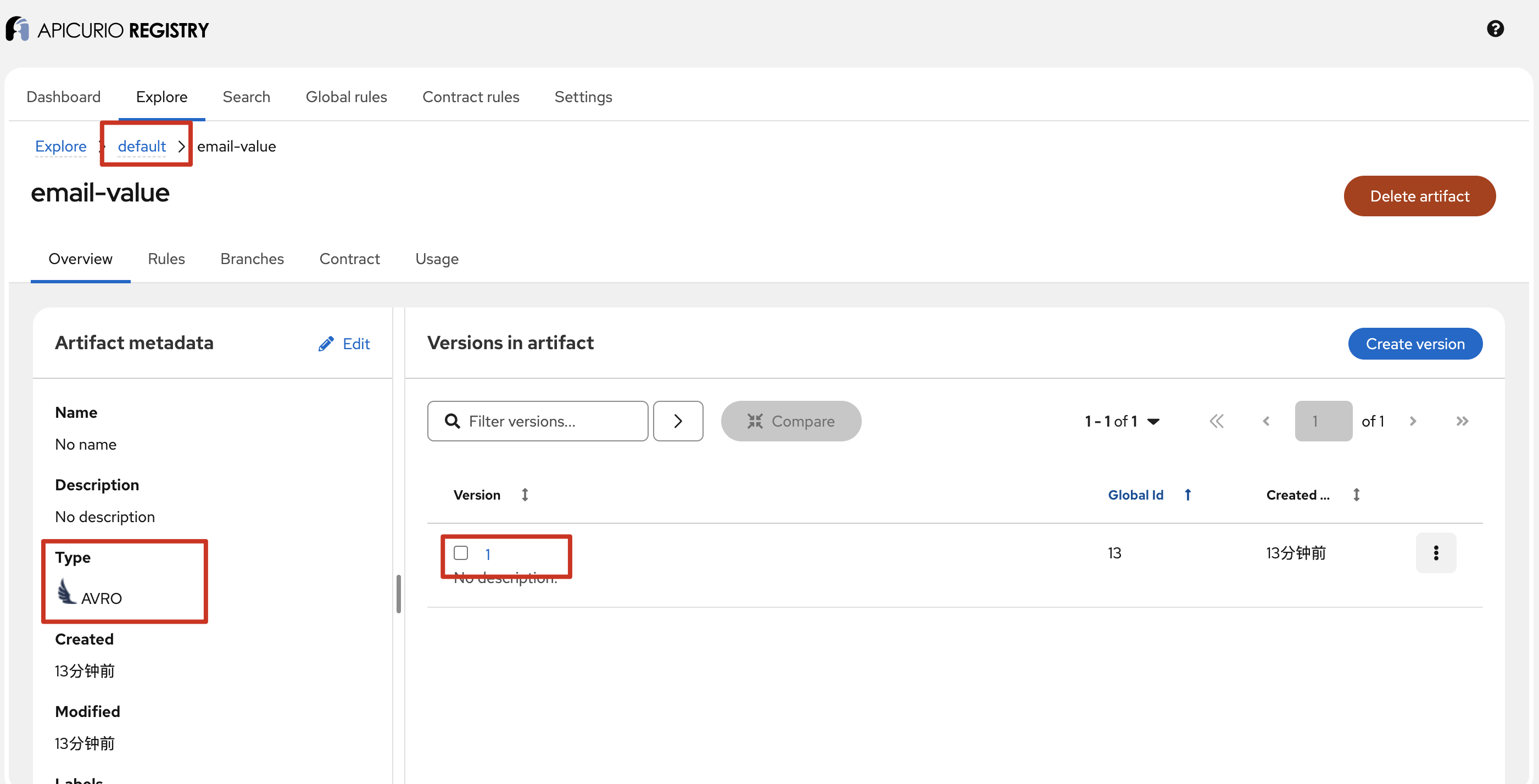 Here we use the default group, and the artifact name follows the format of the topic name plus a -value suffix:
TopicIdStrategy Default strategy that uses the topic name and
keyorvaluesuffix.
There are several other strategies; see the ArtifactReferenceResolverStrategy documentation.
Click a version number under Version to jump to the details of that version, and switch to Content to view the schema details of that version:
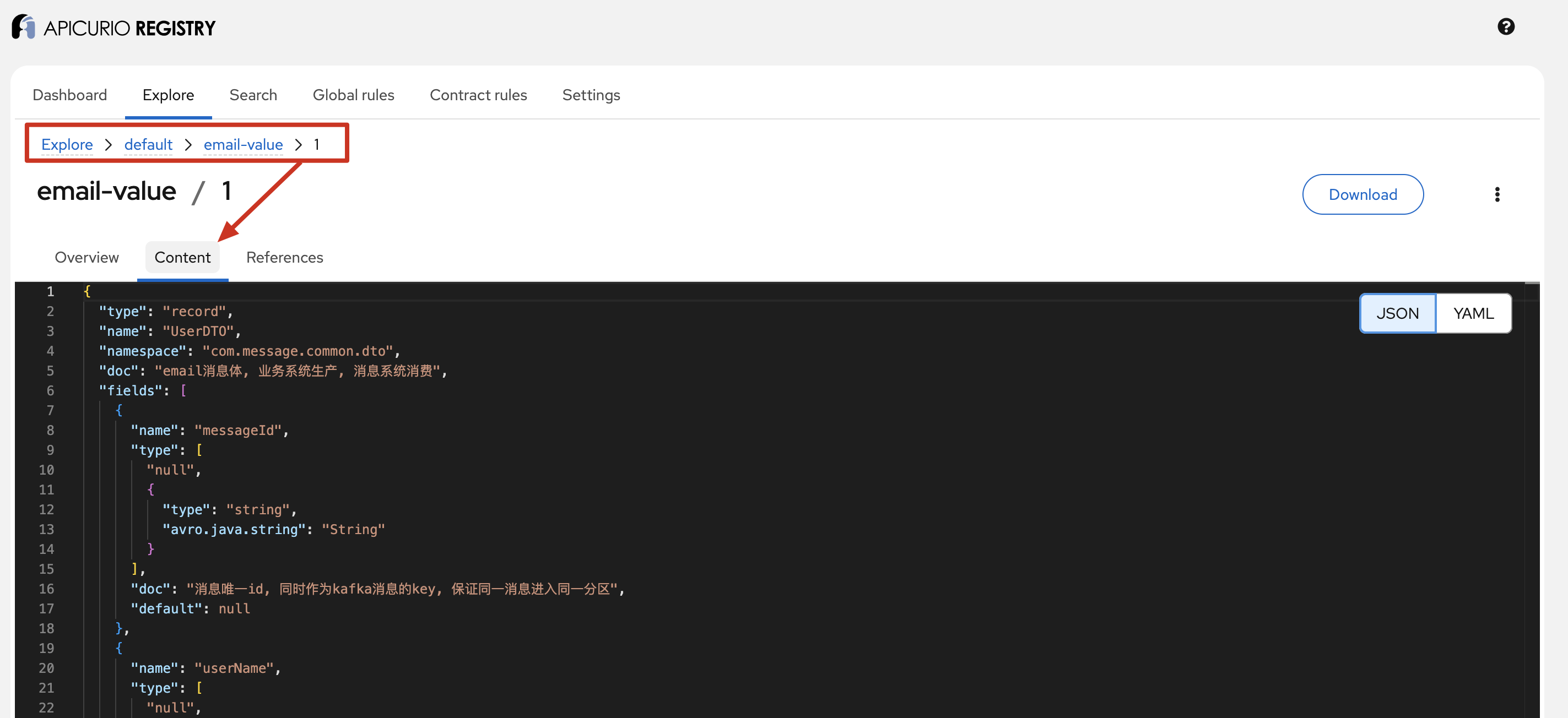
For more usage details, see the official web console documentation.
How It Works
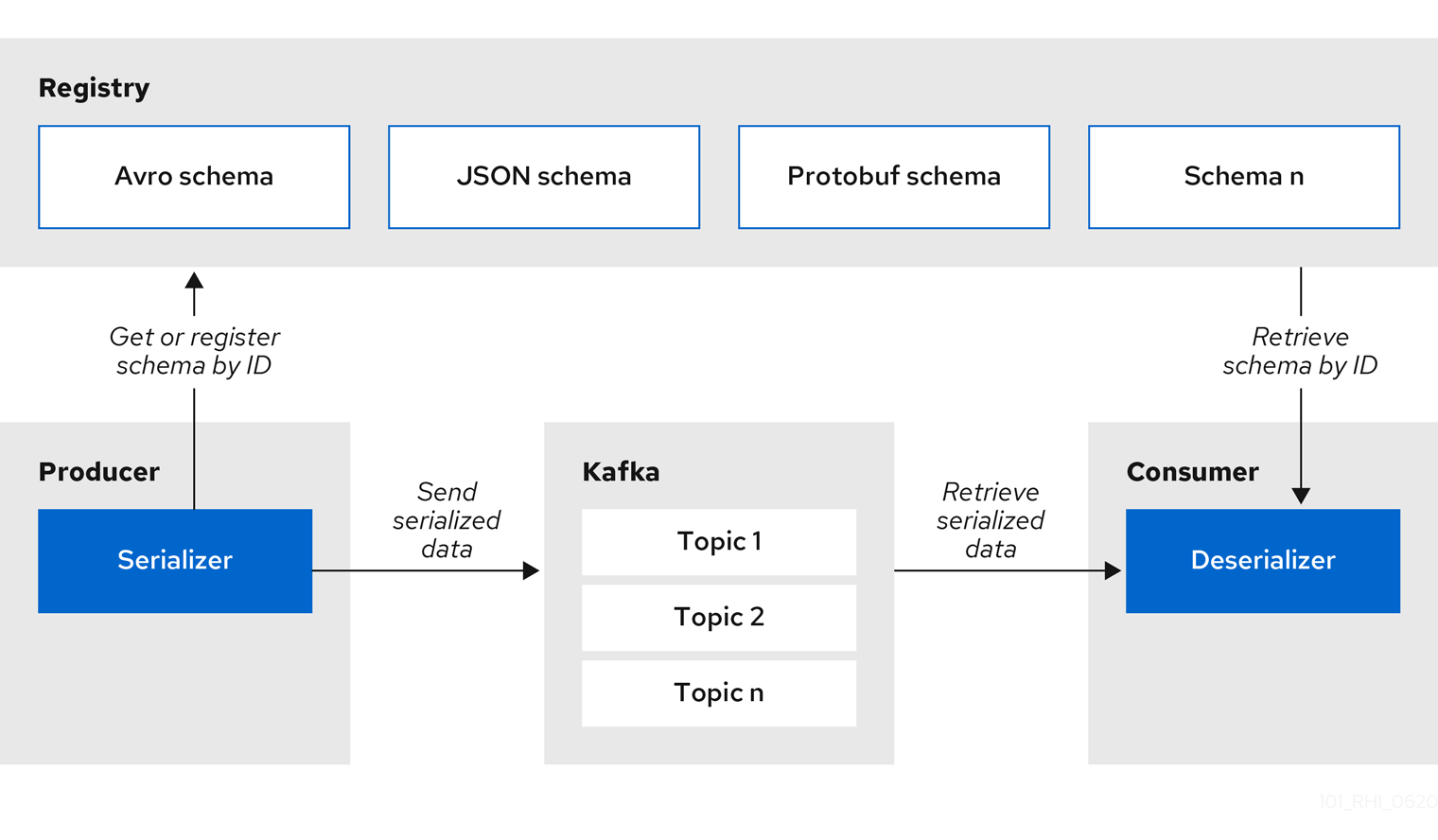 The diagram above is quoted from the official documentation.
The sections on producing and consuming messages below explain this in more detail.
Producing Messages
You only need to switch the Kafka producer’s serialization format from JSON to Avro in Kafka (Part 3): Sending JSON with a Shared Serializer and Improving Producer Throughput, and set the schema registry address:
result.put(ProducerConfig.VALUE_SERIALIZER_CLASS_CONFIG, AvroKafkaSerializer.class.getName());
result.put(SchemaResolverConfig.REGISTRY_URL, registryUrl());
// Disable automatic schema registration with the registry
result.put(SchemaResolverConfig.AUTO_REGISTER_ARTIFACT, Boolean.FALSE.toString());
// Artifact naming strategy: TopicIdStrategy (the default, written out explicitly here), artifactId=<topic>-value, group=default.
// Note: when kafbat kafka-ui deserializes, the main schema is fetched via the ccompat /schemas/ids/{id} endpoint using the contentId embedded in the message (not restricted by group),
// but references are resolved by bare subject name (no group prefix) via /subjects/{subject}/versions/{n}, which only hits the default group;
// a custom group would make reference resolution fail for schemas with references (messages would show as raw bytes), so keep the default.
result.put(SchemaResolverConfig.ARTIFACT_RESOLVER_STRATEGY, TopicIdStrategy.class.getName());
Looking Up the contentId for a Schema
Personally, I find the Producer flow on the left side of the diagram a little misleading. The correct steps are: the first step of serializing a message is to get the ID corresponding to this message’s schema. This ID can be a contentId or a globalId; the default is contentId.
By default, the schema is retrieved from Apicurio Registry by the deserializer using a content ID
You can switch to globalId through apicurio.registry.use-id.
So how does it find the contentId?
In short: it takes the message object’s .avsc file string plus the ARTIFACT_RESOLVER_STRATEGY configured above, and queries the Apicurio server through a REST API request:
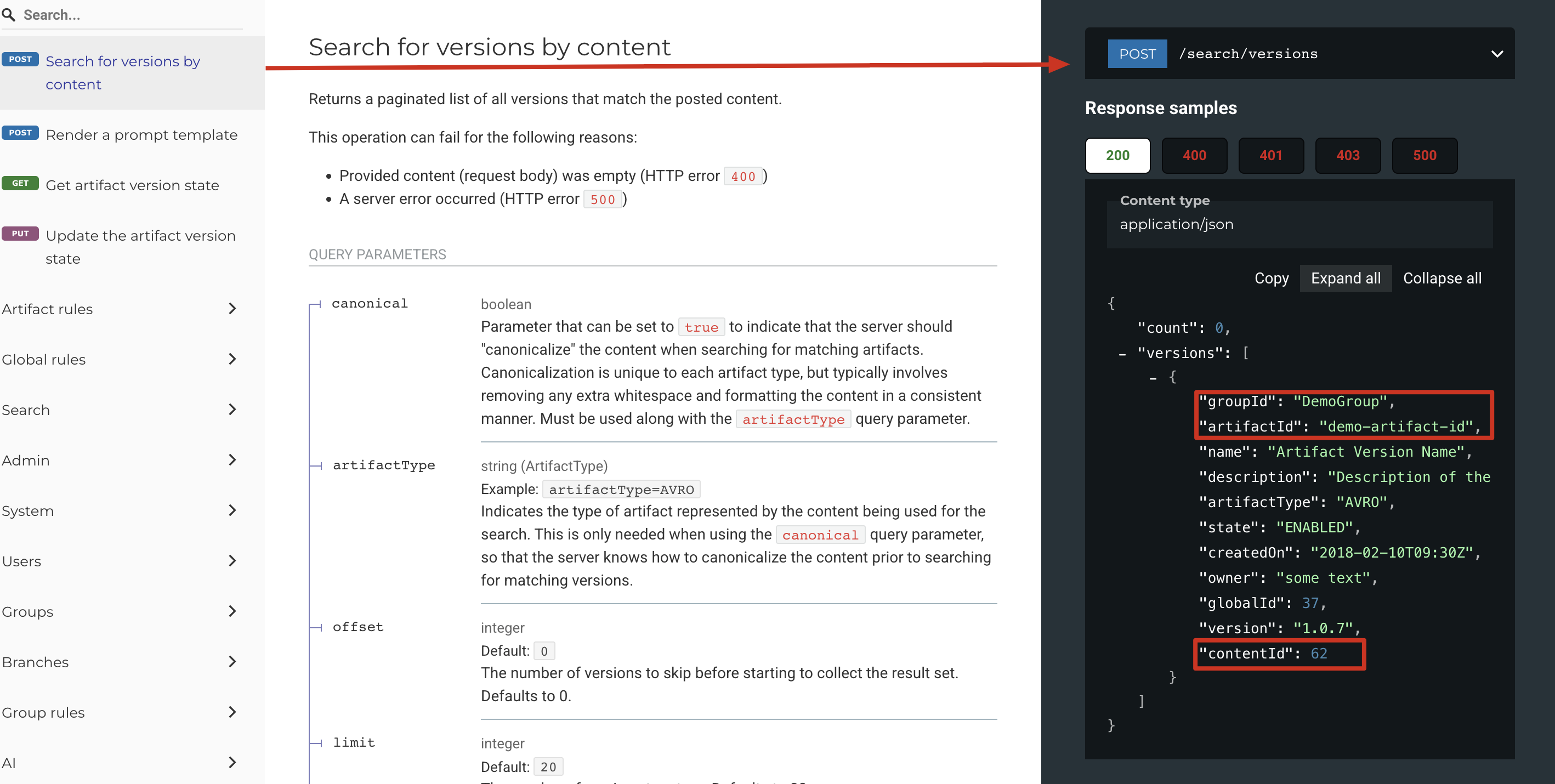
But when sending a message we only have the Java object — where does the .avsc string come from?
When we generate the Java classes corresponding to the .avsc files with Maven, each generated class contains a getSchema method, and that method returns the content of the .avsc file we defined earlier:
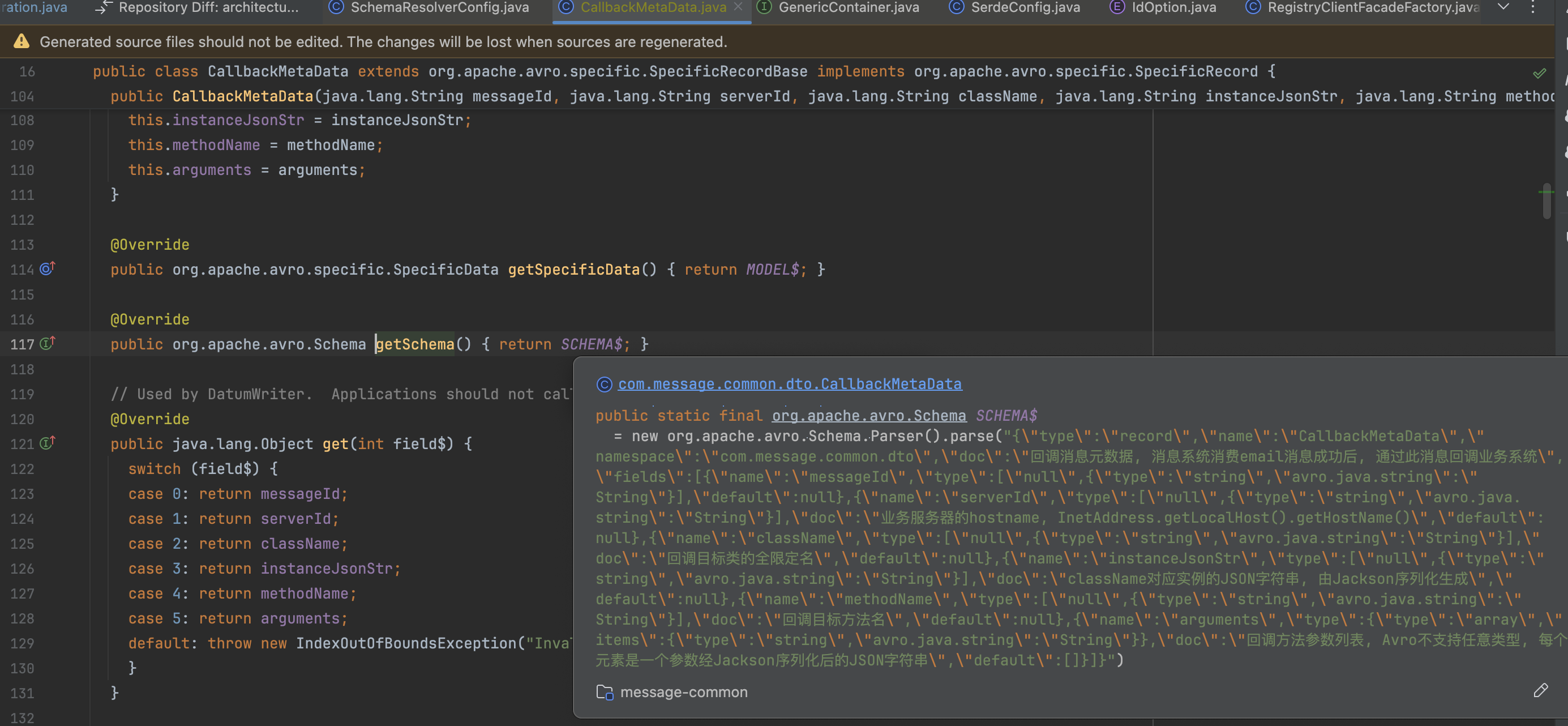 After getting the contentId, it is placed in front of the message body:
# ...
[MAGIC_BYTE]
[CONTENT_ID]
[MESSAGE DATA]
When locating the content ID in the message payload, the format of the data begins with a magic byte, used as a signal to consumers, followed by the content ID, and the message data as normal
The full call stack is as follows:
KafkaProducer.send(record)
     └─ AvroKafkaSerializer.serialize("email", headers, userDTO)
        └─ KafkaSerializer.serializeData → AbstractSerializer.serializeData
           │
           ├─ 1) DefaultSchemaResolver.resolveSchema(Record)
           │     Record = KafkaSerdeMetadata{topic="email", isKey=false, headers}
           │     │
           │     ├─ a. SchemaParser.getSchemaFromData(record, resolveDereferenced)
           │     │      Avro: take the compile-time schema from SpecificRecord.getSchema()
           │     │      → ParsedSchema(raw .avsc bytes + references)
           │     │
           │     ├─ b. AbstractSchemaResolver.resolveArtifactReference(record, parsedSchema, ...)
           │     │      └─ TopicIdStrategy.artifactReference(record, parsedSchema)
           │     │           artifactId = String.format("%s-%s", topic, isKey?"key":"value")
           │     │                        = "email-value"   (groupId=null, version=null)
           │     │      then merged with explicit configuration via the builder (EXPLICIT_ARTIFACT_* unset → strategy values throughout)
           │     │      → ArtifactReference{groupId=null, artifactId="email-value", version=null}
           │     │
           │     ├─ c. getSchemaFromCache(reference, parsedSchema)
           │     │      ERCache looks up three indexes: globalId/contentId/contentHash
           │     │      all three in the reference are null here → miss
           │     │
           │     └─ d. getSchemaFromRegistry(parsedSchema, record, reference) → branches (in order):
           │            autoCreateArtifact=false → skip handleAutoCreateArtifact      ★ my configuration
           │            findLatest=false        → skip resolveSchemaByCoordinates(g, a, "latest")
           │            supportsExtractSchemaFromData()=true (Avro)
           │                                   → handleResolveSchemaByContent        ★ this branch is taken
           │            (only when the resolver cannot extract the schema from the data does it fall to the last branch:
           │             resolveSchemaByCoordinates(g, a, version) fetches by explicit coordinates)
           │
           ├─ 2) handleResolveSchemaByContent(parsedSchema, reference)
           │     ├─ content = parsedSchema.getReferencelessRawSchema() → string
           │     ├─ schemaCache.getByContent(ContentWithReferences(content), loader)
           │     │     ← content-level cache; on a hit, none of 3)-4) happens, zero HTTP
           │     └─ miss → loader lambda:
           │          artifactType = schemaParser.artifactType() = "AVRO"
           │          coordsList = clientFacade.searchVersionsByContent(
           │                           content, canonicalHash, reference, dereferenced)
           │          ★ empty coordsList → throws RuntimeException
           │            "Could not resolve artifact reference by content: <schema content>"
           │          otherwise take list.get(0) → proceed to 4)
           │
           ├─ 3) RegistryClientFacadeImpl.searchVersionsByContent          [Kiota HTTP client]
           │     contentType = ArtifactTypeToContentType.toContentType("AVRO")
           │     POST {APICURIO_REGISTRY_URL}/search/versions?groupId=default&artifactId=email-value
           │     body = raw schema content
           │     │
           │     │  ★ what the server does: search within this artifact's versions by canonical content hash
           │     │    for a content match (lookup only, nothing created). The contentId originates in the server-side data model:
           │     │    content is stored globally deduplicated by canonical hash; a contentId is assigned when content is first persisted,
           │     │    multiple versions with identical content share the same contentId, and contentId is globally unique (not group-scoped)
           │     │
           │     │  HTTP response: VersionSearchResults.versions[]; the JSON of each SearchedVersion
           │     │  carries metadata: globalId, contentId, groupId, artifactId, version, state
           │     │
           │     ├─ filter: state != DISABLED
           │     └─ map (lambda$searchVersionsByContent$3): each SearchedVersion →
           │          RegistryVersionCoordinates.create(getGlobalId(), getContentId(),
           │                                            getGroupId(), getArtifactId(), getVersion())
           │          ★ this is the step where contentId moves from the response JSON into the client object
           │
           ├─ 4) AbstractSchemaResolver.loadFromVersionCoordinates(coords, parsedSchema, refs)
           │     SchemaLookupResult.builder()
           │         .globalId(coords.getGlobalId())
           │         .contentId(coords.getContentId())        ★ contentId lands in the resolution result
           │         .groupId(coords.getGroupId()==null?"default":...) etc.
           │         .parsedSchema(parsedSchema)              ← schema already in hand; no HTTP fetch for content
           │         .build()
           │     → backfill ERCache, return SchemaLookupResult
           │
           └─ 5) AbstractSerializer writes the message
                ├─ executeContractRulesForWrite(lookupResult, data)   ← 3.x contract-rule check (no-ops if no rules are configured)
                ├─ reference = lookupResult.toArtifactReference()
                │     ★ repack the lookupResult's globalId/contentId/groupId/artifactId/version
                │       back into an ArtifactReference
                ├─ getIdHandler() = Default4ByteIdHandler
                │     (setIdHandler is called in the KafkaSerializer constructor; idOption defaults to contentId,
                │      read from SerdeConfig.useIdOption(), default constant = IdOption.contentId.name())
                │     writeId(reference, out):
                │       reference.getContentId().intValue()
                │       → ByteBuffer.allocate(4).putInt(contentId)  ★ 4-byte contentId written to the head of the payload
                └─ serializeData(parsedSchema, userDTO, out)          ← AvroSerializer appends the Avro binary
                    → final bytes: [4-byte contentId][Avro payload]
Consuming Messages
Likewise, you only need to adjust the corresponding configuration from Kafka (Part 4): Consuming JSON, Sharing a Deserializer, and Improving Throughput:
// Use the Avro deserializer provided by Apicurio for the value, which fetches the schema from the registry by the schema id in the message payload
result.put(ConsumerConfig.VALUE_DESERIALIZER_CLASS_CONFIG, AvroKafkaDeserializer.class.getName());
result.put(SchemaResolverConfig.REGISTRY_URL, registryUrl());
// Deserialize into the SpecificRecord classes corresponding to the schemas (the generated com.message.common.dto.UserDTO/CallbackMetaData), rather than GenericRecord
result.put(AvroSerdeConfig.USE_SPECIFIC_AVRO_READER, Boolean.TRUE.toString());
The Consumer flow on the right side of the diagram is not misleading; the detailed call stack is as follows:
KafkaConsumer.poll  →  ValueDeserializer.deserialize("email", headers, bytes)
     └─ AvroKafkaDeserializer.deserialize
        └─ KafkaDeserializer(setIdHandler(new Default4ByteIdHandler()) was called at construction)
           └─ AbstractDeserializer.deserializeData
              │
              ├─ 1) Parse the contentId from the message header
              │     ByteBuffer.wrap(bytes)
              │     idHandler.readId(buffer)  → Default4ByteIdHandler.readId:
              │        buffer.getInt() reads the 4 bytes at the head of the payload
              │        idOption=contentId → ArtifactReference{contentId=N} (all other fields null)
              │     ★ the inverse of the producer's writeId; the message's "schema pointer" is these 4 bytes
              │
              ├─ 2) getCacheKey(reference) → the deserializer-local schema cache
              │     on a hit, jump straight to 5) and reuse the ParsedSchema, zero HTTP
              │
              ├─ 3) DefaultSchemaResolver.resolveSchemaByArtifactReference(reference)
              │     take the id by priority: contentId != null → resolveSchemaByContentId(N)
              │                   (otherwise fall back to contentHash, then globalId)
              │     └─ resolveSchemaByContentId → ERCache.getByContentId(N, loader)
              │          ★ resolver-level cache; only one HTTP request per contentId
              │          miss → loader(lambda$resolveSchemaByContentId$1):
              │          │
              │          ├─ a. clientFacade.getSchemaByContentId(N)
              │          │     GET {APICURIO_REGISTRY_URL}/ids/contentIds/{N}
              │          │     ★ fetch the schema content globally by contentId (the .avsc text of UserDTO),
              │          │       no group/artifact needed — the same lookup path kafbat uses (pitfall 10)
              │          │
              │          ├─ b. clientFacade.getReferencesByContentId(N)
              │          │     GET .../ids/contentIds/{N}/references
              │          │     → [RegistryArtifactReference{groupId="default",
              │          │        artifactId="com.message.common.dto.CallbackMetaData",
              │          │        version="1", name="com.message.common.dto.CallbackMetaData"}]
              │          │
              │          ├─ c. resolveReferences(refs) — resolve references one by one (the nested record of UserDTO)
              │          │     each ref → ArtifactCoordinates(groupId: "default" if null, artifactId, version)
              │          │     → check referenceCache (ConcurrentHashMap) first
              │          │     → miss: fetch and parse the referenced schema content by GAV
              │          │       (getSchemaByGAV → GET /groups/default/artifacts/{artifactId}/versions/{version}/content)
              │          │     → recurse if the reference itself has references (hasReferences)
              │          │     → Map<reference name, ParsedSchema>
              │          │     ★ references are fetched by the GAV coordinates stored at registration, so references must be resolvable in the default group
              │          │
              │          └─ d. schemaParser.parseSchema(content.bytes, referencesMap)
              │               → ParsedSchema<avro.Schema> (main schema + linked references)
              │
              ├─ 4) Assemble SchemaLookupResult(parsedSchema, contentId, globalId, ...)
              │     backfill ERCache + the deserializer-local cache
              │
              └─ 5) Decode the data
                   idHandler.idSize(reference, buffer) = 4 → locate the start of the payload
                   readData(parsedSchema, buffer, start, length)
                   └─ AvroDeserializer → DefaultAvroDatumProvider
                        (reads AvroSerdeConfig at configure time, USE_SPECIFIC_AVRO_READER=true)
                        createDatumReader:
                          writerSchema = the schema pulled from the registry in 3)
                          readerSchema = UserDTO.getSchema() from the local classpath (compile-time generated class)
                          → SpecificDatumReader(writer, reader)   ★ Avro's schema resolution
                            happens here: when the writer and reader schemas differ, project/fill defaults according to Avro rules
                        → binary decode → materialize directly into a UserDTO instance (with nested CallbackMetaData)
Viewing Avro Messages in Kafbat UI
Kafbat-ui can display Avro-typed messages as long as the schema registry address is configured; see the Docker Compose file above for the specific configuration:
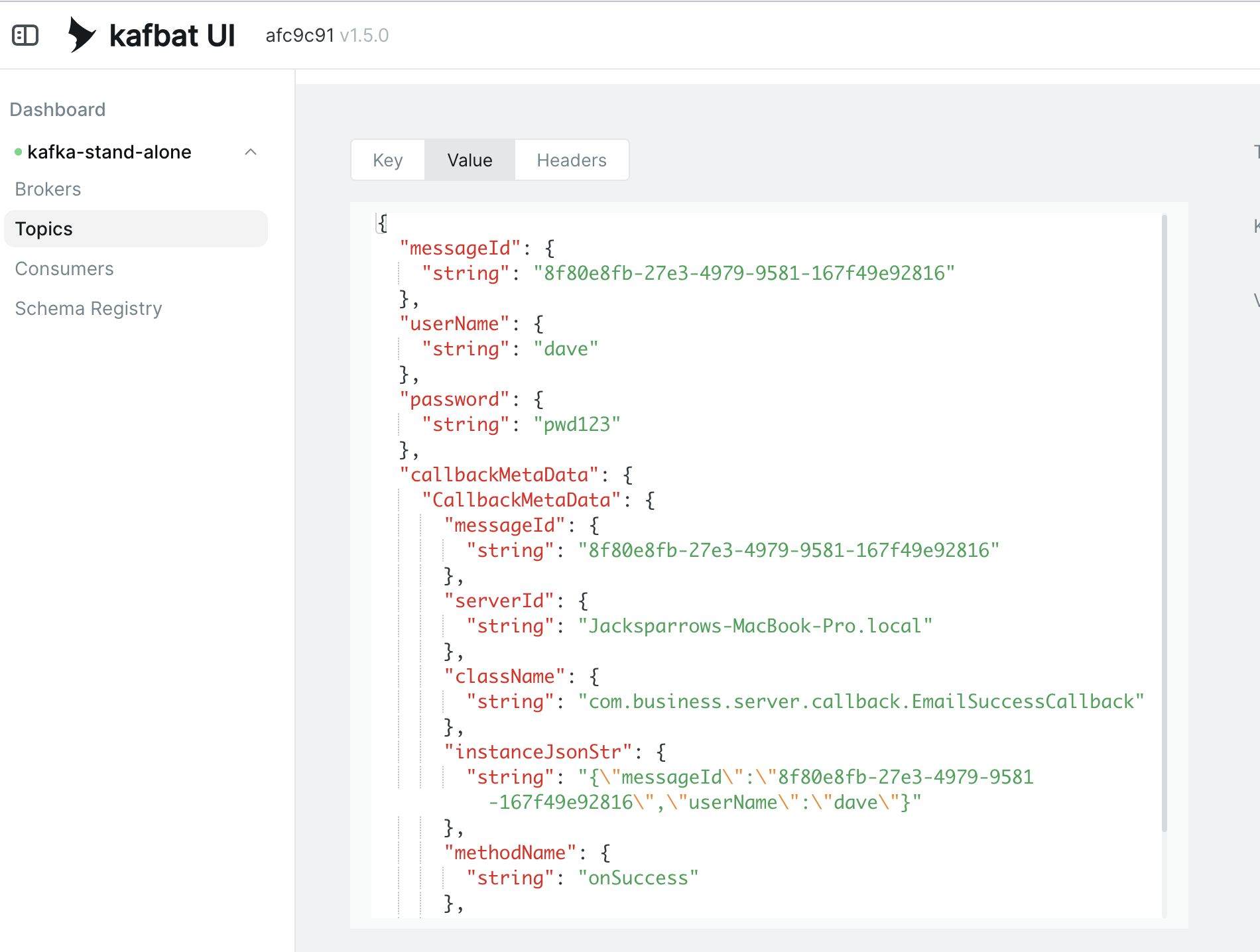
Ensuring Schema Compatibility
Schema compatibility is viewed from the consumer’s perspective.
BACKWARD
It answers: can a consumer that has the new schema read data sent by a producer using the old schema?
FORWARD
It answers: can a consumer still using the old schema read data sent by a producer using the new schema?
In practice, you should avoid changing the types in an .avsc file as much as possible.
Catching Incompatible Schemas During Development and Testing
You can use the apicurio-registry-maven-plugin to detect incompatible schemas at compile time:
<!-- During the test phase, run a compatibility dryRun check on the schema: execute the BACKWARD rule against the versions already published in the registry;
           incompatible changes fail the build directly, surfacing the problem before deployment. Prerequisite: the registry is running and a global BACKWARD rule
           has been created (see docs/deployment.md). When the registry is unavailable, use -DskipRegister=true to skip -->
<plugin>
  <groupId>io.apicurio</groupId>
  <artifactId>apicurio-registry-maven-plugin</artifactId>
  <version>3.3.1</version>
  <executions>
    <execution>
      <id>schema-compatibility-check</id>
      <phase>test</phase>
      <goals>
        <goal>register</goal>
      </goals>
      <configuration>
        <registryUrl>${apicurio.url}</registryUrl>
        <!-- dryRun=true validates without persisting; note that in the plugin's implementation, dryRun only truly takes effect when ifExists is configured -->
        <dryRun>true</dryRun>
        <artifacts>
          <!-- Compatibility check for CallbackMetaData's own evolution (it carries its version sequence in the registry as an independent artifact) -->
          <artifact>
            <groupId>default</groupId>
            <artifactId>com.message.common.dto.CallbackMetaData</artifactId>
            <artifactType>AVRO</artifactType>
            <file>${project.basedir}/src/main/avro/CallbackMetaData.avsc</file>
            <ifExists>FIND_OR_CREATE_VERSION</ifExists>
          </artifact>
          <!-- UserDTO corresponds to email-value (TopicIdStrategy naming); the reference carries no file and points to a version that already exists
               in the registry to construct the reference, and the server uses it to resolve the named references in UserDTO.avsc before running the compatibility check.
               Note: version must be a version that actually exists in the registry; after CallbackMetaData evolves to a new version, this value must be updated accordingly -->
          <artifact>
            <groupId>default</groupId>
            <artifactId>email-value</artifactId>
            <artifactType>AVRO</artifactType>
            <file>${project.basedir}/src/main/avro/UserDTO.avsc</file>
            <ifExists>FIND_OR_CREATE_VERSION</ifExists>
            <references>
              <reference>
                <!-- name must match the named reference in UserDTO.avsc -->
                <name>com.message.common.dto.CallbackMetaData</name>
                <groupId>default</groupId>
                <artifactId>com.message.common.dto.CallbackMetaData</artifactId>
                <version>1</version>
              </reference>
            </references>
          </artifact>
        </artifacts>
      </configuration>
    </execution>
  </executions>
</plugin>