Table of contents
Open Table of contents
Producer Sending Strategy
How can we ensure that a correctly formatted message eventually reaches Kafka? The approach here is:
- Use the default ack setting, all, and configure min.insync.replicas to improve fault tolerance.
- Enable retries.
- If retries fail within a certain period, save the message to the database and let a scheduled job continue sending it later.
- Certain exceptional conditions will produce duplicate messages. How to ensure each is consumed only once will be discussed in the consumer implementation.
- Here, we only need to ensure that a message always goes to the same partition, regardless of retries. Kafka selects the partition using hash(key) if a key is provided. Each of our messages has an ID that never changes across retries, and we will not change the partition count during peak traffic. These conditions ensure that every attempt sends the message to the same partition.
Developers familiar with message queues probably know that a message sent to a broker is not necessarily persisted to disk immediately. It is generally written to the operating system cache, and the OS decides when to flush it to disk. Kafka works the same way. Strictly speaking, the five steps above therefore do not guarantee that data sent to Kafka cannot be lost. Kafka provides log.flush options, flush.message, and flush.ms to control disk flushing and log writes. See the Broker Configuration and Topic Configuration sections of the official documentation for details.
Kafka recommends leaving these settings alone and letting the operating system decide. The documentation states:
We generally feel that the guarantees provided by replication are stronger than sync to local disk, however the paranoid still may prefer having both and application level fsync policies are still supported
In other words, data reliability is ensured through replication rather than forced local disk flushes.
If you have only one standalone node with no replicas, however, you can consider disk-flush settings.
For more on flushing, read Application vs. OS Flush Management and the following sections in the Kafka documentation.
Using a Shared Serializer
Our message format is JSON, so Jackson must serialize classes to JSON strings. If we have several types of POJO messages, implementing the official Serializer interface separately for each is not ideal. Could a generic implementation do this for us? The open-source Kafka documentation does not cover this, but I found an implementation in the official Confluent GitHub repository. Simply add the dependency:
        <dependency>
            <groupId>io.confluent</groupId>
            <artifactId>kafka-json-serializer</artifactId>
            <version>7.5.1</version>
        </dependency>
Also specify the repository URL:
    <repositories>
        <repository>
            <id>confluent</id>
            <url>https://packages.confluent.io/maven/</url>
        </repository>
    </repositories>
The configuration is this line in the detailed code below:
result.put(ProducerConfig.VALUE_SERIALIZER_CLASS_CONFIG, KafkaJsonSerializer.class.getName());Configuring Producer Options
A few points need attention:
- Enable compression.
- The documentation recommends not configuring retries directly. Use delivery.timeout.ms to control retry duration; its default is two minutes.
- Leave buffer.memory at its default of 32 MB unless there is a specific reason to change it.
- Use the default ack setting, all.
- Configure client.id to prevent InstanceAlreadyExistsException.
    /**
     * Tune these settings using the official documentation, relevant chapters of Kafka: The Definitive Guide, and your actual throughput requirements.
     * Locally, bootstrap.server IP addresses should match EXTERNAL in docker-compose.yml.
     * For message compression, the documentation recommends lz4; see https://www.confluent.io/blog/apache-kafka-message-compression/
     *
     * Set client.id to prevent InstanceAlreadyExistsException.
     * Otherwise Kafka generates a client.id, defaulting to producer-1; see {@link ProducerConfig#maybeOverrideClientId(Map)}.
     * Kafka Java Client uses client.id to generate a JMX ObjectName; see registerAppInfo in {@link KafkaProducer#KafkaProducer(ProducerConfig, Serializer, Serializer, ProducerMetadata, KafkaClient, ProducerInterceptors, Time)}.
     * If multiple applications (processes) omit client.id, IDs generated by the default rule can repeat, causing InstanceAlreadyExistsException.
     * Multiple producers in one application (one process) do not cause this when client.id is omitted, because of the incrementing counter {@link ProducerConfig#PRODUCER_CLIENT_ID_SEQUENCE}.
     */
    public static Properties loadProducerConfig(String valueSerializer) {
        Properties result = new Properties();
        result.put(ProducerConfig.BOOTSTRAP_SERVERS_CONFIG, "192.168.0.102:9093");
        // Set client.id
        result.put(ProducerConfig.CLIENT_ID_CONFIG, SERVER_ID);
        result.put(ProducerConfig.KEY_SERIALIZER_CLASS_CONFIG, StringSerializer.class.getName());
        result.put(ProducerConfig.VALUE_SERIALIZER_CLASS_CONFIG, KafkaJsonSerializer.class.getName());
        result.put(ProducerConfig.COMPRESSION_TYPE_CONFIG, CompressionType.LZ4.name);
        // Each email message is about 20KB; default throughput is low, so these settings improve Kafka throughput
        // Default: 16384 bytes. Too small: email messages are sent one at a time rather than batched, which does not fit this scenario
        result.put(ProducerConfig.BATCH_SIZE_CONFIG, 1048576 * 10);
        // Default: 1048576 bytes. This limits batch size and is too small for messages of 20KB
        result.put(ProducerConfig.MAX_REQUEST_SIZE_CONFIG, 1048576 * 10);
        // Wait 10ms to accumulate more messages in a batch and improve throughput
        result.put(ProducerConfig.LINGER_MS_CONFIG, 10);
        return result;
    }
Improving Throughput
- In our actual scenario, each email message is about 20 KB, while batch.size defaults to 16 KB. Without changing it, the producer sends messages one by one, limiting throughput. We therefore set batch.size to 10 MB.
- Changing only that option is insufficient: max.request.size limits one request and defaults to 1 MB. Even with batch.size at 10 MB, sending at most 1 MB per request still limits throughput, so we also set max.request.size to 10 MB.
- With much larger batches, the producer can wait briefly for more data before sending. linger.ms defaults to 0, meaning immediate sending; increase it appropriately for your workload.
Sending Messages
@Log
public class MessageProducer {

    public static final KafkaProducer<String, UserDTO> PRODUCER = new KafkaProducer<>(KafkaConfiguration.loadProducerConfig(UserDTOSerializer.class.getName()));

    private MessageFailedService messageFailedService = new MessageFailedService();

    /**
     * Kafka producers retry failed sends. Related options are retries and delivery.timeout.ms; the documentation recommends delivery.timeout.ms, defaulting to two minutes.
     * The callback runs only after the final retry. For local retry testing, see https://lists.apache.org/thread/nwg326bxpo7ry116nqhxmsmc3bokc6hm
     * @param userDTO
     */
    public void sendMessage(final UserDTO userDTO) {
        ProducerRecord<String, UserDTO> user = new ProducerRecord<>("email", userDTO.getMessageId(),  userDTO);
        try {
            PRODUCER.send( user, (recordMetadata, e) -> {
                if (Objects.nonNull(e)) {
                    log.severe("message has sent failed");
                    MessageFailedEntity messageFailedEntity = new MessageFailedEntity();
                    messageFailedEntity.setMessageId(userDTO.getMessageId());
                    ObjectMapper mapper = new ObjectMapper();
                    try {
                        messageFailedEntity.setMessageContentJsonFormat(mapper.writeValueAsString(userDTO));
                    } catch (JsonProcessingException jsonProcessingException) {
                        log.severe("message content json format failed");
                    }
                    messageFailedEntity.setMessageType(MessageType.EMAIL);
                    messageFailedEntity.setMessageFailedPhrase(MessageFailedPhrase.PRODUCER);
                    messageFailedEntity.setFailedReason(e.getMessage());
                    // If sendMessage receives a list, the same applies: this must not be outside list.foreach
                    // If handled in the main thread, Kafka producer execution is asynchronous,
                    // so it may lag behind the main thread and return an empty value, e.g. an empty failedReason
                    messageFailedService.saveOrUpdateMessageFailed(messageFailedEntity);
                } else {
                    log.info("message has sent to topic: " + recordMetadata.topic() + ", partition: " + recordMetadata.partition() );
                }
            });
        } catch (TimeoutException e) {
            log.info("send message to kafka timeout, message: ");
            // TODO: Custom handling, e.g. email the Kafka administrator
        }
    }
}
A few explanations of the code:
- Messages are sent asynchronously. Log a message when sending succeeds.
- The key point is retry behavior: the callback runs only after the final retry, not once per retry. I asked the community by email; see this thread. To test or debug retries locally, increase min.insync.replicas. For example, with one Kafka node, set it above 1 and configure producer acknowledgments as all. Sending a message then produces retry logs.
Closing the Producer
Implement ServletContextListener and configure it in a listener element in web.xml:
public class KafkaListener implements ServletContextListener {

    private static final List<KafkaProducer> KAFKA_PRODUCERS = new LinkedList<>();

    @Override
    public void contextInitialized(ServletContextEvent sce) {
        KAFKA_PRODUCERS.add(MessageProducer.PRODUCER);
    }

    @Override
    public void contextDestroyed(ServletContextEvent sce) {
        KAFKA_PRODUCERS.forEach(KafkaProducer::close);
    }
}<?xml version="1.0" encoding="UTF-8" ?>
<web-app xmlns="https://jakarta.ee/xml/ns/jakartaee"
xmlns:xsi="http://www.w3.org/2001/XMLSchema-instance"
xsi:schemaLocation="https://jakarta.ee/xml/ns/jakartaee
https://jakarta.ee/xml/ns/jakartaee/web-app_6_0.xsd"
version="6.0">
<listener>
<listener-class>com.business.server.listener.KafkaListener</listener-class>
</listener>
</web-app>Closing Thoughts
- While implementing this, consult the relevant chapters of Kafka: The Definitive Guide, or cloud providers’ Kafka developer documentation. I recommend the book. Although Alibaba Cloud and Huawei Cloud claim compatibility with open-source Kafka, I found their versions lag behind, and many best practices are outdated.
- There is nothing particularly unusual on the producer side. The main tasks are designing the message format for the business scenario and minimizing message size.
- If your messages are larger than mine, exceeding 1 MB, both producer throughput and consumer processing speed become issues. Without a concrete scenario, I cannot suggest a good approach. The option I can think of is reducing serialized message size, perhaps with Avro or Protobuf, though I have not tried either. Please share your experience if you have used them.
Sample Source Repository
- GitHub repository
- The business-server module represents the producer.
- IDEA run configuration:
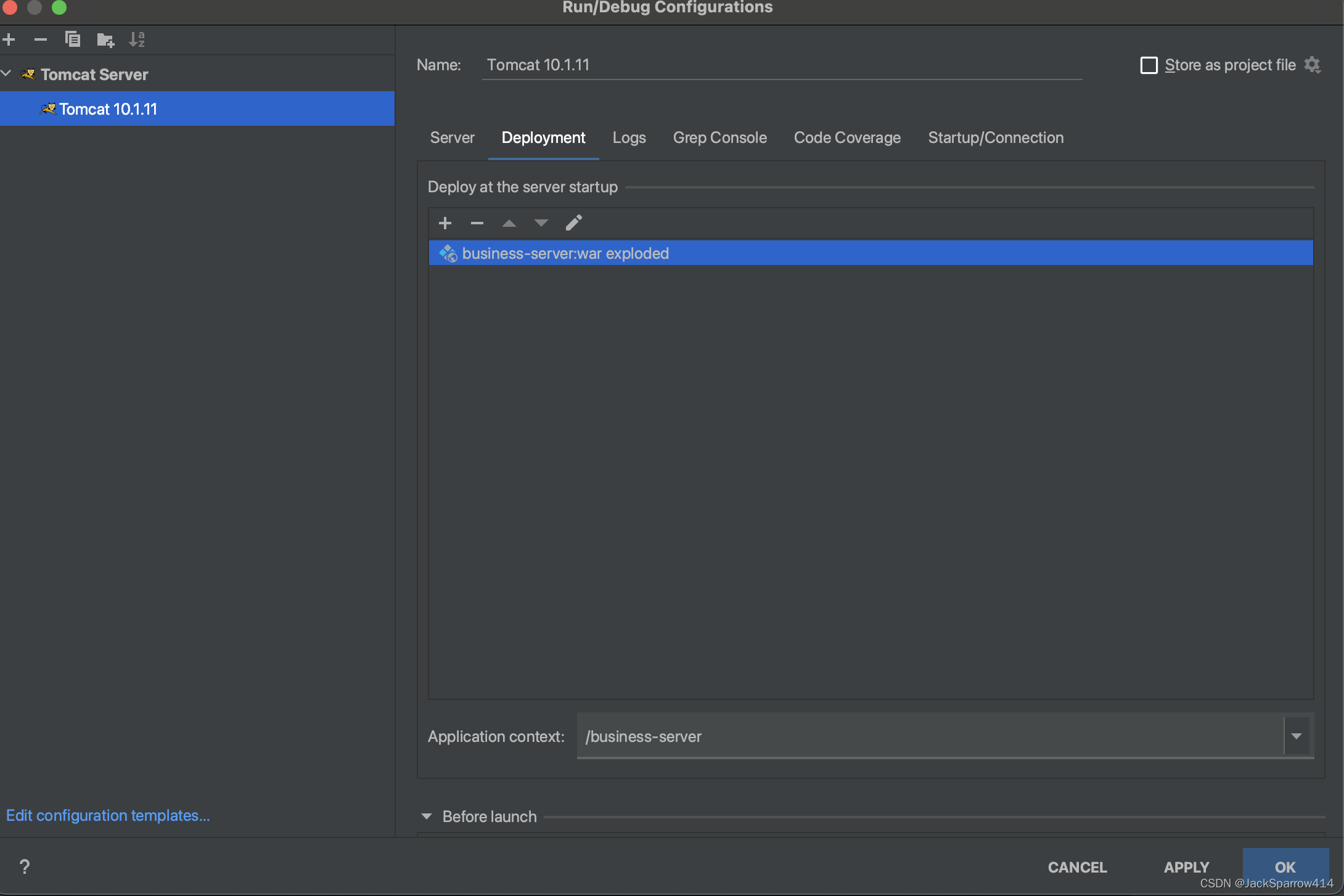 Pay attention to Application context. After startup, visit the port plus Application context, for example:
http://localhost:8999/business-serverThe next post covers consuming messages, important consumer configuration options, and retry mechanisms in the consumption logic.