Table of contents
Open Table of contents
- Avoiding Duplicate Message Processing
- Retrying Consumer Business Logic
- Consumer Commits
- A Shared Deserializer
- How Many Partitions Should We Configure?
- Consumer Configuration and Explanations
- Consumer Processing Logic
- Starting Consumers
- Closing Consumers
- Configuring Listeners
- Using the Template Method Pattern for Emails of Different Priorities
- Closing Thoughts
- Example Source Repository
Article body
In the previous article, failed producer sends were retried by a scheduled job. Messages are partitioned by key, so however many times we resend, the same key always goes to the same partition.
For consumers, the most important question is how to avoid processing messages more than once when they have been resent to a partition for various reasons.
Avoiding Duplicate Message Processing
The basic approach:
- Create a database table for successfully consumed messages, containing only their keys. After consumer business logic succeeds, save the key there.
- For each newly polled batch, query that table for existing keys and skip the business operation for those messages.
- A batch may itself contain duplicate keys. After processing a message, put its key in a set. Check that set before processing the next message: skip it if present; otherwise process normally. Even if the earlier operation failed, later messages with that key are skipped rather than processed again.
Retrying Consumer Business Logic
We use Failsafe for retries. Consult its documentation for usage; I will not cover it in detail here.
Consumer Commits
We follow the approach in the consumer chapter of Kafka: The Definitive Guide: asynchronous and synchronous commits together. Commit asynchronously during normal operation and synchronously during shutdown to ensure the current offsets are submitted before the consumer exits.
A Shared Deserializer
The previous article introduced kafka-json-serializer for consistent JSON serialization. Use the same dependency for deserialization so that each POJO does not need its own Deserializer implementation.
These two lines in the complete configuration below provide the relevant settings:
result.put(ConsumerConfig.VALUE_DESERIALIZER_CLASS_CONFIG, KafkaJsonDeserializer.class.getName());
result.put(KafkaJsonDeserializerConfig.JSON_VALUE_TYPE, valueType);
Unlike serialization, deserialization needs to know the target POJO. The second setting therefore receives POJO.class.getName().
How Many Partitions Should We Configure?
Kafka: The Definitive Guide discusses this in Chapter 2, Installing Kafka > Broker Configuration > Topic Defaults.
So if I want to be able to write and read 1 GB/sec from a topic, and I know each consumer can only process 50 MB/s, then I know I need at least 20 partitions. This way, I can have 20 consumers reading from the topic and achieve 1 GB/sec.
if you don’t have this detailed information, our experience suggests that limiting the size of the partition on the disk to less than 6 GB per day of retention often gives satisfactory results
If you cannot determine those figures, my practical approach is to continuously write data and load-test Kafka together with the consumer code. Observe consumption latency and increase the partition count when performance is insufficient, until latency is acceptable.
One of our topics initially had only 3 partitions, and consumption was very slow. After load testing, we increased it to 20, which was acceptable for us.
Consumer Configuration and Explanations
    /**
     * Adjust these settings using the official documentation, the relevant Kafka: The Definitive Guide chapters, and your actual workload.
     * https://kafka.apache.org/26/documentation/#group.instance.id
     *
     * What is the difference between latest, earliest, and dynamic membership?
     * If the group has never consumed this topic, choose whether to start from the beginning or only new messages. If it already has offsets, the two choices make no difference.
     * Dynamic membership means Kafka treats the consumer as a new member on every restart rather than a previously associated one.
     *
     * Why use group.instance.id?
     * Suppose auto.offset.reset=latest:
     * 1. Without group.instance.id, Kafka treats the consumer as a dynamic member (a new consumer not previously associated with the topic). Messages sent during restart will be lost to that consumer after restart.
     * Suppose auto.offset.reset=earliest:
     * 1. Without group.instance.id, Kafka treats it as a dynamic member. After restart, it will consume all messages again, including those sent during restart.
     *
     * group.instance.id alone is not enough; set heartbeat.interval.ms and session.timeout.ms to appropriate values too.
     * If a deployment/restart takes longer than session.timeout.ms, Kafka considers the consumer dead and triggers a rebalance. This can be slow for large messaging workloads. For details, see:
     * https://kafka.apache.org/26/documentation/#static_membership
     * @param groupInstanceId
     *
     * Setting client.id is recommended for the reasons in {@link #loadProducerConfig()}.
     * Consumer client.id generation is in {@link ConsumerConfig#maybeOverrideClientId(Map)}.
     */
    public static Properties loadConsumerConfig(int groupInstanceId, String valueType) {
        Properties result = new Properties();
        result.put(ConsumerConfig.BOOTSTRAP_SERVERS_CONFIG, "192.168.0.102:9093");
        rresult.put(ConsumerConfig.KEY_DESERIALIZER_CLASS_CONFIG, StringDeserializer.class.getName());
        result.put(ConsumerConfig.VALUE_DESERIALIZER_CLASS_CONFIG, KafkaJsonDeserializer.class.getName());
        result.put(KafkaJsonDeserializerConfig.JSON_VALUE_TYPE, valueType);
        result.put(ConsumerConfig.GROUP_ID_CONFIG, "test");
        // Identifies this consumer as a static group member
        result.put(ConsumerConfig.GROUP_INSTANCE_ID_CONFIG, "test-" + ++groupInstanceId);
        // Set client.id
        result.put(ConsumerConfig.CLIENT_ID_CONFIG, SERVER_ID + "-" + CONSUMER_CLIENT_ID_SEQUENCE.getAndIncrement());
        // Adjust heartbeat.interval.ms and session.timeout.ms with group.instance.id to avoid rebalances during restarts or long restarts
        result.put(ConsumerConfig.HEARTBEAT_INTERVAL_MS_CONFIG, 1000 * 60);
        result.put(ConsumerConfig.SESSION_TIMEOUT_MS_CONFIG, 1000 * 60 * 5);
        // Disable auto-commit
        result.put(ConsumerConfig.ENABLE_AUTO_COMMIT_CONFIG, Boolean.FALSE);
        // Default 1MB; increase for throughput. Applies per partition, allowing 10MB from each partition here
        result.put(ConsumerConfig.MAX_PARTITION_FETCH_BYTES_CONFIG, 1048576 * 10);
        result.put(ConsumerConfig.MAX_POLL_RECORDS_CONFIG, 500);
        // Maximum total returned data size
        result.put(ConsumerConfig.FETCH_MAX_BYTES_CONFIG, 1048576 * 100);
        // Default 5 minutes
        result.put(ConsumerConfig.MAX_POLL_INTERVAL_MS_CONFIG, 1000 * 60 * 5);
        return result;
    }
Important Settings: session.time.ms, heartbeat.interval.ms, and group.instance.id
See the configuration comments above for how these three settings work together.
Increasing Consumer Throughput
As in the previous article, each email message is about 20 KB, and the default settings do not provide enough throughput. In addition to keeping business logic as simple as possible, tune the fourth-, third-, and second-to-last settings for your workload.
Consumer Processing Timeout and poll()
max.poll.interval.ms controls this timeout and defaults to 5 minutes. If processing is slow and poll() is not called again within that interval, Kafka considers the consumer dead. Depending on the configuration, it triggers a rebalance immediately or after a further wait.
Some online articles say processing must finish within poll(timeUnit), or a rebalance occurs. Those refer to much older Kafka versions where polling and heartbeats used the same thread. These threads have long been separated. Ensure your processing does not exceed max.poll.interval.ms; increase it if necessary.
The time in poll() represents how often messages are fetched. Suppose it is 1 minute and processing takes only 10 seconds: after processing, the consumer fetches new messages after 1 minute.
Use manual commits in the consumer.
Consumer Processing Logic
Pay attention to these points:
- Catch possible business exceptions with try-catch to avoid accidentally closing the consumer.
- Retry failed processing. After N retries, save failures to the database for scheduled processing, just as for producer failures.
- If processing succeeds, persist the message key.
@Log
public class MessageConsumerRunner implements Runnable {

    private final AtomicBoolean closed = new AtomicBoolean(false);

    private MessageAckConsumesSuccessService messageAckConsumesSuccessService = new MessageAckConsumesSuccessService();

    private MessageFailedService messageFailedService = new MessageFailedService();

    private final KafkaConsumer<String, UserDTO> consumer;

    private final int consumerPollIntervalSecond;

    public MessageConsumerRunner(KafkaConsumer<String, UserDTO> consumer, int consumerPollIntervalSecond) {
        this.consumer = consumer;
        this.consumerPollIntervalSecond = consumerPollIntervalSecond;
    }

    /**
     * 1. Retry with https://failsafe.dev/.
     * 2. Before processing, check the database and current set for the message ID to avoid duplicates.
     *    Messages are hash-partitioned by key, so repeated production of the same message sends it to the same partition. Special cases caused by dynamically adding partitions are outside this discussion.
     * 4. Retry twice during processing. If both retries fail, insert the reason and message JSON into message_failed for later reproduction or troubleshooting.
     * 3. Commit asynchronously normally and synchronously on shutdown.
     */
    @Override
    public void run() {
        AtomicReference<String> errorMessage = new AtomicReference<>(StringUtils.EMPTY);
        RetryPolicy<Boolean> retryPolicy = RetryPolicy.<Boolean>builder()
            .handle(Exception.class)
            // Retry if business logic returns false or throws an exception
            .handleResultIf(Boolean.FALSE::equals)
            // Excludes the initial attempt
            .withMaxRetries(2)
            .withDelay(Duration.ofMillis(200))
            .onRetry(e -> log.warning("consume message failed, start the {}th retry"+ e.getAttemptCount()))
            .onRetriesExceeded(e -> {
                Optional.ofNullable(e.getException()).ifPresent(u -> errorMessage.set(u.getMessage()));
                log.severe("max retries exceeded" + e.getException());
            })
            .build();
        Fallback<Boolean> fallback = Fallback.<Boolean>builder(e -> {
            // do nothing, suppress exceptions
        }).build();
        try {
            consumer.subscribe(Collections.singletonList("email"));
            while (!closed.get()) {
                // get message from kafka
                ConsumerRecords<String, UserDTO> records = consumer.poll(Duration.ofSeconds(consumerPollIntervalSecond));
                if (records.isEmpty()) {
                    return;
                }
                Set<UserDTO> successConsumed = new HashSet<>();
                Set<UserDTO> failedConsumed = new HashSet<>();
                Map<String, String> failedConsumedReason = new HashMap<>();
                // check message if exist in database
                Set<String> checkingMessageIds = new HashSet<>(records.count());
                records.iterator().forEachRemaining(item -> checkingMessageIds.add(item.value().getMessageId()));
                Set<String> hasBeenConsumedMessageIds = messageAckConsumesSuccessService.checkMessageIfExistInDatabase(checkingMessageIds);
                records.forEach(item -> {
                    if (hasBeenConsumedMessageIds.contains(item.value().getMessageId())) {
                        // if exist, continue
                        return;
                    }
                    // The same message may appear more than once in a batch, so check again
                    hasBeenConsumedMessageIds.add(item.value().getMessageId());
                    try {
                        Failsafe.with(fallback, retryPolicy)
                            .onSuccess(e -> successConsumed.add(item.value()))
                            .onFailure(e -> {
                                failedConsumed.add(item.value());
                                failedConsumedReason.put(item.value().getMessageId(), StringUtils.isNotBlank(errorMessage.get()) ? errorMessage.get() : "no reason, may be check server log");
                                errorMessage.set(StringUtils.EMPTY);
                            })
                            .get(() -> {
                                // Business logic returns true or false because RetryPolicy uses Boolean above. Choose the appropriate type for your actual logic
                                return true;
                            });
                        // Catch all business exceptions to prevent the consumer thread from exiting
                    }catch (Exception e) {
                        log.severe("failed to consume email message" + e);
                        failedConsumed.add(item.value());
                        failedConsumedReason.put(item.value().getMessageId(), StringUtils.isNotBlank(e.getMessage()) ? e.getMessage() : e.getCause().toString());
                    }
                });
                postConsumed(successConsumed, failedConsumed, failedConsumedReason);
                // Commit asynchronously during normal operation
                consumer.commitAsync();
            }
        }catch (WakeupException e) {
            if (!closed.get()) {
                throw e;
            }
        } finally {
            // Commit synchronously when exiting
            try {
                consumer.commitSync();
            } catch (Exception e) {
                log.info("commit sync occur exception: " + e);
            } finally{
                try {
                    consumer.close();
                }catch (Exception e) {
                    log.info("consumer close occur exception: " + e);
                }
                log.info( "shutdown kafka consumer complete");
            }
        }
    }

    /**
     * Handle success, success callbacks, and failure
     * @param successConsumed
     * @param failedConsumed
     * @param failedConsumedReason
     */
    private void postConsumed(Set<UserDTO> successConsumed, Set<UserDTO> failedConsumed, Map<String, String> failedConsumedReason) {
        // Run post-processing asynchronously without blocking the consumer thread

        // Clone the collections rather than retaining their references, since they are reset for each batch
        Set<UserDTO> cloneSuccessConsumed = new HashSet<>(successConsumed);
        Set<UserDTO> cloneFailedConsumed = new HashSet<>(failedConsumed);
        Map<String, String> cloneFailedConsumedReason = new HashMap<>(failedConsumedReason);
        new Thread( () -> {
            if (!cloneSuccessConsumed.isEmpty()) {
                messageAckConsumesSuccessService.insertMessageIds(cloneSuccessConsumed.stream().map(UserDTO::getMessageId).collect(Collectors.toSet()));
                cloneFailedConsumed.forEach(item -> {
                    if (Objects.nonNull(item.getCallbackMetaData())) {
                        // do callback
                        CallbackProducer callbackProducer = new CallbackProducer();
                        callbackProducer.sendCallbackMessage(item.getCallbackMetaData(), MessageFailedPhrase.PRODUCER);
                    }
                });
            }
            if (!cloneFailedConsumed.isEmpty()) {
                ObjectMapper objectMapper = new ObjectMapper();
                cloneFailedConsumed.forEach(item -> {
                    MessageFailedEntity entity = new MessageFailedEntity();
                    entity.setMessageId(item.getMessageId());
                    entity.setMessageType(MessageType.EMAIL);
                    entity.setMessageFailedPhrase(MessageFailedPhrase.CONSUMER);
                    entity.setFailedReason(cloneFailedConsumedReason.get(item.getMessageId()));
                    try {
                        entity.setMessageContentJsonFormat(objectMapper.writeValueAsString(item));
                    } catch (JsonProcessingException e) {
                        log.info("failed to convert UserDTO message to json string");
                    }
                    messageFailedService.saveOrUpdateMessageFailed(entity);
                });
            }
        }).start();
    }

    public void shutdown() {
        log.info( Thread.currentThread().getName() + " shutdown kafka consumer");
        closed.set(true);
        consumer.wakeup();
    }
}
Starting Consumers
Implement the relevant ServletContextListener method to start consumers after Tomcat starts.
public class StartUpConsumerListener implements ServletContextListener {


    /**
     * Assume 10 consumers.
     *
     * Match the consumer count to the partition count. In practice, use AdminClient to obtain the topic partition count and create consumers accordingly.
     * @param sce
     */
    @Override
    public void contextInitialized(final ServletContextEvent sce) {
        ThreadPoolExecutor threadPoolExecutor = new ThreadPoolExecutor(10, 10, 30L, TimeUnit.SECONDS, new LinkedBlockingDeque<>(100), new AbortPolicy());
        for (int i = 0; i < 10; i++) {
            KafkaConsumer<String, UserDTO> consumer = new KafkaConsumer<>(KafkaConfiguration.loadConsumerConfig(i, UserDTO.class.getName()));
            MessageConsumerRunner messageConsumerRunner = new MessageConsumerRunner(consumer, 10);
            // Use another thread to shut down the consumer
            Thread shutdownHooks = new Thread(messageConsumerRunner::shutdown);
            KafkaListener.KAFKA_CONSUMERS.add(shutdownHooks);
            // Start the consumer thread
            threadPoolExecutor.execute(messageConsumerRunner);
        }
    }
}
Closing Consumers
public class KafkaListener implements ServletContextListener {

    public static final Vector<Thread> KAFKA_CONSUMERS = new Vector<>();

    @Override
    public void contextInitialized(ServletContextEvent sce) {
        // do noting
    }

    @Override
    public void contextDestroyed(ServletContextEvent sce) {
        KAFKA_CONSUMERS.forEach(Thread::run);
    }
}
Configuring Listeners
<?xml version="1.0" encoding="UTF-8" ?>
<web-app xmlns="https://jakarta.ee/xml/ns/jakartaee"
         xmlns:xsi="http://www.w3.org/2001/XMLSchema-instance"
         xsi:schemaLocation="https://jakarta.ee/xml/ns/jakartaee
                      https://jakarta.ee/xml/ns/jakartaee/web-app_6_0.xsd"
         version="6.0">
  <display-name>Kafka Message Consumers—Messaging System</display-name>

<!-- contextInitialized runs in declaration order; contextDestroyed runs in reverse declaration order -->
  <listener>
    <listener-class>com.message.server.listener.KafkaListener</listener-class>
  </listener>

  <listener>
    <listener-class>com.message.server.listener.StartUpConsumerListener</listener-class>
  </listener>
</web-app>
Using the Template Method Pattern for Emails of Different Priorities
Emails have different priorities in the application. Each priority maps to different topics, partitions, groups, and polling frequencies.
Initially, we support three levels:
- High Priority: important business emails, such as password-reset confirmations and order confirmations. These need lower latency and higher throughput.
- Medium Priority: workloads between levels 1 and 3.
- Low Priority: scheduled report emails, for example. Latency requirements are less strict; eventual delivery is sufficient.
All three share the same overall steps:
- Poll new messages.
- Deduplicate.
- Send emails.
- Retry failures.
- Persist message IDs or failure records.
- Commit offsets.
Extract an abstract parent class with the following structure:
public abstract class PriorityConsumer {

    private static final Logger LOGGER = LogManager.getLogger();

    abstract String getGroupId();

    abstract String getTopic();

    abstract int getPollIntervalSecond();

    /**
     * <p>Q: Why not mark this method final to prevent overriding?
     * <p>A: That would prevent the subclass from being injected into the CDI container.
     */
    public void consumeMessage() {
        // Actual processing implementation
    }
}
The subclass implementation:
@ApplicationScoped
public class LowPriorityConsumer extends PriorityConsumer {

    @PostConstruct
    public void consume() {
        consumeMessage();
    }

    @Override
    String getGroupId() {
        return LOW_PRIORITY_EMAIL_GROUP_ID;
    }

    @Override
    String getTopic() {
        return LOW_PRIORITY_EMAIL_TOPIC;
    }

    @Override
    int getPollIntervalSecond() {
        return LOW_PRIORITY_CONSUMER_INTERVAL_SECOND;
    }
}
After startup, instantiate LowPriorityConsumer.
Closing Thoughts
- Our main consumer concerns are avoiding duplicate processing and improving throughput.
- Keep processing fast and minimize time-consuming business operations.
Example Source Repository
- GitHub repository
- The message-server module represents the producer.
- IDEA run configuration:
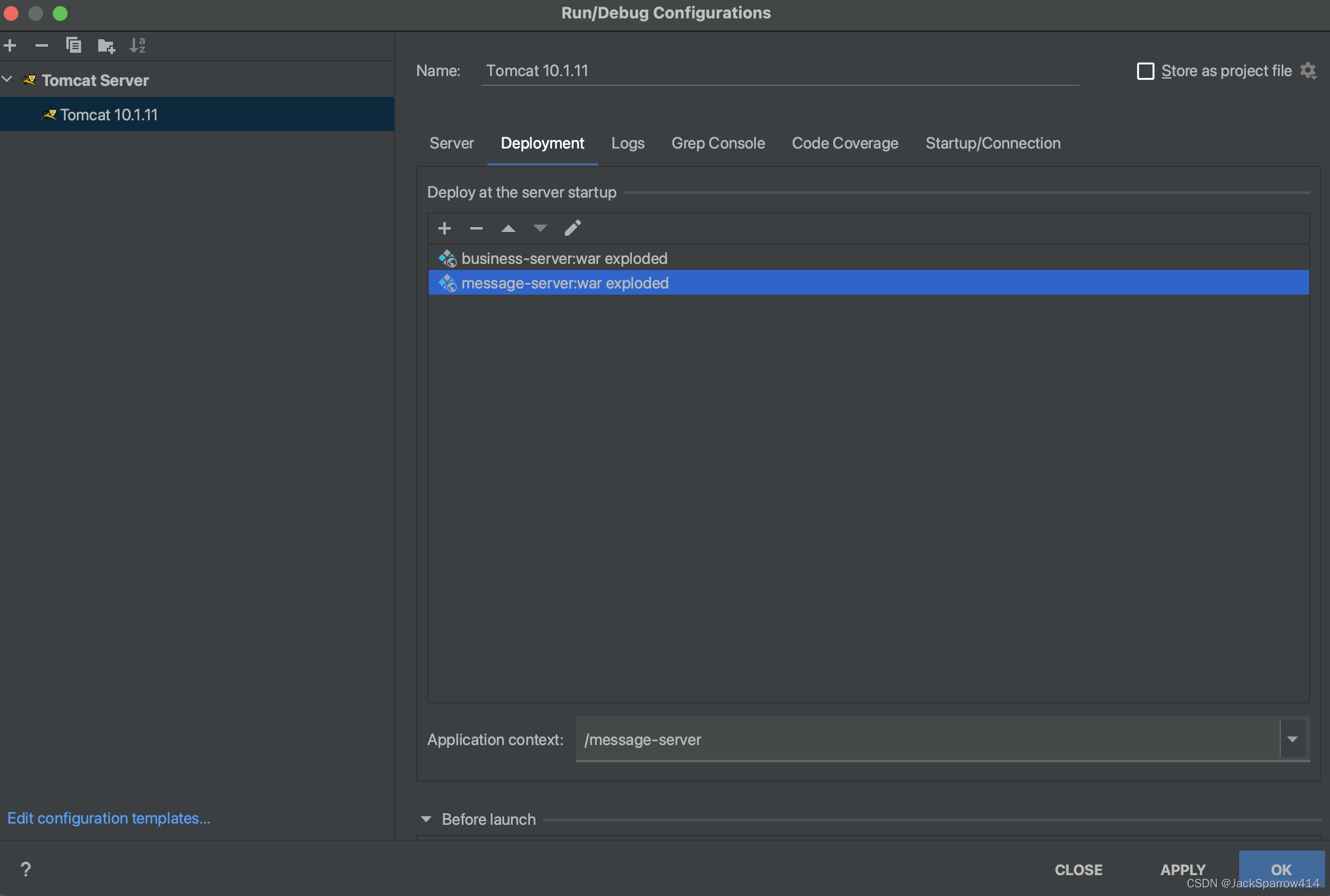
The normal producer and consumer flows are now covered. The next article focuses on reproducing and reprocessing messages after producer and consumer failures, and discusses Kafka rebalancing.