Table of contents
Open Table of contents
Article body
Background:
Database and table sharding alone sometimes cannot handle a high volume of queries effectively. Leaving caching aside and considering only the database layer, we can set up primary-replica replication. Writes go to the primary, and asynchronous or semisynchronous replication keeps data consistent between the primary and replicas. All reads go to the primary’s N replicas, with load balancing distributing queries evenly among them.
With limited hardware resources, I simulate primary-replica read/write splitting by running multiple MySQL instances on one machine and configuring replication between them. If you are unfamiliar with the setup, see Deploying Multiple MySQL Instances on One Machine and Setting Up Primary-Replica Replication.
The previous article already set up two primaries, on ports 3306 and 3310. Add two replicas, on ports 3307 and 3308, for the 3306 instance.
Read/write splitting in ShardingJDBC also requires only a simple configuration.
- Modify the configuration file:
server:
  port: 8999
spring:
  application:
    name: mybatis-demo
  shardingsphere:
    datasource:
      # Data source aliases
      names: ds0,ds1,ds0-slave0,ds0-slave1
      ds0:
        type: com.alibaba.druid.pool.DruidDataSource
        driverClassName: com.mysql.jdbc.Driver
        url: jdbc:mysql://localhost:3306/dhb?serverTimezone=UTC
        password: 12345
        username: root
      ds0-slave0:
        type: com.alibaba.druid.pool.DruidDataSource
        driverClassName: com.mysql.jdbc.Driver
        url: jdbc:mysql://localhost:3307/dhb?serverTimezone=UTC
        password: 12345
        username: root
      ds0-slave1:
        type: com.alibaba.druid.pool.DruidDataSource
        driverClassName: com.mysql.jdbc.Driver
        url: jdbc:mysql://localhost:3308/dhb?serverTimezone=UTC
        password: 12345
        username: root
      ds1:
        type: com.alibaba.druid.pool.DruidDataSource
        driverClassName: com.mysql.jdbc.Driver
        url: jdbc:mysql://localhost:3310/dhb?serverTimezone=UTC
        password: 12345
        username: root
    sharding:
      # Default database-sharding strategy
      default-database-strategy:
        inline:
          sharding-column: id
          algorithm-expression: ds$->{id % 2}
      # Default table-sharding strategy
      default-table-strategy:
        inline:
          sharding-column: age
          algorithm-expression: user_$->{age % 2}
      # Data nodes
      tables:
        user:
          actual-data-nodes: ds$->{0..1}.user_$->{0..1}
      # Default database
      default-data-source-name: ds0
      master-slave-rules:
        ds0:
          master-data-source-name: ds0
          slave-data-source-names: ds0-slave0,ds0-slave1
          #Replica load-balancing algorithm type; options: ROUND_ROBIN and RANDOM.
          #Ignore this option if `load-balance-algorithm-class-name` is present
          load-balance-algorithm-type: ROUND_ROBIN
          #Replica load-balancing algorithm class. It must implement MasterSlaveLoadBalanceAlgorithm and provide a no-argument constructor
          #load-balance-algorithm-class-name=
    props:
      # Print SQL
      sql.show: true
      check:
        table:
          metadata:
          # Whether to check sharded table metadata consistency at startup
          enabled: true
  aop:
    proxy-target-class: false
    # Add this option because the Druid data source conflicts with the default data source
  main:
    allow-bean-definition-overriding: true

mybatis-plus:
  configuration:
    map-underscore-to-camel-case: true
    log-impl: org.apache.ibatis.logging.stdout.StdOutImpl
  global-config:
    db-config:
      logic-not-delete-value: 0
      logic-delete-value: 1
  mapper-locations: classpath:/mapper/*.xml
  typeAliasesPackage: com.example.mybatis.demomybatis.entity
Read/write splitting is configured primarily under master-salve-rules. The replica load-balancing strategies for reads are ROUND_ROBIN and RANDOM. If neither meets your needs, you can implement a custom algorithm using the MasterSlaveLoadBalanceAlogorithm interface. For more details, see the official read/write splitting documentation.
- Test:
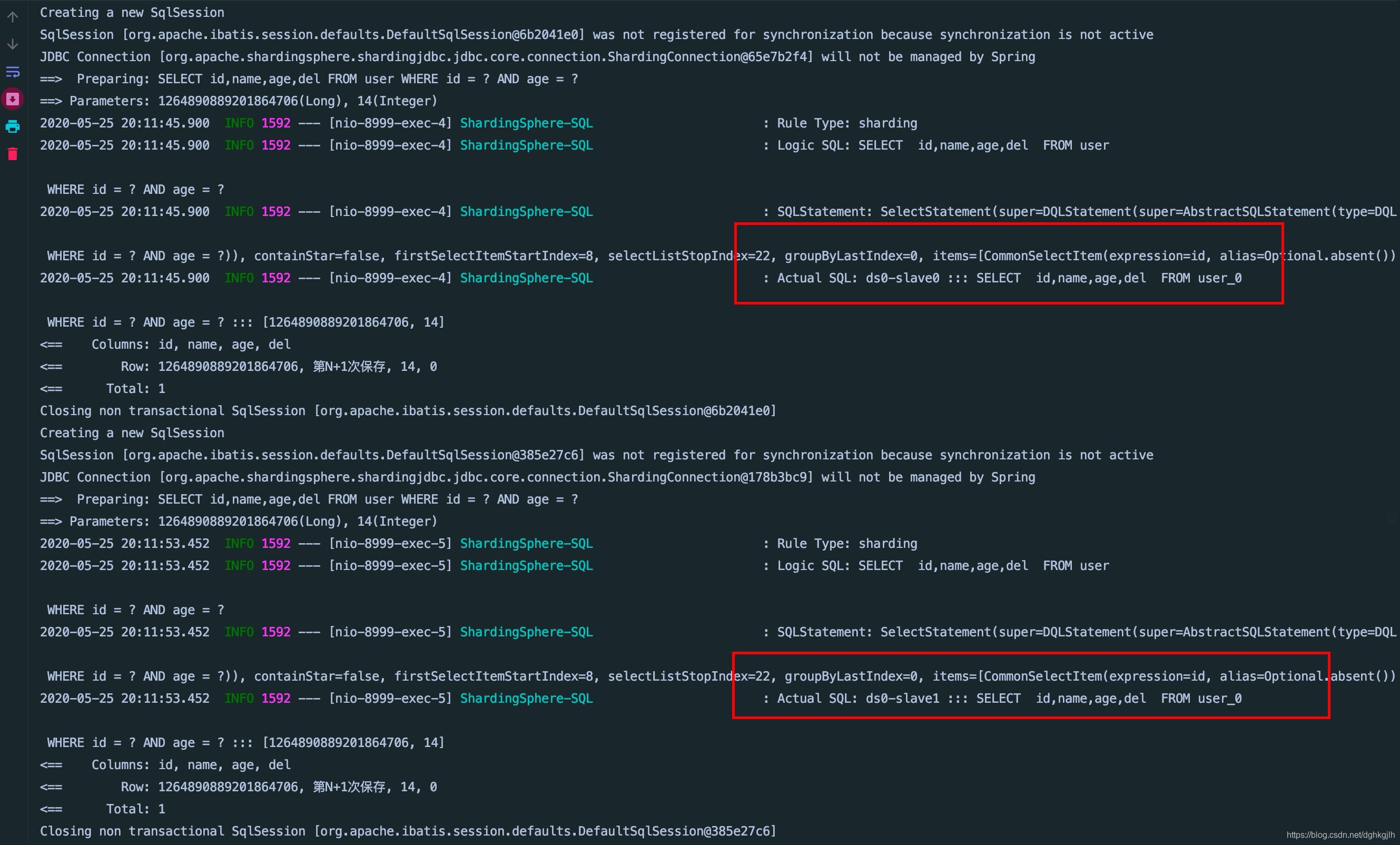
Run four queries. As the image below shows, ShardingJDBC alternates between the two replicas on each query:
Overall, whether we use data sharding or read/write splitting, ShardingSphere hides the underlying details and lets us work as though we were accessing a single table. This is very convenient.
An Unresolved Question:
With read/write splitting, the first query is always slow, and I do not yet know why. If you know the reason, please leave a comment. Thank you!
The sample code is on GitHub. Feel free to use it: sample repository.