Table of contents
Open Table of contents
Article body
Background:
Sensitive personal information, such as passwords, identity card numbers, and home addresses, needs to be encrypted before being stored in a database. This means that even database administrators see encrypted data after it is stored. This process is called data masking here.
Security frameworks such as Shiro and Spring Security offer encryption mechanisms. ShardingJDBC also provides built-in options: MD5 and AES.
For details, see the official data masking documentation.
Configuration:
Add the data masking configuration to the configuration from the previous two articles on sharding and read/write splitting.
server:
  port: 8999
spring:
  application:
    name: mybatis-demo
  shardingsphere:
    datasource:
      # Data source aliases
      names: ds0,ds1,ds0-slave0,ds0-slave1

      # Primary 1
      ds0:
        type: com.alibaba.druid.pool.DruidDataSource
        driverClassName: com.mysql.jdbc.Driver
        url: jdbc:mysql://localhost:3306/dhb?serverTimezone=UTC
        password: 12345
        username: root
      # Replica 1 of primary 1
      ds0-slave0:
        type: com.alibaba.druid.pool.DruidDataSource
        driverClassName: com.mysql.jdbc.Driver
        url: jdbc:mysql://localhost:3307/dhb?serverTimezone=UTC
        password: 12345
        username: root
      # Replica 2 of primary 1
      ds0-slave1:
        type: com.alibaba.druid.pool.DruidDataSource
        driverClassName: com.mysql.jdbc.Driver
        url: jdbc:mysql://localhost:3308/dhb?serverTimezone=UTC
        password: 12345
        username: root

      # Primary 2
      ds1:
        type: com.alibaba.druid.pool.DruidDataSource
        driverClassName: com.mysql.jdbc.Driver
        url: jdbc:mysql://localhost:3310/dhb?serverTimezone=UTC
        password: 12345
        username: root

    # Data sharding configuration---start
    sharding:
      # Default database sharding strategy
      default-database-strategy:
        inline:
          sharding-column: id
          algorithm-expression: ds$->{id % 2}
      # Default table sharding strategy
      default-table-strategy:
        inline:
          sharding-column: age
          algorithm-expression: user_$->{age % 2}
      # Data nodes
      tables:
        user:
          actual-data-nodes: ds$->{0..1}.user_$->{0..1}
      # Default database
      default-data-source-name: ds0
    # Data sharding configuration---end


      # Read/write splitting configuration---start
      master-slave-rules:
        ds0:
          master-data-source-name: ds0
          slave-data-source-names: ds0-slave0,ds0-slave1
          # Replica load-balancing algorithm; options: ROUND_ROBIN, RANDOM.
          # Ignored if `load-balance-algorithm-class-name` is present
          load-balance-algorithm-type: ROUND_ROBIN
          # Replica load-balancing class; must implement MasterSlaveLoadBalanceAlgorithm and provide a no-argument constructor
          #load-balance-algorithm-class-name=
      # Read/write splitting configuration---end


      # Data masking rules---start
      encrypt-rule:
          encryptors:
            encryptor_aes:
              # Encryption/decryption algorithm name; built-in options are MD5 and aes.
              # To customize, implement
              # org.apache.shardingsphere.encrypt.strategy.spi.Encryptor
              # or
              # org.apache.shardingsphere.encrypt.strategy.spi.QueryAssistedEncryptor
              # either of these two interfaces
              type: aes
              props:
                aes.key.value: 123456abc
          tables:
            # Database table corresponding to the sharding tables above
             user:
              columns:
                # Logical column used in SQL; both the entity property and encrypted database column are named name here
                name:
                  # Ciphertext column for storing encrypted data
                  cipherColumn: name
                  # Encryptor name
                  encryptor: encryptor_aes
      # Data masking rules---end

    props:
      # Print SQL
      sql.show: true
      check:
        table:
          metadata: true
          # Check sharded-table metadata consistency on startup
          enabled: true
      query:
         with:
           cipher:
             column: true

  aop:
    proxy-target-class: false
    # Added because the Druid data source conflicts with the default data source
  main:
    allow-bean-definition-overriding: true

mybatis-plus:
  configuration:
    map-underscore-to-camel-case: true
    log-impl: org.apache.ibatis.logging.stdout.StdOutImpl
  global-config:
    db-config:
      logic-not-delete-value: 0
      logic-delete-value: 1
  mapper-locations: classpath:/mapper/*.xml
  typeAliasesPackage: com.example.mybatis.demomybatis.entity
Testing:
- Insert a record
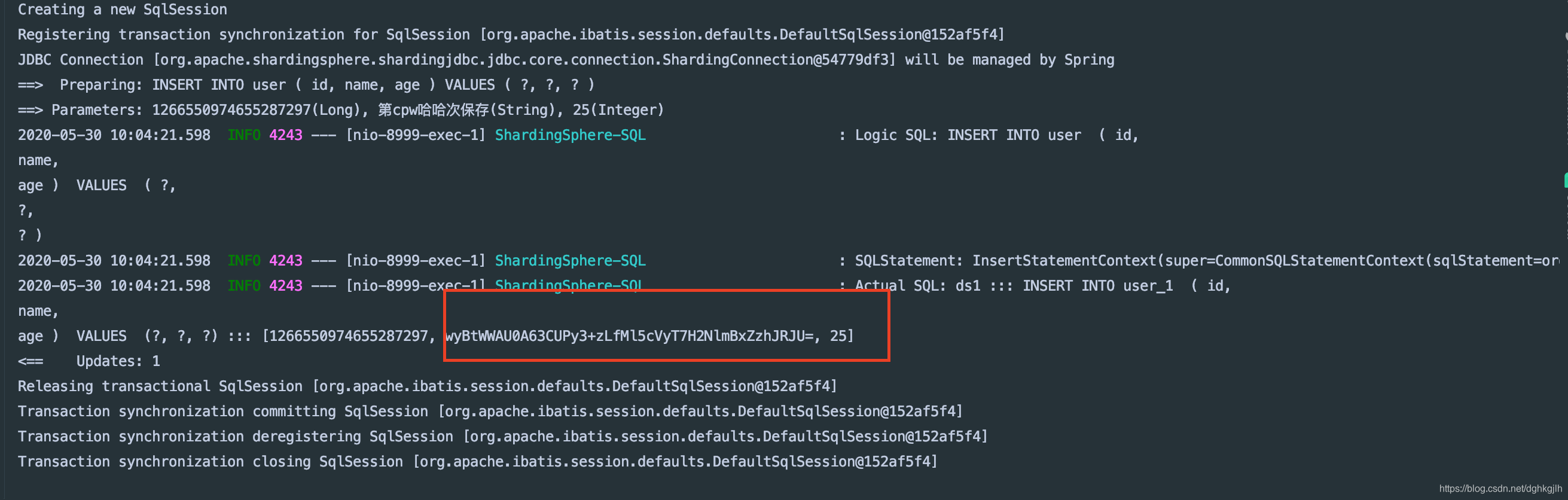
According to the earlier sharding rules, the record is routed to user_1 in ds1 (the instance on port 3310), and the name field is encrypted before insertion.
- Query the record just inserted
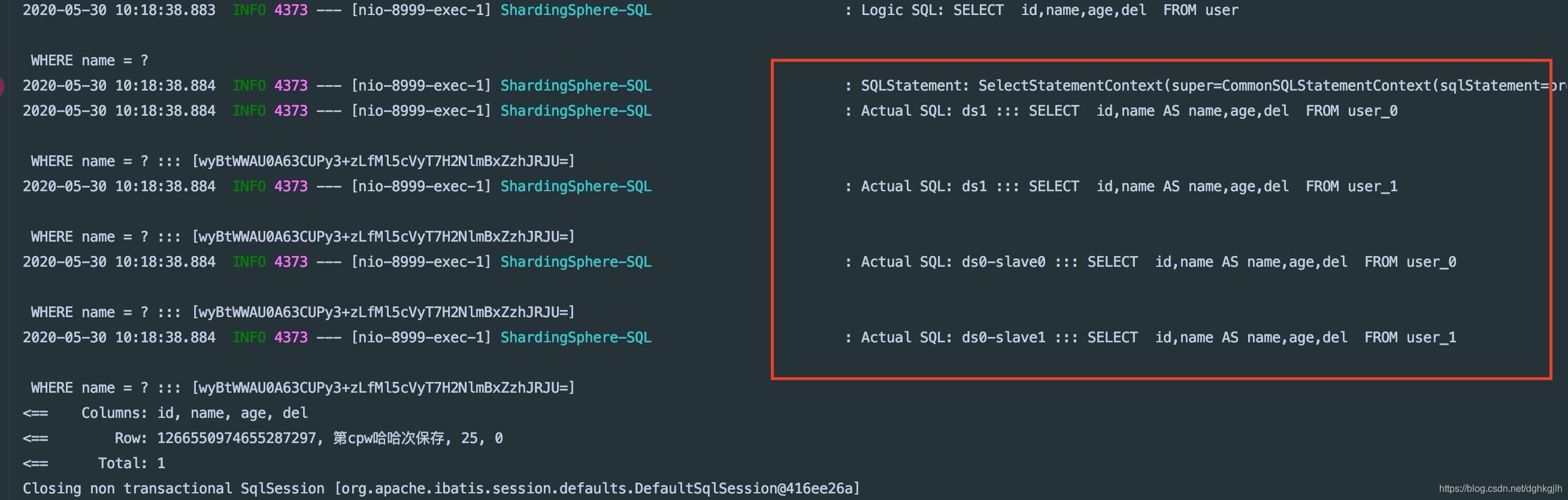
The returned name is decrypted. This completes the data masking setup.
Question 1: Why did this query access four tables?
Answer: the earlier configuration uses id for database sharding and age for table sharding. The query uses name, which is not configured as a sharding key. It therefore performs full routing and queries all tables. Do not write queries this way in production.
Question 2: If this is full routing, have we not configured eight tables in total, with user_0 and user_1 in each database? Why were only four queried?
Answer: in the earlier read/write splitting configuration, ds0-slave0 and ds0-slave1 are replicas of ds. Reads are routed to replicas by default, so I expected two replicas plus one primary, or six tables, but the query accessed four. I am still unsure about this and have opened an issue on GitHub to see whether the maintainers can explain it.
All code and configuration from this article are on GitHub; feel free to use them. Repository
June 1 update:
The maintainers have replied. Full routing is defined in terms of shards. In a setup combining sharding with primary/replica replication, tables with the same name in the corresponding databases are treated as the same table.