Table of contents
Open Table of contents
Article body
Background:
In development, we often have a few large business tables: user tables, order tables, or other central application tables. Here, large means a huge volume of data. These tables may quickly grow to millions, tens of millions, or hundreds of millions of rows, and continue growing rapidly. A single table may no longer meet storage requirements, and queries can be slow even with sensible indexes. We then need database and table sharding.
For example:
Suppose the user table is growing rapidly. We can shard its database and tables, scaling out through multiple MySQL instances. Each instance has a user database, and each database contains N user tables named user_N (N=0,1,…). Their schemas are identical; only the table names differ.
Basic principles for database and table sharding:
I recommend keeping each table below 10 million rows.
Choosing the number of table shards:
N = (total rows expected over the next 3–5 years) / recommended rows per table (10 million).
N is the number of table shards in each database. I recommend allocating enough shards up front. Expanding because there are too few is troublesome, especially when the sharding key uses a hash algorithm.
Choosing the number of database shards:
Calculate from storage capacity: (storage needed over the next 3–5 years) / recommended storage per database (less than 300 GB).
I chose ShardingSphere because many earlier database middleware projects, such as Mycat and TDDL, were no longer maintained in my experience, whereas ShardingSphere remained active and graduated to an Apache top-level project this year. Meituan’s open-source Zebra has configuration that is too complicated compared with ShardingSphere.
If database middleware design interests you, read this Meituan article.
Database middleware has two proxy approaches: a client-side proxy (DataSource) and a server-side proxy (database proxy). The following descriptions are quoted from the Meituan article:
- Server-side proxy (proxying the database): a separately deployed proxy service manages multiple database instances. The application connects to it through an ordinary data source such as c3p0, Druid, or DBCP. All SQL is sent to the proxy, which operates on the underlying databases and returns results. Database/table sharding and read-write splitting are completely transparent to developers in this approach.
- Client-side proxy (proxying the data source): the application uses a special data source acting as a proxy, internally managing several ordinary data sources such as c3p0, Druid, or DBCP. Each ordinary data source connects to a different database. SQL produced by the application is processed by the data-source proxy, which performs operations such as SQL rewriting, delegates execution to the ordinary data sources, merges the results, and returns them. The proxy generally also implements JDBC APIs and can therefore integrate directly with ORM frameworks. Application code must be changed to use the proxy data source instead of a connection pool such as c3p0, Druid, or DBCP directly.
ShardingSphere-JDBC is a client-side data-source proxy.
ShardingSphere collectively calls database and table sharding data sharding.
- Add the dependency.
        <dependency>
            <groupId>org.apache.shardingsphere</groupId>
            <artifactId>sharding-jdbc-spring-boot-starter</artifactId>
            <version>4.1.0</version>
</dependency>- Configure it.
server:
  port: 8999
spring:
  application:
    name: mybatis-demo
  shardingsphere:
    datasource:
      # Database aliases
      names: ds0,ds1
      ds0:
        type: com.alibaba.druid.pool.DruidDataSource
        driverClassName: com.mysql.jdbc.Driver
        url: jdbc:mysql://localhost:3306/dhb?serverTimezone=UTC
        password: 12345
        username: root
      ds1:
        type: com.alibaba.druid.pool.DruidDataSource
        driverClassName: com.mysql.jdbc.Driver
        url: jdbc:mysql://localhost:3310/dhb?serverTimezone=UTC
        password: 12345
        username: root
    sharding:
      # Default database sharding strategy
      default-database-strategy:
        inline:
          sharding-column: id
          algorithm-expression: ds$->{id % 2}
      # Default table sharding strategy
      default-table-strategy:
        inline:
          sharding-column: age
          algorithm-expression: user_$->{age % 2}
      # Data nodes
      tables:
        user:
          actual-data-nodes: ds$->{0..1}.user_$->{0..1}
      # Default database
      default-data-source-name: ds0
    props:
      # Print SQL.
      sql.show: true
      check:
        table:
          metadata:
          # Whether to check table-shard metadata consistency at startup
          enabled: true
    # Add this setting because Druid conflicts with the default data source.
  main:
    allow-bean-definition-overriding: true
Configuration explanation:
There are two local MySQL instances, on 3306 and 3310. Each has a dhb database containing two user tables, user_0 and user_1:
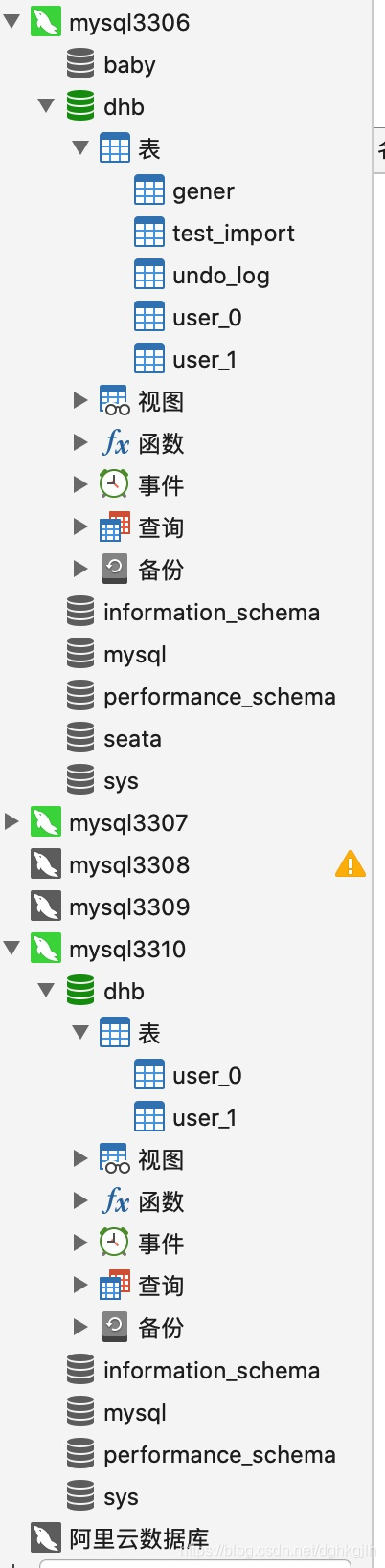
How the configuration works:
The database sharding strategy uses id % 2. A result of 0 selects ds0, the database in the 3306 instance; a result of 1 selects ds1 in the 3310 instance.
After selecting the database, which table is chosen? age % 2 selects user_0 for 0, or user_1 for 1.
For logical tables, actual tables, and data nodes, see the official documentation.
The configured strategy is inline-expression sharding. In a real application, you can implement the official interfaces to provide database and table sharding algorithms for your business. See sharding for the four interfaces: StandardShardingStrategy, ComplexShardingStrategy, and HintShardingStrategy.
For inline-expression syntax, see the official examples.
Important note:
If Alibaba’s Druid data source causes a data-source conflict at startup, use the final line of the configuration above.
- The entity class uses Lombok and MyBatis-Plus to simplify operations. The table name here is the logical table user, corresponding to four actual tables: ds0.user_0, ds0.user_1, ds1.user_0, and ds1.user_1.
@Data
@TableName(value = "user")
public class UserItem {
    @TableId
    private Long id;
    private String name;
    private Integer age;
    private Integer del;
}- Use it to insert a record.
The console prints the following SQL:
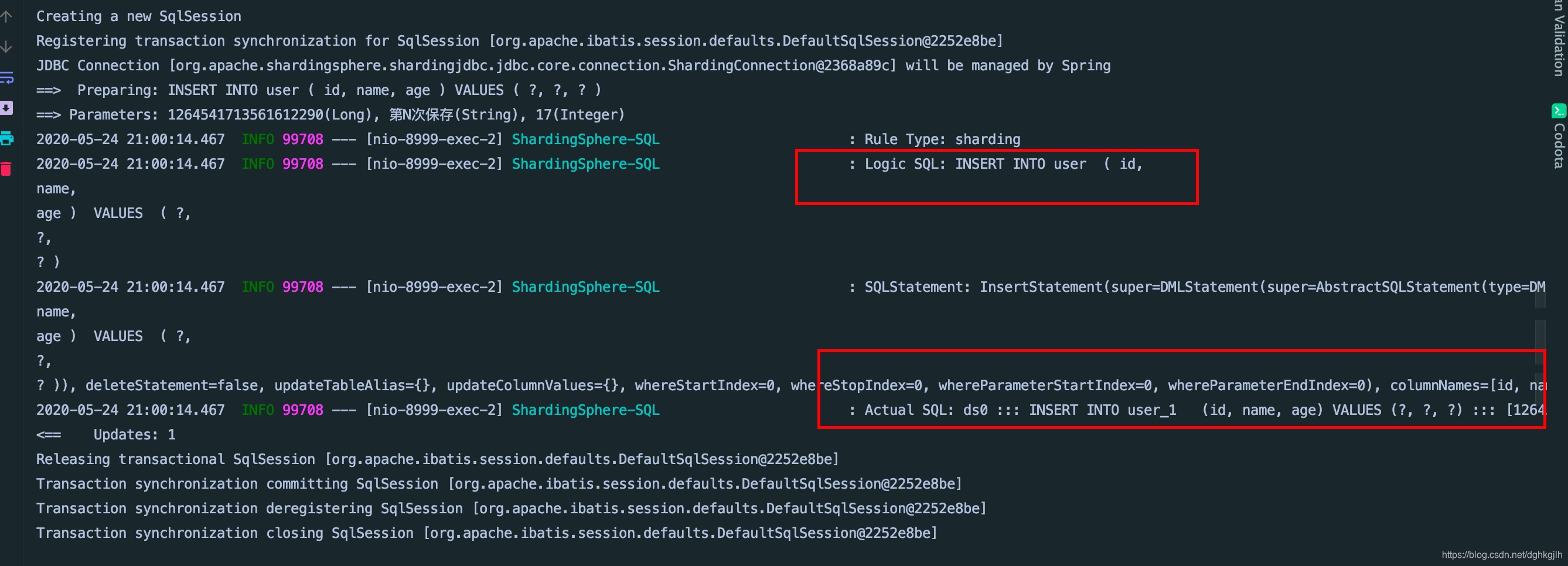
ShardingSphere-JDBC writes the data to user_1 in ds0, the 3306 instance, according to the configured database and table sharding strategies.
A query containing the sharding key can locate a particular table in a particular database. Without the sharding key, it performs full routing, querying all four destinations.
Based on the configured sharding strategy, ShardingSphere-JDBC performs SQL parsing => execution optimization => SQL routing => SQL rewriting => SQL execution => result merging. See the internal architecture.
This is only a small usage example. Real business scenarios are more complicated, including sharding parent-child tables and joining sharded with unsharded tables.