Table of contents
Open Table of contents
Introduction
When decoupling multiple systems with Kafka, the basic requirements at the design stage are similar; the business logic for consuming messages is usually what differs.
This article uses a business system and an email system as an example. When the business system needs to send an email, it neither sends it on its own server nor calls the email system through RPC. Instead, it sends an email request to Kafka as a message, and the email system consumes that message to send the email.
The Current System
Our current system has N servers running the same code through rolling deployments. Every server executes email-sending logic. Emails are sent asynchronously using a shared thread pool to reuse resources.
Why Decouple?
The classic response is:
It works already, so why change it? How much benefit will this investment of people and time ultimately bring? Is it really worth it? Are we using a message queue just for its own sake? And so on.
To answer, we need to understand which problems in the current system can affect email delivery.
- Although email delivery uses its own thread pool, N other business thread pools run on the same server. When a server has performance problems or becomes unstable, we take it offline and shut down Tomcat. Our current shutdown is abrupt: we simply kill the Tomcat process. If the email thread pool or its waiting queue contains many unsent emails, those tasks are lost.
- Besides the main system, we have N other systems that also need to send email. We do not want to maintain multiple copies of the same code.
- We need to integrate the email provider’s webhook functionality. With many outgoing emails, it generates many webhook requests to our system, and processing them consumes server resources. These requests are important, but should not destabilize the system or affect core business functionality.
Decoupling provides several benefits:
- The business system does not call the email system directly, so it does not put direct request pressure on it. This avoids instability in either system caused by large request/response volumes.
- Kafka performs very well and should be able to handle a high volume of writes from the business system. Of course, our daily data volume is nowhere near that of leading internet companies.
- The email system can consume messages at an appropriate pace. We can also tune its hardware, software, and JVM more precisely.
Where Is the Boundary Between the Email and Business Systems?
The main question is which responsibilities belong to each system, while balancing overall performance and load.
Consider notifying a customer by email after an order is completed. There are two approaches:
- The business system sends only orderId to Kafka. The email system queries the database by orderId, assembles the data, renders the template, and calls the email provider’s API.
- The business system assembles the data by orderId, serializes the data and template to a string, and sends it to Kafka. The email system receives and deserializes the string, renders the data with the template, and calls the provider’s API.
We chose the second approach because the first has these drawbacks:
- With only orderId, and no centralized Redis cache for Order-related beans, the email system must query the database once or several times to assemble the complete data. This increases database load.
- As more scenarios are integrated, each requires debugging. The email system must account for both maintainability across scenarios and code compatibility during rolling deployments.
The second approach offers these benefits:
- The email server defines a unified email format, independent of any business domain. Incoming messages only need to follow that format; the email system does not adapt separately to each scenario.
- Once received and deserialized, the message can be sent without database queries to assemble data, adding no database load.
- We make extensive use of the JVM-level cache Ehcache. For orders, most data beans needed for email come from the preceding purchase flow or related caches. They can be used directly without querying and assembling them again. The bean is converted to a Map when sent to Kafka, fully decoupling it from the business domain. The email system ultimately receives only a Map and does not depend on a specific business class.
Overall Design
- The user triggers email delivery with a request to the business system.
- The business system sends a message to Kafka asynchronously.
- The messaging system retrieves the message from Kafka and executes its consumption logic.
- The messaging system calls the email provider’s API to send the email.
- User actions such as opening the email or clicking links are reported to the provider.
- The provider sends those actions back to the messaging system through webhooks.
- The messaging system writes user actions to the database for product-team analysis.
- The business system also needs notification after its message is consumed by the email system.
- Ensure messages are not lost.
- Ensure messages are not consumed twice.
- Kafka high availability and stability are outside this article’s scope.
Sequence Diagram
The following sequence diagram was drawn with Mermaid.
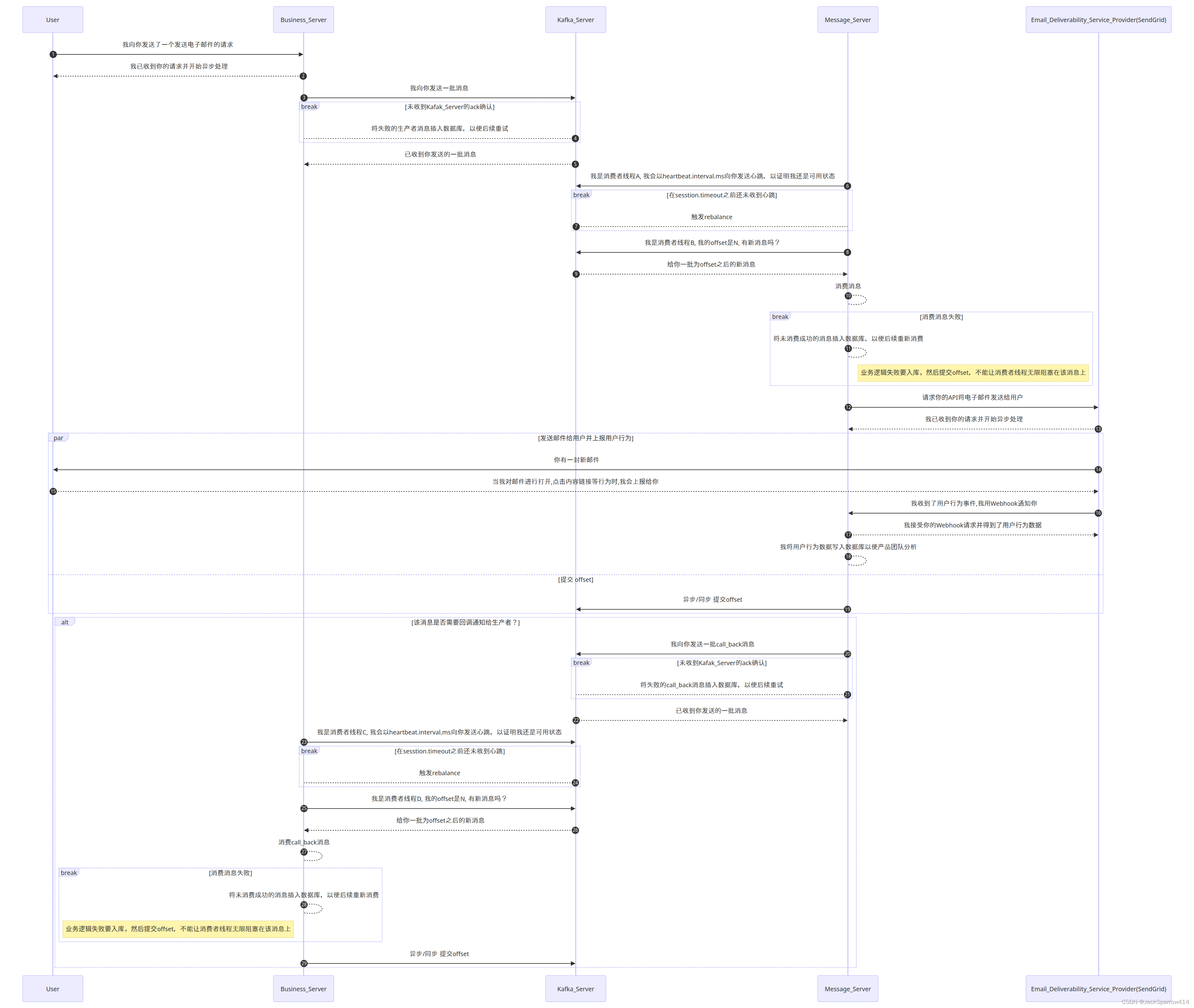 If it is hard to read, view the high-resolution Chinese diagram or high-resolution English diagram.
Explanation
- Steps 1–19 are the core flow.
- Steps 20–29 are optional. If there is a callback message, the callback is also performed.
Switching Between the Old and New Systems During Initial Rollout
After the new messaging server goes live, email delivery gradually moves to the email system. If Kafka or the email system fails, how can we fall back to the original logic and keep emails flowing?
The rough idea is to check before sending. If a message cannot be sent to Kafka, automatically switch email delivery to the old logic. Once Kafka or the email system recovers, update the state maintained in Redis to switch message sending back to the new logic.
Closing Thoughts
The sequence diagram captures the overall design. Later articles will explain implementation details. Interaction with the email provider and webhook details will not be covered further; explore them yourself if needed. The next post focuses on the business-system producer implementation.
References
- Recommended reading: Contentsquare engineering blog: Building a reliable notification system