Table of contents
Open Table of contents
Article body
In a microservice application—for example, one using Spring Cloud—services can call one another through OpenFeign.
Suppose there are two microservices, A and B. Method a is transactional in A, and method b is transactional in B. A business method businessA in A needs to call both a and b to complete its workflow.
The call order is b first, then a. Method b completes normally, commits its transaction, and saves its changes to the database. If an exception occurs while a executes, a rolls back normally because of the exception. The business workflow has now failed, but b’s transaction has already committed and cannot roll back.
This is a transaction problem encountered in microservices.
Seata can solve this problem. See the official documentation.
-
Download seata-server from the 1.1.0 release page. There are four options under Assets; choose seata-server-1.1.0.zip.
-
Extract the download and customize the configuration in conf. Open file.conf, change mode to db, and configure the account, password, and other database settings in the db section below.
## transaction log store, only used in seata-server
store {
  ## store mode: file、db
  mode = "db"

  ## file store property
  file {
    ## store location dir
    dir = "sessionStore"
    # branch session size , if exceeded first try compress lockkey, still exceeded throws exceptions
    maxBranchSessionSize = 16384
    # globe session size , if exceeded throws exceptions
    maxGlobalSessionSize = 512
    # file buffer size , if exceeded allocate new buffer
    fileWriteBufferCacheSize = 16384
    # when recover batch read size
    sessionReloadReadSize = 100
    # async, sync
    flushDiskMode = async
  }

  ## database store property
  db {
    ## the implement of javax.sql.DataSource, such as DruidDataSource(druid)/BasicDataSource(dbcp) etc.
    datasource = "dbcp"
    ## mysql/oracle/h2/oceanbase etc.
    dbType = "mysql"
    driverClassName = "com.mysql.jdbc.Driver"
## Create a seata database if it does not already exist.
    url = "jdbc:mysql://127.0.0.1:3306/seata?useUnicode=true&characterEncoding=UTF-8"
    user = "root"
    password = "12345"
    minConn = 1
    maxConn = 10
## After creating the database, create the three tables below.
    globalTable = "global_table"
    branchTable = "branch_table"
    lockTable = "lock_table"
    queryLimit = 100
  }
}
SQL for creating the three tables.
-
Save file.conf and open register.conf. Set type to Spring Cloud’s eureka. In the eureka section below, configure the Eureka registry address and set application=“seata-server” (the default is default), then save and exit.
-
Enter the bin folder of the extracted seata-server and start it. On macOS, run:
seata-server.sh -h 127.0.0.1 -p 9091 -m db -n 1-h: the IP address registered with the registry (it must match the registry’s IP address to register successfully; locally, this is 127.0.0.1).
-p: the seata-server port.
-m: the storage mode for global transaction session information: file or db. Startup arguments take precedence.
-n: the server node. When running multiple servers, distinguish their nodes to generate transactionIds in different ranges and avoid collisions.
- After startup, create microservices A and B. In addition to their basic configuration, add the Seata and spring-cloud-alibaba-seata dependencies (the latter handles passing the XID between microservices). I recommend Seata 1.1.0: this version automatically proxies the data source, so you do not need to create the proxy yourself. It also supports YAML configuration. Older versions required file.conf and register.conf in each microservice; now the settings can be configured directly.
            <dependency>
                <groupId>com.alibaba.cloud</groupId>
                <artifactId>spring-cloud-alibaba-seata</artifactId>
                <version>2.2.0.RELEASE</version>
                <exclusions>
                    <exclusion>
                        <artifactId>seata-spring-boot-starter</artifactId>
                        <groupId>io.seata</groupId>
                    </exclusion>
                </exclusions>
            </dependency>

            <!-- Alibaba distributed transactions -->
            <dependency>
                <groupId>io.seata</groupId>
                <artifactId>seata-spring-boot-starter</artifactId>
                <version>1.1.0</version>
</dependency>- Configure both microservices. Here is service A as an example:
server:
  port: 8084
  servlet:
    context-path: /clientTwo
  tomcat:
    connection-timeout: 5000
spring:
  main:
    allow-bean-definition-overriding: true
  application:
    name: demo-clientTwo
  datasource:
      url: jdbc:mysql://localhost:3306/dhb?useUnicode=true&characterEncoding=UTF-8
      username: root
      password: 12345
# Configure the transaction group here.
  cloud:
    alibaba:
      seata:
        tx-service-group: my_test_tx_group
eureka:
  instance:
    instance-id: ${spring.application.name}:${vcap.application.instance_id:${spring.application.instance_id:${random.value}}}
    lease-renewal-interval-in-seconds: 30
    lease-expiration-duration-in-seconds: 90
  client:
    service-url:
      defaultZone: http://localhost:8081/eureka/
    registry-fetch-interval-seconds: 15
# Configure the timeout for calls between microservices here.
feign:
  client:
    config:
      default:
        connect-timeout: 4000
        read-timeout: 4000
# Alibaba distributed transaction configuration
seata:
  service:
    vgroup-mapping:
# my_test_tx_group is the group name configured above.
# seata-server corresponds to application in register.conf.
      my_test_tx_group: seata-server
    grouplist:
# This corresponds to seata-server above; the value is the Seata service's IP address and port.
      seata-server: 192.168.0.105:9091
    enable-degrade: false
    disable-global-transaction: false
mybatis-plus:
mapper-locations: classpath*:/mapper/*.xml-
Create an undo_log table in the database of every microservice participating in the distributed transaction. See the undo_log creation SQL. undo_log records the information needed for transaction rollback. For more details, see the official explanation of AT mode, two-phase commit, and the role of undo_log.
-
Add @GlobalTransactional to businessA in microservice A.
-
Test it: call transactional method b in microservice B through A. After b finishes and control returns to A, throw an exception manually and check whether b’s transaction rolled back.
@GlobalTransactional(rollbackFor = Exception.class)
    @PostMapping(value = "clientTwoSave")
    public Integer save(@RequestBody User user){

        com.example.clientone.democlientone.entity.User one = new com.example.clientone.democlientone.entity.User();
        BeanUtils.copyProperties(user,one);
        System.out.println(RootContext.getXID());
        one.setId(4432);
        testTransactionService.clientOneSaveUser(one);
        // Throw an exception manually.
        int a = 1/0;
        userService.save(user);
        return user.getId();
    }
Check the user table for microservice B: no new record remains.
- After b finishes and returns to A, pause in the debugger before throwing the exception and inspect the user and undo_log tables.
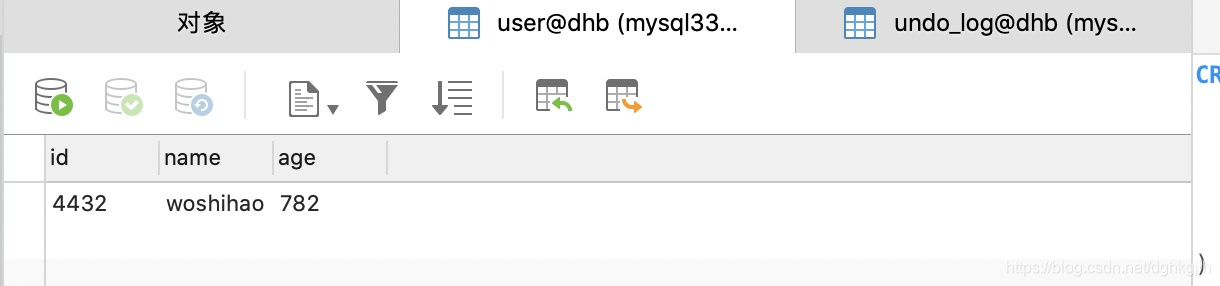

You can see that data was indeed inserted after b committed normally, but it was restored to its original state when the exception occurred. The console for microservice B shows:
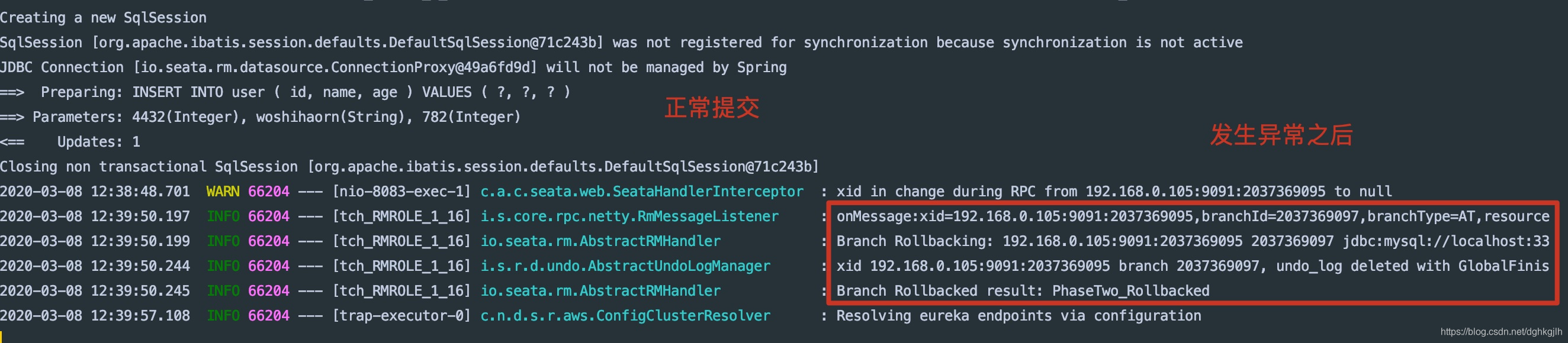 The branchId and xid match the data in undo_log.
This is the process for controlling distributed transactions with Seata’s AT mode.