Table of contents
Open Table of contents
Article body
We previously set up multiple local MySQL instances. We can use them for primary-replica replication.
Three main threads are involved: the primary’s binlog dump thread, the replica I/O thread, and the replica SQL thread.
Use the instance on port 3306 as the primary (master), and those on 3307 and 3308 as replicas (slaves).
The basic process is:
-
Start the primary and configure a user with replication permissions.
-
Start the replica I/O thread and connect to the primary.
-
When the primary performs relevant operations, it records them in the binary log, binlog. The binlog dump thread sends them to the replica I/O thread, which writes the contents into the relay log. Note: the primary has one binlog dump thread per replica, so multiple replicas require multiple dump threads.
-
The replica SQL thread reads statements from the relay log and executes them.
-
After execution, the replica deletes relay logs to avoid excessive disk usage.
Additional Note:
After recovering from a crash, how does a replica know where replication stopped?
By default, it creates two files to save replication progress: master.info and relay-log.info.
For the complete setup, see the official MySQL replication documentation, which explains the steps in detail.
The binlog supports three formats:
binlog_format=Statement records the executed SQL statements, such as update user set user.created > ‘2020-01-01’.
binlog_format=Row records individual row data. If the condition above matches 100 rows, all 100 rows are recorded in detail in the binlog. The resulting log is naturally much larger than with the first format.
binlog_format=Mixed combines both formats.
- Under [mysqld] in the primary configuration, enable log-bin and assign a server-id. The official documented range is 1 to
-1.
[mysqld]
server-id = 1
port=3306
socket=/tmp/mysql.sock1
key_buffer_size=16M
max_allowed_packet=8M
datadir=/usr/local/mysql3306/data
basedir=/usr/local/mysql3306
pid-file = /usr/local/mysql3306/data/3306.pid
# Enable MySQL logging
log-bin = mysql-bin
innodb_flush_log_at_trx_commit=1
# On every transaction commit, MySQL calls the filesystem to flush binlog to disk. The default is 0 (disabled). Enabling it is not recommended here because frequent disk I/O under many concurrent commits affects performance.
sync_binlog=0
Log in to the primary and check whether log-bin is enabled; ON means enabled.
show variables like 'log_bin';Create a dedicated replication user on the primary. repl is a custom username; localhost is used here because the replicas are local. For a remote replica, use its IP. 12345 is the password.
Tip: MySQL 8 defaults to the caching_sha2_password authentication policy. Unless SSL connections are configured, the replica still cannot connect, as shown below:
select user,host,plugin,authentication_string from user \G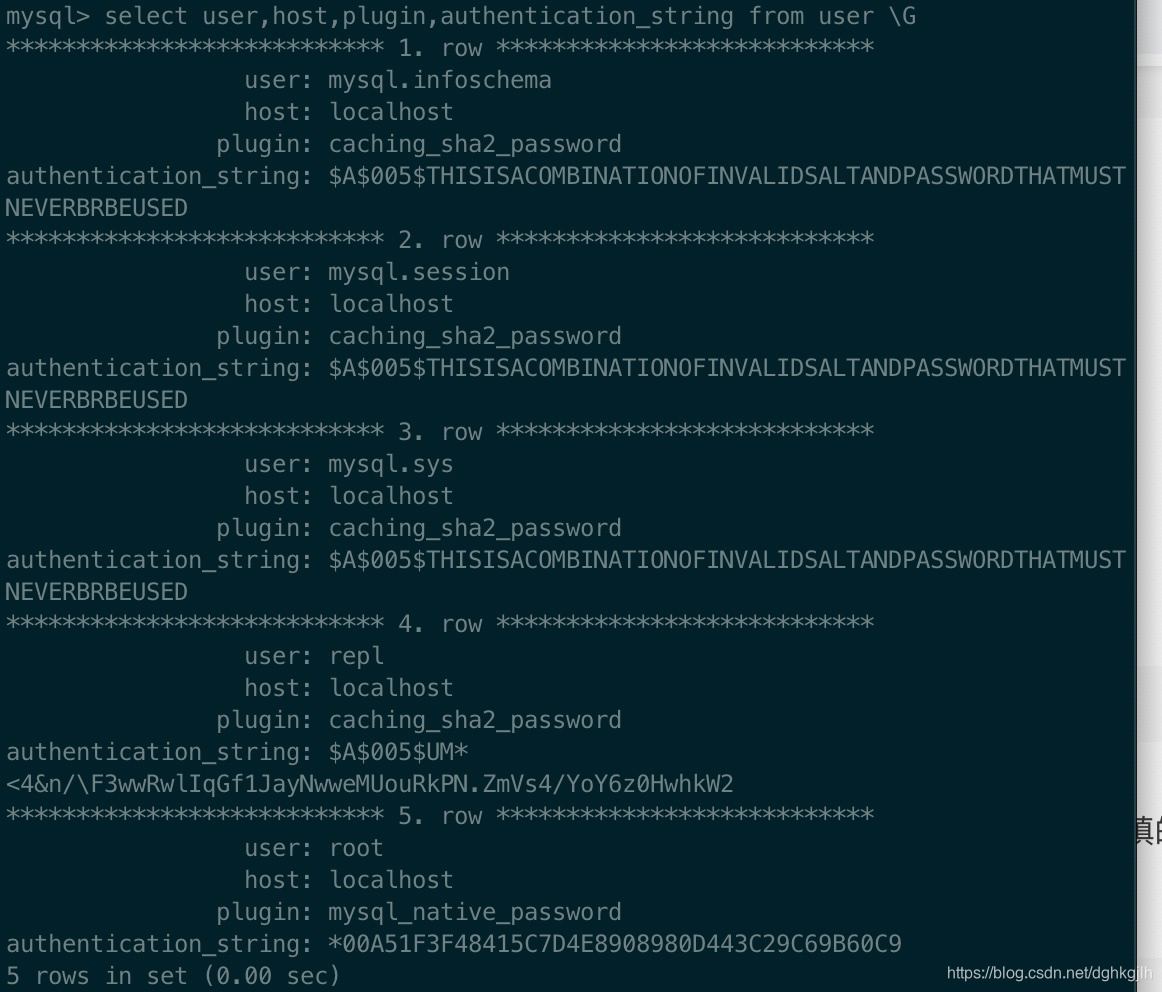
You can change the MySQL 8 policy to mysql_native_password.
create user 'repl'@'localhost' identified with 'mysql_native_password' by '12345';Grant permissions:
grant replication slave on *.* to 'repl'@'localhost';Restart the primary and check whether the user and grants were created successfully.
select user,host from mysql.user;show grants for 'repl'@'localhost';Successful grants look like this:
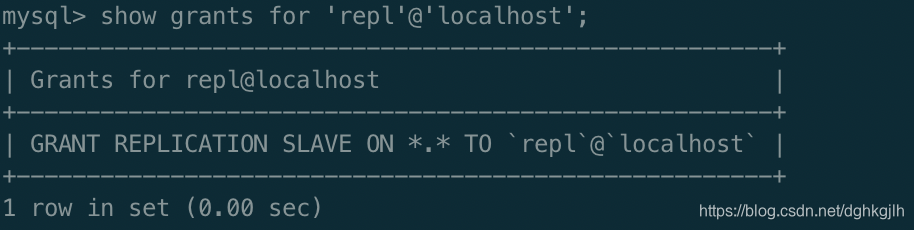
Configure server-id on both replicas; every instance must have a different ID.
Start the instances on 3307 and 3308, then connect to a replica from the command line. The following uses 3308.
- Connect to 3308. Because several instances run on one machine, specify its socket with -S. Configure the socket path in my.cnf.
mysql -uroot -p -S /tmp/mysql.sock3- Configure the replica:
change master to master_host='localhost',master_user='repl',master_password='12345',master_log_file='mysql-bin.000002',master_log_pos=2123;What if you do not know the final two values, master_log_file and master_pos?
Check them on the primary:
show master status;The output is:

Note that the final argument is not enclosed in single quotes.
- After configuration, start the replica.
start slave;- Inspect its status. Note: do not put ; at the end of this SQL statement. If you do, ERROR:No query specified appears at the bottom.
show processlist \G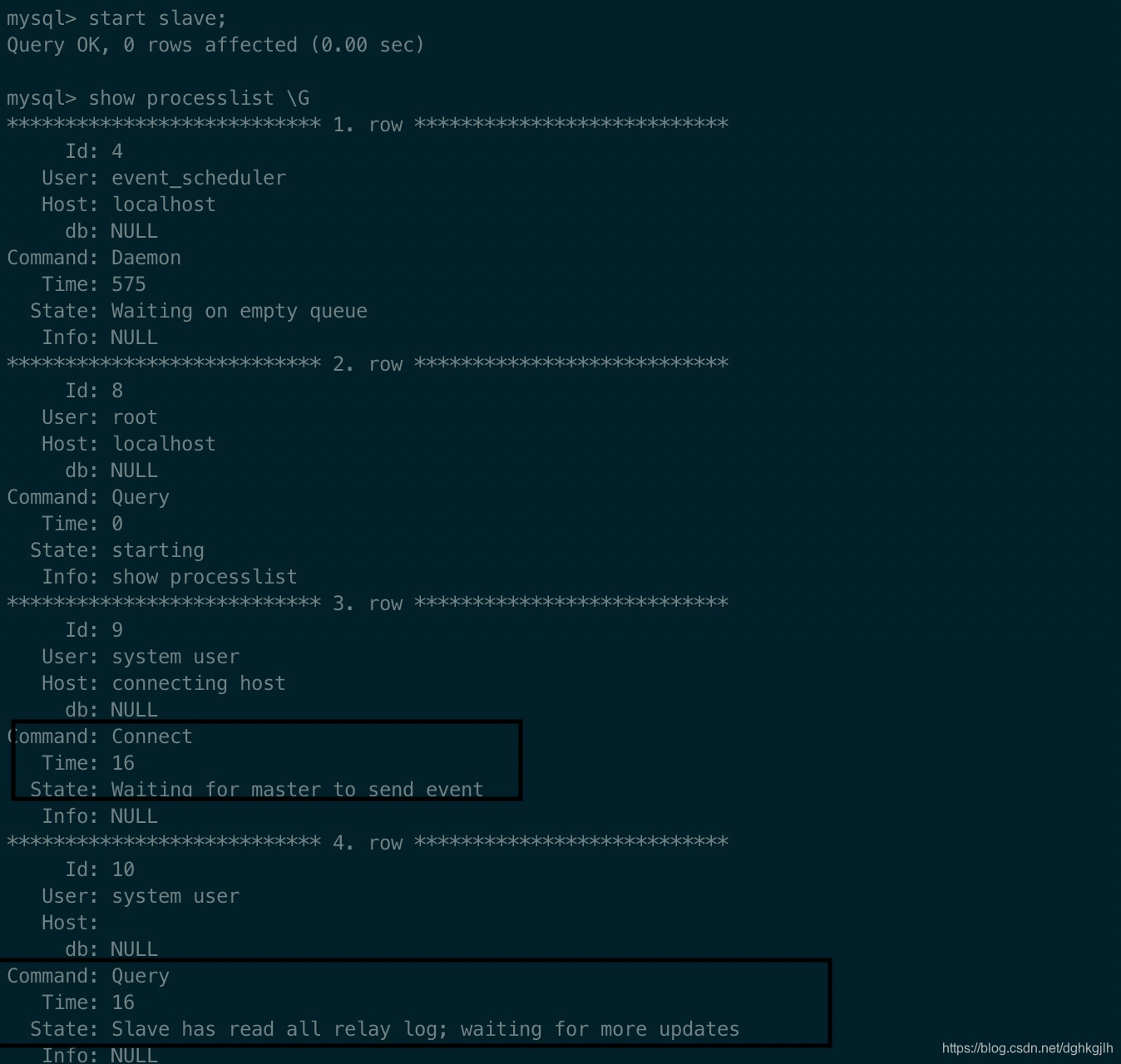
- Insert a record on the primary to test whether the replica receives it.
Insert a record on the primary and inspect its data:
use dhb(my database);
insert into user (id,name,age) values (111,'测试slave',112);
select * from user;
Inspect the replica on 3308:
use dhb;
select * from user;
If the record appears, synchronization succeeded. If not, how can we diagnose the problem?
Run this on the replica. Again, there is no ; after \G:
show slave status \GFocus on Last_IO_Error (usually the specific error message), Master_Log_File, and Read_Master_Log_Pos. The latter two should match the primary.
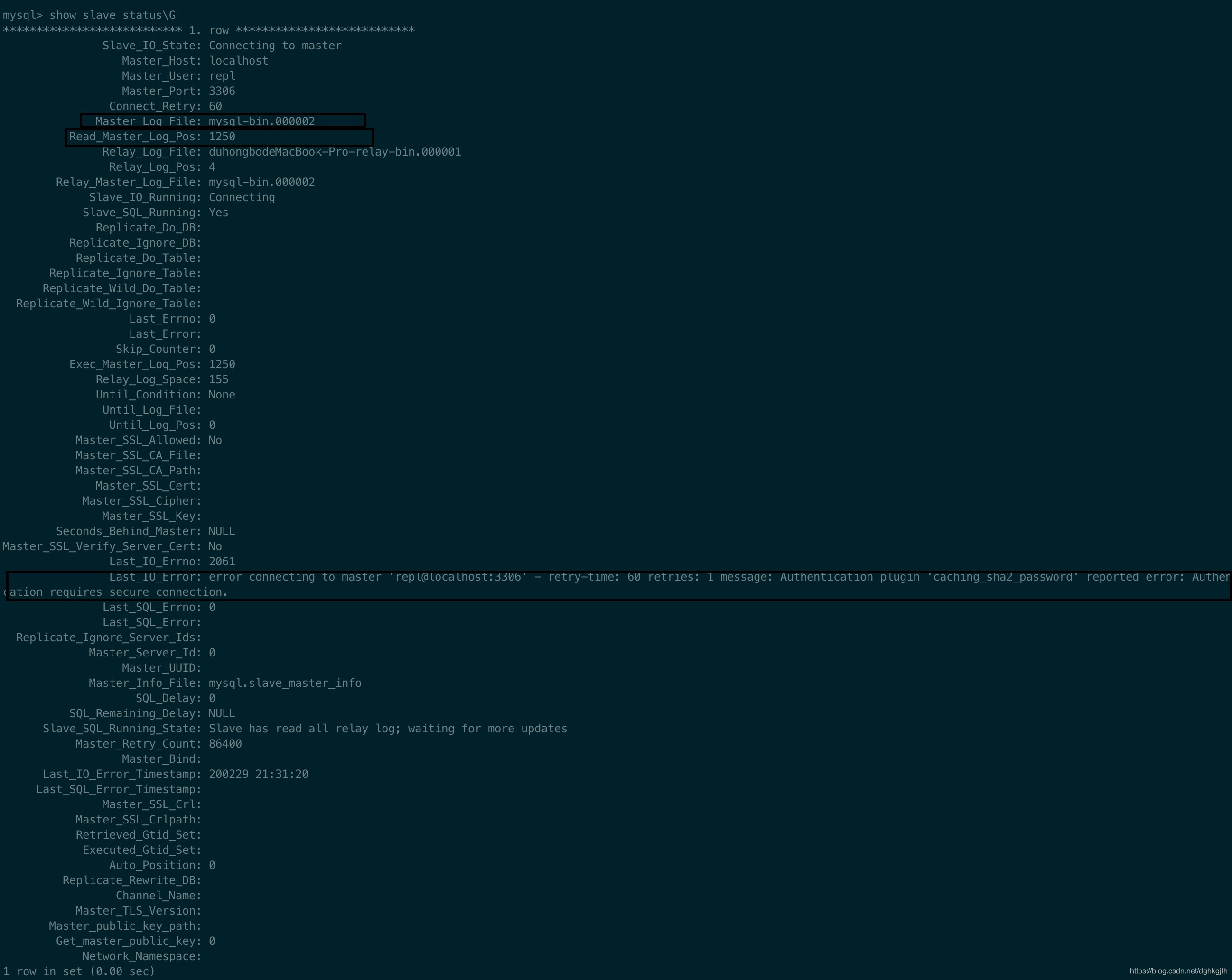
Here, Last_IO_Error suggests that my master_password is wrong, or that SSL is not enabled on the primary; the solution is described above. Change the replica’s master_password. To change an individual parameter:
stop slave;
change master to master_password(specify only the parameter to change) ='12345';
start slave;
To replicate only specific databases or tables, set the options in the replica’s my.cnf:
replicate-ignore-table = dhb.user
replicate-ignore-db = otherdb
replicate-do-db = dhb
replicate-do-table = dhb.gener
All insert, update, delete, create-table, alter-table, and drop-table operations on the primary are synchronized to replicas.
Common Problems:
If a record is deleted on the replica and then updated on the primary, the update fails on the replica.
A subsequent insert on the primary is not replicated either, as shown below:

This happens because:
When executing binlog SQL fails on the replica, for example due to a missing row or primary-key conflict, replication stops and waits for user intervention.
Handling: this option is intended for a replica used only to serve queries and reduce load, rather than as the primary’s backup. I strongly advise against it when the replica is a backup database.
# Use the following option to skip errors and continue. all means all errors; you can also configure a list of err_code,err_code2,...
slave-skip-errors = all
To end the replication relationship completely:
1. Run on the replica:
stop slave;
reset slave all;
This clears the relationship between the replica and primary.
2. If the primary also no longer maintains replication, run on the primary:
reset master;
For other options such as master-connect-retry and log-slave-updates, consult the official documentation or MySQL books.
Replication Modes:
Asynchronous replication: the process above is asynchronous. The primary reports success immediately after an insert, update, or delete. At that point, the replica may not have updated its data, for example because:
-
The primary’s operating system has not yet flushed the contents to the binlog on disk, or the disk failed during flushing and the binlog did not receive the contents.
-
A slow network causes the I/O thread to read the binlog slowly.
Either can briefly leave the primary and replica inconsistent.
Semisynchronous replication addresses these situations. After an update succeeds on the primary, it waits until at least one replica I/O thread receives the binlog and writes it successfully to the relay log before reporting success. If delivery to a replica takes too long, the primary waits for the configured timeout and then switches to asynchronous mode. rpl_semi_sync_master_timeout specifies that timeout in milliseconds. With a fast, stable network between primary and replica, data is updated on the replica more promptly.
Questions to Consider:
How do we ensure high availability of MySQL instances in a primary-replica setup?
An open-source option is MHA, Master High Availability. If the primary fails, MHA quickly promotes a replica to preserve availability.
How can we handle binlog transmission between the primary and replicas?
Alibaba’s open-source cannal is available.
Further Topics:
Common replication topologies:
-
One primary with multiple replicas.
-
Cascading replication. With many replicas, the primary creates a binlog dump thread for each, while also handling heavy writes. This creates substantial load. Use a topology such as master1 -> master2 -> slave1, slave2, … slaveN. The first primary sends data only to master2, so it has one dump thread. master2 then forwards data to the replicas. Two replication stages make this somewhat less efficient. Since master2 serves only as a relay rather than handling application reads and writes, use the BLACKHOLE table engine on it. See the Chinese book MySQL Explained for details.
-
Dual-primary replication; consult relevant books if interested.