Table of contents
Open Table of contents
How ShardingSphere ShardingJDBC Works
This article uses ShardingJDBC 4.1.1.
Traditional JDBC Usage
Approach 1: DriverManager
Class.forName("com.mysql.cj.jdbc.Driver");
Connection connection = DriverManager.getConnection(url, user, password);
PreparedStatement preparedStatement = connection.prepareStatement("insert into t_user (id, name) values (?, ?)");
preparedStatement.setInt(1, 12);
preparedStatement.setString(2, "this is paramter");
preparedStatement.executeUpdate();
// For queries, also close ResultSet
// resultSet.close();
preparedStatement.close();
connection.close();
Approach 2: DataSource
DruidDataSource datasource = new DruidDataSource();
dataSource.setDriverClassName(driver);
dataSource.setUrl(url);
dataSource.setUsername(user);
dataSource.setPassword(password);
Connection connection = dataSource.getConnection();
PreparedStatement preparedStatement = connection.prepareStatement("select * from t_user");
ResultSet resultSet = preparedStatement.executeQuery();
while(resultSet.next()) {
   int id = resultSet.getInt(1);
   int gener = resultSet.getInt(2)
}
resultSet.close();
preparedStatement.close();
connection.close();
The second approach is now generally used: a connection pool manages the data source, reusing connections to save resources. Both approaches share the same core steps:
- Load the driver.
- Obtain a Connection.
- Obtain a Statement or PreparedStatement.
- Bind SQL values: PreparedStatement.setXXX(paramterIndex, value).
- Execute SQL: PreparedStatement.executeXXX().
- Obtain the ResultSet.
- Close the resources in order: XXX.close().
The ShardingJDBC Workflow
-
At startup, load all data-source configurations, such as DBCP, Druid, and C3P0, into a Map and assign it to the appropriate data source: sharding, primary-replica, or shadow. This is a logical data source. Why logical? We will see later.
Detailed flow:
SpringBootConfiguration implements EnvironmentAware, generally used to read configuration properties, and its setEnvironment(Environment environment) method.
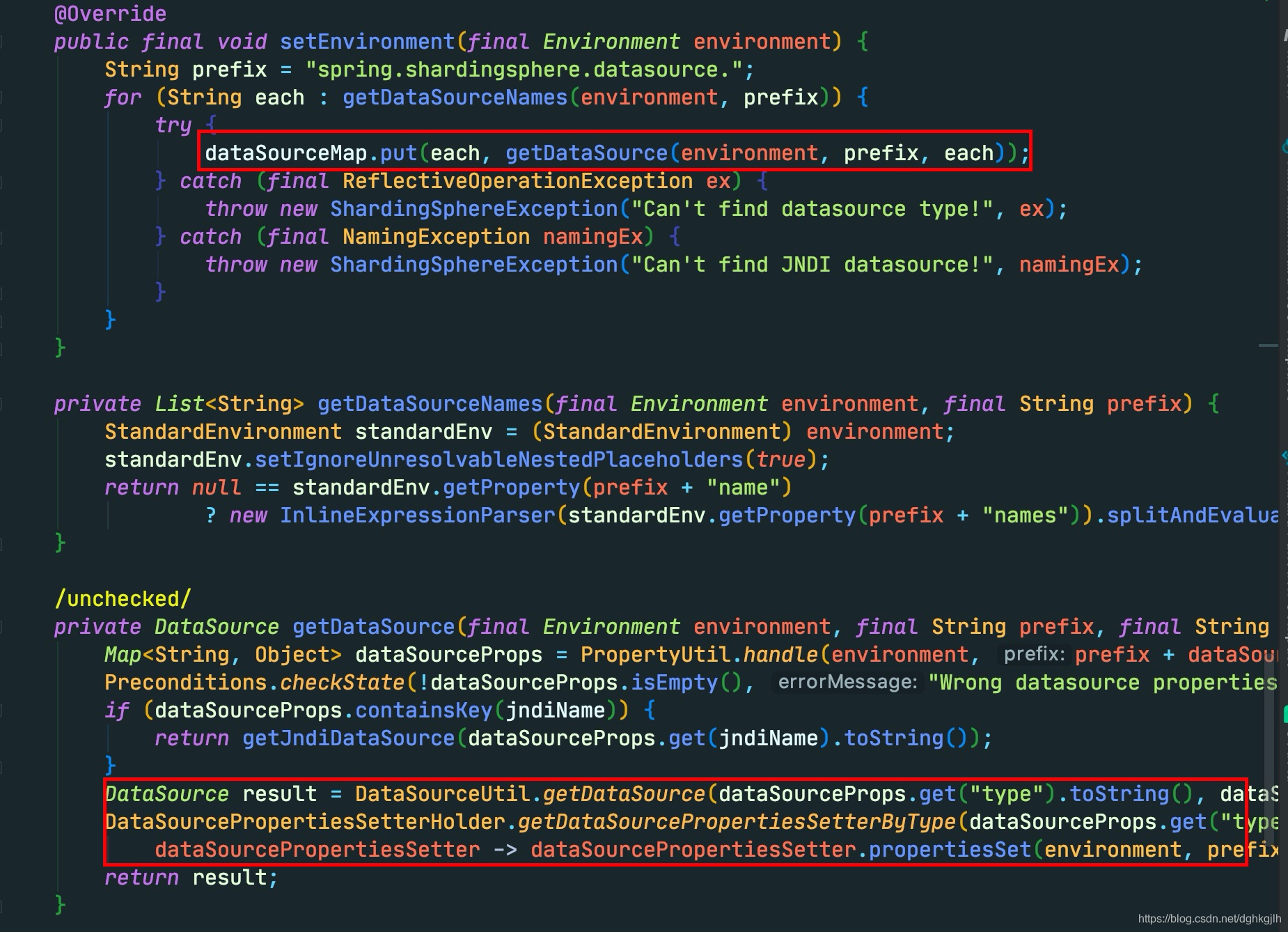
It puts all configured data sources into a Map<data source name, data source instance>. Focus on how each is instantiated: read its type, assuming com.alibaba.druid.pool.DruidDataSource here.
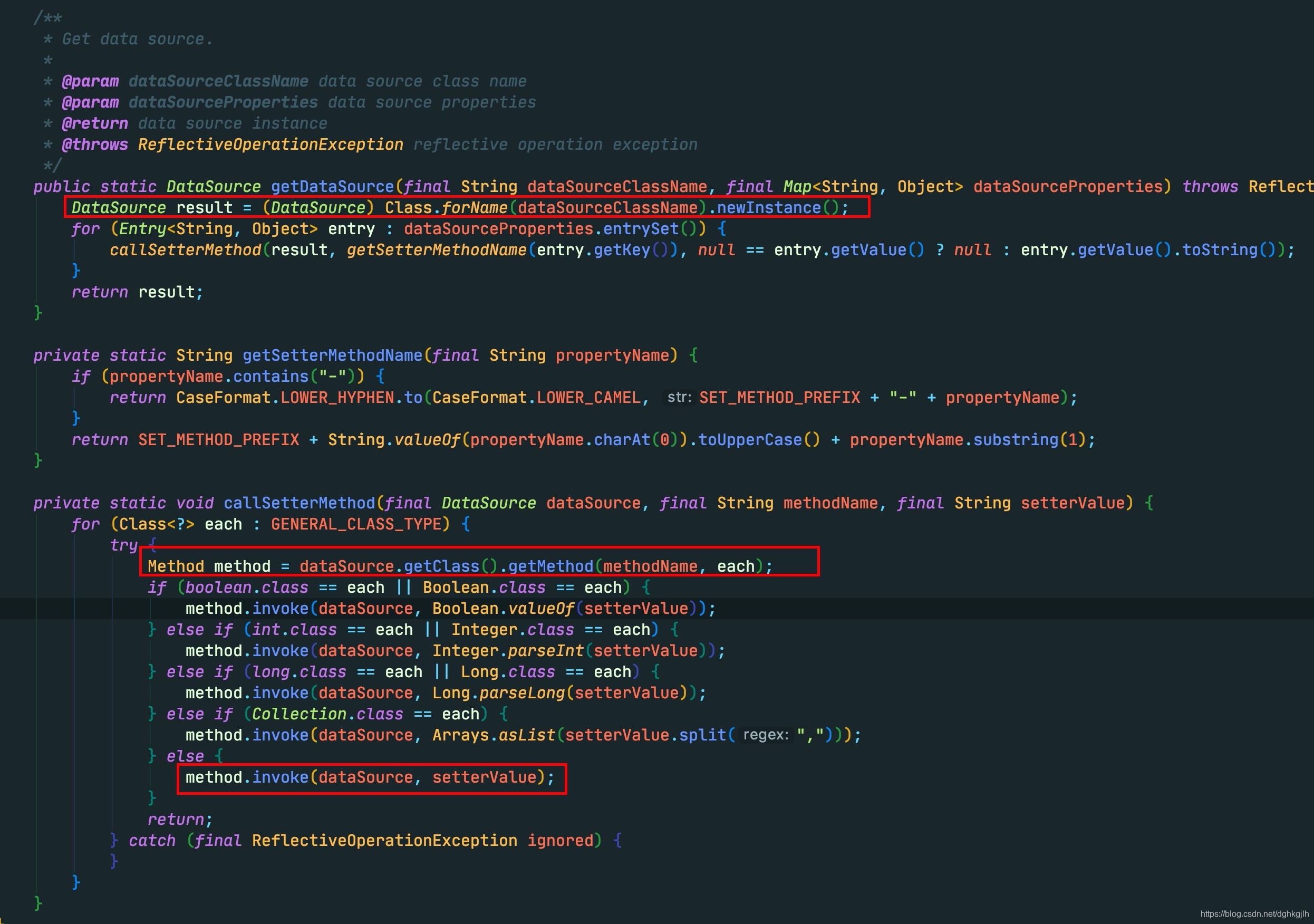 Each data source is instantiated with Class.forName().newInstance(). Other properties are then assigned. Setter names are constructed from property names—for example, url becomes setUrl—and callSetterMethod uses reflection to invoke them with configured values. The completed data source is added to the Map.
After setEnvironment, other code runs.
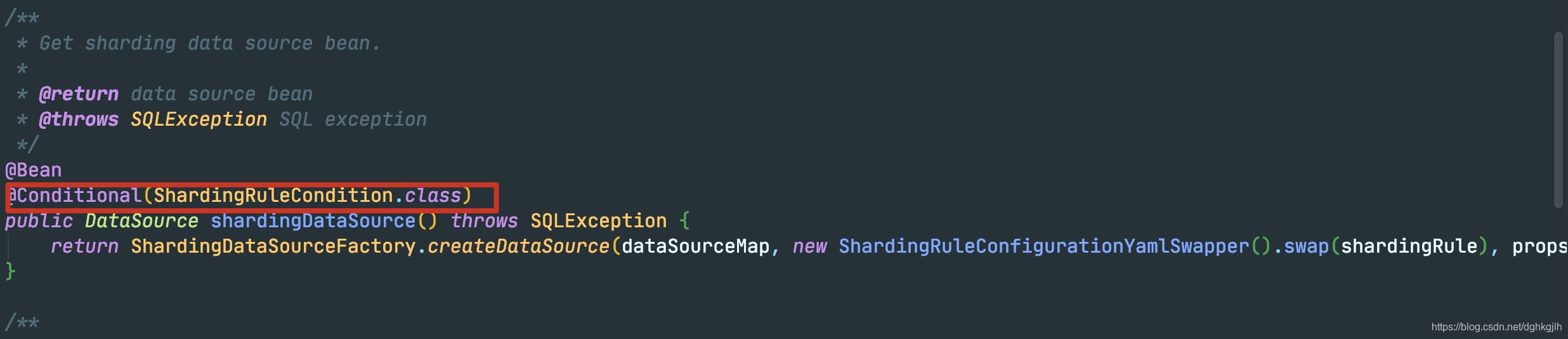
When the @Conditional condition holds, the configuration is treated as sharding. A ShardingDataSource is instantiated with that Map as a property.
Why create a custom data source when physical data sources are already available?
Reason 1: with MyBatis, SqlSessionFactoryBean requires a data source through setDataSource. afterPropertiesSet() checks it and fails if null. SqlSessionFactoryBean implements InitializingBean, so it implements afterPropertiesSet().
-
Begin a sharded query, insert, delete, or update: prepare to execute SQL.
Consider a MyBatis insert.
Its core logic is SimpleExector.doUpdate, which obtains a Connection and Statement and sets parameters. prepareStatement calls this.getConnectoin(), which calls openConnection(), eventually invoking the current DataSource.getConnection. That is ShardingDataSource.getConnection, returning a ShardingConnection.
Why return a custom Connection? We will explain later.
After obtaining the connection, handler.prepare obtains a Statement. instantiateStatement ultimately calls connection.prepareStatement. Here, ShardingConnection.prepareStatement returns a ShardingPreparedStatement.
Why return a custom PreparedStatement?
Next come SQL parameter values. handler.parameterize calls DefaultParameterHandler.setParameters, selecting a TypeHandler for each parameter type. BaseTypeHandler.setParameter().setNonNullParameter ultimately invokes PreparedStatement.setInt, setString, or another setXXX according to that handler.
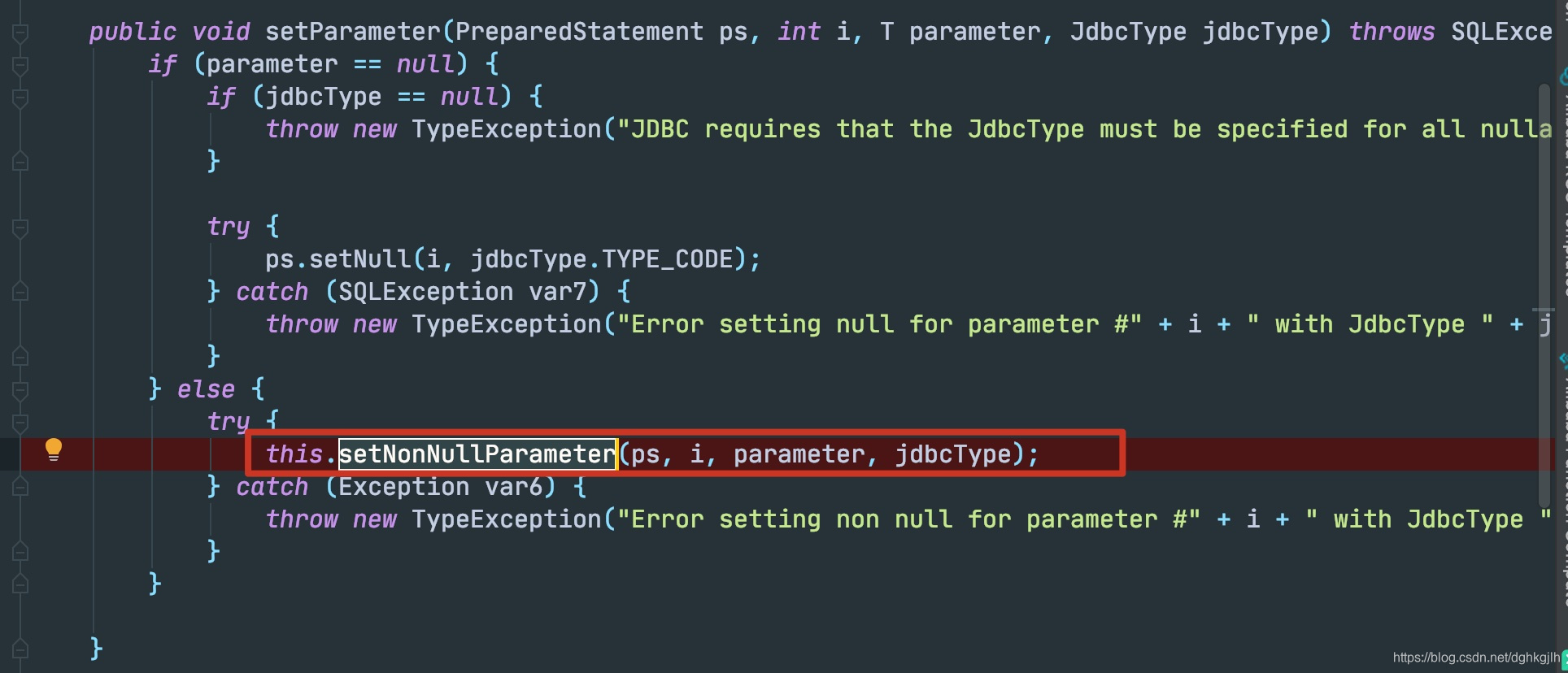
It calls SharingPreparedStatement.setInt() on the returned object.
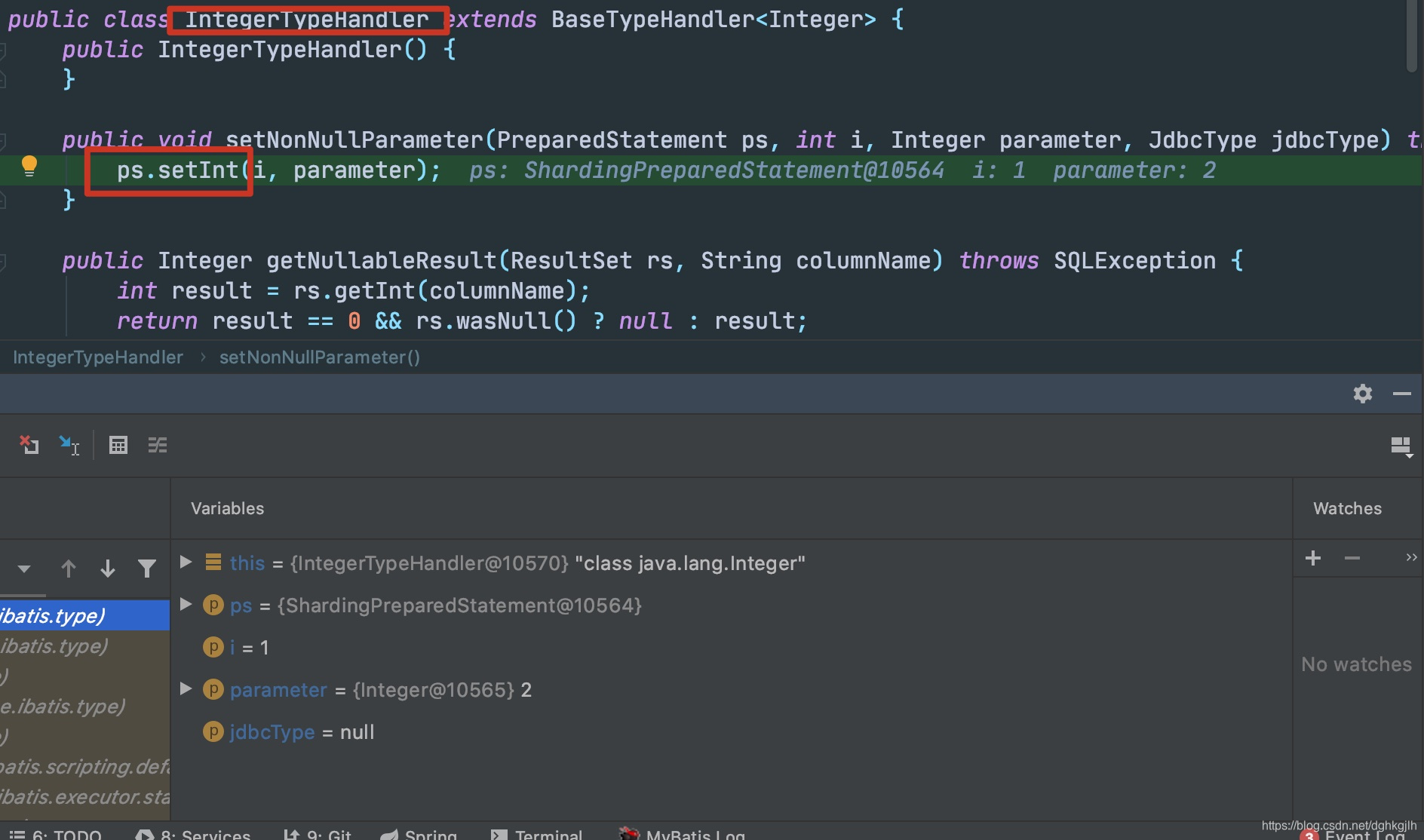
A normal implementation, such as MySQL ClientPreparedStatement, binds parameters and values in setInt. ShardingPreparedStatement does not.
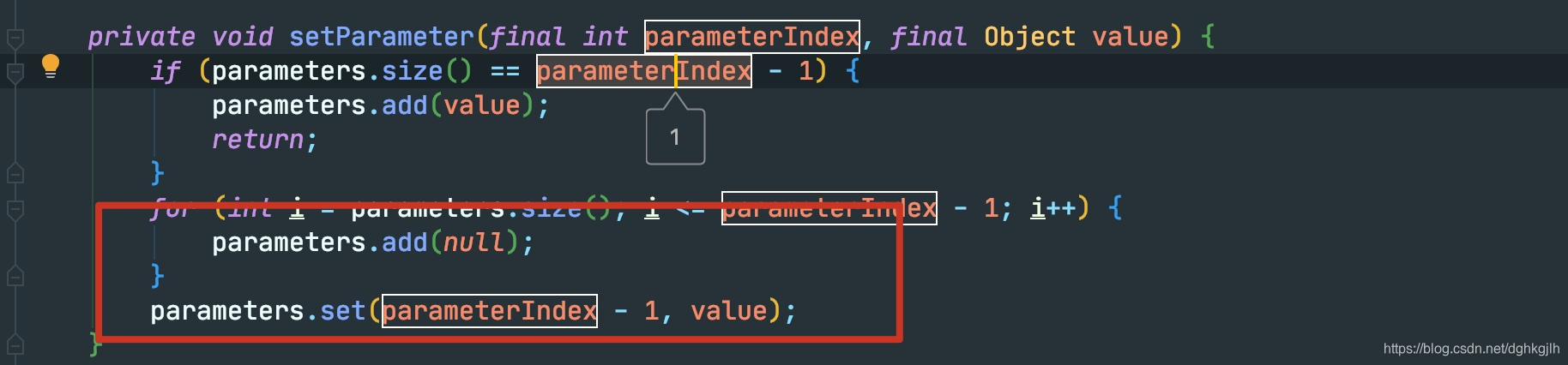
It merely puts them in a List and returns. setString and other setXXX methods do the same.
At this point, MyBatis believes it has a connection and statement and has bound SQL values. Only execution remains. In reality, it has only instances of custom ShardingJDBC classes; we have not yet even seen a physical connection obtained.
-
Begin SQL execution.
MyBatis considers everything ready and ultimately calls ps.execute(). This still invokes ShardingPreparedStatement.execute, because that is the object returned earlier.
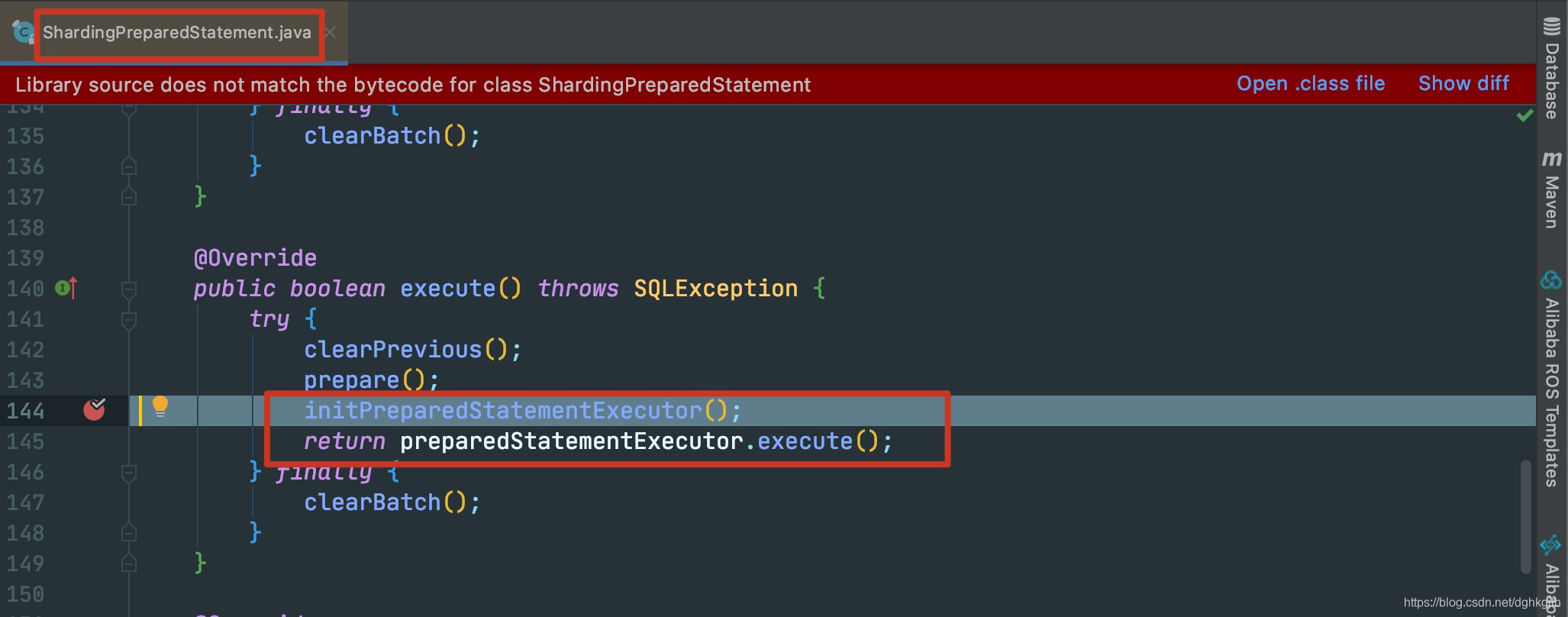
prepare rewrites SQL according to sharding, primary-replica, and shadow rules. This is core functionality and is not discussed here.
Enter the method at line 144.
It has three submethods:
preparedStatementExecutor.init(executionContext);
setParametersForStatements();
replayMethodForStatements();
First submethod:
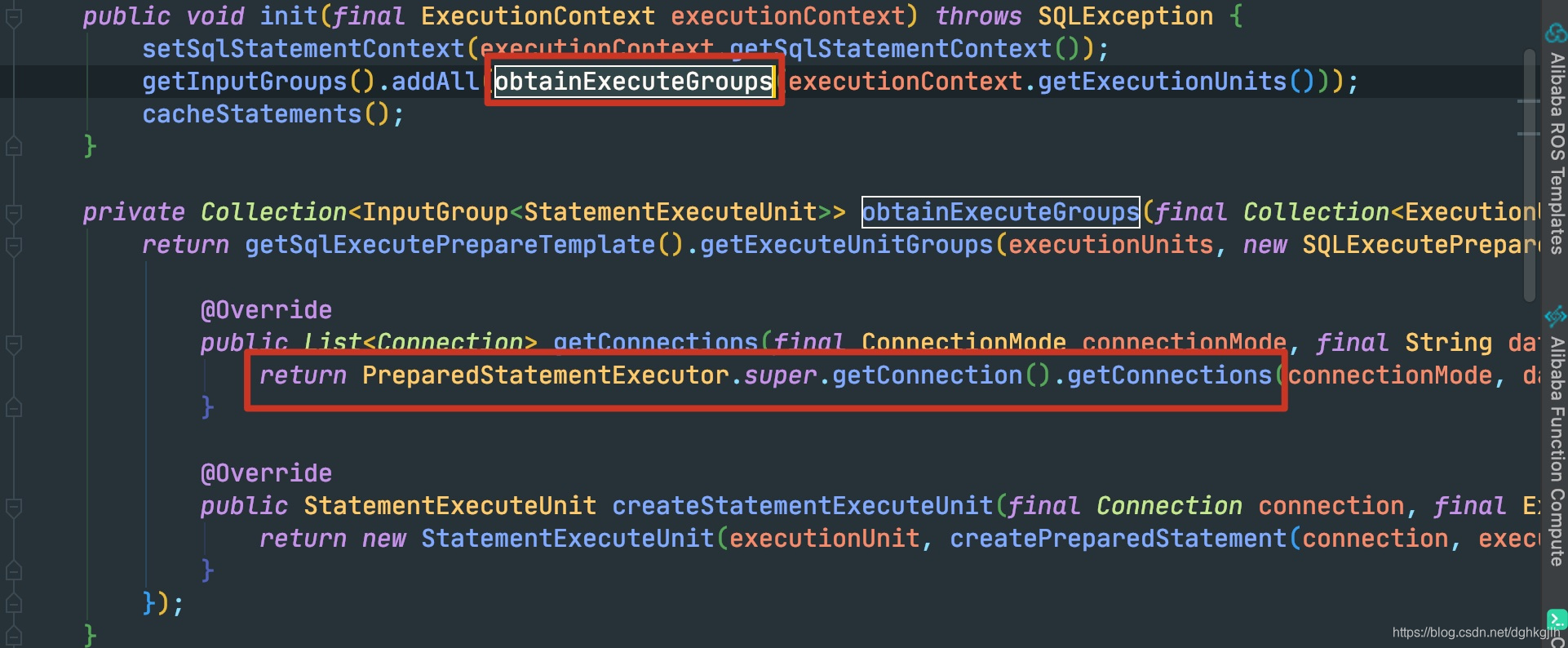
This is where a physical connection is finally obtained.
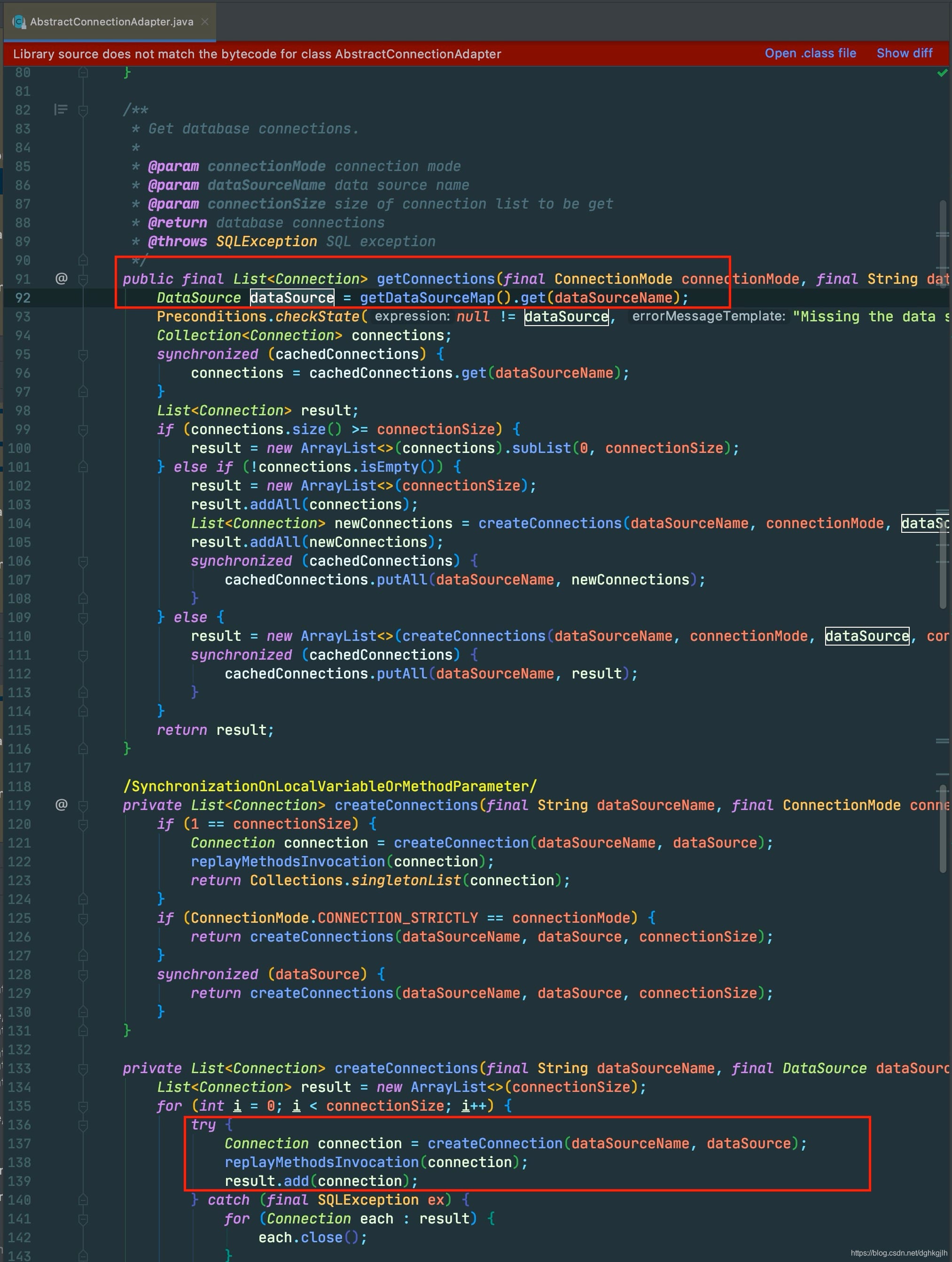
Using the configured datasource name, it retrieves the instantiated DataSource from the startup Map. dataSource.getConnection obtains the physical connection. Then createdPreparedStatement from the screenshot obtains a physical Statement by calling connection.prepareStatement on the physical connection.
Second submethod: after obtaining the connection and statement, enter setParametersForStatements.
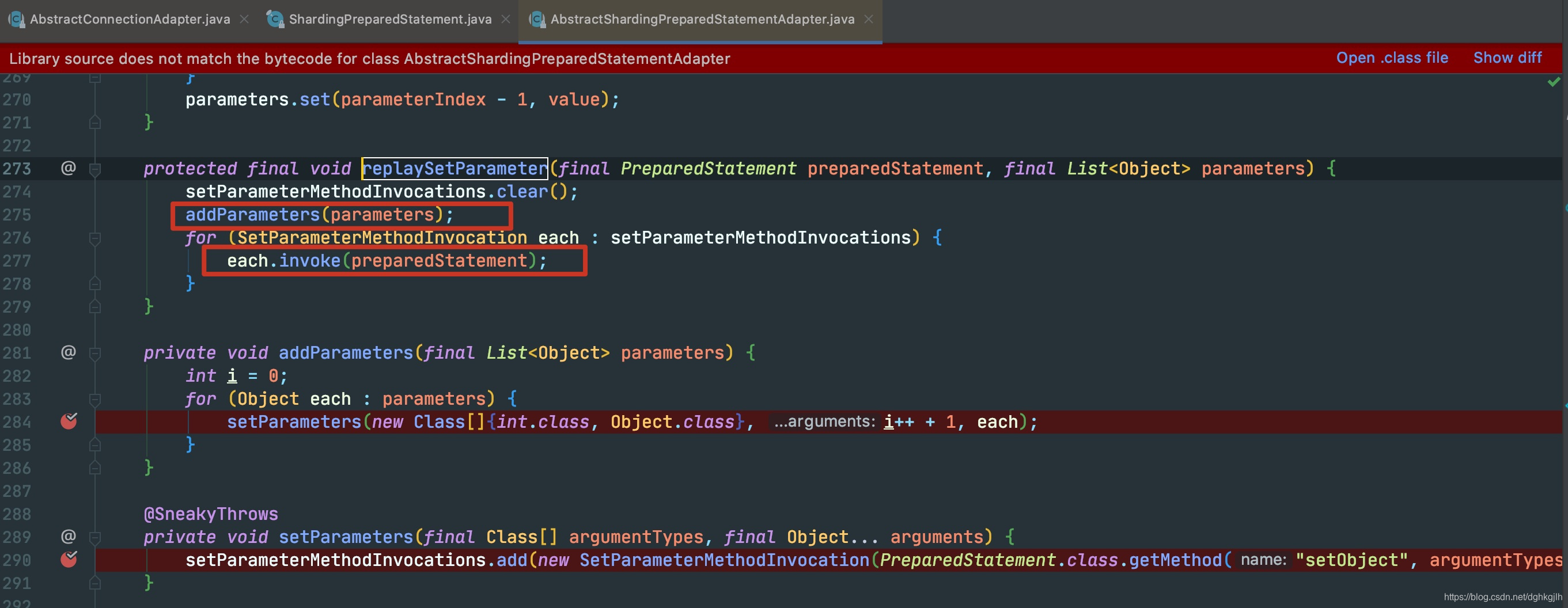 It invokes PreparedStatement.setObject reflectively to bind values, iterating over the List populated when MyBatis set parameters earlier.
 -
Finally execute SQL.
After routing, rewriting, acquiring the connection and statement, and binding parameters, preparedStatementExecutor.execute() finally runs. It ultimately calls org.apache.shardingsphere.sharding.execute.sql.execute.SQLExecuteCallback#executeSQL.
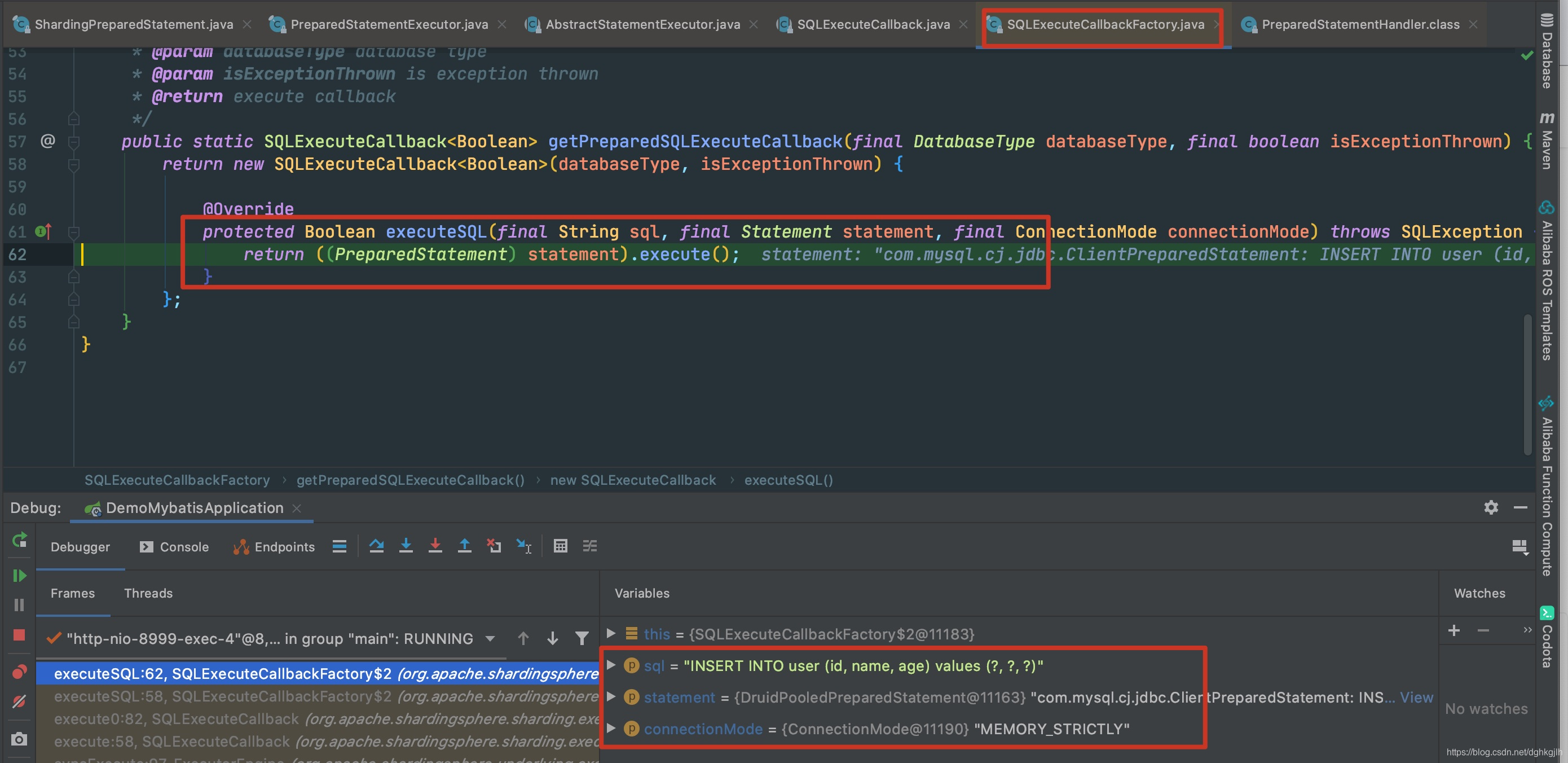
These are now the physical data source’s connection and statement, rather than ShardingConnection or ShardingPreparedStatement. They perform execution.
-
Handle the result set.
After the core MyBatis ps.execute call, results are processed.

Note: ps is still ShardingPreparedStatement. The physical PreparedStatement was obtained inside the preceding ps.execute call.
DefaultResultSetHandler ultimately retrieves the resultSet.
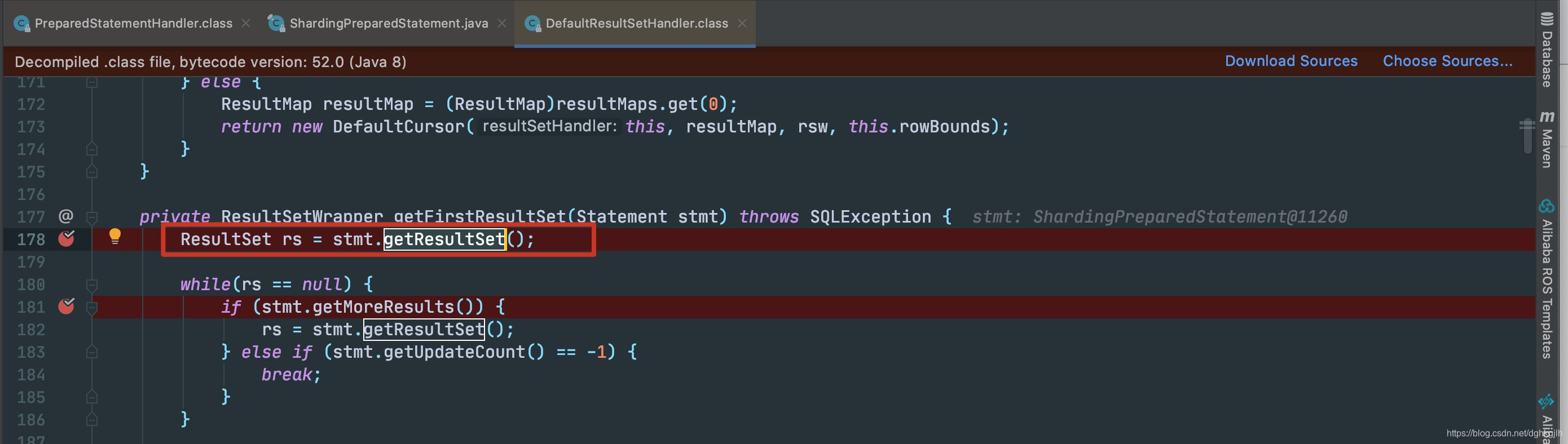
It calls ShardingPreparedStatement.getResultSet.
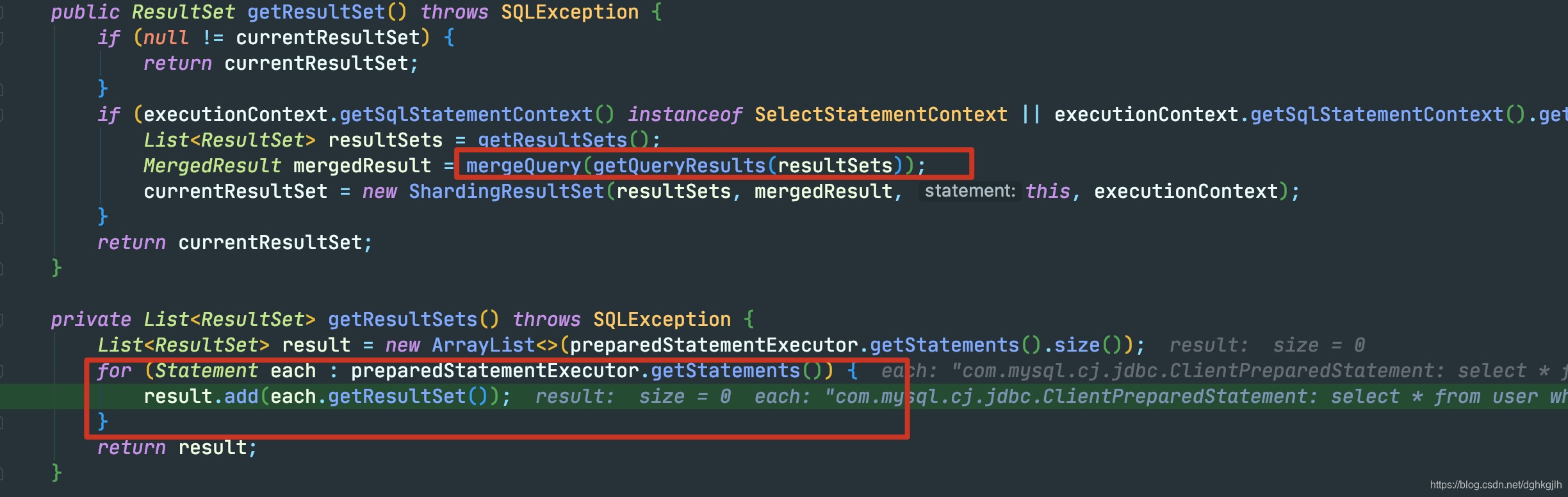
each is a physical PreparedStatement. Calling getResultSet obtains its results. ShardingJDBC then merges them, another core feature not covered here.
That completes the execution flow. Returning to our earlier questions: why custom datasource, connection, statement, and result implementations?
They provide compatibility with ORM frameworks: these custom classes let MyBatis proceed normally. They also avoid duplicating functionality and keep focus on core features. ShardingJDBC moves all core JDBC steps into the lowest-level execute method. Before that execution, custom classes implement sharding, primary-replica routing, encryption/decryption, and shadow features. To other frameworks, these classes are usable. They act as stand-ins—letting a framework believe it has physical objects—while also implementing ShardingJDBC functionality.
Simulating ShardingJDBC Execution
Having followed the flow, let us simulate it with custom classes:
Custom DataSource: MyDataSource
Custom Connection: Myconnection
Custom PreparedStatement: MyPreparedStatement
Create MyDataSource at Container Startup
public class DataSourceConfiguration implements EnvironmentAware {

    private Environment environment;

    @Override
    public void setEnvironment(final Environment environment) {
        this.environment = environment;
    }

    @Bean
    @SneakyThrows
    public DataSource createDataSource() {
        Map<String, Object> property = getDataSourcePropertyByPrefix("spring.datasource");
        Preconditions.checkState(CollectionUtil.isNotEmpty(property));
        Map<String, DataSource> dataSourceMap = new HashMap<>(1);
        DataSource dataSource = (DataSource) Class.forName(property.get("type").toString()).newInstance();
        property.remove("type");
        Iterator<Entry<String, Object>> iterator = property.entrySet().iterator();
        while (iterator.hasNext()) {
            Entry<String, Object> entry = iterator.next();
            // Invoke property setters reflectively to set required values
            callSetterMethod(dataSource, getSetterMethodName(entry.getKey()), entry.getValue().toString());
        }
        // Assign the data source
        dataSourceMap.put("master", dataSource);
        return new MyDataSource(dataSourceMap);
    }

    @SneakyThrows
    private void callSetterMethod(final DataSource dataSource, final String setterMethodName, final String value) {
        Method method = dataSource.getClass().getMethod(setterMethodName, String.class);
        method.invoke(dataSource, value);
    }

    private String getSetterMethodName(final String key) {
        return key.contains("-") ? CaseFormat.LOWER_HYPHEN.to(CaseFormat.LOWER_CAMEL, "set-" + key) : "set" + String.valueOf(key.charAt(0)).toUpperCase() + key.substring(1);
    }

    private Map getDataSourcePropertyByPrefix(String prefix) {
        // Read configuration with Binder
        Binder binder = Binder.get(environment);
        BindResult<Map> bind = binder.bind(prefix, Bindable.of(Map.class));
        return bind.get();
    }
}
DataSource.getConnection() Returns MyConnection
public class MyDataSource implements DataSource {

    /**
     * Custom dataSourceMap containing data sources such as Druid and C3P0.
     */
    private final Map<String, DataSource> dataSourceMap;

    public MyDataSource(final Map<String, DataSource> dataSourceMap) {
        this.dataSourceMap = dataSourceMap;
    }

    /**
     * Obtain a connection by simply returning a MyConnection object.
     */
    @Override
    public Connection getConnection() throws SQLException {
        return new MyConnection(dataSourceMap);
    }
}
MyConnection.prepareStatement Returns MyPreparedStatement
@Getter
public class MyConnection implements Connection {

    private final Map<String, DataSource> dataSourceMap;

    public MyConnection(final Map<String, DataSource> dataSourceMap) {
        this.dataSourceMap = dataSourceMap;
    }

    @Override
    public Statement createStatement() throws SQLException {
        return null;
    }

    @Override
    public PreparedStatement prepareStatement(final String sql) throws SQLException {
        return new MyPreparedStatement(this, sql);
    }
}
Execute the Actual Core JDBC Steps in MyPreparedStatement
@Getter
public class MyPreparedStatement implements PreparedStatement {

    private final MyConnection myConnection;
    private final String sql;
    private ResultSet resultSet;
    private final List<Object> parameters = new ArrayList<>();

    public MyPreparedStatement(final MyConnection myConnection, final String sql) {
        this.myConnection = myConnection;
        this.sql = sql;
    }
   // ....some methods omitted
   @Override
    public void setInt(final int parameterIndex, final int x) throws SQLException {
        // When MyBatis TypeHandler handles parameters, temporarily store them in a list

        // The list needs values before set can be called
        parameters.add(null);
        parameters.set(parameterIndex - 1, x);
    }
  /**
     * The place that actually obtains Connection and PreparedStatement and executes the statement.
     */
    @Override
    public boolean execute() throws SQLException {
        // Get the physical data source
        DataSource dataSource = this.myConnection.getDataSourceMap().get("master");
        // Get its physical connection
        Connection connection = dataSource.getConnection();
        // Obtain the physical preparedStatement
        PreparedStatement preparedStatement = connection.prepareStatement(this.sql);
        // Set property values through reflection
        final AtomicInteger loop = new AtomicInteger(0);
        parameters.forEach(item -> {
            Method method = null;
            try {
                // Approach one: bind values directly with preparedStatement.setObject
                preparedStatement.setObject(loop.get()+1, item);

                // Approach two: invoke preparedStatement.setObject reflectively
               // method = PreparedStatement.class.getMethod("setObject", int.class, Object.class);
                //method.invoke(preparedStatement, loop.get()+1, item);
                // NoSuchMethodException | IllegalAccessException | InvocationTargetException |
            } catch ( SQLException e) {
                e.printStackTrace();
            }
            loop.getAndIncrement();
        });
        preparedStatement.execute();
        ResultSet statementResultSet = preparedStatement.getResultSet();
        this.resultSet = statementResultSet;
        // Do not close resources yet; the handler still needs them for result processing
        //statementResultSet.close();
        // preparedStatement.close();
        //connection.close();
        return true;
    }
    @Override
    public ResultSet getResultSet() throws SQLException {
        return this.resultSet;
    }
}
This essentially simulates ShardingJDBC’s full workflow, implementing JDBC DataSource, Connection, and Statement methods. Resource closing is still missing from the example.
Notes
- All examples are on GitHub; feel free to use them.
- MyBatis execution details were not examined closely here. See the related MyBatis analysis posts.