Table of contents
Open Table of contents
- MySQL Notes
- Basics
- Connecting
- Data Types
- DDL, DML, DCL
- MySQL Keywords and Reserved Words
- What’s the Difference Between Primary Keys and Non-Primary Keys?
- What’s the Difference Between Clustered and Non-Clustered Indexes in MySQL?
- What’s the Difference Between a Primary Key and a Unique Index?
- The Difference Between innoDB and myIsam
- How Do You Add a Field to an Online Table with Hundreds of Thousands of Rows?
- Under innodb, Can You Leave Out the Primary Key? Can a Primary Key Be Null? How Many Primary Keys Can You Set?
- Advanced Topics
- Useful Resources
- Basics
MySQL Notes
Basics
Connecting
Official documentation on connecting
The mysql connection command must be run in the bin directory under the MySQL installation directory. The default installation location on macOS is /usr/local/mysql/bin
-
Single-instance connection
A single-instance connection means there is only one MySQL instance on one machine
mysql -h host -u user -p -
Multi-instance connection
A multi-instance connection means there are multiple MySQL instances on one machine
mysql -h host -u user -p -S /tmp/mysql.sock*mysql.sock* means it could be mysql.sock1, mysql.sock2, and so on. What if you don’t know which one it is?
Its configuration is set in the socket part of the [mysqld] section of the MySQL configuration file my.conf
Data Types
Numeric Types
Integers:
Signed
Unsigned
1 byte = 8 bits
Calculation rule: ($n = 2 \times 8 \times \text{bytes occupied}$)
- If signed, the minimum is $-2^{n-1}$ and the maximum is $2^{n-1} -1$
- If unsigned, the minimum is 0 and the maximum is $2^n -1$
Why is the signed range $2^{n-1}$? Since there is a sign, positive and negative values must be distinguished, so the range has to be split into two parts — you divide the normal range by 2. In exponent arithmetic, dividing two numbers means subtracting their exponents.
| Type | Bytes | Signed minimum | Signed maximum | Unsigned minimum | Unsigned maximum |
|---|---|---|---|---|---|
| TINYINT | 1 | $-(2^{8-1}) = -(2^7)= -128$ | $2^{8-1} -1 = 2^7 - 1 = 127$ | 0 | $2^8 -1 = 255$ |
| SMALLINT | 2 | $-(2^{16-1}) =-(2^{15})= -32768$ | $2^{16-1} - 1 = 2^{15} - 1 = 32767$ | 0 | $2^{16} -1 = 65535$ |
| MEDIUMINT | 3 | $-(2^{24-1}) = -(2^{23})=-8388608$ | $2^{24-1} -1 = 2^{23} -1 = 8388607$ | 0 | $2^{24} -1 = 1677215$ |
| INT | 4 | $-(2^{32-1}) = -(2^{31}) = -2147483648$ | $2^{32-1} -1 = 2^{31} -1 = 2147483647$ | 0 | $2^{32} -1 = 4294967295$ |
| BIGINT | 8 | $-(2^{64-1}) = -2^{63}$ | $2^{64-1} -1 = 2^{63} -1$ | 0 | $2^{64} -1$ |
What does the notation int(5) mean?
It means that when the value’s width is less than 5 digits, the front of the number is padded to fill the width; it is generally used together with zerofill. It does not represent the actual storage bytes occupied — the table above already defines the number of bytes occupied by each type.
Floating-point numbers
Numbers with a decimal point: 3.14, 7.9869, and so on
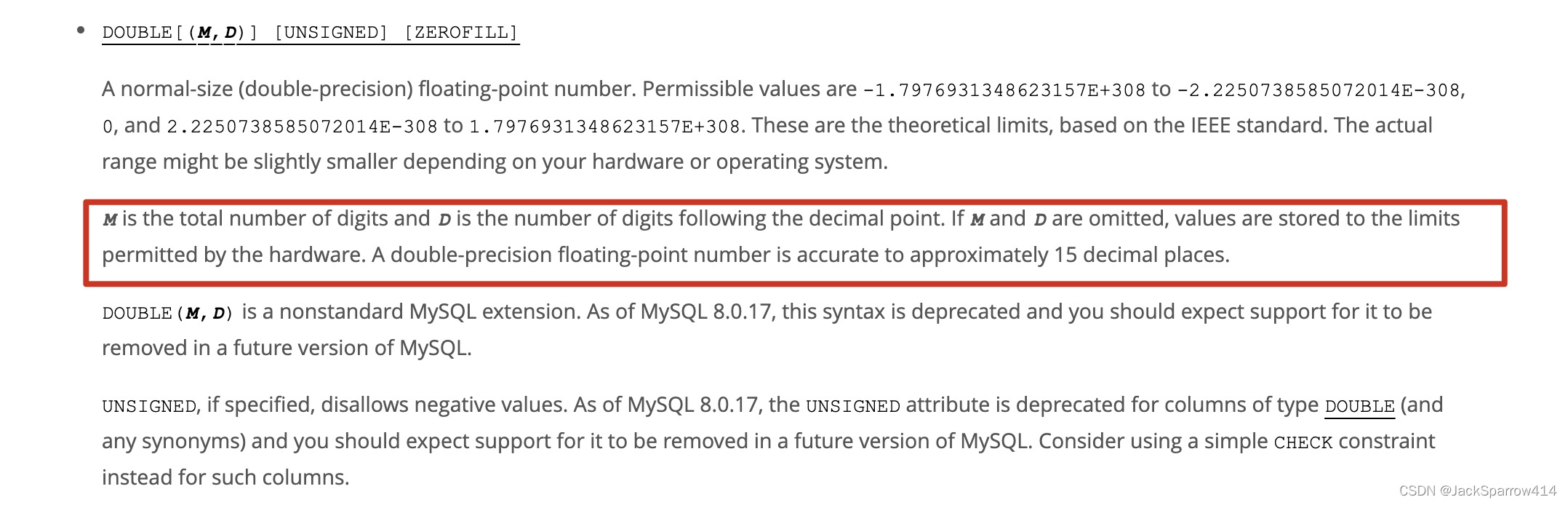
FLOAT(M, D) 4 bytes, single precision
DOUBLE(M, D) 8 bytes, double precision
M = integer digits + fractional digits
D = the number of digits after the decimal point
The number of digits expressed by D should be no greater than M-2, and the maximum possible is 30
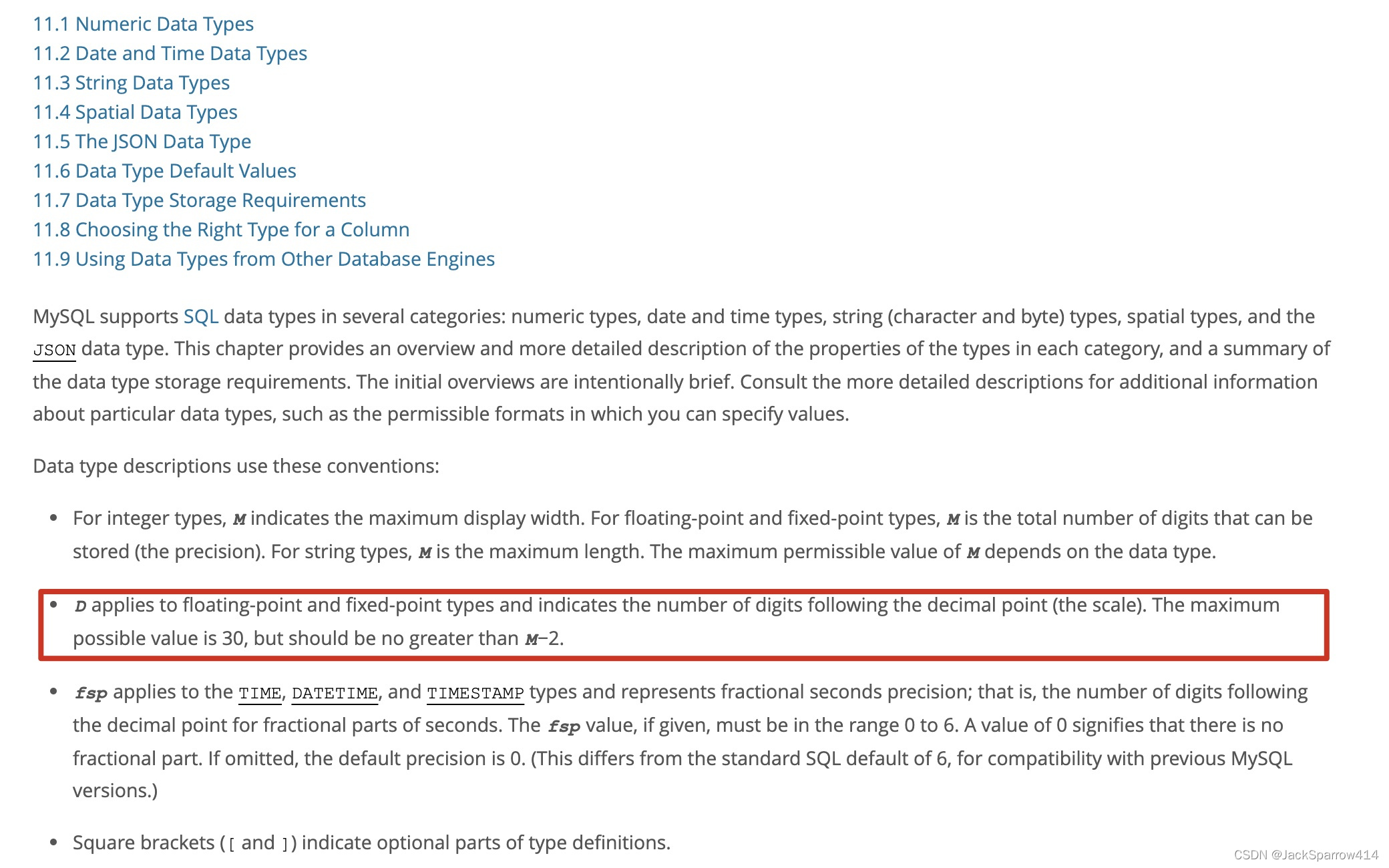
For example: float(5, 2) means there are 5 digits in total, of which the fractional part takes 2 digits; if the fractional part exceeds 2 digits, it is rounded to 2 digits
If no precision is specified, it is determined by the actual hardware
Fixed-point numbers:
DECIMAL(M, D) M+2 bytes, generally used to represent high-precision data such as currency
If no precision is specified, the default is (10, 0)
Date and Time Types
Date and time types documentation
| Type | Bytes | Minimum | Maximum | Default when invalid data is inserted |
|---|---|---|---|---|
| DATE | 4 | 1000-01-01 | 9999-12-31 | 0000-00-00 |
| DATETIME | 8 | 10-01-01 00:00:00 | 9999-12-31 23:59:59 | 0000-00-00 00:00:00 |
| TIMESTAMP | 4 | 1970-01-01 00:00:01 | 2038-01-19 03:14:07 | 0000-00-00 00:00:00 |
| TIME | 3 | -838:59:59 | 838:59:59 | 00:00:00 |
| YEAR | 1 | 1901 | 2155 | 0000 |
DATE:
DATETIME:
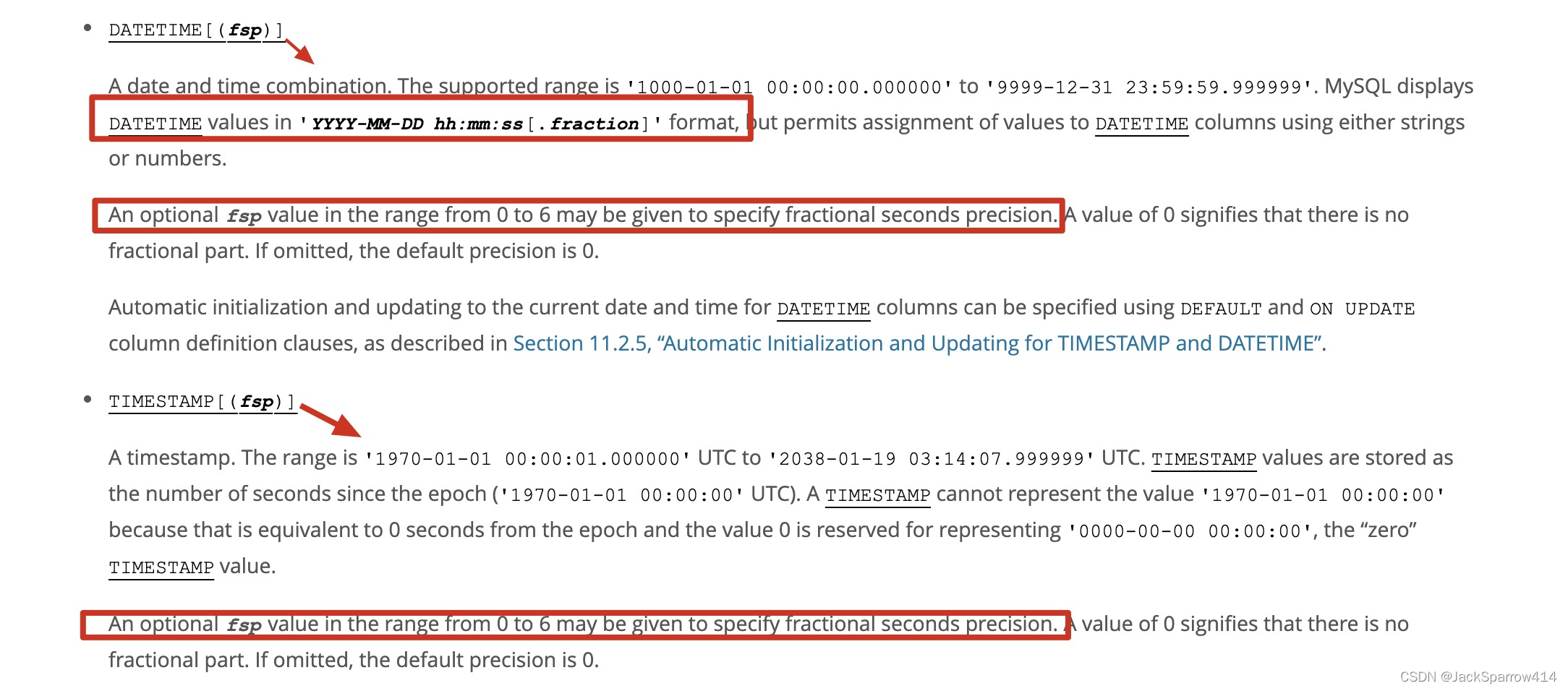
DATETIME[(fsp)] - DATETIME(3)
fsp ranges from 0 to 6
After representing year-month-day hour:minute:second, DATETIME and TIMESTAMP can take up to 6 more digits of microseconds. At most 6 digits. Displayed as 1000-01-01 00:00:00.000000
TIMESTAMP:
The same year-month-day hour:minute:second format; compared to DATETIME, TIMESTAMP occupies fewer bytes — only 4 bytes. However, the maximum range TIMESTAMP can represent only reaches a certain moment in 2038.
TIMESTAMP is affected by time zones; both inserts and queries are first converted to the local time zone. So for the same row of data, users in different time zones may see different times.
How can a field be automatically updated to the current time when inserting or updating data?
DEFAULT CURRNT_TIMEAMP ON UPDATE CURRENT_TIMESTAMPNote: this setting works for fields of type DATETIME and TIMESTAMP alike.
Example:
ALTER TABLE t1 ADD COLUMN birthday DATETIME DEFAULT CURRENT_TIMESTAMPALTER TABLE t1 MODIFY COLUMN birthday DATE DEFAULT CURRENT_TIMESTAMP ON UPDATE CURRENT_TIMESTAMPString Types
CHAR(M):
The char type is a fixed-length string; the maximum value of M is 0-255. If the value does not reach M bytes, it is padded with spaces. One Chinese character or one English letter each occupies one byte.
VARCHAR(M):
VARCHAR is a variable-length string; the maximum value of M is 65535. If the value stored in a VARCHAR field does not exceed 255 bytes, the VARCHAR prefix occupies 1 byte; if it exceeds 255 bytes, the VARCHAR prefix occupies 2 bytes. So the bytes occupied by a VARCHAR field’s value are:
total bytes = 1 or 2 + the bytes of the actual value
BLOB:
TINYBLOB, MEDIUBLOB, LONGBLOB
Used to store binary data
TEXT:
TINYTEXT, MEDIUMTEXT, LONGTEXT
Used to store non-binary data
The two have the same storage ranges; they just apply to different kinds of data
Other types
JSON, ENUM, SET
DDL, DML, DCL
MySQL Keywords and Reserved Words
Just look them up directly in the official keywords documentation.
What’s the Difference Between Primary Keys and Non-Primary Keys?
What’s the Difference Between Clustered and Non-Clustered Indexes in MySQL?
Answer:
- A clustered index is an index where the index structure and the data are stored together. The primary key index is a clustered index, so you can find the corresponding data directly through the index. Drawbacks of clustered indexes: they rely on ordered data. If the indexed data is not ordered, it has to be sorted at insert time. That is fine for integers, but for data like strings and UUIDs that are long and hard to compare, inserts will definitely be slow. The update cost is also relatively high.
- A non-clustered index, by contrast, first finds the primary key of the corresponding data through the index, and then queries by the primary key. The update cost of a non-clustered index is not as high as that of a clustered index, because the leaf nodes of a non-clustered index do not store data.
What’s the Difference Between a Primary Key and a Unique Index?
Answer:
- A primary key does not allow null values, while a unique index column allows null values
- A table can have only one primary key, but can have multiple unique indexes
- A primary key is a database constraint
The Difference Between innoDB and myIsam
Answer:
- Different locking scope: myIsam only supports table-level locks, while innodb supports row-level locks and table-level locks
- innodb supports transactions; myisam does not support transactions
- innodb supports foreign keys; myisam does not support foreign keys
- Innodb supports MVCC
How Do You Add a Field to an Online Table with Hundreds of Thousands of Rows?
Answer: adding a field causes a table lock; you can use a professional tool such as pt-online-schema-change to modify the table structure.
Under innodb, Can You Leave Out the Primary Key? Can a Primary Key Be Null? How Many Primary Keys Can You Set?
Answer:
- You can leave out the primary key. If no primary key is set, MySQL uses a rowId as the hidden primary key — see the official documentation. The purpose of a primary key is to ensure data uniqueness and integrity.
- If a primary key is set, it cannot be null; if it is null, the error Field ‘PRIMARY_KEY_COLUMN_NAME’ doesn`t hava default value is reported.
- There can be only one primary key. The so-called multiple primary keys — a composite primary key — uses multiple fields together as the primary key of a table.
Advanced Topics
Transactions
The MySQL engine that supports transactions is InnoDB.
A transaction is an independent, atomic unit of work. When a transaction makes multiple changes to the database, either all the changes succeed once the transaction is committed, or all the changes are undone when the transaction is rolled back.
ACID
A: atomicity — either everything succeeds or everything fails
C: consistency
I: isolation — transactions do not affect each other
D: durability — once a transaction is committed, the changes made are saved to the database
isolation - Isolation Levels
Documentation on setting and querying transaction isolation levels
What are the use cases for each of the transaction isolation levels?
Query the current transaction isolation level
select @@session.transaction_isolation;Query the global transaction isolation level
select @@global.transaction_isolation;How do you specify the transaction isolation level in the my.conf configuration file? This is covered in the documentation above.
Dirty Read:
Definition: transaction B reads data that transaction A has modified but not yet committed.
The demonstration is as follows.
Two clients connect to the same MySQL database.
In client A, start a transaction, update the data, and do not commit for now.
# Set the transaction isolation level to read uncommitted
set session transaction isolation level read uncommitted;
# Start the transaction
start transaction;
# Update the data
update gener set gener = 56 where id = 12;
In client B, start a transaction and query the data; you will find that the uncommitted data from client A’s transaction can be read.
set session transaction isolation level read uncomitted;
start transaction;
select * from gener where id = 12;
The result is shown below:
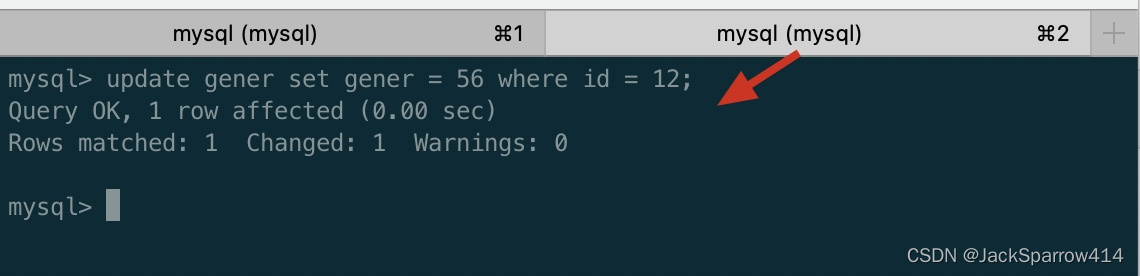
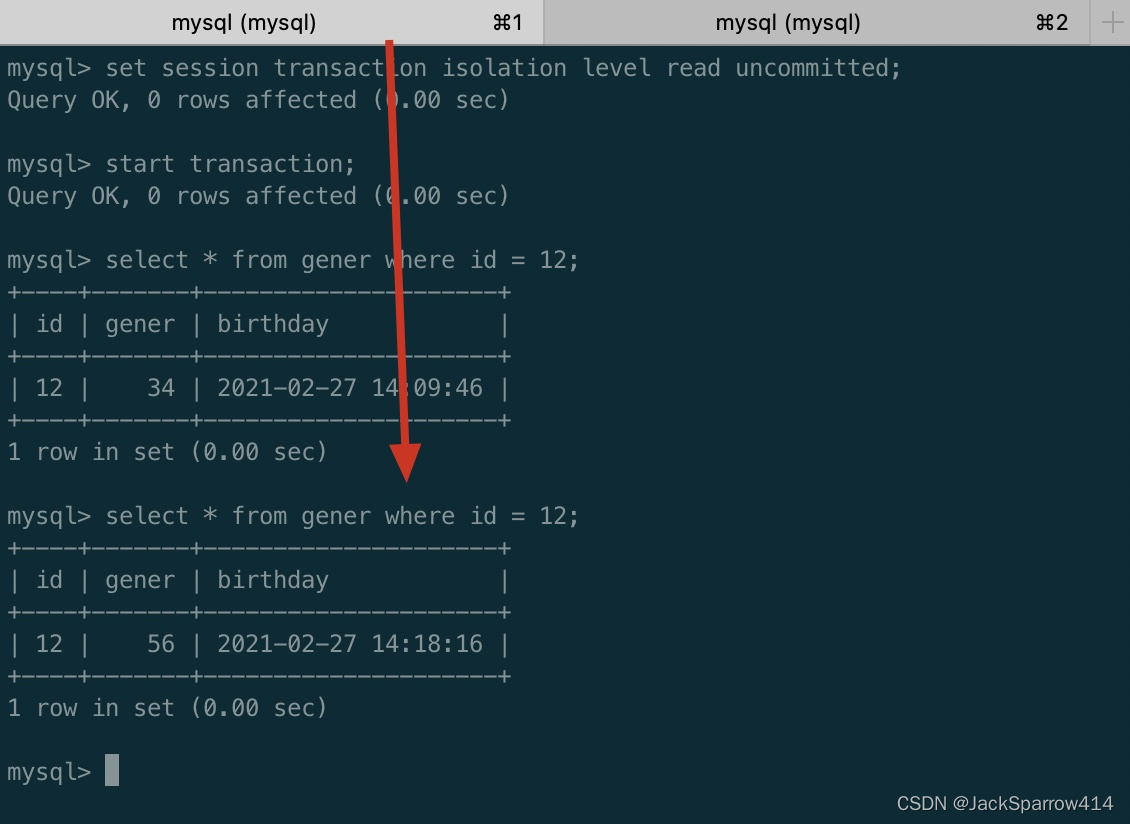
As you can see, with the transaction isolation level set to read uncommitted, dirty reads are very likely to occur.
Nonrepeatable Read
Definition: transaction B reads the same row multiple times and finds that not every query returns the same data.
The meaning of a repeatable read is: within the entire transaction, no matter when the data is read, the data returned each time should be the same.
The demonstration is as follows:
Client A:
# Set the transaction isolation level to read committed
set session transaction isolation level read committed;
start transaction;
update gener set gener = 66 where id = 12;
# Not committed yet at this point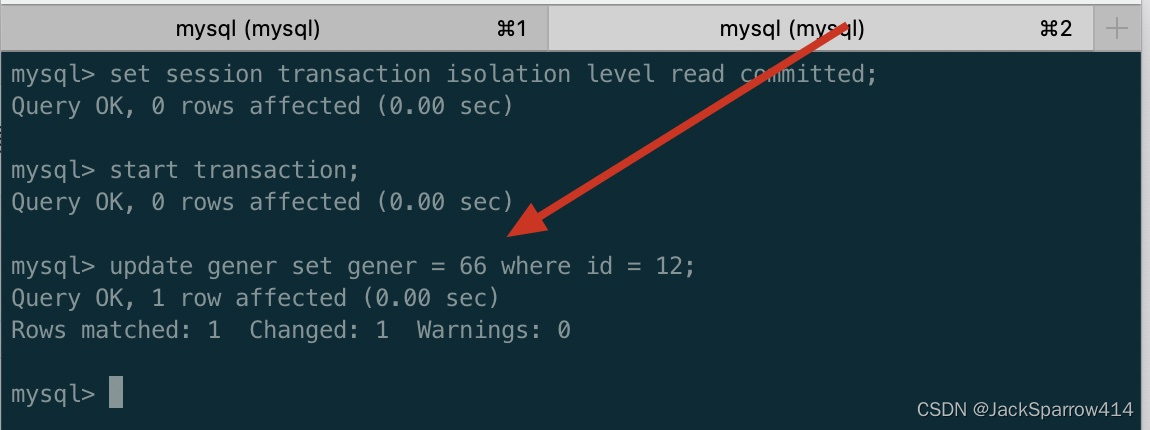
View the same row in client B:
set session transaction isolation level read committed;
start transaction;
select * from gener where id =12;
The result is as follows:
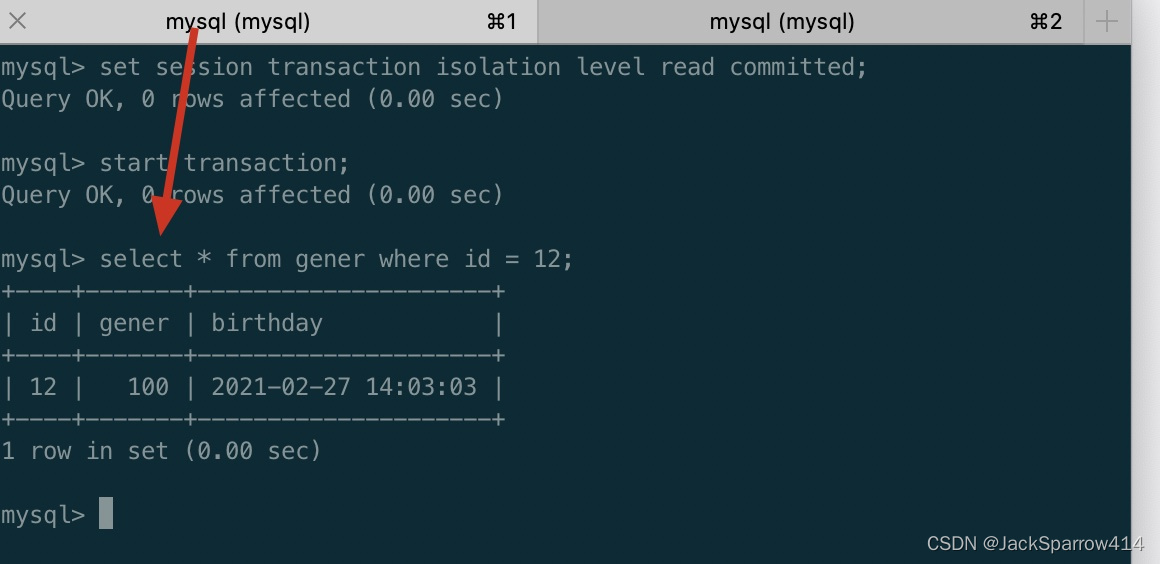 As you can see, with the transaction isolation level set to read committed, dirty reads are prevented.
Next, commit the transaction in client A, and query the row with id=12 again in client B’s transaction.
Client A:
commit;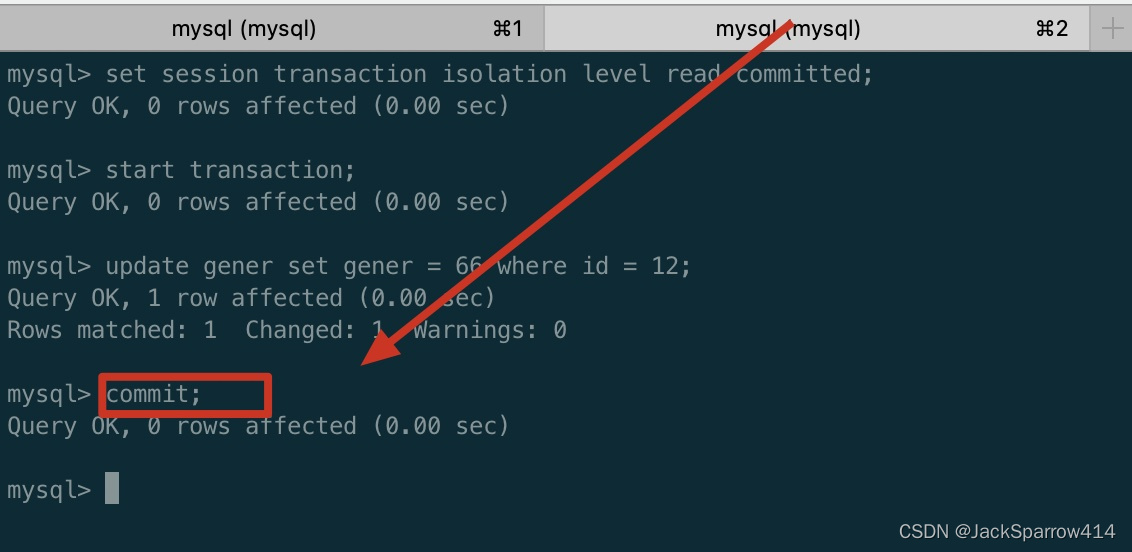
Client B queries again:
select * from gener where id =12;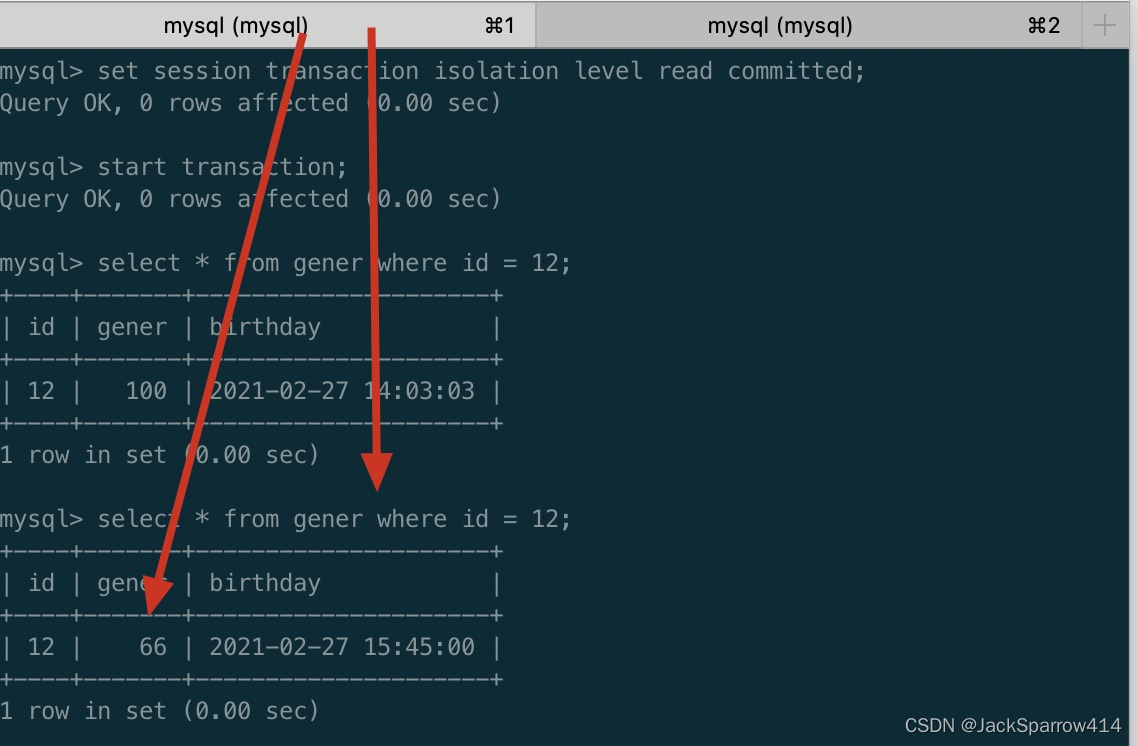
As you can see, querying the same row again in transaction B returns a different result from the previous query. The read committed isolation level does not prevent non-repeatable reads.
Phantom Read:
Definition: when transaction B performs an insert, or an update with a condition, it is told that the data already exists, or the number of updated rows does not equal the number of rows from the previous query. This is easier to understand with the example below.
Demonstration:
Client A:
# Set the transaction isolation level to repeatable read
set session transaction isolation level repeatable read;
start transaction;
insert into gener(id, gener) values (1998, 88);
commit;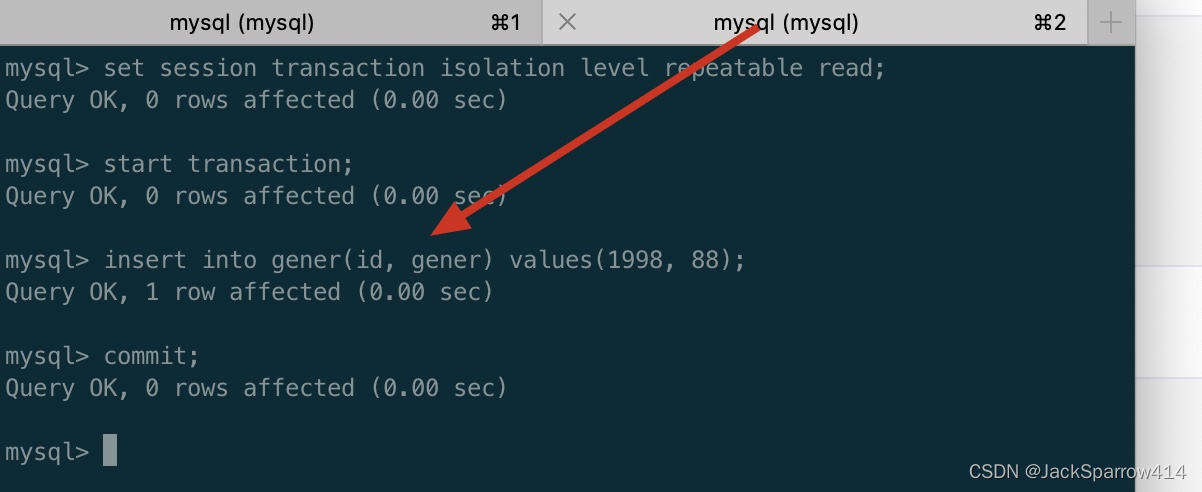
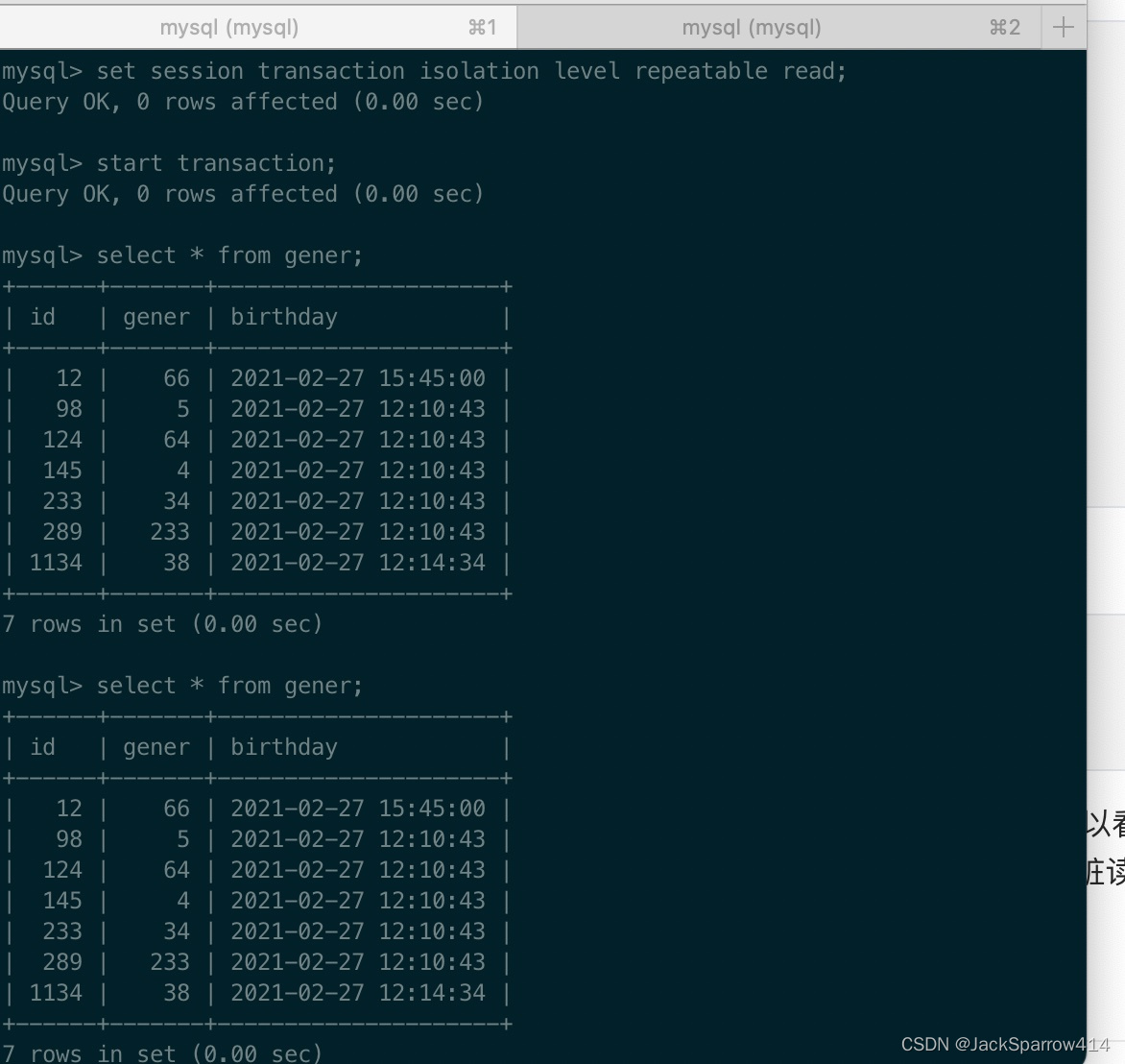
Client B:
set session transaction isolation level repeatable read;
strat transaction;
select * from gener;
Query twice — once before and once after client A commits its transaction — and the two query results are the same. As you can see, with the transaction isolation level set to repeatable read, every query during the transaction returns the same result, which prevents dirty reads and non-repeatable reads.
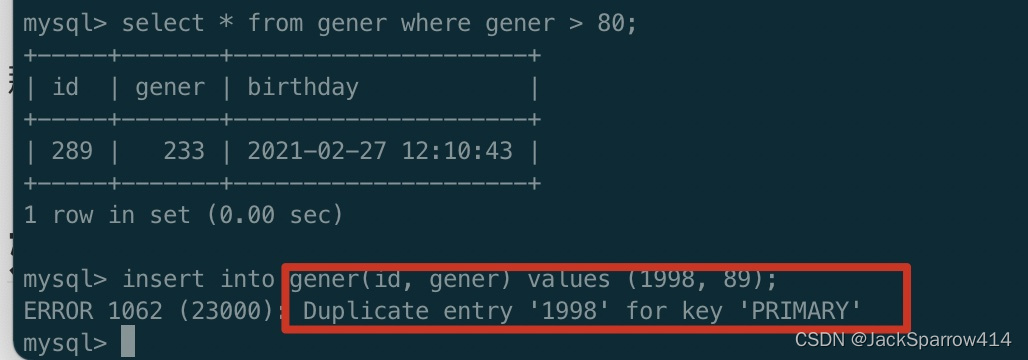
At this point, if we insert a row with the same ID in transaction B, an error is reported.
Let’s use the same scenario to show the update case. For the row just inserted by transaction A, the value of the gener field is 88.
Run the following query in transaction B:
select * from gener where gener > 64;The query returns 2 rows. Next, in transaction B, update the rows where gener>64 by adding 1 to gener, and you will find that three rows end up being affected.
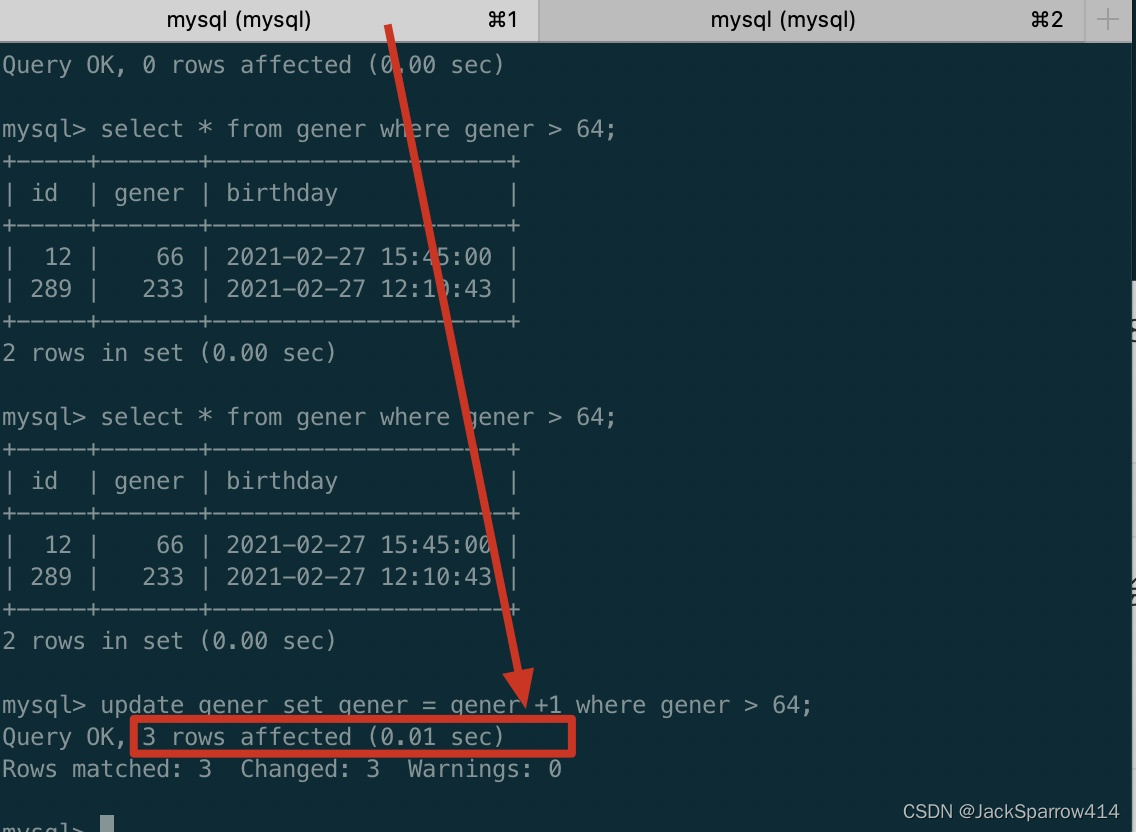
As you can see, there is a problem here: based on the earlier query in transaction B, only two rows should match, but here there are three. At this point, without committing transaction B yet, query again, and you will find that the data just committed by transaction A shows up.
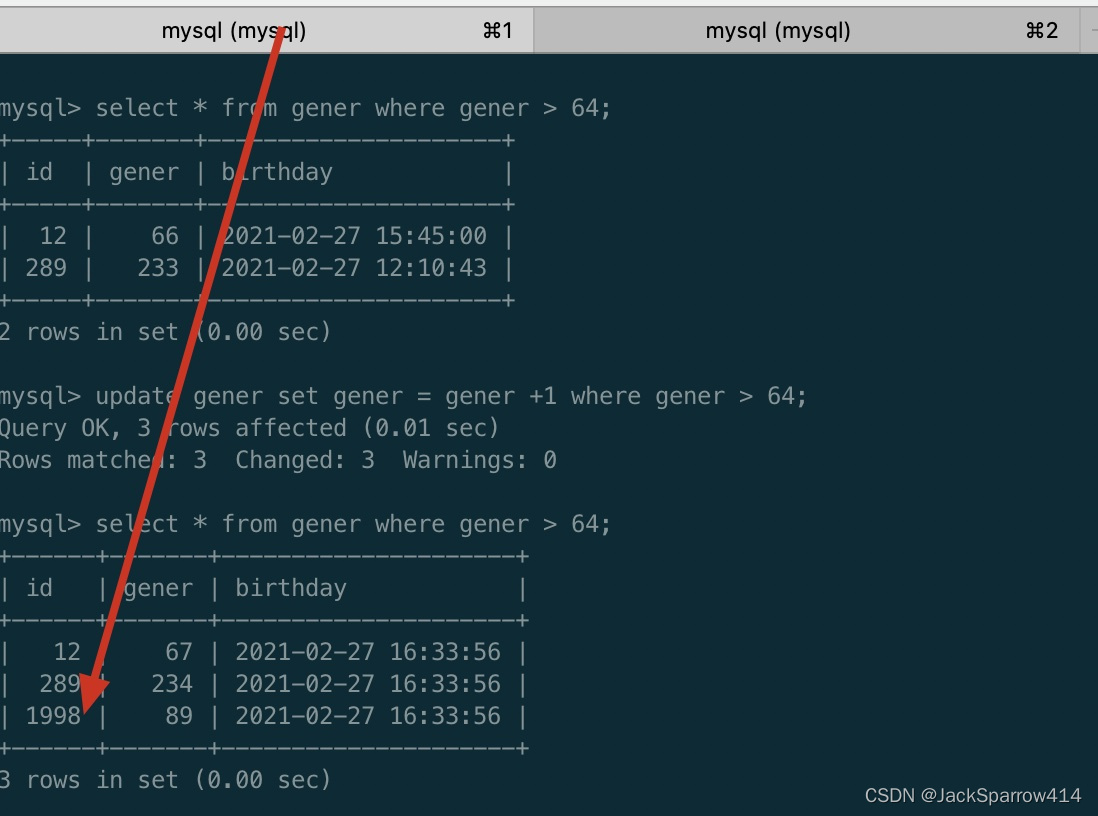 So transaction B has produced a phantom read. Phantom reads and non-repeatable reads are sometimes easily confused by some explanations found online.
You can take a look at this article on phantom reads (in Chinese); it explains it in great detail.
SERIALIZABLE:
The highest isolation level; dirty reads, non-repeatable reads, and phantom reads do not occur. Transactions are executed in a serial manner.
From the demonstrations above, you can tell what the commonly used abbreviations stand for.
RU - read uncommitted
RC - read committed
RR - repeatable read
Gap Locks - Next-Key Locks
In the explanation above, phantom reads can still occur under the RR isolation level. Gap locks can be used to guarantee that phantom reads do not occur; they are designed to prevent multiple transactions from inserting records into the same range.
For example:
select * from emp where empid > 100 for updateSuppose the table currently has only 101 rows. This SQL not only locks the row with id 101, but also locks rows with empid greater than 101, even though those rows do not exist.
At this point, if
insert into emp values (102);it will block.
The benefit of gap locks is obvious: they prevent phantom reads. But the downside is also obvious: they block concurrent inserts of data that matches the condition, and under high concurrency this can cause severe lock waits.
If MySQL Uses the MyIsam Storage Engine, Will Spring Transactions Take Effect?
Answer:
Even if Spring imposes restrictions at the code level, the MyIsam storage engine itself does not support transactions. So once a failure occurs while data is being written into the database, even if no error is reported at the code level, the ACID properties of the data cannot be guaranteed.
Indexes
CREATE [UNIQUE | FULLTEXT | SPATIAL] INDEX index_name
    [index_type]
    ON tbl_name (key_part,...)
    [index_option]
    [algorithm_option | lock_option] ...

key_part: {col_name [(length)] | (expr)} [ASC | DESC]

index_option: {
    KEY_BLOCK_SIZE [=] value
  | index_type
  | WITH PARSER parser_name
  | COMMENT 'string'
  | {VISIBLE | INVISIBLE}
  | ENGINE_ATTRIBUTE [=] 'string'
  | SECONDARY_ENGINE_ATTRIBUTE [=] 'string'
}

index_type:
    USING {BTREE | HASH}

algorithm_option:
    ALGORITHM [=] {DEFAULT | INPLACE | COPY}

lock_option:
    LOCK [=] {DEFAULT | NONE | SHARED | EXCLUSIVE}
Creating an index looks like this:
CREATE INDEX idx_gener USING BTREE ON gener (gener);Dropping an index:
DROP INDEX index_name ON tbl_name;Index Types
NORMAL
FULLTEXT - full-text index
UNIQUE - unique index
SPATIAL - spatial index
Index Methods
BTREE and HASH
Documentation on the difference between B-Tree and Hash index methods. Here is a brief summary of the differences:
- The B-Tree index method supports more operators than the Hash index method. The operators B-Tree supports are =, >, >=, <, <=, BETWEEN, LIKE, and as long as LIKE does not start with %, the index can be used.
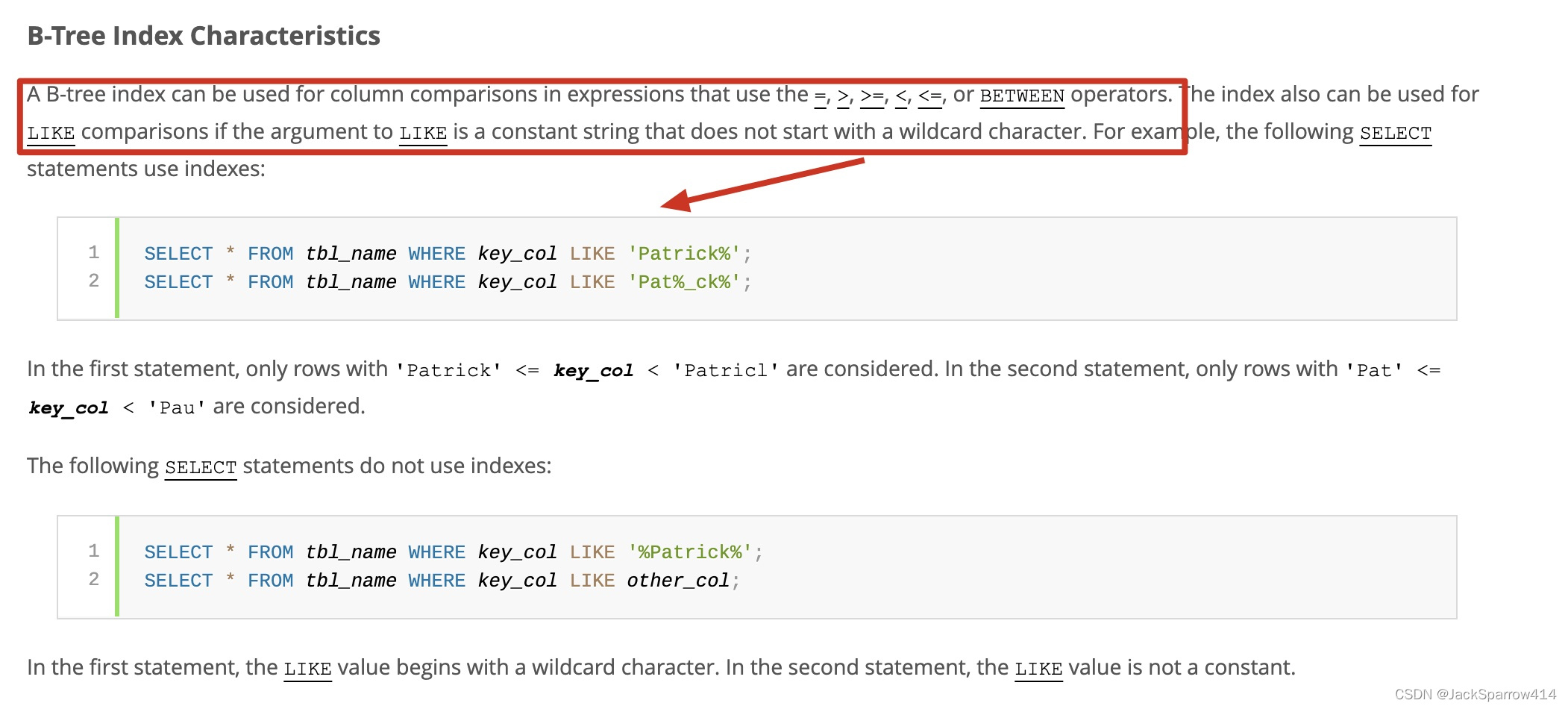
-
Hash indexes only use = or <=>. As you can see, Hash indexes support too few operators, and the optimizer cannot use a Hash index to speed up ORDER BY operations.
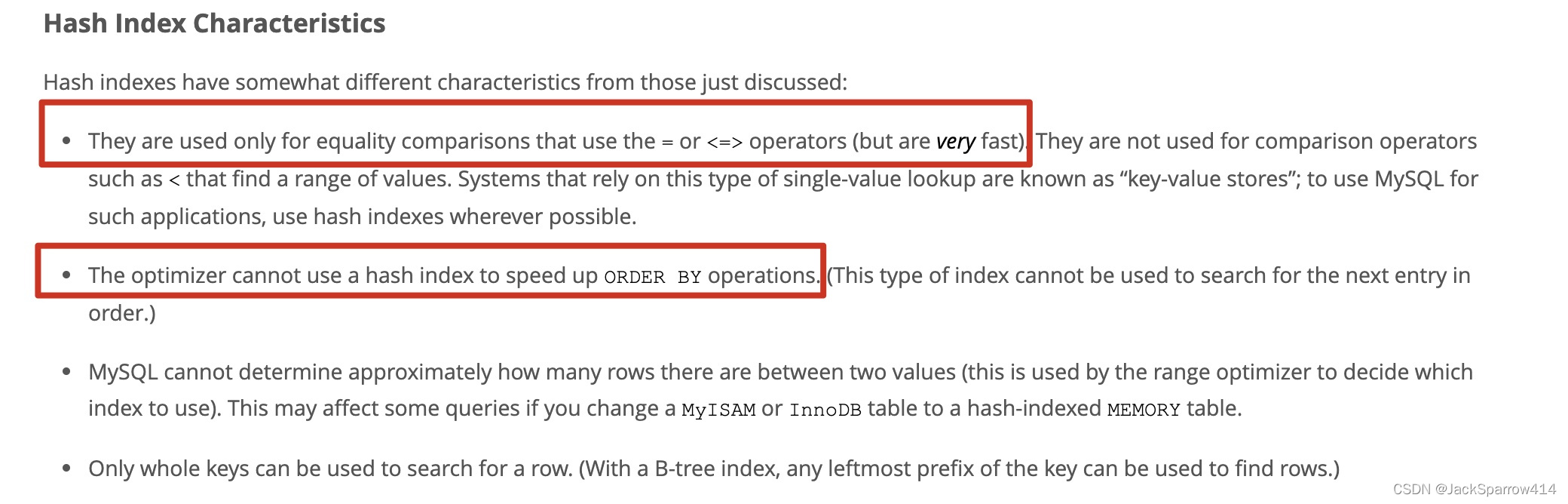
So for indexes: if the SQL statement only involves = or <=> on the indexed field, you can consider using a hash index; in other cases, a B-Tree index is recommended.
Scenarios Where Indexes Become Ineffective
-
Implicit data type conversion — for example, the field type is bigint but a ” string is used in the query, and vice versa
-
Using a leading % in LIKE causes the index to become ineffective
-
Using a function in the query condition, e.g.
select * from employees where char_length(first_name)=5 limit 10;
With Multiple Indexes, Which One Does MySQL Use? If Fields b and c Both Have Normal Indexes, Which Index Does MySQL Prefer? Why?
Answer:
Should this be answered from the angle of the MySQL optimizer?
SQL Optimization
Use EXPLAIN to view the SQL execution plan.
EXPLAIN documentation, EXPLAIN output format documentation
Usage:
explain select * form gener where id > 64; select_type is generally: SIMPLE - single table, PRIMARY - main query, UNION, SUBQUERY - subquery
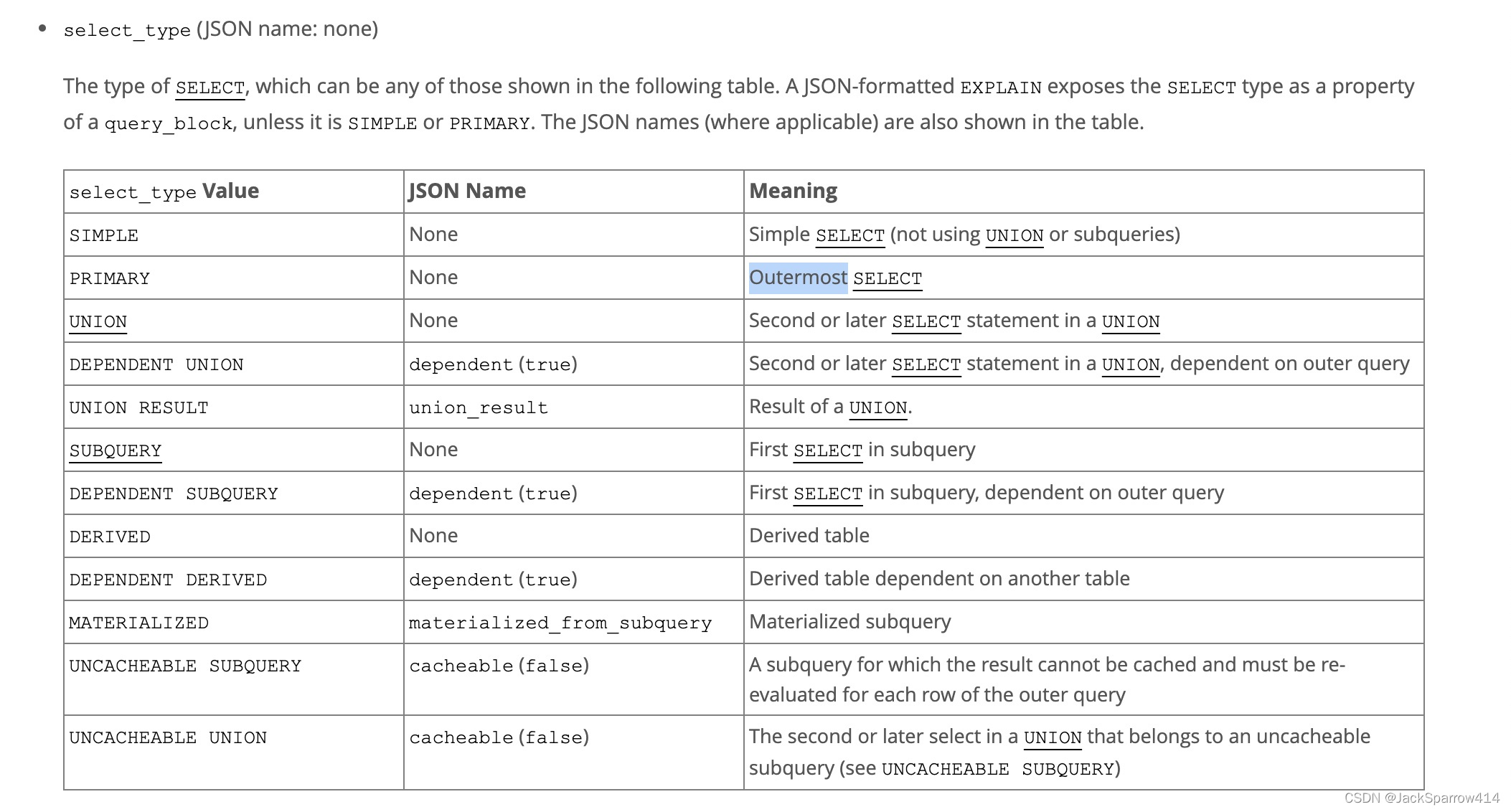 Focus on type, possible_keys, key, rows, key_len.
For type, performance from best to worst is:
- system, const
- eq_ref - unique index
- ref - non-unique index or a prefix scan of a unique index
- range - range queries, common with <, <=, >, >=, BETWEEN
- index - the index tree is fully scanned
- ALL - full table scan
possible_keys represents the indexes that may be used
key represents the index actually used
rows represents the number of rows MySQL has to query
Several MySQL Logs
slow query log
Purpose: records slow queries
Enable slow query logging in my.cnf
slow_query_log = 1
# Default value is 10
long_query_time = 2
# Log SQL statements that did not use an index during the query
log_queries_not_using_indexes = 1
binary log
Purpose: records database changes, table creation, and table data changes — that is, DML-related information. It typically appears on the Master side in master-slave replication scenarios.
Enable bin log in my.cnf
log-bin = mysql-bin
# On every transaction commit, write synchronously to the bin log
sync_binlog = 1
# The data format recorded in the bin log
binlog-format = ROW/STATEMENT/MIXED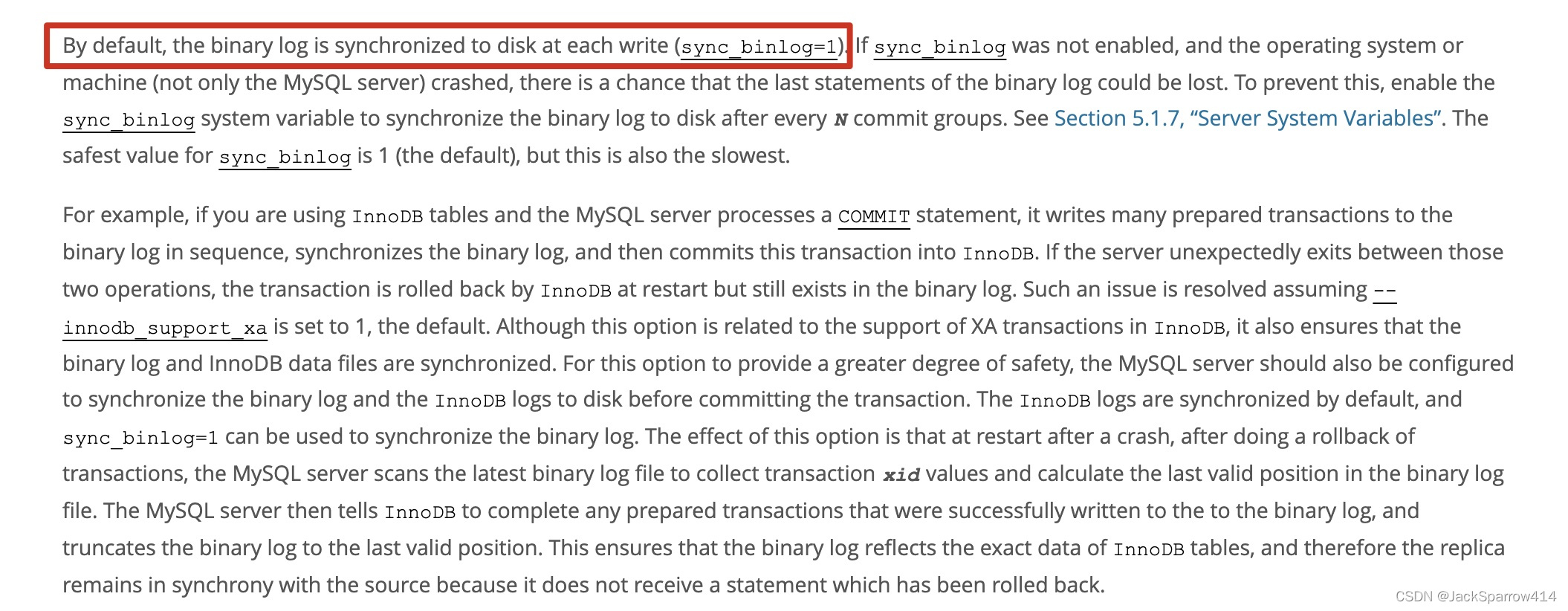

bin log recording formats
ROW - the actual data of each row
STATEMENT - the SQL executed by the MySQL server
MIXED - a mix of the two above
relay log
Purpose: the log provided for the Slave to execute. In master-slave replication scenarios, the Master sends the binlog to the Slave; the Slave first writes the contents of the binlog into the relay log, and then the Slave thread reads the relay log contents and starts writing the data into the slave database.
error log and general query log
undo log
Records the state of the data before the transaction, used to implement transaction rollback
- Write an undo log record before modifying data
- The transaction is committed only after the undo log is written to disk
redo log
Records the state of the data after the transaction, used to recover data that has not been written to disk but whose transaction has already succeeded
- Write a redo log record after modifying data
- The transaction is committed only after the log buffer is written to disk
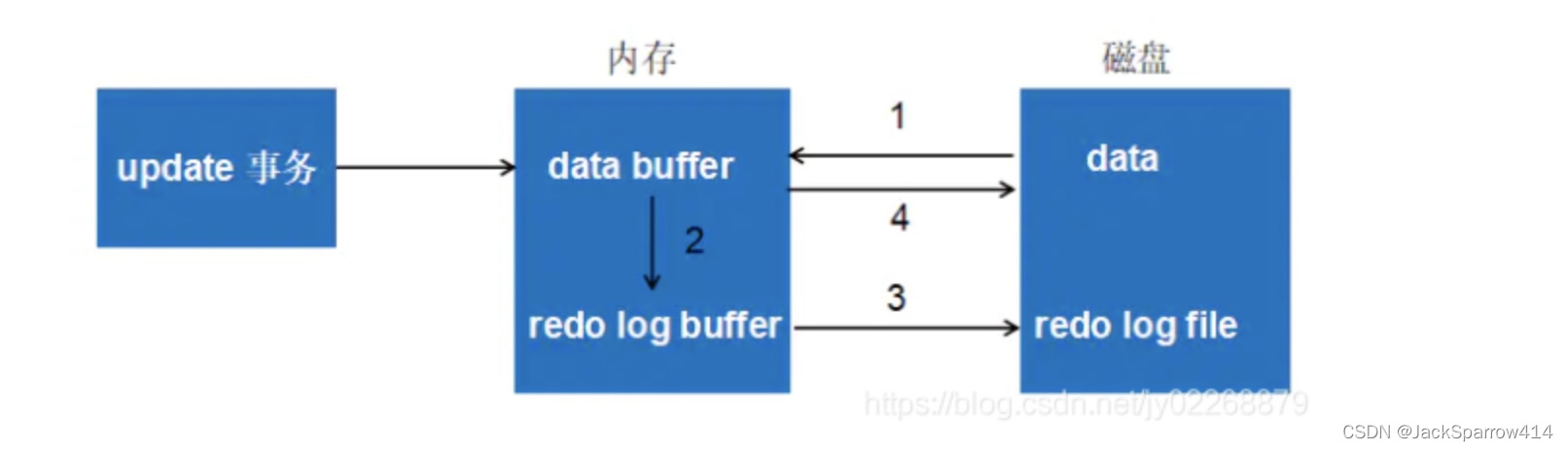
For a more detailed related article, see here (in Chinese).
Useful Resources
- MySQL official documentation
- MySQL official glossary — you can use a relevant word to quickly find the related documentation. For example, if you are not sure what DDL, DML, or DCL mean, a quick look at this address will tell you.