Table of contents
Open Table of contents
Sending Email with Velocity in Spring Boot
Introduction
What Can Velocity Be Used For?
Many people know Velocity as a template engine for MVC views. Today, with separate frontend and backend applications, I think a large proportion of companies use frontend frameworks such as React or Vue. Using template engines to render frontend pages seems less common.
Besides page rendering, the official documentation mentions an important use case: sending email. An application may use a shared email template while displaying different content for each user. The template needs to remain separate from the Java code and rarely changes. This is where Velocity is useful.
Getting Started
In simple terms, Velocity syntax defines variables and retrieves their values in a template, while Java code supplies those values and renders the template.
Templates
Template syntax mainly falls into two categories:
References
See the reference documentation. I will only make a few brief notes here.
-
Naming rules.
A reference consists of $ plus a variable or method name. The name must begin with a letter; subsequent characters may be letters, digits, or underscores (_).
-
Accessing properties and methods.
Use a name followed by a dot.
## Access customerName on order.
$order.customerName
For whether a reference accesses a property or a method, see the property lookup rules.
-
Formal reference notation.
When other words immediately follow a variable, Velocity may treat them as part of the variable name. To prevent this, use formal reference notation.
Jack is a ${vice}maniacThis looks up only vice.
Directives
Directives begin with #. The main common ones are:
-
set: assign a value.
#set($temList = $order.items)Assign items to the variable temList.
-
If / ElseIf / Else: conditions.
#if( $foo < 10 )
    Go North
#elseif( $foo == 10 )
    Go East
#elseif( $bar == 6 )
    Go South
#else
    Go West
#end
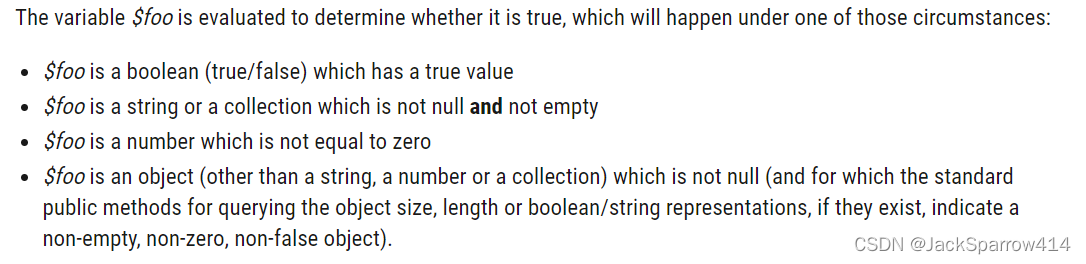
foo may be an object, collection, array, and so on. The condition is:
-
foreach: loops.
#set($temList = $order.items) #foreach($item in $temList) $item #end -
include and parse: reuse other templates.
<html>
## Specify the full path under resources here.
    #parse("templates/emails/header.vm")
<body>
</body>
</html>
For other features, such as escaping and arithmetic, see the relevant documentation.
Java Code
After writing the template, we need to assign its variables. See the developer guide.
Create a Spring Boot application.
Use Velocity or VelocityEngine according to preference. Context is the main API for assigning variables.
An example template:
<html>
    #parse("templates/emails/header.vm")
<body>
Hi, $order.customerName<br>
## Use formal reference notation.
Here are the details of the order you completed at ${order.paymentTime}:
<table border="1">
    <tr>
        <th>Item</th>
    </tr>
    #set($temList = $order.items)
    #foreach($item in $temList)
        <tr>
            <td>$item</td>
        </tr>
    #end
</table>
<br>
Total amount: $order.paymentAmount<br>
Delivery method: $order.deliveryMethod
</body>
</html>
Assign values to the template above:
@Service
@Log
public class SendEmailService {

    private static final VelocityEngine ve = new VelocityEngine();

    /**
     * https://velocity.apache.org/engine/2.3/configuration.html#resource-management
     *
     * https://velocity.apache.org/engine/2.3/configuration.html#configuration-examples
     * Pay attention to the final paragraph.
     * Node that the three names 'file', 'class', and 'jar' are merely for your convenience and sanity.
     * They can be anything you want - they are just used to associate a set of properties together.
     * However, it is recommended that you use names that give some hint of the function
     *
     * It explains that file, class, and jar can be replaced with other names. Hence resource.loader.class.class below; class is used here.
     */
    @PostConstruct
    public void initVelocity() {
        ve.setProperty(RuntimeConstants.RESOURCE_LOADERS, "class");
        ve.setProperty("resource.loader.class.class", ClasspathResourceLoader.class.getName());
        ve.setProperty("resource.loader.class.cache", true);
        ve.init();
    }

    public boolean sendOrderDetailEmail() {
        Order order = new Order();
        order.setCustomerName("jack");
        List<String> items = Arrays.asList("猪肉", "牛肉", "鱼肉");
        order.setItems(items);
        order.setPaymentAmount(BigDecimal.valueOf(78.365));
        order.setPaymentTime(LocalDateTime.now());
        order.setDeliveryMethod("顺丰");
        // Assign values.
        VelocityContext context = new VelocityContext();
        context.put("order", order);
        context.put("header", "OrderDetail");
        // Get the template.
        Template template = ve.getTemplate(SendEmailUtil.obtainTemplateRealPath("orderDetail"));
        StringWriter writer = new StringWriter();
        // Render the template with the variable values.
        template.merge(context, writer);
        return true;
    }
}Note: pay particular attention to configuring the location from which Velocity reads templates. See the ResourceLoader documentation.
When Must ResourceLoader Be Configured?
- When using velocityEngine.mergeTemplate or template.merge, configure ResourceLoader during initialization.
- A .vm file containing #include or #parse also requires ResourceLoader configuration.
/**
 * Two approaches: https://velocity.apache.org/engine/devel/developer-guide.html#using-velocity
 * One uses a string directly with velocityEngine.evaluate.
 * The other uses a template file with velocityEngine.mergeTemplate and requires resourceLoader configuration at initialization.
 *
 * Velocity configuration: https://velocity.apache.org/engine/devel/configuration.html#configuring-velocity
 * Default configuration file location: org/apache/velocity/runtime/defaults/velocity.properties
 * Any values specified before init() time will replace the default values.
 * Therefore, you only have to configure velocity with the values for the keys    that you need to change,
 * and not worry about the rest
 */
@Log
@Component
public class VelocityUsageService {

    /**
     * A string containing #parse or #include requires resourceLoader configuration.
     * @return
     */
    public String velocityEvaluateHasParseOrIncludeDirective() {
        StringWriter writer = new StringWriter();
        String template = "<html>\n" + "## Specify the full path under resources here.\n" + "    #parse(\"templates/emails/header.vm\")\n" + "<body>\n" + "Hi, $order.customerName<br>\n" + "## Use formal reference notation.\n" +
            "Here are the details of the order you completed at ${order.paymentTime}:\n" + "<table border=\"1\">\n" + "    <tr>\n" + "        <th>Item</th>\n" + "    </tr>\n" + "    #set($temList = $order.items)\n" +
            "    #foreach($item in $temList)\n" + "        <tr>\n" + "            <td>$item</td>\n" + "        </tr>\n" + "    #end\n" + "</table>\n" + "<br>\n" + "Total amount: $order.paymentAmount<br>\n" +
            "Delivery method: $order.deliveryMethod\n" + "</body>\n" + "</html>";
        VelocityEngine velocityEngine = new VelocityEngine();
        velocityEngine.setProperty(RuntimeConstants.RESOURCE_LOADERS, "class");
        velocityEngine.setProperty("resource.loader.class.class", ClasspathResourceLoader.class.getName());
        velocityEngine.setProperty("resource.loader.class.cache", true);
        VelocityContext velocityContext = new VelocityContext();
        Order order = new Order();
        order.setCustomerName("jack");
        List<String> items = Arrays.asList("猪肉", "牛肉", "鱼肉");
        order.setItems(items);
        order.setPaymentAmount(BigDecimal.valueOf(78.365));
        order.setPaymentTime(LocalDateTime.now());
        order.setDeliveryMethod("顺丰");
        velocityContext.put("order", order);
        velocityContext.put("header", "OrderDetail");
//        velocityContext.put("name", "sparrow");
        velocityEngine.evaluate(velocityContext, writer, UUID.randomUUID().toString(), template);
        log.info(writer.toString());
        return writer.toString();
    }

    public String velocityEvaluateNoParseAndIncludeDirective() {
        StringWriter writer = new StringWriter();
        String template = "hello $name";
        VelocityEngine velocityEngine = new VelocityEngine();
        VelocityContext velocityContext = new VelocityContext();
        velocityContext.put("name", "sparrow");
        velocityEngine.evaluate(velocityContext, writer, UUID.randomUUID().toString(), template);
        log.info(writer.toString());
        return writer.toString();
    }

    /**
     * https://velocity.apache.org/engine/devel/developer-guide.html#resource-loaders
     * When using velocityEngine.mergeTemplate or template.merge, configure ResourceLoader during initialization.
     * A .vm file containing #include or #parse also requires ResourceLoader configuration.
     *
     * because the resource management system will also handle non-template reasources, specifically things that are loaded via the #include() directive
     */
    public String velocityMergeTemplate() {
        StringWriter writer = new StringWriter();
        VelocityEngine velocityEngine = new VelocityEngine();
        velocityEngine.setProperty(RuntimeConstants.RESOURCE_LOADERS, "class");
        velocityEngine.setProperty("resource.loader.class.class", ClasspathResourceLoader.class.getName());
        velocityEngine.setProperty("resource.loader.class.cache", true);
        VelocityContext velocityContext = new VelocityContext();
        velocityContext.put("name", "sparrow");
        // Approach 1
//        Template template = velocityEngine.getTemplate(SendEmailUtil.obtainTemplateRealPath("registerSuccess"));
//        template.merge(velocityContext, writer);
        // Approach 2
        velocityEngine.mergeTemplate(SendEmailUtil.obtainTemplateRealPath("registerSuccess"), Charset.defaultCharset().name(), velocityContext, writer);
        log.info(writer.toString());
        return writer.toString();
    }
}
Integrating Email Sending
Here we send email using a 163.com mailbox.
Two main protocols are involved in sending and receiving email:
- SMTP, or Simple Mail Transfer Protocol, sends email. It is a standard protocol for transmitting email over computer networks.
- IMAP, or Internet Message Access Protocol, receives email. It is a protocol for receiving and managing messages, allowing email clients such as Outlook and Thunderbird to connect to a mail server and view, download, organize, and manage email.
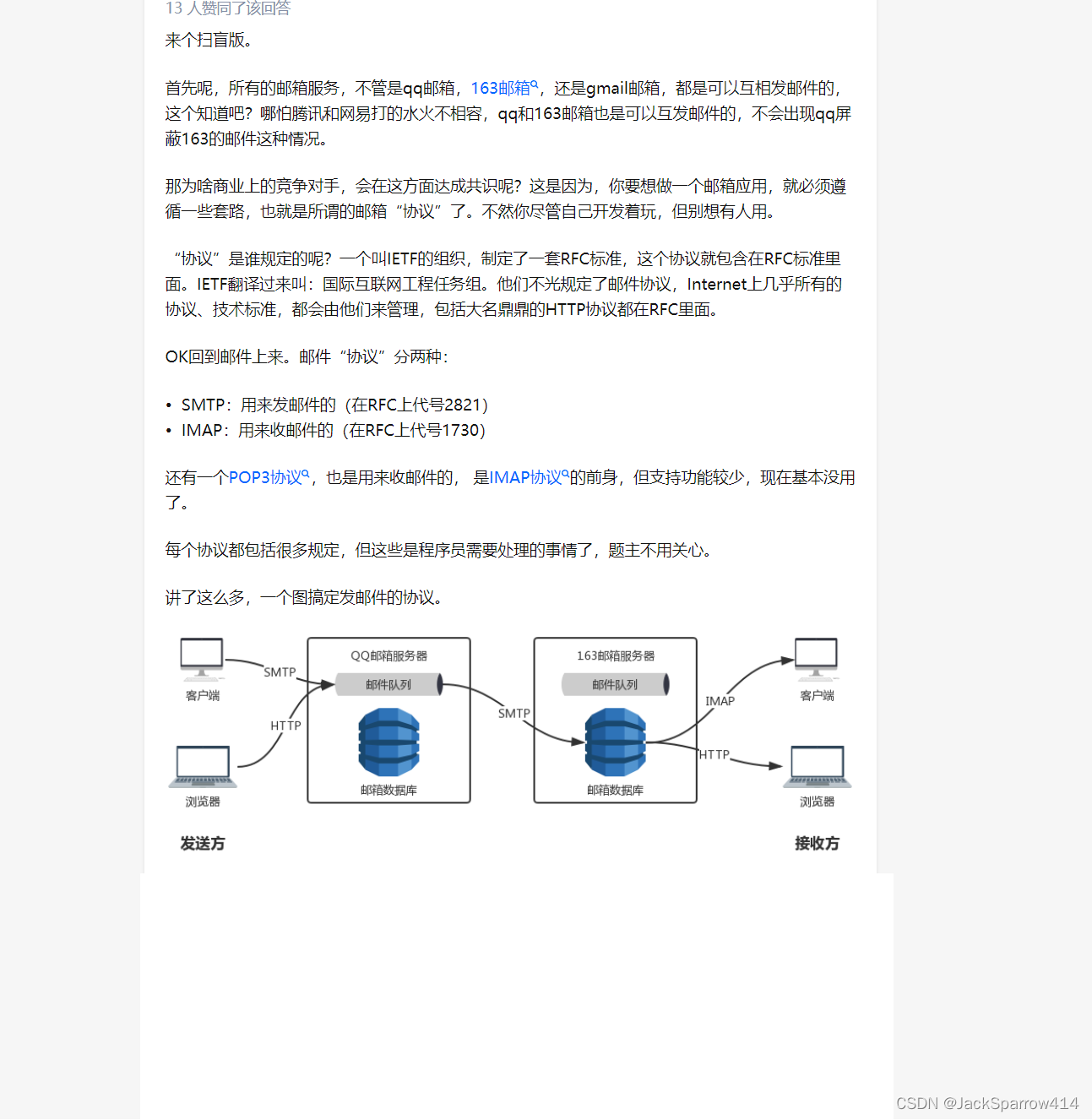
Use JavaMailSender, the mail utility integrated by Spring Boot. See documentation 1 and documentation 2.
Prerequisites
Enable POP3/SMTP/IMAP in the 163.com mailbox and obtain an authorization code.
Implementation
Configuration File
server:
  port: 18080
  servlet:
    context-path: /v
spring:
  mail:
    host: smtp.163.com
    username: YOUR_EMAIL_ADDRESS
    # Authorization code for the 163.com mailbox
    password: YOUR_AUTHORIZATION_CODE
    properties:
      mail:
        smtp:
          auth: true
          starttls:
            enable: true
            required: true
  # https://velocity.apache.org/engine/devel/developer-guide.html#logging
  logging:
    level:
      org.apache.velocity: trace
Sending the Email
@Service
@Log
public class SendEmailService {

    private static final VelocityEngine ve = new VelocityEngine();

    @Autowired
    private JavaMailSender javaMailSender;

    @PostConstruct
    public void initVelocity() {
        ve.setProperty(RuntimeConstants.RESOURCE_LOADERS, "class");
        ve.setProperty("resource.loader.class.class", ClasspathResourceLoader.class.getName());
        ve.setProperty("resource.loader.class.cache", true);
        ve.init();
    }

    public boolean sendOrderDetailEmail() {
        VelocityContext context = new VelocityContext();
        Order order = new Order();
        order.setCustomerName("jack");
        List<String> items = Arrays.asList("猪肉", "牛肉", "鱼肉");
        order.setItems(items);
        order.setPaymentAmount(BigDecimal.valueOf(78.365));
        order.setPaymentTime(LocalDateTime.now());
        order.setDeliveryMethod("顺丰");
        context.put("order", order);
        context.put("header", "OrderDetail");
        Template template = ve.getTemplate(SendEmailUtil.obtainTemplateRealPath("orderDetail"));
        StringWriter writer = new StringWriter();
        template.merge(context, writer);
        javaMailSender.send(buildMessage("OrderDetail Email", writer.toString()));
        return true;
    }

    @SneakyThrows
    private MimeMessage buildMessage(String subject, String emailContent) {
        MimeMessage message = javaMailSender.createMimeMessage();
        MimeMessageHelper helper = new MimeMessageHelper(message);
        helper.setFrom("SENDER_EMAIL_ADDRESS");
        helper.setTo("RECIPIENT_EMAIL_ADDRESS");
        helper.setSubject(subject);
        message.setText(emailContent, Charset.defaultCharset().name(), "html");
        return message;
    }
}
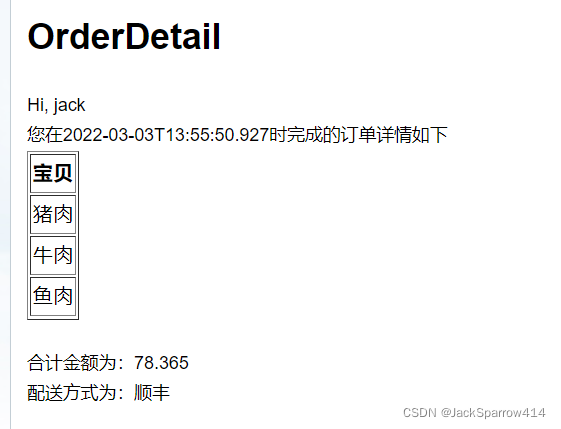
Result
Official Documentation
Reading the official documentation falls into two main parts:
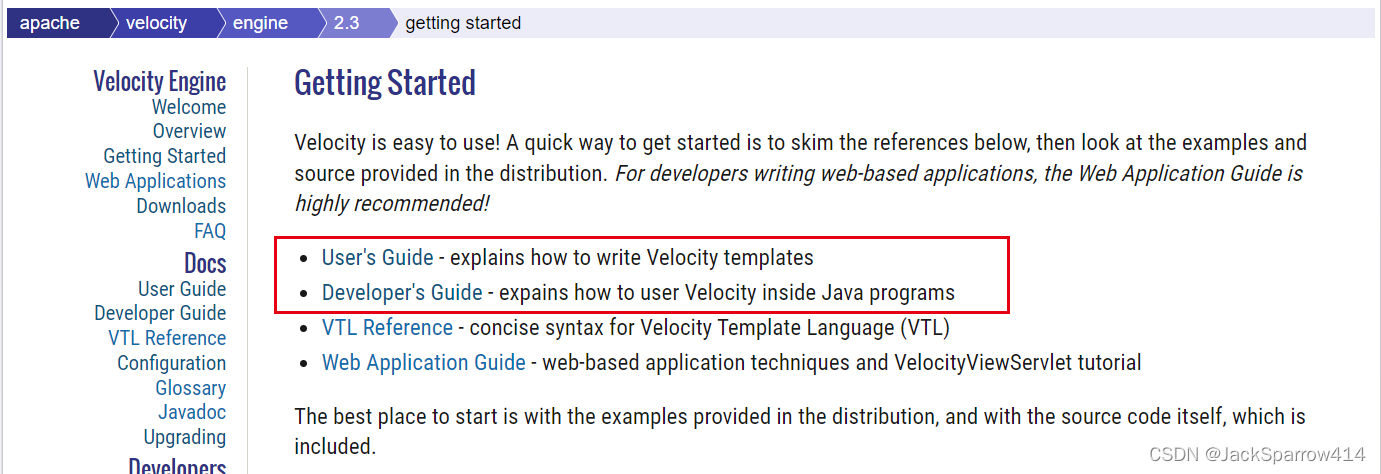
- For writing templates, use the User’s Guide.
- For writing Java code, use the Developer’s Guide.
Example Code
- Complete example repository. For more detailed usage, read the comments in the code.