Table of contents
Open Table of contents
- Introduction
- Which JDK Vendor Should We Use?
- How Much Faster Is JDK 17?
- Upgrade Approach
- Final Notes
Introduction
Our company has more than ten Java applications. Infrastructure and configuration upgrades—operating systems, Apache, Tomcat, third-party dependencies in pom.xml, and the JDK—must be coordinated across the platform. Because of the number of applications and code complexity, seemingly simple changes require extra care.
Last year we moved from JDK 8 to JDK 11. This year we plan to move from JDK 11 to JDK 17, and I am responsible for the upgrade. The following describes my thinking and practices during the process. This approach also applies to later JDK upgrades.
If your company is considering moving from JDK 8 to JDK 11 or 17, I recommend JD.com’s technical team articles. Our issues overlap with theirs by about 80%; after reading them, you may not even need my article.
Which JDK Vendor Should We Use?
This question arises because after Oracle acquired Java, Oracle JDK releases after 8u202 became paid offerings. A company still using an earlier Oracle JDK must make a choice when upgrading.
Many JDK vendors are available, including Oracle, Red Hat, and the open-source Adoptium Eclipse Temurin distribution. How do they differ? A Korean engineer’s Which Version of JDK Should I Use? helps explain vendors and version differences.
We prioritize open-source options over paid commercial offerings, so we chose Adoptium Eclipse Temurin and plan later upgrades according to its release roadmap and our needs.
How Much Faster Is JDK 17?
The JD.com articles briefly discuss this. Here are a few more links:
- How much faster is Java 17?
- GC progress from JDK 8 to JDK 17
- A web tool for quickly comparing JVM options across versions
Articles About GC
- Bending pause times to your will with Generational ZGC
- A Netflix presentation about Java
- An article on ZGC performance
Upgrade Approach
Read the Official Migration Guide
Read Oracle’s JDK 17 migration guide carefully. Although we use an open-source JDK rather than paid Oracle JDK, standard JDK changes are shared.
Code Compatibility Issues After Upgrading
We encountered an incompatibility in code checking an exception message for a null input.
In JDK 11:
public static int parseInt(String s, int radix)
                throws NumberFormatException
    {
        if (s == null) {
            throw new NumberFormatException("null");
        }
}
In JDK 17:
public static int parseInt(String s, int radix)
                throws NumberFormatException
    {
        if (s == null) {
            throw new NumberFormatException("Cannot parse null string");
        }
}
Some developers based exception handling on the message string. After upgrading, those checks no longer matched and caused bugs.
Fix: change the null-handling logic; do not base it on exception message strings.
Ensuring Reflection Still Works on JDK 17
While reading Oracle’s migration guide, I found this passage: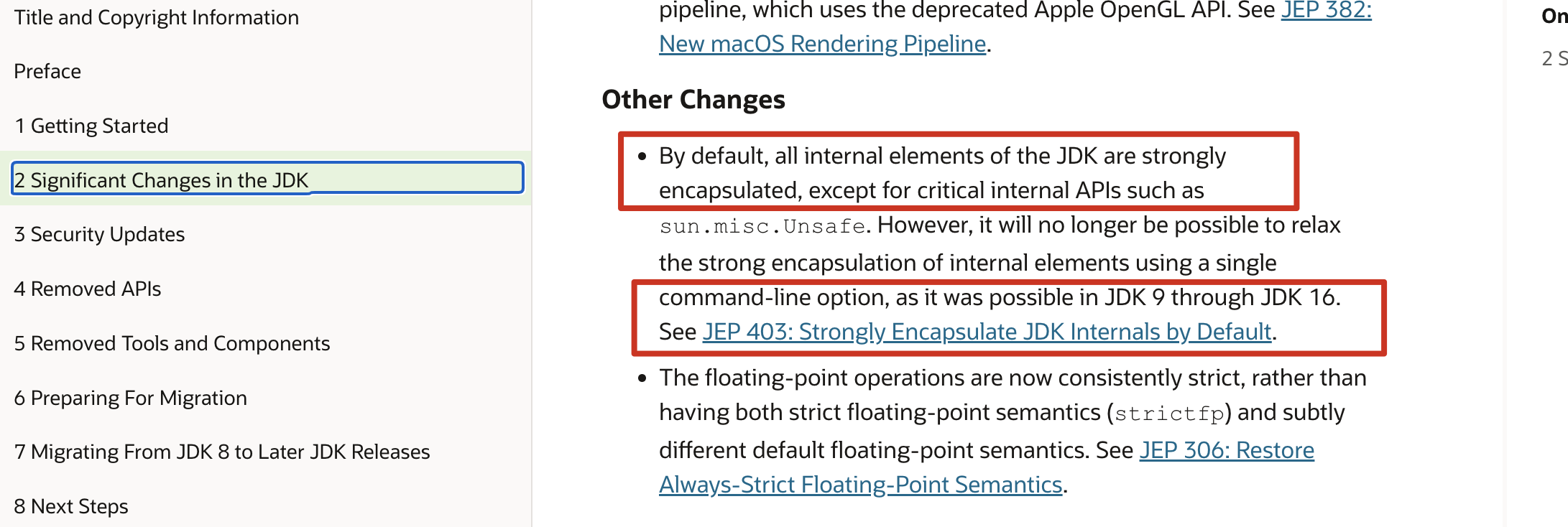 For developers still on JDK 8, some background helps: JDK 9 introduced the Module System, dividing JDK packages more precisely and tightening reflective-access restrictions.
If unfamiliar with modules, see the modularity discussion in JD.com’s JDK 8-to-11 article or search for an introduction.
JDK 9–15 used modules but still allowed some reflective access more leniently. Users could add --illegal-access=permit to permit it.
JDK 16 defaults to denying illegal reflective access with --illegal-access=deny: a package accessed reflectively must be opened with opens in module-info. However, JDK 16 still allows changing the option to permit.
From JDK 17, —illegal-access no longer takes effect (see JEP 403); the JVM ignores it at startup.
Finding Third-Party Libraries with Disallowed Reflection
With that background, consider the practical problem: many Java applications run on JDK 11, with large codebases and many dependencies. How can we identify reflection that JDK 17 will disallow?
- Add
--illegal-access=warnto JVM startup options for all applications in test and production. Our test environment runs many automated smoke tests daily. Periodically inspect both environments’ logs for messages like:WARNING: Illegal reflective access by - After running step 1 in production for some time, add —add-opens as needed for reported accesses, for example:
The equals sign can be omitted; see the JDK team’s discussion:--add-opens=java.desktop/javax.swing=ALL-UNNAMED
Usually, however, include the equals sign. Continue analyzing logs for the warnings from step 1.--add-opens java.desktop/javax.swing=ALL-UNNAMED - After validating those two steps for a period, change test and production JVM options to
--illegal-access=deny. Keep analyzing logs to ensure reflection is not failing.
Switching the Runtime to JDK 17
Our strategy:
- Run JDK 17 in the test environment for a period. If stable, gradually move production runtimes to 17.
- Keep JDK 11 for compilation in Jenkins builds.
- In other words, run artifacts compiled by JDK 11 on JDK 17.
Configuring Tomcat’s JSP Compiler Version
Also update TOMCAT_HOME/conf/web.xml to use 17. Our Tomcat 10 defaults to compilation version 11.
<init-param>
     <param-name>compilerSourceVM</param-name>
     <param-value>17</param-value>
</init-param>
<init-param>
      <param-name>compilerTargetVM</param-name>
      <param-value>17</param-value>
</init-param>
Improving Jenkins Jobs for Java Builds
Currently, the JDK used by Tomcat after the build is hard-coded in the Jenkins jobs.
This makes current and future upgrade testing awkward. DevOps largely maintains these jobs; users request changes, and DevOps creates separate jobs.
After understanding their workflow, I realized there was no need to copy or create jobs. Add a parameter such as RUNTIME_JDK to the existing job and pass it to the shell script. After building the Docker image and before starting Tomcat, run switchJDK.sh to switch the JDK.
The benefits are:
- Over the long term, this reduces DevOps workload and improves maintainability. They only need to periodically include future JDK versions in our custom Docker image, without participating in each upgrade.
- Developers and QA can quickly switch back to the current JDK if early upgrade testing encounters problems, without disrupting smoke tests for active tickets.
Switching the Compile-Time JDK to 17
Once production has run stably on JDK 17 for a period, change compilation to JDK 17, mainly through pom.xml:
<maven.compiler.source>17</maven.compiler.source>
<maven.compiler.target>17</maven.compiler.target>
After merging this change into the main branch, switch the project’s Jenkins job to JDK 17 for compilation as well.
Asking Developers to Switch to JDK 17
Once the changes are merged, the upgrade is complete. Notify developers to download and switch to the same JDK version as test and production, and update IDEA’s Java and compiler settings.
Final Notes
Upgrading all applications from JDK 8 to 11—including verification, testing, staged production rollout, and completion—took nearly six months. We expect JDK 17 to go more smoothly, perhaps taking about four months.
The tasks do not look complicated, but completing the process without disrupting services requires great care and close collaboration with other teams. It tests skills beyond programming.
I will close with one sentence:
Only those patient enough to do simple things well can acquire the skills to do difficult things with ease.