Table of contents
Open Table of contents
- What Things Look Like Without HTTPS
- A Clearer Explanation of Why Encryption Matters
- Symmetric Encryption, Asymmetric Encryption, and CA Certificates
- Generate a Key Pair and Self-Signed Certificate with Java keytool
- Configure TLS/SSL in Tomcat
- What Things Look Like with HTTPS
- Final Thoughts
- References
Article body
I often encounter HTTPS, TLS, and SSL. After reading a few articles, I used to think I understood them, but I did not. I want to fill in this foundational knowledge, without going deeply into subjects such as interpreting the various standards.
What Things Look Like Without HTTPS
We know that HTTP is insecure and why. To make this more concrete and deepen my understanding, I built a simple demonstration using Wireshark.
Demonstration Setup
Create a simple local RESTful Java project and deploy it to Tomcat.
- JDK version: OpenJDK 11.0.19
- Tomcat version: 10.1.11
Wireshark Capture Filters and Display Filters
Set a Capture Filter
We only want local packets, so select Loopback in the interface and set the capture filter before starting.
src host localhost and dst host localhost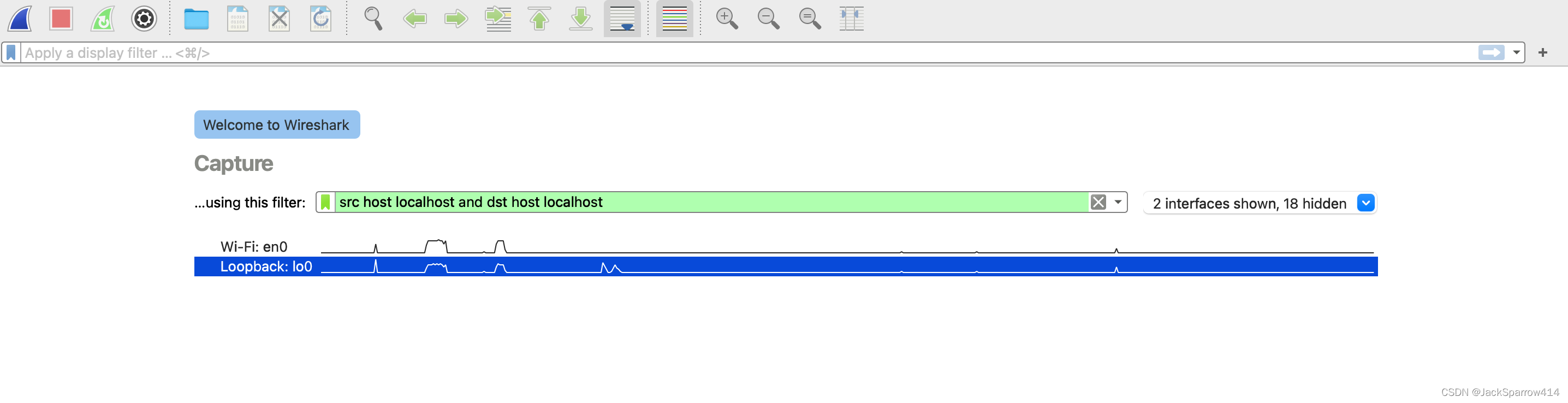 Press Enter to start capturing.
Find capture filter syntax through Wireshark > Help > Wiki > CaptureFilters > Further Information (pcap-filter man page), which provides the full syntax.
Start the Application
Start the test application locally. Configure only the HTTP port in IntelliJ IDEA’s Tomcat settings; mine is 8080.
Send a POST request from the terminal.
curl -X POST http://localhost:8080/validation/valid/inline/postFilter Captured Packets with a Display Filter
Set the display filter.
http and tcp.port eq 8080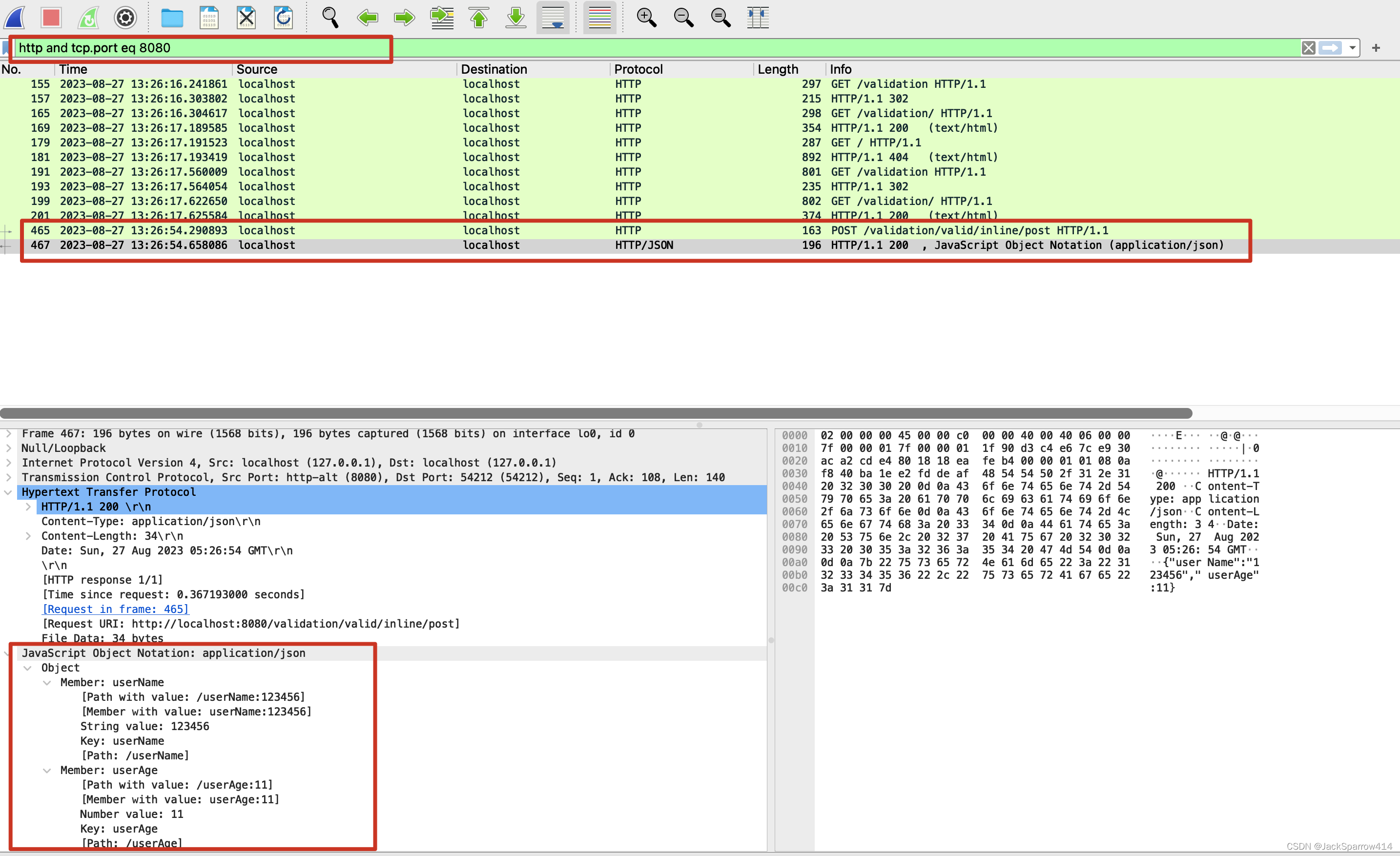 For display filter syntax, see:
- Wireshark > Help > Wiki > DisplayFilters.
- Wireshark website > Documentation > Display Filter Reference.
Conclusion
The demonstration can be summarized as follows: HTTP sends everything in the clear. Data travels over the network as plaintext. Packet-capture tools can intercept it, and it may even be modified. The consequences are alarming: people interacting with online services can easily have their private information exposed.
A Clearer Explanation of Why Encryption Matters
To address plaintext communication, we must encrypt it and deal with man-in-the-middle attacks.
For a more precise explanation of why encryption is needed, see Cloudflare’s article. The following points are translated from its Chinese version:
-
Privacy: encryption ensures that communications and stored data can only be read by the intended recipient or legitimate owner. It protects privacy by preventing attackers, advertising networks, internet service providers, and sometimes governments from intercepting and reading sensitive information.
-
Security: encryption helps prevent data breaches both in transit and at rest. If a company device is lost or stolen and its hard drive is properly encrypted, its data remains protected. Encrypted communication similarly allows parties to exchange sensitive information without exposing it.
-
Data integrity: encryption also helps prevent malicious activity, such as attacks on data in transit. When data travels over the internet, encryption helps ensure that what arrives has not been viewed or altered along the way.
-
Regulations: for these reasons, many industry and government rules require companies to encrypt user data. Examples of regulations and compliance standards requiring encryption include HIPAA, PCI-DSS, and GDPR.
Symmetric Encryption, Asymmetric Encryption, and CA Certificates
Key Exchange
- Regardless of the encryption method, keys sent by a server or exchanged between a browser and server can be intercepted in a man-in-the-middle attack. The attacker impersonates either endpoint and interacts with the other, potentially forging requests or responses and obtaining browser or server request data containing the sensitive information discussed above.
- You might think: why not obtain the key before requesting the server? But how would you do that? The internet has countless services, and you cannot know in advance which website you will use on a particular day. The key therefore needs to be determined during the first connection to the server.
How do we address man-in-the-middle attacks? The CA certificate section below explains.
Symmetric Encryption
Symmetric encryption uses one key for both encryption and decryption.
That is its drawback: anyone who obtains the key can both decrypt and encrypt information.
Asymmetric Encryption
-
Asymmetric encryption uses two keys and addresses the drawback above. Data encrypted with key-1 must be decrypted with its corresponding key-2; key-1 cannot decrypt it itself. The point to understand here is that the two keys can encrypt and decrypt for each other. Which key encrypts and which decrypts depends on the scenario. The following is quoted from Alibaba Cloud’s documentation.
A key pair generated by an encryption algorithm can be globally unique. When one key encrypts data, only the other key in the pair can decrypt it. For example, data encrypted with a public key requires its corresponding private key for decryption; data encrypted with a private key likewise requires the corresponding public key. Otherwise, decryption fails.
-
The following is quoted from Alibaba Cloud’s documentation.
Each user establishes a private key known only to them, used for decryption and signing. They also establish and publish a public key, shared with other users, for encryption and signature verification.
Since the private key belongs only to its owner, it can produce an encrypted file that others cannot generate, forming a digital signature.
-
When we share our public key, others can encrypt information intended for us. Only our private key can decrypt it, so even if the message is lost or stolen, others cannot recover the original information. This addresses the privacy and security concerns above.
-
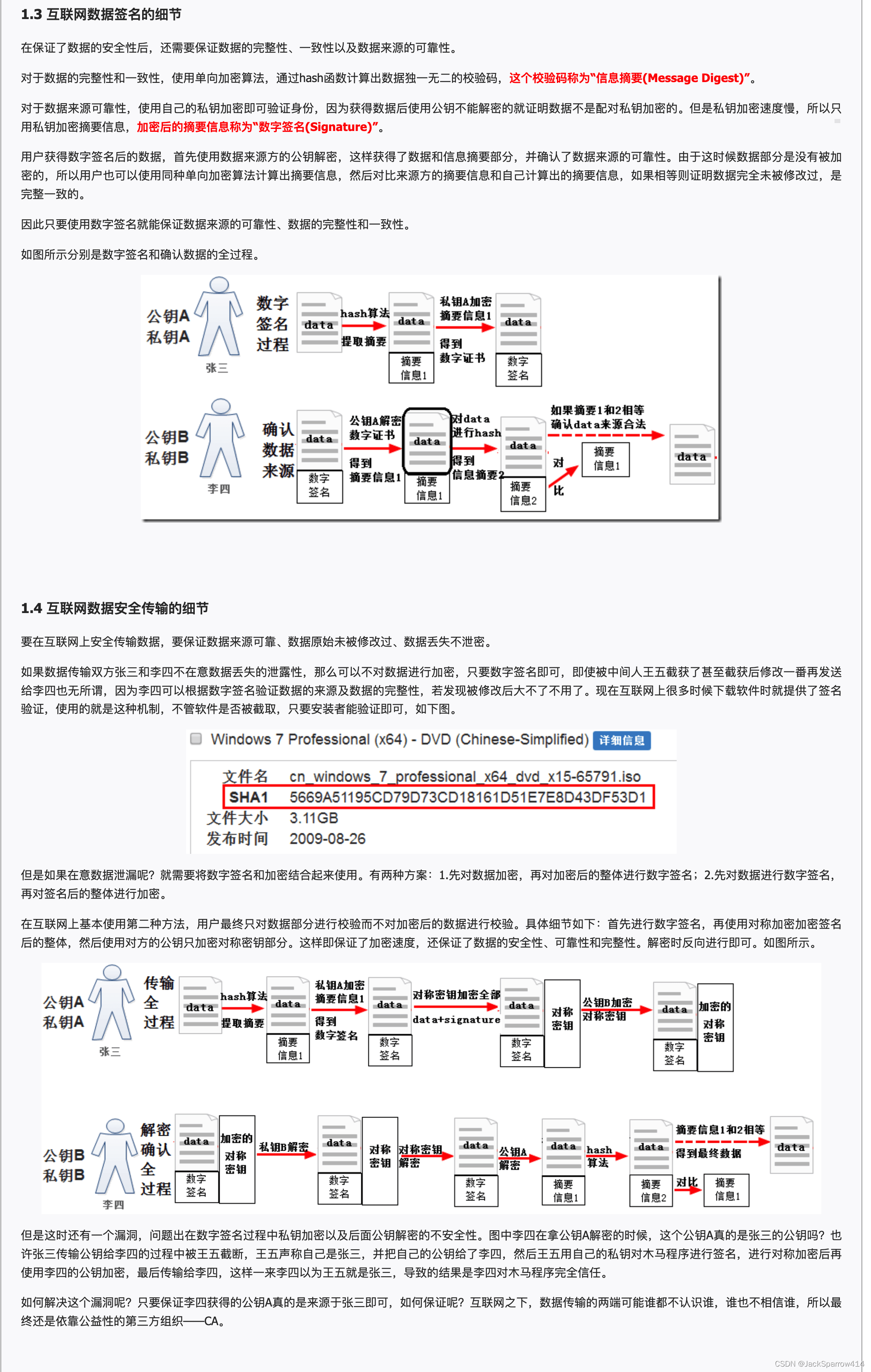
How is data integrity ensured? The following is quoted from LinuxIDC.
When encrypting data, a one-way algorithm uses a hash function to calculate a unique checksum, called a message digest. To establish the source’s identity, encrypt with the private key: if the public key cannot decrypt the result, it was not encrypted with the corresponding private key. Private-key encryption is slow, however, so only the digest is encrypted. The encrypted digest is called a digital signature. The recipient first uses the sender’s public key to decrypt the signed data, obtaining the data and digest and confirming the source. Since the data itself is not encrypted at this stage, the recipient can calculate its digest with the same one-way algorithm and compare it with the sender’s digest. A match indicates that the data is unchanged and consistent.
-
Encrypting a message digest with our private key lets anyone with our public key decrypt that digest. It tells the recipient that the message really came from us.
-
To better understand public and private keys, try an online tool. This website demonstrates RSA encryption and decryption.
Certificate Authorities and Certificates
Both symmetric and asymmetric encryption face the same question: how do we prevent man-in-the-middle attacks?
A trusted third party is introduced for this purpose. Here is the explanation from the keytool documentation:
In a large-scale networked environment, it is impossible to guarantee that prior relationships between communicating entities were established or that a trusted repository exists with all used public keys. Certificates were invented as a solution to this public key distribution problem. Now a Certification Authority (CA) can act as a trusted third party
A CA’s main role is to assure the client that it is communicating with the intended server, rather than an attacker impersonating it.
But another question arises: if an attacker can impersonate a server, why not impersonate the CA?
How Is Trust Between the Client and the CA Established?
When a CA returns a certificate, the client uses the CA’s public key to verify that its digital signature was genuinely issued by that CA. But are there not many CA public keys too?
This raises a few questions:
- Wait—is this another client/server problem, with the CA as the server? To avoid endless recursion, certificates containing CA public keys are installed in the operating system by default. There are relatively few CAs, so they can be included in advance.
- For more detail, see this answer on man-in-the-middle attacks with CA certificates and asymmetric encryption, which explains why a man-in-the-middle attack against the CA is unlikely.
- This also explains why asymmetric encryption is used at this stage. With symmetric encryption, anyone who cracked the CA’s key could impersonate it, with disastrous consequences.
Generate a Key Pair and Self-Signed Certificate with Java keytool
A quick command:
keytool -hThe following command generates a key pair and a self-signed certificate.
keytool -genkey -alias tomcat -keyalg RSAgenkey and genkeypair are equivalent.
The command uses the default SHA256withRSA signature algorithm to create a self-signed certificate that includes the public key and the distinguished name information. The certificate is valid for 180 days
The default filename is .keystore. From the keytool documentation:
For example, if keytool -genkeypair is called and the -keystore option isn’t specified, the default keystore file named .keystore is created in the user’s home directory if it doesn’t already exist
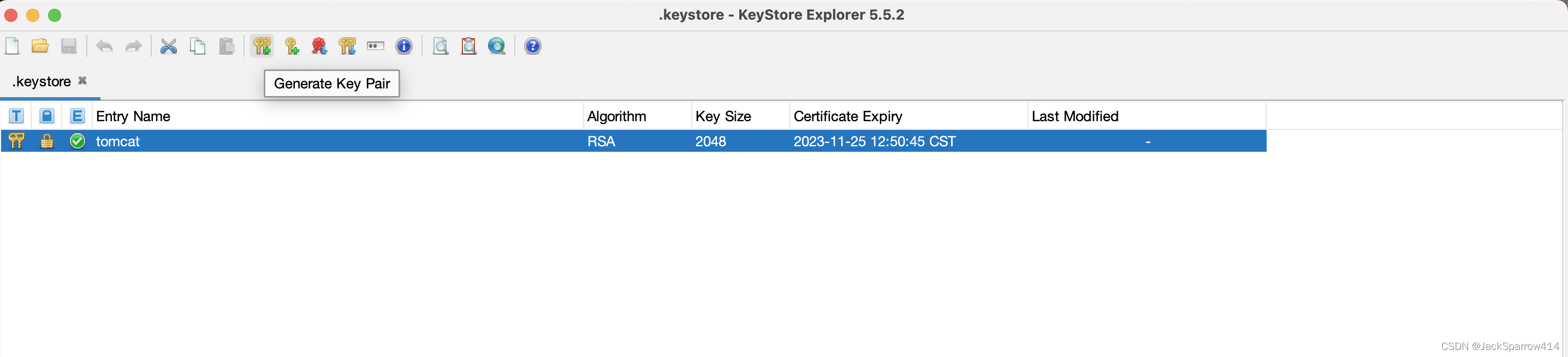
Generate Them with KeyStore Explorer
Besides keytool, I usually use KeyStore Explorer to generate them through its graphical interface. There are too many commands to remember, and a few mouse clicks are more convenient.
The Difference Between .pem and .p12 Files
See this Stack Overflow answer on PEM, CRT, and KEY files.
PEM is a file format and can store different kinds of content.
In practice, a .pem file typically contains a public key, while a .p12 file typically contains a public key, private key, and certificate.
Configure TLS/SSL in Tomcat
- Uncomment the following section in Tomcat’s conf/server.xml and set the Tomcat HTTPS port to 8443 in IntelliJ IDEA.
<Connector port="8443" protocol="org.apache.coyote.http11.Http11NioProtocol"
           maxThreads="150" SSLEnabled="true">
    <UpgradeProtocol className="org.apache.coyote.http2.Http2Protocol" />
    <SSLHostConfig>
        <Certificate
        	certificateKeystoreFile="${user.home}/.keystore"
  			certificateKeystorePassword="changeit"
  			type="RSA" />
    </SSLHostConfig>
</Connector>
Complete official Tomcat SSL configuration guide
SSL Still Does Not Work After Configuring a Self-Signed Certificate
After restarting Tomcat, visiting https://localhost:8443/validation/ in the browser still produces this warning:
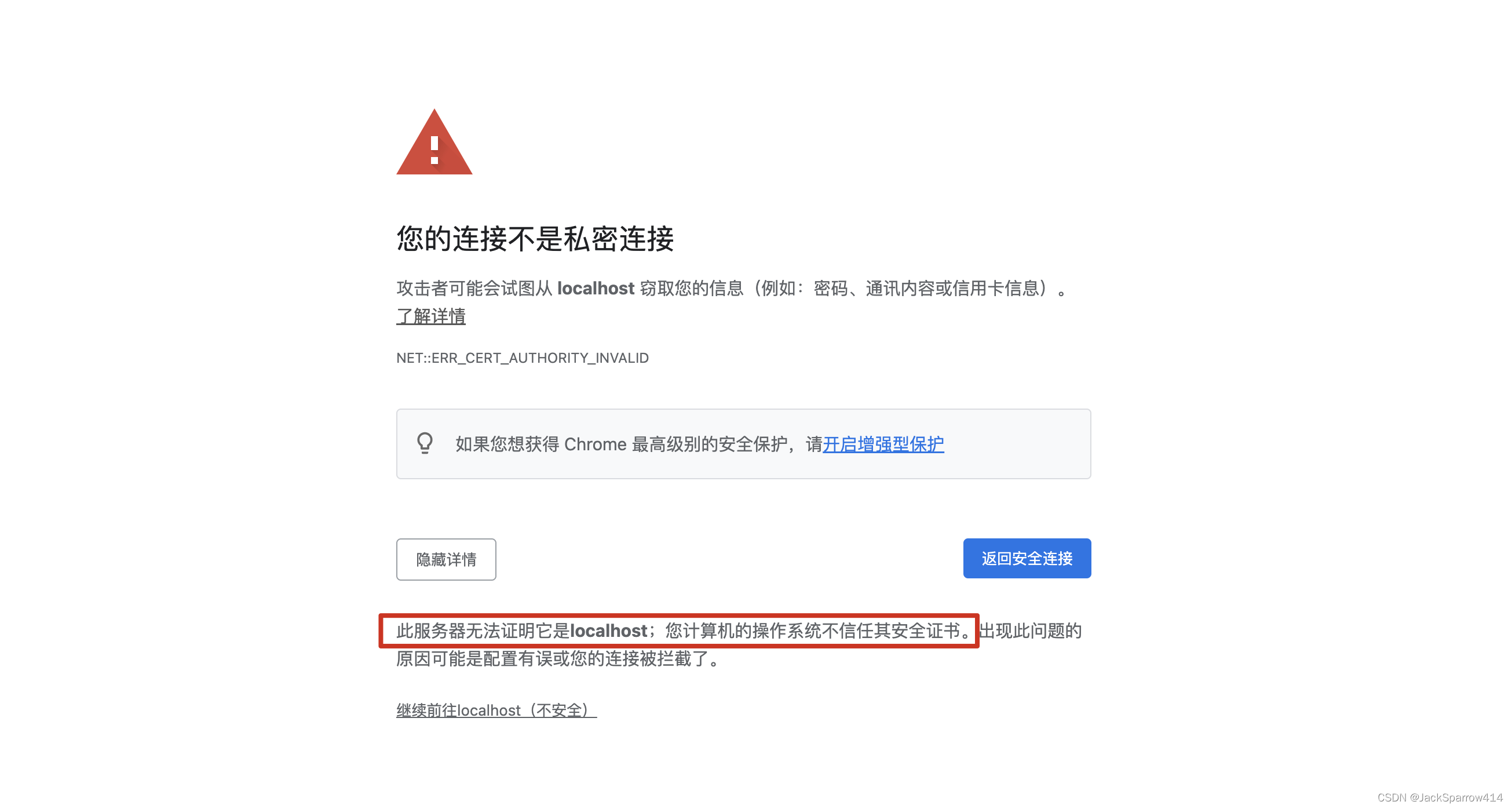 For a self-signed certificate, import it into the appropriate operating-system store.
- Export the self-signed certificate.
keytool -export -alias tomcat -keystore .keystore -file tomcat.cer - On macOS, open Keychain Access, drag the exported certificate into it, double-click the certificate, expand Trust, and set the trust level to Always Trust.
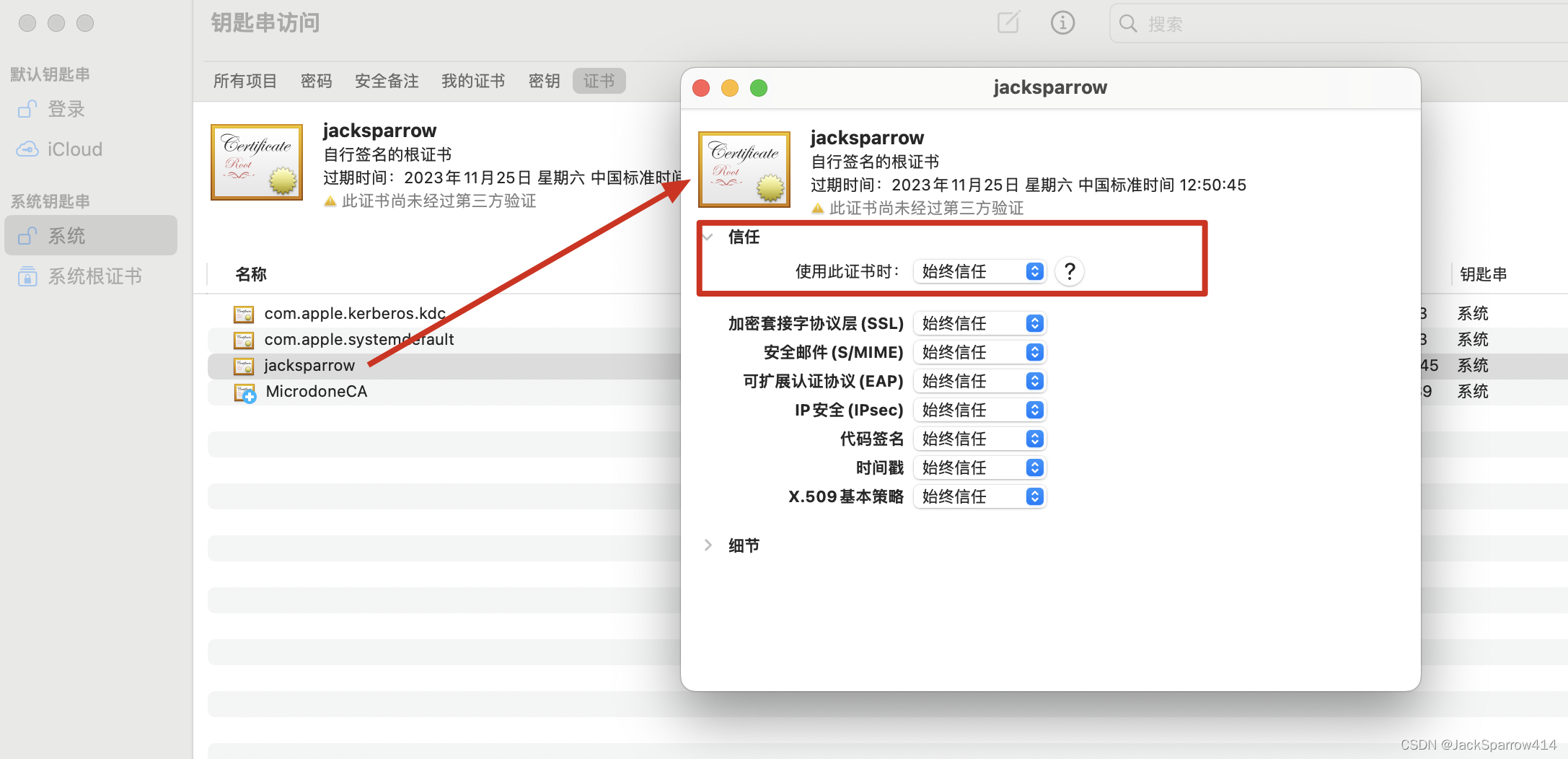
- Restart Tomcat and access it through HTTPS. Chrome now says the certificate does not contain a Subject Alternative Name, although Safari works normally.
Fix Chrome’s Missing Subject Alternative Name Warning
After looking into this, I found that a self-signed certificate needs SubjectAlternativeName configured.
- Stack Overflow question 1: the certificate does not contain a Subject Alternative Name extension
- Stack Overflow question 2: resolving SSL certificate server names and adding alternative names
Delete the key and exported certificate generated earlier, then generate them again.
keytool -genkey -alias tomcat -keyalg RSA -ext san=IP:127.0.0.1,DNS:localhostFor the complete san syntax, see the supported named extensions section of the keytool documentation
After generating the certificate, export it again, add it to the appropriate operating-system store, and trust it. Restart Tomcat and revisit https://localhost:8443/validation/.
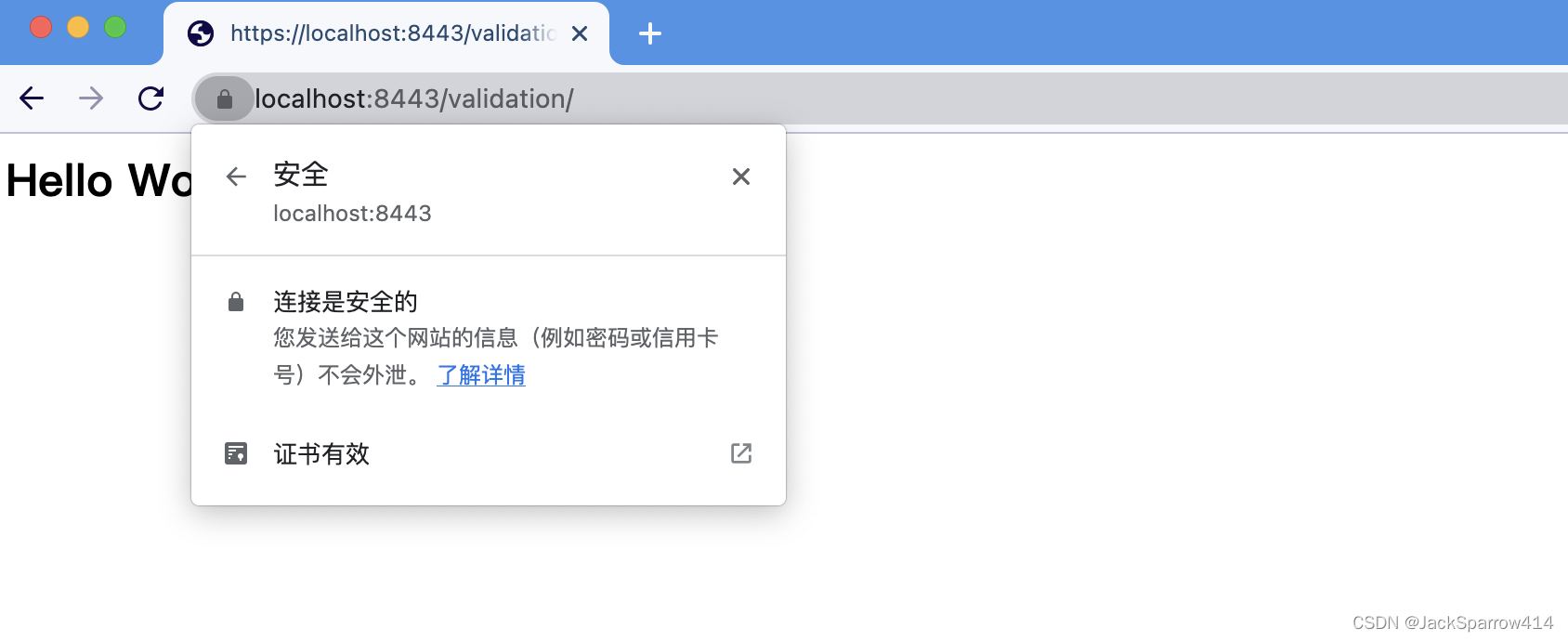 This time, the expected 🔐 icon appears.
What Things Look Like with HTTPS
With HTTPS configured, capture packets with Wireshark again.
This time, send an HTTPS request.
curl -X POST -k https://localhost:8443/validation/valid/inline/postPackets Captured by Wireshark
tls and tcp.port in {8443, 55026}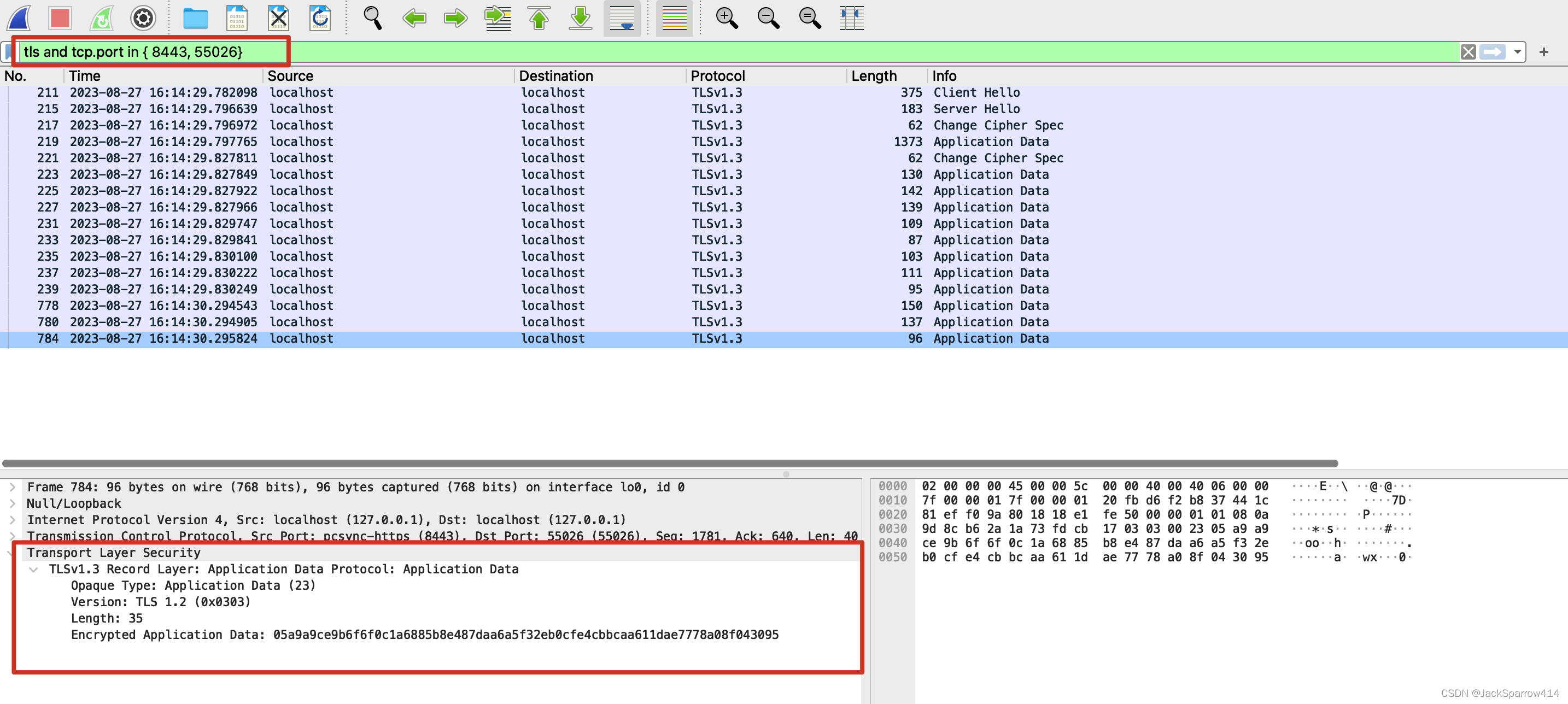 The captured packets are now encrypted. The plaintext data is no longer visible.
Also note that TLS encryption hides the entire HTTP request, including the HTTP URL. Compare this with the first screenshot in the post.
Further Thoughts: Is Frontend/Client/Browser Request Encryption Necessary?
Here, frontend encryption means encrypting a user’s password before submitting a login request to the backend. This is widely debated on technical websites; I will give only my own understanding.
First, there are three places where encryption occurs in an HTTP request:
- Client-side encryption, before submitting the request.
- Transport encryption: HTTPS.
- Server-side encryption: developers with some experience know that passwords are stored using a method such as hash(password + salt).
For a developer with some experience, such as myself, who knows how server-side encryption works and that HTTPS encrypts all HTTP content, my answer is: I do not think frontend encryption is necessary.
My reasons are:
- Encryption before request submission cannot stop scripts in malicious browser extensions. They can listen to keyboard events or inspect HTML elements and obtain the plaintext password before the request is submitted.
- Even if the password is appended to the URL, the example above shows that HTTPS encrypts the entire HTTP content. With HTTPS supported, the transport is secure, so this concern can be disregarded.
- Many large companies also submit passwords as plaintext. Perhaps try persuading their engineers first?
Common arguments:
- What if I enter my password, step away from the computer, and someone opens developer tools with F12? I think this is why many people use frontend encryption. In my view, 2FA or passkeys can address this scenario. If your company cannot support those approaches, I would leave it there. This offers only a limited deterrent, rather than protection against a determined attacker; I will not explore it further.
- What about the request body? On some sites, F12 reveals it; on others, it does not. I think this may be intended to deter scrapers. If scraping is a problem, try rate limiting, blocklists, or similar measures. I have little experience in this area, so I will not expand on it. As above, it is a limited deterrent against determined attackers.
My view is that any technical decision must consider the team’s staffing and familiarity with its stack, costs, benefits, and other complex factors.
Final Thoughts
This post organizes my questions and thoughts about TLS, public and private keys, and CA certificates.
The next post analyzes the TLS handshake in detail.
References
- The Java keytool documentation, especially Terms, which explains keystores, entries, aliases, certificates, and certificate chains.
- DigiCert: What Are SSL, TLS, and HTTPS?
- DigiCert: What Is an SSL Certificate?