Table of contents
Open Table of contents
OAuth 2.0 Authorization Code Flow in Practice
This article is not an introduction to the authorization code flow. It is for developers who want to implement or experiment with the flow themselves.
Prerequisite Knowledge
- RestEasy
- nimbus-jose-jwt
- JPA
- CDI
- javax.security
Terminology
- Resource Owner: the user.
- Resource Server: handles requests for the user’s resources.
- Authorization Server: obtains the user’s authorization.
- Scope: the permitted operations on the user’s resources.
- Client: a third-party application.
Authorization Code Flow
-
The Resource Server provides resources, and the Resource Owner has permission to access them.
Note: do not think of a resource as merely the user’s profile or avatar. In a RESTful architecture, each URI represents a resource. Understanding this is crucial.
-
When a third-party Client wants to access the Resource Owner’s resources, it needs permission from the Authorization Server before it can access those resources on the Resource Server.
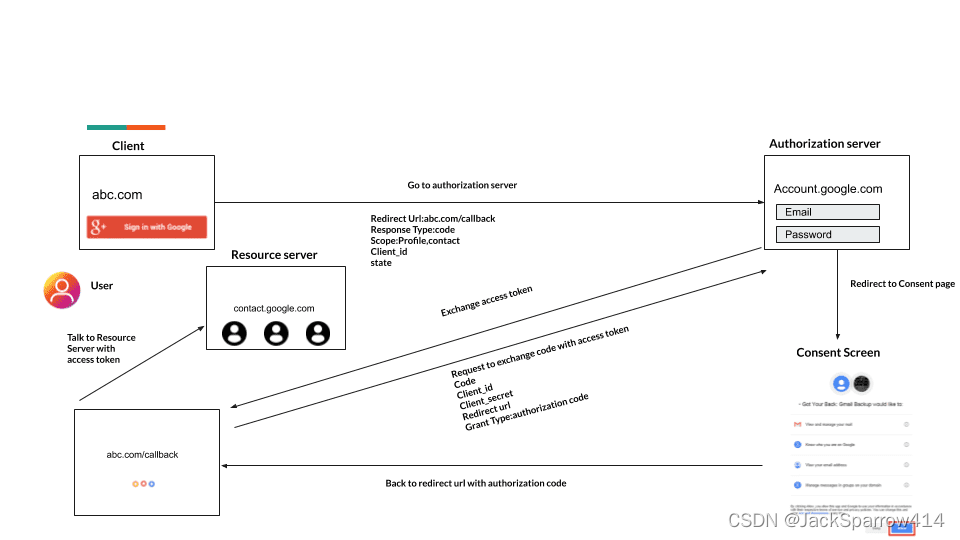
The detailed flow is:
-
When the Client wants access to the Resource Owner’s resources, it sends a request to the Authorization Server. response_type=code indicates the authorization code flow; redirect_uri is the Client URL called back after user authorization.
The Authorization Server receives the request, returns the requested Scope, and presents a consent page asking the Resource Owner for authorization.
https://authorization-server.com/auth ?response_type=code &client_id=29352915982374239857 &redirect_uri=https://thirdparty-server/callback &state=xcoiv98y2kd22vusuye3kch -
The Resource Owner grants authorization and submits the Scope to the Authorization Server. The server generates an authorization code, sets its expiry time, and stores it. It then redirects to the redirect_uri supplied in the previous request.
https://thirdparty-server/callback ?code=g0ZGZmNjVmOWIjNTk2NTk4ZTYyZGI3 &state=xcoiv98y2kd22vusuye3kch -
The third-party Client receives the callback and checks that state matches (to prevent CSRF attacks). If it does, the Client requests the Authorization Server again, exchanging code for access_token.
grant_type=authorization_code
code=g0ZGZmNjVmOWIjNTk2NTk4ZTYyZGI3
client_id=client_id
client_secret=client_secret
Authorization Server
Its main responsibilities are requesting authorization from the Resource Owner and issuing tokens.
Displaying the User Consent Page
    @GET
    @DenyAll
    public Response applyForUserAuthorization(@Context HttpServletRequest request,
                                      @Context HttpServletResponse response,
                                      @Context UriInfo uriInfo) throws ServletException, IOException {
        MultivaluedMap<String, String> params = uriInfo.getQueryParameters();
        String state = params.getFirst("state");
        // TODO: Use another storage approach in a real application.
        if (state.length() > 0) {
            stateMap.put(1, state);
        }
        //1. client_id
        String clientId = params.getFirst("client_id");
        if (clientId == null || clientId.isEmpty()) {
            return informUserAboutError(request, response, "Invalid client_id :" + clientId);
        }
        // Check whether clientId exists on the authorization server.
        Client client = appDataRepository.getClient(clientId);
        if (client == null) {
            return informUserAboutError(request, response, "Invalid client_id :" + clientId);
        }
        //2. Client Authorized Grant Type
        if (client.getAuthorizedGrantTypes() != null && !client.getAuthorizedGrantTypes().contains("authorization_code")) {
            return informUserAboutError(request, response, "Authorization Grant type, authorization_code, is not allowed for this client :" + clientId);
        }
        //3. redirectUri
        String redirectUri = params.getFirst("redirect_uri");
        if (client.getRedirectUrl() != null && !client.getRedirectUrl().isEmpty()) {
            if (redirectUri != null && redirectUri.isEmpty() && !client.getRedirectUrl().equals(redirectUri)) {
                //sould be in the client.redirectUri
                return informUserAboutError(request, response, "redirect_uri is pre-registred and should match");
            }
            redirectUri = client.getRedirectUrl();
//            params.putSingle("resolved_redirect_uri", redirectUri);
        } else {
            if (redirectUri == null || redirectUri.isEmpty()) {
                return informUserAboutError(request, response, "redirect_uri is not pre-registred and should be provided");
            }
            params.putSingle("resolved_redirect_uri", redirectUri);
        }
        request.setAttribute("client", client);

        //4. response_type
        String responseType = params.getFirst("response_type");
        if (!"code".equals(responseType) && !"token".equals(responseType)) {
            return informUserAboutError(request, response, "invalid_grant :" + responseType + ", response_type params should be code or token:");
        }
        //Save params in session
        request.getSession().setAttribute("ORIGINAL_PARAMS", params);

        //4.scope: Optional
        String requestedScope = request.getParameter("scope");
        if (requestedScope == null || requestedScope.isEmpty()) {
            requestedScope = client.getScopes();
        }
        //5. user principal, common userId
        Principal principal = securityContext.getUserPrincipal();
        User user = appDataRepository.getUser(principal.getName());
        String allowedScopes = checkUserScopes(user.getScopes(), requestedScope);
        request.setAttribute("scopes", allowedScopes);
        // Forward to the consent page.
        request.getRequestDispatcher("/authorize.jsp").forward(request, response);
        return null;
    }
The User Grants Consent
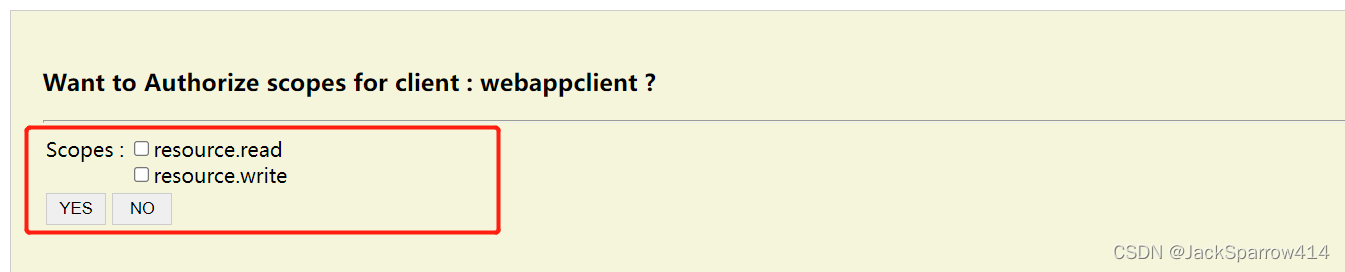
Submitting Consent and Generating code
    @DenyAll
    @POST
    @Consumes(MediaType.APPLICATION_FORM_URLENCODED)
    public void userAuthorization(@Context HttpServletRequest request,
                                      @Context HttpServletResponse response,
                                      MultivaluedMap<String, String> params) throws ServletException, IOException {
        MultivaluedMap<String, String> originalParams = (MultivaluedMap<String, String>) request.getSession().getAttribute("ORIGINAL_PARAMS");
        if (originalParams == null) {
             informUserAboutError(request, response, "No pending authorization request.");
        }
//        String redirectUri = originalParams.getFirst("resolved_redirect_uri");
        String redirectUri = "http://localhost:8080/thirdparty-server/third/apply/callback";
        StringBuilder sb = new StringBuilder(redirectUri);
        sb.append("?state=").append(stateMap.get(1));
        String approvalStatus = params.getFirst("approval_status");
        if ("NO".equals(approvalStatus)) {
            URI location = UriBuilder.fromUri(sb.toString())
                    .queryParam("error", "User doesn't approved the request.")
                    .queryParam("error_description", "User doesn't approved the request.")
                    .build();
             Response.seeOther(location).build();
        }

        //==> YES
        List<String> approvedScopes = params.get("scope");
        if (approvedScopes == null || approvedScopes.isEmpty()) {
            URI location = UriBuilder.fromUri(sb.toString())
                    .queryParam("error", "User doesn't approved the request.")
                    .queryParam("error_description", "User doesn't approved the request.")
                    .build();
             Response.seeOther(location).build();
        }
        String responseType = originalParams.getFirst("response_type");
        String clientId = originalParams.getFirst("client_id");
        if ("code".equals(responseType)) {
            String userId = securityContext.getUserPrincipal().getName();
            AuthorizationCode authorizationCode = new AuthorizationCode();
            authorizationCode.setCode(RandomString.make(15));
            authorizationCode.setClientId(clientId);
            authorizationCode.setUserId(userId);
            authorizationCode.setApprovedScopes(String.join(" ", approvedScopes));
            authorizationCode.setExpirationDate(LocalDateTime.now().plusMinutes(10));
            authorizationCode.setRedirectUrl(redirectUri);
            appDataRepository.save(authorizationCode);
            String code = authorizationCode.getCode();
            sb.append("&code=").append(code);
        }
        // Call back the third-party application.
        response.sendRedirect(sb.toString());
    }
Issuing a Token
    @POST
    @Consumes(MediaType.APPLICATION_FORM_URLENCODED)
    @Produces(MediaType.APPLICATION_JSON)
    @DenyAll
    public Response token(@HeaderParam(HttpHeaders.AUTHORIZATION) String authHeader,
                          MultivaluedMap<String, String> params) {
        //Check grant_type params
        String grantType = params.getFirst("grant_type");
        if (grantType == null || grantType.isEmpty()) {
            return responseError("Invalid_request", "grant_type is required", Response.Status.BAD_REQUEST);
        }
        if (!supportedGrantTypes.contains(grantType)) {
            return responseError("unsupported_grant_type", "grant_type should be one of :" + supportedGrantTypes, Response.Status.BAD_REQUEST);
        }

        //Client Authentication
        String[] clientCredentials = extract(authHeader);
        if (clientCredentials.length != 2) {
            return responseError("Invalid_request", "Bad Credentials client_id/client_secret", Response.Status.BAD_REQUEST);
        }
        String clientId = clientCredentials[0];
        Client client = appDataRepository.getClient(clientId);
        if (client == null) {
            return responseError("Invalid_request", "Invalid client_id", Response.Status.BAD_REQUEST);
        }
        String clientSecret = clientCredentials[1];
        if (!clientSecret.equals(client.getClientSecret())) {
            return responseError("Invalid_request", "Invalid client_secret", Response.Status.UNAUTHORIZED);
        }
        AuthorizationGrantTypeHandler authorizationGrantTypeHandler = authorizationGrantTypeHandlers.select(NamedLiteral.of(grantType)).get();
        TokenVO tokenResponse = null;
        try {
            tokenResponse = authorizationGrantTypeHandler.createAccessToken(clientId, params);
        }catch (Exception ex) {
            log.log(Level.WARNING, "acquire token failed", ex);
        }
        return Response.ok(tokenResponse)
                .header("Cache-Control", "no-store")
                .header("Pragma", "no-cache")
                .build();
    }
Only the basic code for generating access_token is shown here.
@Named("authorization_code")
public class AuthorizationCodeGrantTypeHandler extends AbstractGrantTypeHandler{

    private EntityManager entityManager = JPAUtil.acquireEntityManager();

    @Inject
    private AppDataRepository appDataRepository;

    @Override
    public TokenVO createAccessToken(String clientId, MultivaluedMap<String, String> params) throws Exception {
        //1. code is required
        String code = params.getFirst("code");
        if (code == null || "".equals(code)) {
            throw new WebApplicationException("invalid_grant");
        }
        AuthorizationCode authorizationCode = entityManager.find(AuthorizationCode.class, code);
        if (!authorizationCode.getExpirationDate().isAfter(LocalDateTime.now())) {
            throw new WebApplicationException("code Expired !");
        }
        String redirectUri = params.getFirst("redirect_uri");
        //redirecturi match
        if (authorizationCode.getRedirectUrl() != null && !authorizationCode.getRedirectUrl().equals(redirectUri)) {
            //redirectUri params should be the same as the requested redirectUri.
            throw new WebApplicationException("invalid_grant");
        }
        //client match
        if (!clientId.equals(authorizationCode.getClientId())) {
            throw new WebApplicationException("invalid_grant");
        }
        String accessToken = generateAccessToken(clientId, authorizationCode.getUserId(), authorizationCode.getApprovedScopes());
        String refreshToken = generateRefreshToken(clientId, authorizationCode.getUserId(), authorizationCode.getApprovedScopes());
        TokenVO result = new TokenVO();
        result.setAccess_token(accessToken);
        result.setExpires_in(expiresInMilliseconds);
        result.setScope(authorizationCode.getApprovedScopes());
        result.setRefresh_token(refreshToken);
        return result;
    }
}
Third-Party Application
Receiving code and Requesting a Token
    @GET
    @Path("callback")
    @Produces(MediaType.APPLICATION_JSON)
    @SneakyThrows
    public Response callback(@Context HttpServletRequest request,
                             @Context HttpServletResponse response) {

        String clientId = "webappclient";
        String clientSecret = "webappclientsecret";

        //Error:
        String error = request.getParameter("error");
        if (error != null) {
            request.setAttribute("error", error);
            return Response.status(Status.INTERNAL_SERVER_ERROR).entity("获取access_token失败").build();
        }
        String localState = (String) request.getSession().getAttribute("CLIENT_LOCAL_STATE");
        if (!localState.equals(request.getParameter("state"))) {
            request.setAttribute("error", "The state attribute doesn't match !!");
            return Response.status(Status.INTERNAL_SERVER_ERROR).entity("校验state失败").build();
        }

        String code = request.getParameter("code");
        // Call authorization-server internally to obtain the token.
        Client client = ClientBuilder.newClient();
        WebTarget target = client.target("http://localhost:8080/authorization-server/auth/token");

        Form form = new Form();
        form.param("grant_type", "authorization_code");
        form.param("code", code);
        form.param("redirect_uri", redirectUri);
        TokenVO tokenResponse = target.request(MediaType.APPLICATION_JSON_TYPE)
            .header(HttpHeaders.AUTHORIZATION, getAuthorizationHeaderValue(clientId, clientSecret))
            .post(Entity.entity(form, MediaType.APPLICATION_FORM_URLENCODED_TYPE), TokenVO.class);

        request.setAttribute("token", tokenResponse);
        // Display the obtained token on the page.
        request.getRequestDispatcher("/success.jsp").forward(request, response);
        return null;

    }
Accessing Protected Resources
Use the token just obtained to access the Resource Server. The server checks permissions based on the token’s scope, usually with a global filter. By parsing the JWT, it determines whether the request has permission to access the resource.
@Log
@Provider
public class SecurityFilter implements ContainerRequestFilter {

    @Context
    private ResourceInfo resourceInfo;

    @Override
    @SneakyThrows
    public void filter(ContainerRequestContext containerRequestContext) throws IOException {
        Method method = resourceInfo.getResourceMethod();
         // no need to check permissions
        if (method.isAnnotationPresent(DenyAll.class)) {
            log.info("no need to check permission");
            return;
        }
        // After handling special cases, parse the token and check permissions normally.
        verifyTokenAndPermission(containerRequestContext, method);
    }

    @SneakyThrows
    private void verifyTokenAndPermission(final ContainerRequestContext containerRequestContext, final Method method) {
        MultivaluedMap<String, String> headers = containerRequestContext.getHeaders();
        List<String> authorization = headers.get("Authorization");
        String token = authorization.get(0).substring("Bearer".length()).trim();
        // verify token
        JWSVerifier verifier = generateRsaJwsVerifier();
        SignedJWT jwt = SignedJWT.parse(token);
        if (!jwt.verify(verifier)) {
            containerRequestContext.abortWith(buildResponse(Response.Status.FORBIDDEN));
        }
        Map<String, Object> claims = jwt.getJWTClaimsSet().getClaims();
        // Users on the third-party platform and authorization server are linked through unionId; the third-party user table contains user_id and union_id.
        // If the authorization server is only used internally, userId can also be used.
        String unionId= jwt.getJWTClaimsSet().getSubject();
        String scopes = (String) claims.get("scope");
        log.info("scopes is:\n" + scopes);
        List<String> parsedScopes = Arrays.asList(scopes.split("\\s+"));


        // verify permission
        if (method.isAnnotationPresent(RolesAllowed.class)) {
            RolesAllowed rolesAnnotation = method.getAnnotation(RolesAllowed.class);
            String[] roles = rolesAnnotation.value();
            if (!parsedScopes.containsAll(Arrays.asList(roles))) {
                containerRequestContext.abortWith(buildResponse(Response.Status.FORBIDDEN));
            }
            containerRequestContext.setSecurityContext(new SecurityContext() {
                @Override
                public Principal getUserPrincipal() {
                    return () -> unionId;
                }

                @Override
                public boolean isUserInRole(String role) {
                    return parsedScopes.contains(role);
                }

                @Override
                public boolean isSecure() {
                    return true;
                }

                @Override
                public String getAuthenticationScheme() {
                    return "CLIENT_CERT";
                }
            });
        }
    }

    private JWSVerifier generateRsaJwsVerifier() throws Exception{
        String pemEncodedRSAPrivateKey = PEMKeyUtils.readKeyAsString("rsa/publish-key.pem");
        RSAKey rsaKey = (RSAKey) JWK.parseFromPEMEncodedObjects(pemEncodedRSAPrivateKey);
        return new RSASSAVerifier(rsaKey);
    }

    private Response buildResponse(Response.Status status) {
        return Response
                .status(status)
                .entity("{\"errmsg\": \"\"}")
                .type(MediaType.APPLICATION_JSON_TYPE)
                .build();
    }
}
Actually accessing resources on the Resource Server:
@Path("user/protect")
@RequestScoped
@Log
public class UserResource {

    @GET
    @Path("read")
    @Produces(MediaType.TEXT_PLAIN)
    @RolesAllowed("resource.read")
    public String readProtectedInfo(@Context SecurityContext securityContext) {
        log.info( "unionId: " + securityContext.getUserPrincipal().getName());
        return "Read Success";
    }

    @POST
    @Path("write")
    @Consumes(MediaType.APPLICATION_FORM_URLENCODED)
    @Produces(MediaType.TEXT_PLAIN)
    @RolesAllowed("resource.write")
    public String writeProtectedInfo(@FormParam("writeInfo") String writeInfo, @Context SecurityContext securityContext) {
    	log.info( "unionId: " + securityContext.getUserPrincipal().getName());
        return "Write Success \n" + writeInfo;
    }
}
Project Structure
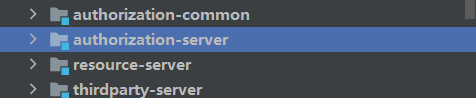
Tomcat Configuration
- First ensure the local H2 database is running and accessible.
- Download the H2 JDBC JAR and place it under $TOMCAT_HOME/lib.
Deployment
First run the following in authorization-common:
mvn installThen deploy with Tomcat 9.
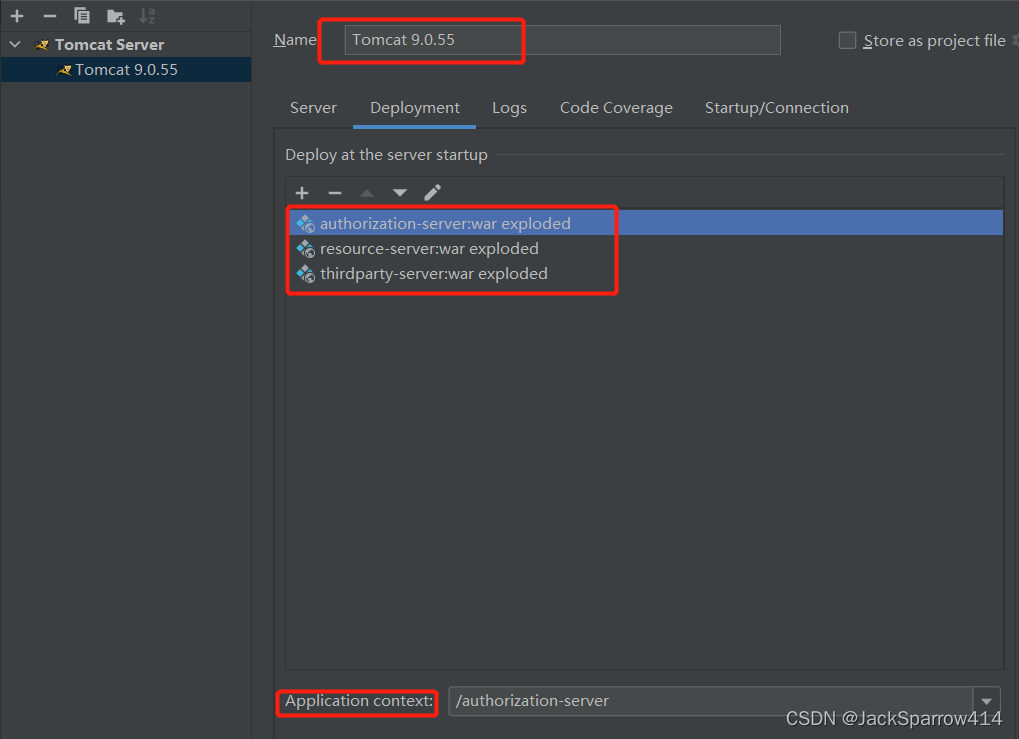 At Tomcat startup, Hibernate automatically creates the table structure and initializes the data. See authorization-server/src/main/resources/META-INF/persistence.xml for the configuration.
After successful startup, visit http://localhost:8080/thirdparty-server/ to try it out. Once you have a token, use curl or Postman to access resource-server and check whether it behaves as expected.