Table of contents
Open Table of contents
Article body
Solr provides examples for different clients; see the official SolrJ documentation
- Add the POM dependency
        <dependency>
            <groupId>org.apache.solr</groupId>
            <artifactId>solr-solrj</artifactId>
            <version>${solr.version}</version>
</dependency>- Create the corresponding Solr entity, SolrUserEntity, and annotate Solr fields with @Field
/**
 * Entity corresponding to a Solr document
 * @author jacksparrow414
 * @date 2020-05-03
 * @description: TODO
 */
public class SolrUserEntity {
    @Field
    private String userId;
    @Field
    private String name;
    @Field
    private Long age;

    // Getters and setters omitted
    ...

    @Override
    public String toString() {
        return "SolrUserEntity{" +
                "userId='" + userId + '\'' +
                ", name='" + name + '\'' +
                ", age=" + age +
                '}';
    }
}-
Add, update, delete, and query data with SolrJ
-
Provide a utility class for obtaining a shared SolrClient. Use the same client for all Solr operations.
/**
 * @author jacksparrow414
 * @date 2020-05-03
 * @description: TODO
 */
class SolrUtil {
    private static SolrClient solrClient=null;
    static SolrClient getSolrClient(){
        if (ObjectUtil.isNull(solrClient)){
            synchronized(SolrUtil.class){
                if (ObjectUtil.isNull(solrClient)){
                    String solrUrl = "http://localhost:8983/solr";
                    solrClient = new HttpSolrClient.Builder(solrUrl)
                            .withConnectionTimeout(10000)
                            .withSocketTimeout(6000)
                            .build();
                }
            }
        }
        return solrClient;
    }
}- Create SolrService to operate on cusdomData.
/**
 * @author jacksparrow414
 * @date 2020-05-03
 * @description: TODO
 */
@Service
public class SolrService {
   private final String SOLR_CORE = "customData";
   private final SolrClient solrClient = SolrUtil.getSolrClient();

    /**
     * Add data to Solr
     * First approach
     * @throws Exception
     */
    public void insertDataToSolr() throws Exception{
        SolrInputDocument solrInputDocument = new SolrInputDocument();

        solrInputDocument.addField("userId","31234738");
        solrInputDocument.addField("name","testInsert");
        solrInputDocument.addField("age",19);

        UpdateResponse updateResponse = solrClient.add(SOLR_CORE,solrInputDocument);
        // A commit is required at the end
        solrClient.commit(SOLR_CORE);
        solrClient.close();
    }

    /**
     * Add data to Solr
     * Second approach
     * @throws Exception
     */
    public void insertDataToSolrByBean() throws Exception{
        SolrUserEntity entity = new SolrUserEntity();
        entity.setUserId("1977362");
        entity.setName("我的");
        entity.setAge(18L);
        solrClient.addBean(SOLR_CORE,entity);
        solrClient.commit(SOLR_CORE);
        solrClient.close();
    }

    /**
     * Update data in Solr
     * @throws Exception
     */
    public void updateDataToSolrByBean() throws Exception{
        SolrUserEntity updateEntity = new SolrUserEntity();
        updateEntity.setUserId("31234738");
        updateEntity.setName("update");
        updateEntity.setAge(56L);
        solrClient.addBean(SOLR_CORE,updateEntity);
        solrClient.commit(SOLR_CORE);
        solrClient.close();
    }
    /**
     * Query data from Solr
     * First approach
     * @throws Exception
     */
    public void queryDataFromSolr()throws Exception{
        Map<String,String> queryMap = CollectionUtil.newHashMap(16);
        queryMap.put("q","*:*");
        queryMap.put("sort","age desc");
        MapSolrParams mapSolrParams = new MapSolrParams(queryMap);
        QueryResponse queryResponse = solrClient.query(SOLR_CORE,mapSolrParams);
        List<SolrUserEntity> beans = queryResponse.getBeans(SolrUserEntity.class);
        beans.forEach(System.out::println);
        solrClient.close();
    }

    /**
     * Query data from Solr
     * Second approach
     * @throws Exception
     */
    public void queryDataFromSolrBySolrQuery() throws Exception{
        SolrQuery solrQuery = new SolrQuery("userId:1977362");
        solrQuery.addField("userId");
        solrQuery.addField("name");
        solrQuery.setSort("userId", SolrQuery.ORDER.desc);
        List<SolrUserEntity> entities = solrClient.query(SOLR_CORE,solrQuery)
                                                  .getBeans(SolrUserEntity.class);
        entities.forEach(System.out::println);
        solrClient.close();
    }
    /**
     * Delete data from Solr using a query
     * @throws Exception
     */
    public void deleteDataFromSolr()throws Exception{
        solrClient.deleteByQuery(SOLR_CORE, "name:update");
        solrClient.commit(SOLR_CORE);
        solrClient.close();
    }
}
Solr provides two approaches to CRUD operations: one does not require an entity class, while the other uses a corresponding entity class with @Field annotations.
I recommend the entity-based approach. In an application, the usual flow is roughly:
Receive JSON from the frontend -> convert the JSON to the corresponding entity -> insert it into a MySQL table -> update the corresponding Solr core
This lets you reuse the entity from the earlier steps. As the examples show, adding or updating an entity generally requires only an addBean call. Solr also offers many other methods, including addBeans for batch additions/updates and deleteById for deletion by ID.
Note: specify the corresponding core when calling solrClient.commit(), then close the client connection after committing.
- Verify the operations in the Solr console
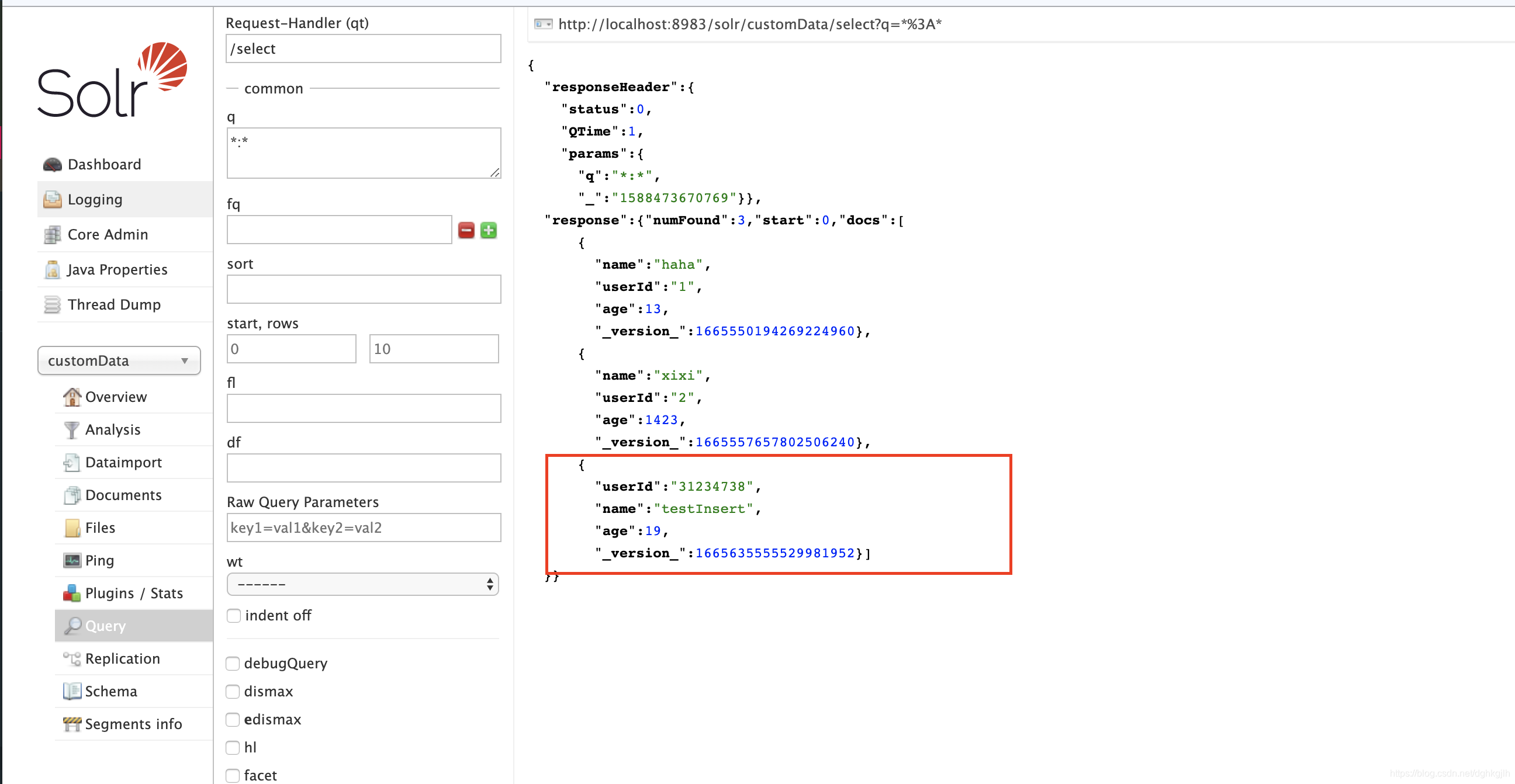
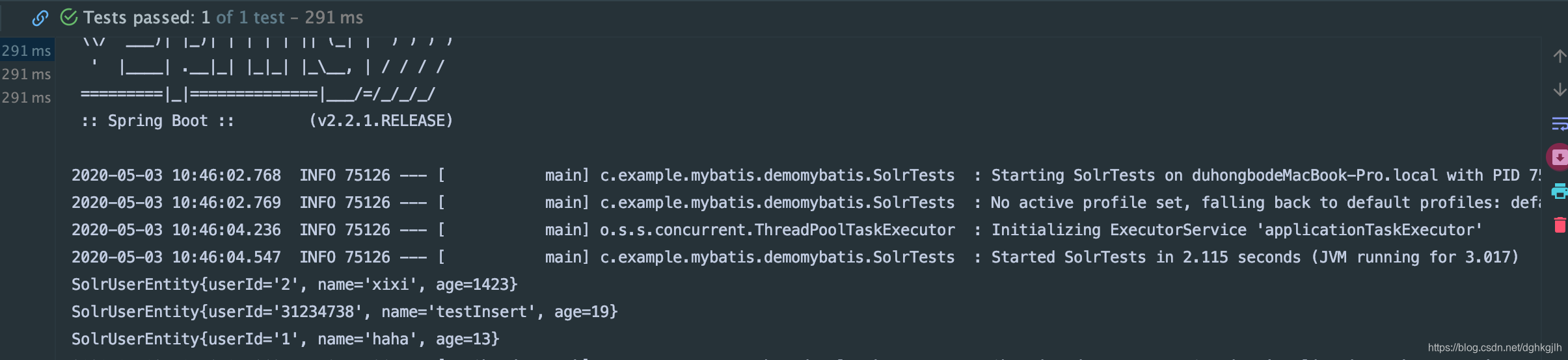
The Solr console shows that the data from the methods above has been inserted. The IDE also displays the newly inserted data queried through SolrJ.
The example project is available on GitHub; feel free to use it.