Table of contents
Open Table of contents
Article body
For more Spring Data Solr examples, see the official documentation.
- Add the dependency to pom.xml and modify the configuration.
        <dependency>
            <groupId>org.springframework.data</groupId>
            <artifactId>spring-data-solr</artifactId>
            <version>4.1.7.RELEASE</version>
        </dependency>
Configure the Solr address in application.yml:
spring:
  data:
    solr:
host: http://localhost:8983/solr- Use @SolrDocument to annotate the entity corresponding to a Solr core.
/**
 * @author jacksparrow414
 * @date 2020-05-04
 * @description: TODO
 */
@Builder
@Data
@SolrDocument(collection = "customData")
public class SolrSpringUserEntity {
    @Id
    private String userId;
    @Indexed
    private String name;
    @Indexed
    private Long age;

}
Explanation:
collection in @SolrDocument is the Solr core name. solrCoreName also exists, but is deprecated; use collection.
@Id represents uniqueKey in customData.
@Index represents indexed, stored, and other field options. The first two default to true. Inspect the Index annotation for all options.
@Data and @Builder are Lombok annotations. For more, see the official Lombok documentation.
- Extend the official interfaces (CrudRepository and PageAndSortingRepository) for basic CRUD and pagination. You can also use @Query for custom queries.
/**
 * @author jacksparrow414
 * @date 2020-05-03
 * @description: TODO
 */

public interface SolrSpringService extends CrudRepository<SolrSpringUserEntity,String>,
        PagingAndSortingRepository<SolrSpringUserEntity,String> {

    @Query(value = "userId:*",fields = {"userId","name"})
    List<SolrSpringUserEntity> customQueryOne();

    @Query(value = "name:* AND age:*",filters = {"name:我的 And age:[* TO 19]"})
    List<SolrSpringUserEntity> customQueryTwo();

    @Query(value = "*:*",filters = {"name:我的","age:[* TO 19]"})
    List<SolrSpringUserEntity> customQueryThree();
}
Explanation:
Built-in save, delete, and pagination operations are provided. For queries tailored to actual business scenarios, use @Query or SolrTemplate to assemble query parameters flexibly.
- Query with SolrTemplate.
package com.example.mybatis.demomybatis.solr;

import com.example.mybatis.demomybatis.entity.SolrSpringUserEntity;
import org.springframework.beans.factory.annotation.Autowired;
import org.springframework.data.domain.Page;
import org.springframework.data.domain.Sort;
import org.springframework.data.solr.core.SolrTemplate;
import org.springframework.data.solr.core.query.SimpleQuery;
import org.springframework.stereotype.Service;

import java.util.List;
import java.util.stream.Collectors;

/**
 * @author jacksparrow414
 * @date 2020-05-04
 * @description: TODO
 */
@Service
public class SolrCustomServiceImpl implements SolrCustomService{

    @Autowired
    SolrTemplate solrTemplate;
    @Override
    public List<SolrSpringUserEntity> customFindAll() {
        // Set the query
        SimpleQuery simpleQuery = new SimpleQuery("*:*");
        simpleQuery.addSort(Sort.by("age").ascending());
        // Call the SolrTemplate method
        Page<SolrSpringUserEntity> query = solrTemplate.query("customData", simpleQuery, SolrSpringUserEntity.class);
        return query.stream().collect(Collectors.toList());
    }

    @Override
    public SolrSpringUserEntity customFindByParams() {
        return null;
    }
}
SolrTemplate provides many methods for manipulating Solr data; use them as needed.
- Testing
/**
 * @author jacksparrow414
 * @date 2020-05-04
 * @description: TODO
 */
@SpringBootTest()
public class SolrSpringTests {
    @Autowired
    SolrSpringService solrSpringService;
    @Autowired
    SolrCustomService solrCustomService;

    @Test
    public void testFindById(){
        Optional.ofNullable(solrSpringService.findById("1977362"))
                .ifPresent(u-> System.out.println(u.get()));
    }

    @Test
    public void testDeleteById(){
        solrSpringService.deleteById("897654");
    }

    @Test
    public void testPage(){
        Page<SolrSpringUserEntity> u = solrSpringService
                .findAll(PageRequest.of(1, 2));
        System.out.println(u.getTotalElements());
        System.out.println(u.getTotalPages());
        u.forEach(System.out::println);
    }

    @Test
    public void testCustomQueryOne(){
        Optional.ofNullable(solrSpringService.customQueryOne())
                .filter(CollectionUtil::isNotEmpty)
                .ifPresent(u-> u.forEach(System.out::println));
    }

    @Test
    public void testCustomQueryTwo(){
        Optional.ofNullable(solrSpringService.customQueryTwo())
                .filter(CollectionUtil::isNotEmpty)
                .ifPresent(u->u.forEach(System.out::println));
    }

    @Test
    public void testCustomQueryThree(){
        Optional.ofNullable(solrSpringService.customQueryThree())
                .filter(CollectionUtil::isNotEmpty)
                .ifPresent(u->u.forEach(System.out::println));
    }

    @Test
    public void testCustomFindAll(){
       Optional.ofNullable(solrCustomService.customFindAll())
               .filter(CollectionUtil::isNotEmpty)
               .ifPresent(u->u.forEach(System.out::println));
    }

}
Test the built-in pagination interface:
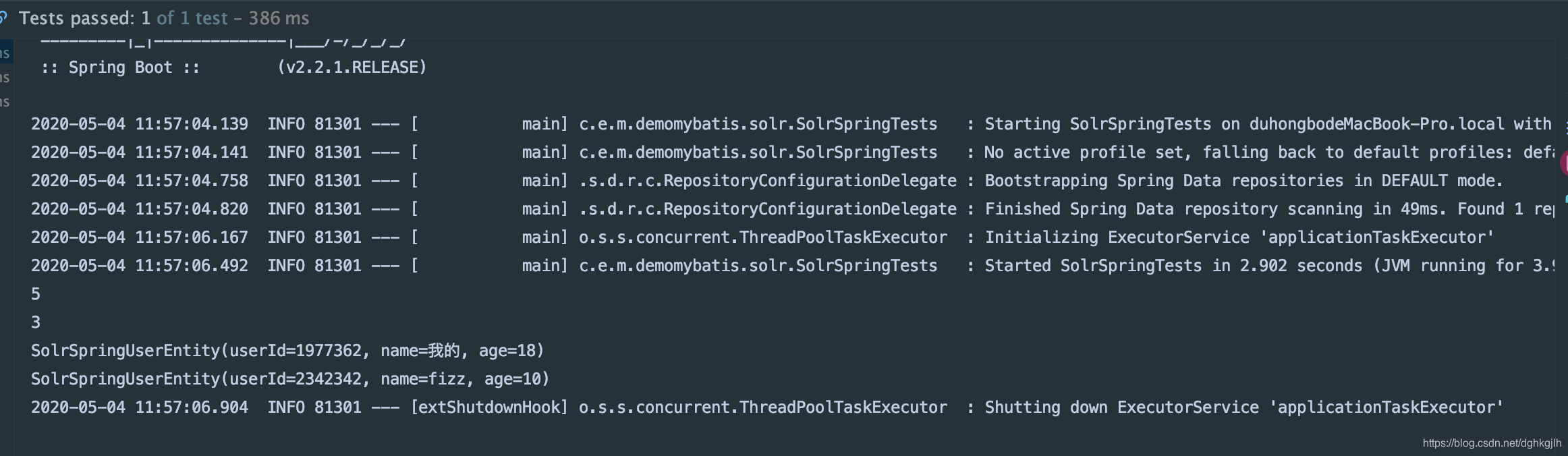
5: total records
3: total pages
Two records on the current page
- Spring supports Solr transactions; add @Tranasctional.
A real business scenario might be:
Receive frontend JSON -> operate on MySQL -> after success, perform the corresponding Solr operation.
Spring’s transaction annotation also works for Solr, which is convenient: there is no need to commit manually, and it participates in the same transaction as the database operations. Both database and Solr operations guarantee ACID.
/**
 * @author jacksparrow414
 * @date 2020-05-04
 * @description: TODO
 */
@RestController
@RequestMapping(value = "solr")
public class SolrController {

    @Autowired
    private SolrSpringService solrSpringService;
    @Autowired
    private UserService userService;

    @Transactional(rollbackFor = Exception.class)
    @RequestMapping(value = "solrTransaction")
    public void testSaveTransactionByAnnotation(){
        SolrSpringUserEntity springUserEntity = SolrSpringUserEntity.builder()
                .userId("238938212")
                .name("testTransaction")
                .age(122L).build();
        UserEntity userEntity = new UserEntity();
        BeanUtils.copyProperties(springUserEntity,userEntity);
        userEntity.setId(123456);
        userEntity.setAge(12);
        // Insert into the MySQL user table
        userService.addUser(userEntity);
        // Synchronize the data to Solr
        solrSpringService.save(springUserEntity);
         int wrong = 1/0;
    }
}
When the final 1/0 fails, the whole transaction rolls back, leaving both the database and Solr unchanged.
- Extend Spring Data with a custom repository. In practice, we may want both built-in Spring Data methods and custom methods, preferably through one interface. The framework provides this mechanism. See the documentation.
First define a custom interface and implementation. The implementation class name must end in Impl.
/**
 * Custom Solr operations.
 * @author jacksparrow414
 * @date 2020/12/12
 */
public interface ArticleSolrService {

    /**
     * Delete Solr data in batches.
     * @param ids Solr IDs
     * @return
     */
    boolean deleteSolrDataByIds(Collection<String> ids);

    /**
     * Query Solr data using query parameters.
     * @return
     */
    List<ArticleSolrEntity> queryDataByParams(QuerySolrParamDto querySolrParamDto);
}
The implementation is:
/**
 * Note: the class name must end in Impl. See <a href="https://docs.spring.io/spring-data/solr/docs/current/reference/html/#repositories.single-repository-behavior">the official documentation</a>.
 * @author jacksparrow414
 * @date 2020/12/12
 */
@Service
public class ArticleSolrServiceImpl implements ArticleSolrService {

    @Autowired
    private SolrTemplate solrTemplate;

    @Transactional(rollbackFor = Exception.class)
    @Override
    public boolean deleteSolrDataByIds(final Collection<String> ids) {
        Preconditions.checkArgument(CollectionUtil.isNotEmpty(ids), "collection must not be null");
        UpdateResponse response = solrTemplate.deleteByIds("article", ids);
        // Remember to commit, or this will not take effect
        solrTemplate.commit("article");
        return response.getStatus() == 0;
    }

    @Override
    public List<ArticleSolrEntity> queryDataByParams(final QuerySolrParamDto querySolrParamDto) {
        Query simpleQuery = buildSimpleQuery(querySolrParamDto);
        Page<ArticleSolrEntity> articles = solrTemplate.queryForPage("article", simpleQuery, ArticleSolrEntity.class);
        return articles.getContent();
    }

    /**
     * Build a Query from specific parameters.
     * Why use the default *:* rather than concatenate a queryString from the conditions?<br/>
     * According to the Stack Overflow answer, fq works better because it can use FilterCache, greatly improving query performance.
     * <a href="https://stackoverflow.com/questions/11627427/solr-query-q-or-filter-query-fq">Stack Overflow discussion</a><br/>
     *
     * Inspect Criteria for its many other operations; only a few are used here.<br/>
     * Pagination built with PageRequest.of() is zero-based in Spring Data. Our incoming parameters generally start at 1, so subtract 1.<br/>
     * Specify ordering with Sort.
     * @param querySolrParamDto Query parameters
     * @return SimpleQuery
     */
    private SimpleQuery buildSimpleQuery(final QuerySolrParamDto querySolrParamDto) {
        Preconditions.checkNotNull(querySolrParamDto.getPageNo(), "pageNo must not be null");
        Preconditions.checkNotNull(querySolrParamDto.getPageSize(), "pageSize must not be null");
        SimpleQuery result = new SimpleQuery("*:*");
        Pageable pageable = PageRequest.of(querySolrParamDto.getPageNo()-1,
            querySolrParamDto.getPageSize(),
            Sort.by(SearchableArticleSolrDefinition.ID_FIELD).ascending());
        result.setPageRequest(pageable);
        if (ObjectUtil.isNotNull(querySolrParamDto.getId())) {
            Criteria criteria = new Criteria(SearchableArticleSolrDefinition.ID_FIELD);
            criteria.is(querySolrParamDto.getId());
            result.addFilterQuery(buildSimpleFilterQuery(criteria));
        }
        if (StrUtil.isNotBlank(querySolrParamDto.getAuthorName())) {
            Criteria criteria = new Criteria(SearchableArticleSolrDefinition.AUTHOR_NAME_FIELD);
            criteria.contains(querySolrParamDto.getAuthorName());
            result.addFilterQuery(buildSimpleFilterQuery(criteria));
        }
        if (CollectionUtil.isNotEmpty(querySolrParamDto.getSubjectId())) {
            Criteria criteria = new Criteria(SearchableArticleSolrDefinition.SUBJECT_ID_FIELD);
            criteria.in(querySolrParamDto.getSubjectId());
            result.addFilterQuery(buildSimpleFilterQuery(criteria));
        }
        // Solr phrase queries are wrapped in ""
        if (StrUtil.isNotBlank(querySolrParamDto.getContent())) {
            StringBuilder phraseQueryString = new StringBuilder(SearchableArticleSolrDefinition.CONTENT_FIELD);
            phraseQueryString.append(":").append("\"").append(querySolrParamDto.getContent()).append("\"");
            Criteria criteria = new SimpleStringCriteria(phraseQueryString.toString());
            result.addFilterQuery(buildSimpleFilterQuery(criteria));
        }
        return result;
    }

    /**
     * Build a SimpleFilterQuery with Criteria.
     * @param criteria Specific filter conditions
     * @return SimpleFilterQuery
     */
    private FilterQuery buildSimpleFilterQuery(final Criteria criteria) {
        SimpleFilterQuery result = new SimpleFilterQuery();
        result.addCriteria(criteria);
        return result;
    }
}
Then define a shared interface extending the official CRUD and pagination interfaces and the custom ArticleSolrService interface.
/**
 * Extend a Spring Data repository with your own interface.
 * Have the repository extend that interface, then use the repository directly for both built-in and custom methods.<br/>
 * <a href="https://docs.spring.io/spring-data/solr/docs/current/reference/html/#repositories.custom-implementations">Official documentation</a>
 * @author jacksparrow414
 * @date 2020/12/12
 */
public interface ArticleRepository extends CrudRepository<ArticleSolrEntity, String>,
    PagingAndSortingRepository<ArticleSolrEntity, String>, ArticleSolrService {
}
You can now use it as follows. The first method is built in, and the remaining methods are custom. Only ArticleRepository needs to be injected.
/**
 * @author jacksparrow414
 * @date 2020/12/12
 */
@RunWith(SpringRunner.class)
@SpringBootTest
public final class SolrExtendTest {

    @Autowired
    private ArticleRepository articleRepository;

    @Test
    public void assertSaveBatchToSolr() {
        ArticleSolrEntity first = new ArticleSolrEntity();
        first.setId(IdUtil.simpleUUID());
        first.setContent("this is first article");
        first.setAuthorName("jack");
        first.setArticleName("jack article");
        first.setDel(0);
        first.setSubjectId(Lists.newArrayList(1, 2));
        ArticleSolrEntity second = new ArticleSolrEntity();
        second.setId(IdUtil.simpleUUID());
        second.setContent("this is second article");
        second.setAuthorName("mark");
        second.setArticleName("mark article");
        second.setDel(0);
        second.setSubjectId(Lists.newArrayList(2, 3, 4));
        articleRepository.saveAll(Lists.newArrayList(first, second));
    }

    @Test
    public void assertDeleteBatchByIds() {
        boolean actual = articleRepository.deleteSolrDataByIds(Lists.newArrayList("777777", "23128391283"));
        Assert.assertTrue(actual);
    }

    @Test
    public void assertQueryDataByParams() {
        QuerySolrParamDto querySolrParamDto = new QuerySolrParamDto();
//        querySolrParamDto.setId("98f1d57e708c425bb9c7d1e4f4b35150");
        querySolrParamDto.setAuthorName("k");
//        querySolrParamDto.setSubjectId(Lists.newArrayList(2));
        querySolrParamDto.setContent("this is second");
        querySolrParamDto.setPageNo(1);
        querySolrParamDto.setPageSize(5);
        List<ArticleSolrEntity> actual = articleRepository.queryDataByParams(querySolrParamDto);
        Assert.assertTrue(CollectionUtil.isNotEmpty(actual));
    }
}
Tips:
- When using SolrTemplate, set the corresponding log level to debug to see the final query. This makes it easy to check whether you wrote it correctly.
logging:
   level:
     org.springframework.data: debug
As shown below:

- According to the latest information on Spring’s website, Spring Data Solr is scheduled to stop being maintained in 2022. Meanwhile, Spring Data continues supporting Elasticsearch. This also says something about the landscape: Solr has some shortcomings for modern search, while the newer Elasticsearch is gaining momentum. Still, learning some Solr before Elasticsearch is useful and can make it easier, because their syntax is similar.
Finally, for large-scale internal use, establish consistent Solr conventions. Otherwise, some areas may use SolrClient while others use Spring Data Solr, and some may concatenate queries manually while others build them with Spring Data Solr Criteria.
All unit tests and other code are on GitHub. Feel free to use them. Questions and discussion are welcome in the comments.