Table of contents
Open Table of contents
Custom YAML Configuration in Spring Boot
Introduction
When using Spring Boot or third-party JARs, configuration in a YAML file is straightforward. How can we implement our own YAML configuration?
Implementation
Add POM Dependencies
   <!--Dependency required for custom YAML configuration-->
   <dependency>
			<groupId>org.springframework.boot</groupId>
			<artifactId>spring-boot-configuration-processor</artifactId>
		</dependency>
     <!--Use Lombok; note that Lombok is optional here.-->
		<dependency>
			<groupId>org.projectlombok</groupId>
			<artifactId>lombok</artifactId>
		</dependency>
Create a JSON Metadata File
- Create a META-INF folder under the resource folder.
- Create spring-configuration-metadata.json under META-INF.
The file contents are:
{
  "groups": [
    {
      "name": "jack.sparrow",
      "type": "com.learn.spring.spring01.config.CustomConfigurationProperties",
      "sourceType": "com.learn.spring.spring01.config.CustomConfigurationProperties"
    }
  ],
  "properties": [
    {
      "name": "jack.sparrow.enabled",
      "type": "java.lang.Boolean",
      "defaultValue": true,
      "description": "Whether the configuration is enabled"
    },
    {
      "name": "jack.sparrow.code",
      "type": "java.lang.Integer",
      "sourceType": "com.learn.spring.spring01.config.CustomConfigurationProperties",
      "description": "The code property of the configuration properties class",
      "defaultValue": 1
    },
    {
      "name": "jack.sparrow.name",
      "type": "java.lang.String",
      "sourceType": "com.learn.spring.spring01.config.CustomConfigurationProperties"
    },
    {
      "name": "jack.sparrow.check",
      "type": "java.lang.Boolean",
      "sourceType": "com.learn.spring.spring01.config.CustomConfigurationProperties",
      "description": "The check property",
      "defaultValue": true
    },
    {
      "name": "jack.sparrow.name.nameMap",
      "type": "java.util.Map<java.lang.String,java.lang.String>",
      "sourceType": "com.learn.spring.spring01.config.CustomConfigurationComplexProperties",
      "description": "The map property"
    }
  ]
}
groups: these entries represent the parent nodes of the custom configuration. Define one group for each parent node.
A group’s name is the parent node’s name in the YAML configuration.
A group’s type and sourceType are the same: both specify the fully qualified name of the configuration class for the entire group.
properties: these are the individual child entries under each parent node—the settings to which values are assigned in the YAML file.
A property’s name is the child node’s name in the YAML configuration.
A property’s type is the data type of the corresponding field in the configuration class, such as java.lang.String.
A property’s description describes that node’s configuration setting.
A property’s defaultValue is used when the node is not configured.
A property’s sourceType is the fully qualified name of its configuration class.
Create the CustomConfigurationProperties Class
@Getter
@Setter
@ConfigurationProperties(prefix = "jack.sparrow")
public class CustomConfigurationProperties {

    // private String name;
    private Integer code;
    private Boolean check;

}
Create the CustomConfigurationComplexProperties Class
@Getter
@Setter
@ConfigurationProperties(prefix = "jack.sparrow.name")
public class CustomConfigurationComplexProperties {

    private Map<String,String> nameMap = new HashMap<>();
}Note: in the JSON above, the second-level child node name has no value of its own, whereas the third-level node nameMap needs values. This requires two configuration classes, because prefix can only locate one level below itself and cannot reach deeper levels.
Configure the Application Class
@EnableConfigurationProperties({CustomConfigurationProperties.class, CustomConfigurationComplexProperties.class})
@SpringBootApplication
public class Spring01Application {

	public static void main(String[] args) {
		SpringApplication.run(Spring01Application.class, args);
	}
}
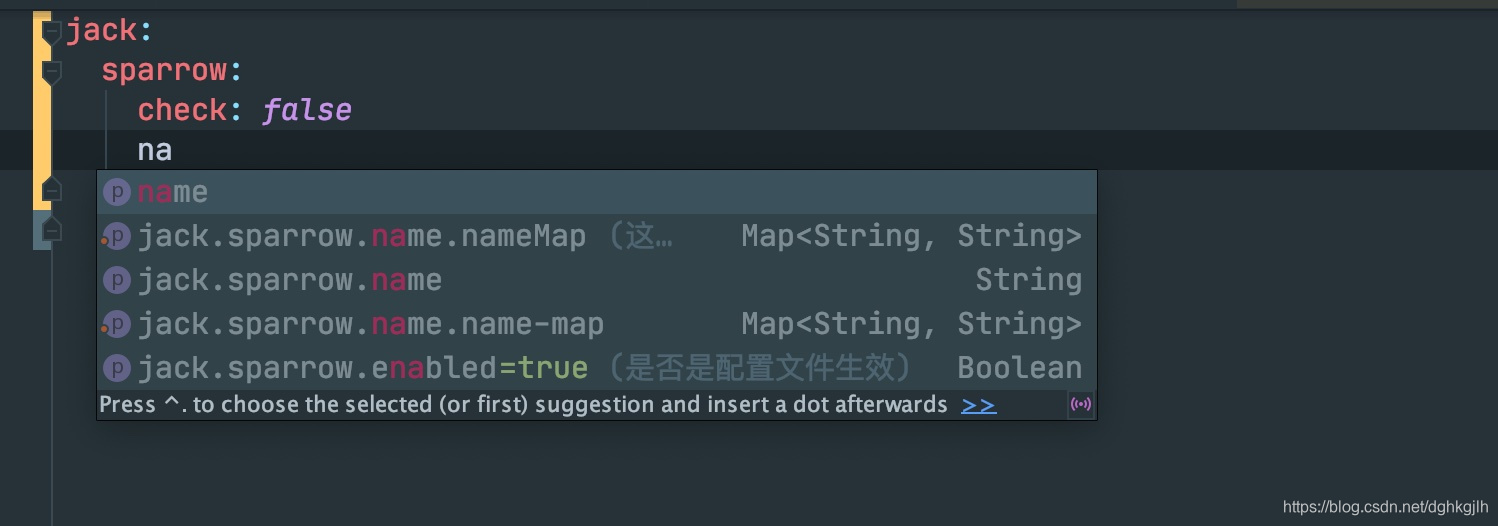
Configure the YAML File
jack:
  sparrow:
    check: false
    name:
      nameMap:
        jack: "this is jack"
        rose: "this is rose"
    code: 3
As shown below:
Test Whether the Configuration Takes Effect
@Configuration
@ConditionalOnProperty(
        prefix = "jack.sparrow",
        name = {"enabled"},
        havingValue = "true",
        matchIfMissing = true
)
@AllArgsConstructor
public class CustomConfiguration implements EnvironmentAware {
    private final CustomConfigurationProperties properties;
    private final CustomConfigurationComplexProperties complexProperties;

    @Override
    public void setEnvironment(Environment environment) {
        String prefix = "jack.sparrow.";
        StandardEnvironment standardEnvironment = (StandardEnvironment) environment;
        this.getProValue(prefix,standardEnvironment);
    }


    private void getProValue(String prefix,Environment environment){
        String code = environment.getProperty(prefix + "code");
        System.out.println(code);
        Map<String, String> nameMap = complexProperties.getNameMap();
        nameMap.forEach((k,v) -> {
            System.out.println(k);
            System.out.println(v);
        });
        System.out.println(properties.getCheck());
    }
}
Start the application and watch the console to see the printed configuration values.
name (the name of a property configured in the JSON metadata) works with havingValue. The retrieved property value is compared with havingValue, and the configuration is loaded only if they match.
matchIfMissing controls whether the configuration can be loaded when that property is absent. If true, it loads normally even without the property; otherwise, an error occurs.
Create a Custom Auto-Configuration Class
With custom YAML configuration in place, how can we configure it automatically under certain conditions when another application adds our dependency? Many frameworks, including Alibaba’s Druid data source and Feign, provide a spring-boot-starter that performs auto-configuration when added as a dependency. How do we define our own auto-configuration class? The official Spring Boot documentation on auto-configuration explains the implementation in detail, from defining your own configuration to testing whether it takes effect. Example code. For my own custom auto-configuration, see this article.