Table of contents
Open Table of contents
Introduction
Troubleshooting sometimes requires reading Java framework source. Frameworks with external network interaction now commonly use the reactor pattern. Although I have read many explanations, I tend to forget them over time and still feel lost when reading source. To understand it thoroughly, I will implement a minimal socket server, first in C and eventually in Java, working from the underlying mechanisms toward I/O multiplexing, select, epoll, and reactors.
The Simplest Socket Server
Overall Server Flow
Serving external clients generally involves these steps:
- Create a socket.
- Bind it to an address and port.
- Enable accepting connections.
- Wait for and accept a connection.
- Read and write data on the new connection.
- Close that connection.
- Repeat steps 4–6.
C Server Implementation
-
Creating a socket essentially opens a file and returns its file descriptor.
int make_socket()
{
    int sockfd;
    sockfd = socket(AF_INET, SOCK_STREAM, 0);
    if (sockfd < 0)
    {
        perror("socket");
        exit(EXIT_FAILURE);
    }
  	int flags = fcntl(sockfd, F_GETFL, 0);
    if (flags < 0)
    {
        perror("fcntl");
        exit(EXIT_FAILURE);
    }
    if (!(flags & O_NONBLOCK))
    {
        printf("socket is blocking I/O\n");
    }
    return sockfd;
}
Files
When opening a file, specify an access mode such as O_RDWR for reading and writing, and operation flags such as O_NONBLOCK for nonblocking access.
Whether read, write, and similar system calls block depends on the underlying file’s flags. Without O_NONBLOCK, reads and writes are blocking.
Sockets open in blocking mode by default.
File Descriptors
The kernel maintains three tables for files and descriptors:
-
A per-process file descriptor table, also called the descriptor table/open file descriptor table. Each process has its own table. One column refers to the system-wide open file table, the second table below. I use “reference” rather than “pointer” here to avoid confusion with C pointers. Think of it as an ID identifying a row in the second table if that helps.
-
The system-wide open file table. References from all process descriptor tables can point here.
-
Different processes may refer to the same entry. For example, fork() gives the child copies of all parent file descriptors, so corresponding references point to the same open-file entry. This table therefore has an important reference count; another reference increments it by 1.
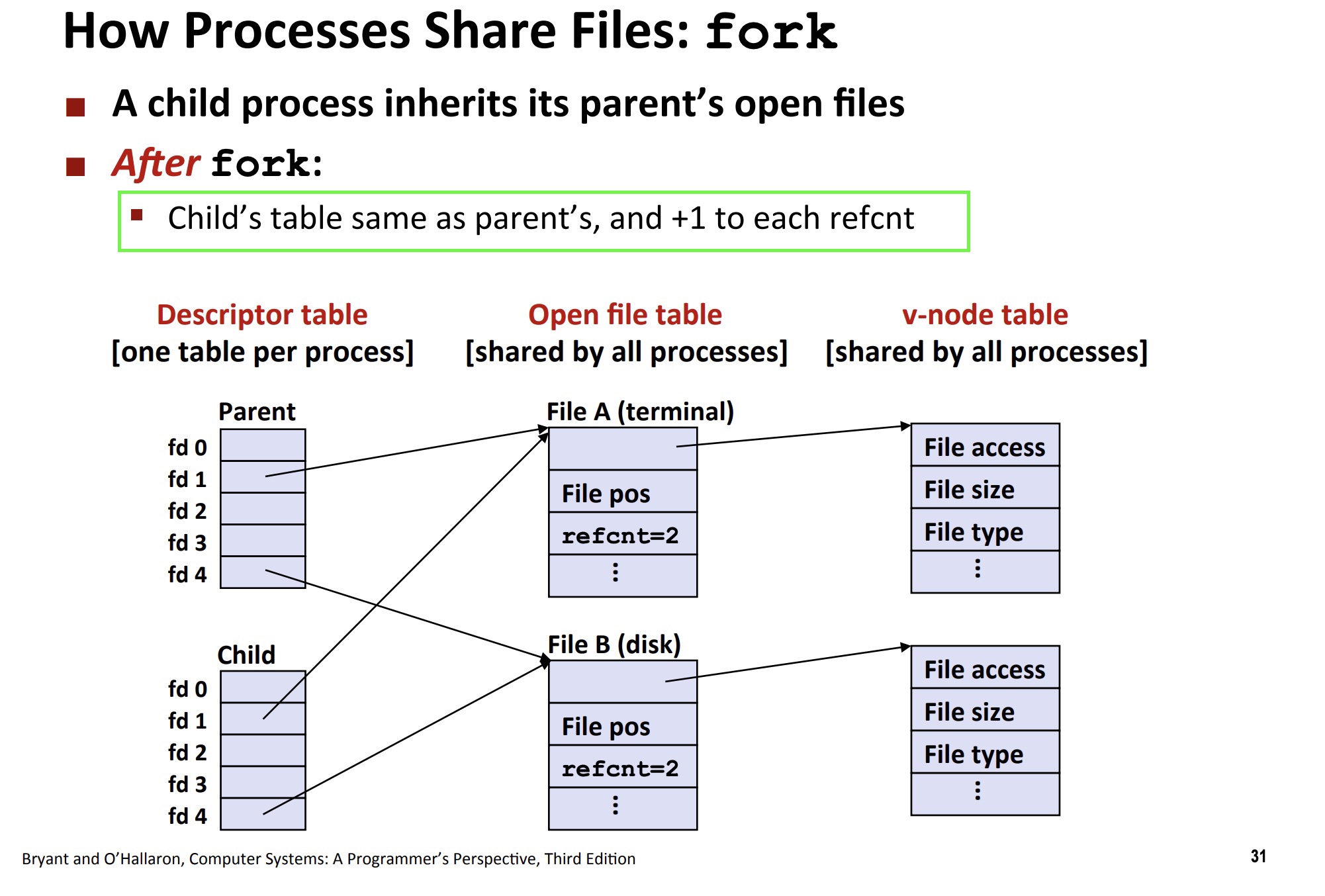
The screenshot comes from Computer Systems: A Programmer’s Perspective (CSAPP) lecture materials.
Closing a resource, for example with close(), decrements the reference count. The kernel releases the underlying resource only when the count reaches 0. For TCP, this begins connection teardown: sending the first FIN for an active close, or the second FIN for a passive close.
-
Both the number of descriptors a process may hold and the total number of files the system may open are limited.
-
Another column refers to the actual file’s inode in the third table, the filesystem inode table.
-
-
The filesystem inode table. Conceptually, it registers files, with one row per file.
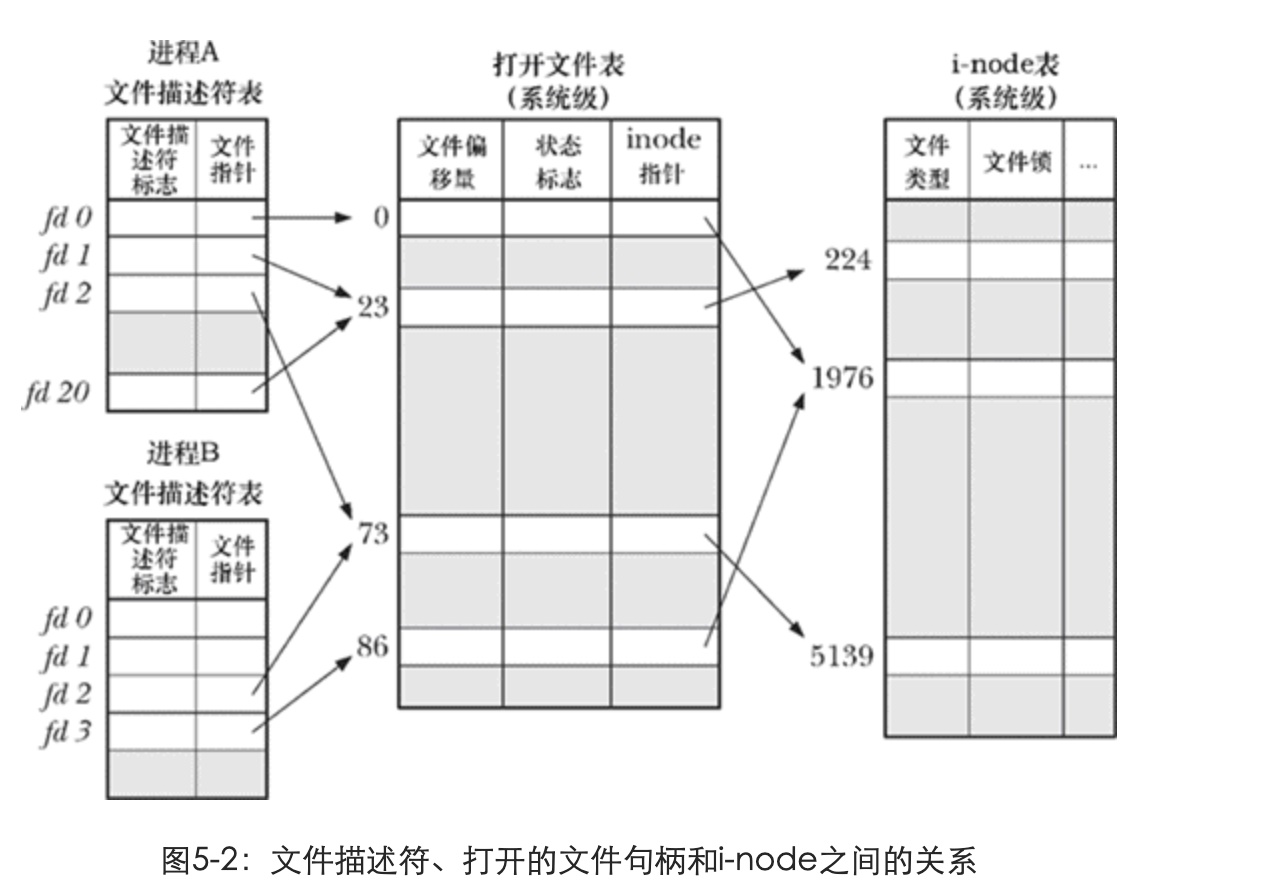
-
Bind the socket to an address and port, and call listen to accept connections.
#define SERVER_PORT 18080

int bind_server_socket_to_port_and_listen()
{
    int sockfd = make_socket();
    struct sockaddr_in server_addr_info;
    server_addr_info.sin_family = AF_INET;
    server_addr_info.sin_port = htons(SERVER_PORT);
    server_addr_info.sin_addr.s_addr = INADDR_ANY;
    if (bind(sockfd, (struct sockaddr *)&server_addr_info, sizeof(server_addr_info)) < 0)
    {
        perror("bind");
        close(sockfd);
        exit(EXIT_FAILURE);
    }
    if (listen(sockfd, SOMAXCONN) < 0)
    {
        perror("listen");
        close(sockfd);
        exit(EXIT_FAILURE);
    }
    return sockfd;
}
Network Byte Order
htons means host to network short: it converts a 16-bit integer from host byte order to network byte order. IP addresses and ports are integer values, but different machines store multibyte integers in different orders—big-endian or little-endian. Network protocols define a standard byte order called network byte order, which is big-endian. Conversion functions turn integers into this standard order before writing them to socket address structures, allowing protocols to interpret them correctly regardless of either machine’s native order.
The backlog Parameter
After the TCP three-way handshake, if the server has not yet called accept, incoming connections queue up. backlog specifies this queue length.
If the queue is full when the final handshake ACK arrives, the kernel may discard that ACK and retransmit SYN+ACK. After repeated attempts with the accept queue still full, the server may abandon the half-open connection. The client sees an apparently successful TCP handshake but times out when sending data.
Client          Kernel (Server)         App
|                  |                   |
|──── SYN ────────→|                   |
|                  | Add to SYN queue   |
|←── SYN-ACK ──────|                   |
|                  |                   |
|──── ACK ────────→|                   |
|                  | Accept queue full? |
|                  |    ├── No → Add to accept queue → Wait for accept()
|                  |    └── Yes → Drop ACK (or send RST)
|                  |                   |
|  (The client believes it is connected!) |
|  (But it is absent from the server accept queue) |
Usually, use the SOMAXCONN macro. To test this behavior, change listen’s second argument to 1, sleep for several seconds while processing a request, and send multiple simultaneous requests.
-
Process the request and close the connection.
#define BUFFER_SIZE 512
#define MESSAGE "I have received your message"

int read_from_client(int client_socket)
{
    char buffer[BUFFER_SIZE];
    int bytes_read = read(client_socket, buffer, BUFFER_SIZE);
    if (bytes_read < 0)
    {
        perror("read");
        exit(EXIT_FAILURE);
    }
    else if (bytes_read == 0)
    {
        return -1;
    }
    fprintf(stdout, "got message: '%s'\n", buffer);
    return 0;
}

void handle_request(int client_socket)
{
    while (1)
    {
        if (read_from_client(client_socket) <= 0)
        {
            write(client_socket, MESSAGE, strlen(MESSAGE) + 1);
            close(client_socket);
            printf("close client socket\n");
            break;
        }
    }
}
Single-Process Server
A single-process server is also called an iterative server. Its one main process accepts a connection, handles the request, returns, and repeats.
int server_that_can_only_process_requests_iteratively()
{
    int server_socket = bind_server_socket_to_port_and_listen();
    while (1)
    {
        struct sockaddr_in client_socket;
        socklen_t addr_len = sizeof(client_socket);
        printf("server is ready for accept connection......\n");
        int new_client_socket = accept(server_socket, (struct sockaddr *)&client_socket, &addr_len);
        if (new_client_socket < 0)
        {
            perror("accept");
            exit(EXIT_FAILURE);
        }
        fprintf(stdout,
                "Server: connect from host %s, port %hd.\n",
                inet_ntoa(client_socket.sin_addr),
                ntohs(client_socket.sin_port));
        handle_request(new_client_socket);
    }
}
It handles one client at a time and moves to the next only after finishing the current client. It has no concurrency.
Multiprocess Server
A server with concurrency is called a concurrent server. It can be implemented with multiple processes or multiple threads, among other approaches.
int server_that_can_process_requests_concurrently_using_child_process()
{
    int server_socket = bind_server_socket_to_port_and_listen();
    while (1)
    {
        /*
            If client connection details are not needed, pass NULL for the last two arguments
        */
        int new_client_socket = accept(server_socket, NULL, NULL);
        if (new_client_socket < 0)
        {
            perror("accept");
            exit(EXIT_FAILURE);
        }
        printf("Server: new client connected.");
        switch (fork())
        {
        case -1:
            close(new_client_socket);
            break;
        case 0:
            close(server_socket);
            handle_request(new_client_socket);
            _exit(0);
        default:
            close(new_client_socket);
            break;
        }
    }
}
After fork(), two processes exist, and both continue from the return of fork(). The file-descriptor explanation above answers these questions:
-
Why does the child close the listening descriptor?
The child handles the actual client connection, not accepting new connections—that is the parent’s responsibility. Closing server_socket decrements its reference count.
-
Why does the parent close the descriptor for handling the request?
The parent only listens and does not handle the established connection. Closing new_client_socket decrements its reference count. Even if the child closes it after processing, leaving the parent’s copy open prevents the kernel from fully closing TCP because the reference count is not zero. The server may never actively initiate teardown, or may accumulate CLOSE-WAIT connections after clients initiate closure. The parent also accumulates descriptors until it reaches the system limit.
Processes are relatively heavy, and fork is expensive.
Multithreaded Server
void *handle_request_for_threads(void *client_socket)
{
    int client_fd = *(int *)client_socket;
    free(client_socket);
    printf("thread is %lu\n", (unsigned long)pthread_self());
    handle_request(client_fd);
    return NULL;
}

int server_that_can_process_requests_concurrently_using_thread()
{
    int server_socket = bind_server_socket_to_port_and_listen();
    while (1)
    {
        int new_client_socket = accept(server_socket, NULL, NULL);
        if (new_client_socket < 0)
        {
            perror("accept");
            exit(EXIT_FAILURE);
        }
        pthread_t client_thread;
        int *pclient = malloc(sizeof(int));
        if (pclient == NULL)
        {
            perror("malloc");
            exit(EXIT_FAILURE);
        }
        *pclient = new_client_socket;
        int create_result = pthread_create(&client_thread, NULL, handle_request_for_threads, pclient);
        if (create_result != 0)
        {
            perror("pthread_create");
            exit(EXIT_FAILURE);
        }
        pthread_detach(client_thread);
    }
}
pthread_create’s final argument is a pointer. Before calling it, allocate memory and store the newly accepted descriptor through that pointer. Why?
If you pass &new_client_socket directly, the child thread may not run before the main thread accepts another client. When it reads that address, it may get the second client’s socket instead.
An alternative avoids allocating a separate pointer:
void *handle_request_for_threads(void *client_socket)
{
    int client_fd = (int)(intptr_t)arg;
    ...
}
int server_that_can_process_requests_concurrently_using_thread(){
    ...
    int create_result = pthread_create(&client_thread, NULL, handle_request_for_threads,(void *)(intptr_t)new_client_socket)
    ...
}
I prefer the first form.
pthread_detach automatically reclaims thread resources after termination.
Although threads are much lighter than processes, this code still has limited concurrency. Thread creation costs time and memory too. Suppose creating one thread takes 1 second. With 1,000 simultaneous connections, the main loop must finish accept and thread creation before repeating, so the last connection waits 999 seconds before processing.
Using Pools to Manage Processes/Threads Efficiently
Pooling manages processes or threads and avoids creating one in the main process for every request.
- During startup, before any requests arrive, precreate a fixed number of child processes or threads rather than creating one per client. This decouples accept from thread creation.
- Each worker handles one client at a time. After completion, it does not terminate; it obtains the next pending client and continues.
- The pool must be large enough to respond to requests. The parent monitors available workers and increases the pool at peak load so that new clients can be served immediately. Reduce it as load falls, since excess idle processes reduce overall system performance. This is resource scheduling.
Thread Pool Example
A thread pool is essentially an array of worker threads plus an array serving as a task queue.
Q: Why does a thread pool need a queue? A: If submissions outpace processing, threads become occupied and the server cannot handle new clients. A queue provides a buffer. Without one, where would a worker find its next task? The queue in a pool is fundamentally a producer–consumer model. After finishing a task, a consumer competes for another task from the buffer. If none exists, it blocks until notified that a task has arrived.
#define MAX_QUEUE_SIZE 4
#define WORKERS 4

static int task_queue_size = 0;
static pthread_mutex_t mutex = PTHREAD_MUTEX_INITIALIZER;
static pthread_cond_t cond = PTHREAD_COND_INITIALIZER;

struct client_info
{
    int client_socket;
    int using_non_blocking_io;
};

// Store pointers rather than values; enterprise applications commonly use pointers here
struct client_info *task_queue[MAX_QUEUE_SIZE];

void *thread_workers_handle_request(void *arg)
{
    while (1)
    {
        struct client_info *client;
        int s = pthread_mutex_lock(&mutex);
        if (s != 0)
        {
            perror("pthread_mutex_lock");
            exit(EXIT_FAILURE);
        }
        while (task_queue_size == 0)
        {
            print_time();
            pthread_cond_wait(&cond, &mutex);
            print_time();
        }
        // Decrement the task count, then use it as the array index; task_queue[--task_queue_size] also works
        task_queue_size--;
        client = task_queue[task_queue_size];
        s = pthread_mutex_unlock(&mutex);
        if (s != 0)
        {
            perror("pthread_mutex_unlock");
            exit(EXIT_FAILURE);
        }
        // Do not run business logic while holding the lock. Release it immediately after obtaining the object
        int client_socket = client->client_socket;
        free(client);
        printf("thread %ld is handling request from client %d\n", (unsigned long)pthread_self(), client_socket);
        close(client_socket);
    }
}


int using_thread_pool()
{
    int server_socket = bind_server_socket_to_port_and_listen();
    for (size_t i = 0; i < WORKERS; i++)
    {
        pthread_t tid;
        pthread_create(&tid, NULL, thread_workers_handle_request, NULL);
    }
    while (1)
    {
        int client_socket = accept(server_socket, NULL, NULL);
        if (client_socket < 0)
        {
            perror("accept");
            exit(EXIT_FAILURE);
        }
        struct client_info *client = malloc(sizeof(struct client_info));
        client->client_socket = client_socket;
        client->using_non_blocking_io = 0;
        pthread_mutex_lock(&mutex);
        task_queue[task_queue_size++] = client;
        pthread_cond_signal(&cond);
        pthread_mutex_unlock(&mutex);
    }
}- At startup, create 4 worker threads for request processing.
- Workers compete concurrently for tasks in the array. pthread_mutex_t ensures thread safety.
- With no tasks, pthread_cond_wait releases the mutex and sleeps. It serves these purposes:
- If shared state is not ready, unlock the mutex before waiting on the condition variable, allowing others to access the state.
- After notification wakes the thread, reacquire the mutex, because it will typically access shared state immediately.
- pthread_cond_wait() automatically performs both unlocking and relocking.
- The main process submits tasks to the array and uses pthread_cond_signal to wake one worker.
- After acquiring the lock and retrieving the data needed by business logic, release it promptly instead of executing the business operation inside the lock. Avoid holding the lock for a long time.
Remaining Problems
All reads and writes so far are blocking I/O: the server waits for client data, and the client waits for the server. With many connections that have little to send or receive, the associated process or thread stays blocked doing nothing, wasting resources.
One might terminate idle processes or threads to reclaim resources, since each consumes memory.
The next post discusses solving this with nonblocking I/O and implementing I/O multiplexing.
Notes
More TCP background is available in this post.