Table of contents
Open Table of contents
Querying Elasticsearch
In the previous article, we created some data. Once data exists, the usual next steps are updating, deleting, and querying it.
Before We Begin
If you do not know where to start with Elasticsearch queries, treat it as a database and think about the queries you normally use in development. That gives you a direction, and then finding the corresponding documentation becomes much faster.
Querying requires familiarity with the official Query DSL. At a minimum, know which query suits the current business need so you can quickly look it up. The DSL documentation lists full-text queries, term-level queries, geographical queries, and many others. We need to know these types and understand which query to use for each field and field type.
Knowing the DSL well not only helps us query data faster; it also helps when programming with the Elasticsearch Java API later.
Elasticsearch query endpoints often end in _search.
Simple Queries
Counting Documents
I want to see how many articles the current index contains.
GET /my-articles/_countQuerying All Documents
Query all articles.
GET /my-articles/_searchPaginated Queries
As the number of articles grows, we need to display the data with pagination.
Two records per page:
GET /my-articles/_search
{
  "from": 1,
  "size": 2
}
Querying by ID
In everyday development, we may query by one or more IDs.
Query by a single ID:
GET /my-articles/_doc/FoGzCXoBZpqt44v39dwJQuery multiple IDs with multi-get. The mget documentation shows three approaches; I prefer the one below.
GET /my-articles/_mget
{
  "ids":["dBCh0XkBokVGPLgUdSlh","FoGzCXoBZpqt44v39dwJ"]
}
GET /my-articles/_search
{
"query":{
"ids":{
"values":["dBCh0XkBokVGPLgUdSlh","FoGzCXoBZpqt44v39dwJ"]
}
}
}Sorting Results
Sort the articles.
Use sort with the syntax field:asc/desc. Separate multiple sort fields with commas.
GET /my-articles/_search?sort=creted:desc,reading_count:ascAnother approach is:
GET /my-articles/_search
{
  "sort":[
    {
      "created":{
        "order":desc
      }
    }
  ]
}
Retrieving Only Selected Fields
We may not need every field in a document, only those required by the application.
Separate multiple fields with commas.
First approach:
GET /my-articles/_search?_source_includes=title,author,article_contentSecond approach:
search request body parameters.
GET /my-articles/_search
{
  "source":{
    "includes":["title","author","article_content"]
  }
}
Third approach:
GET /my-articles/_search
{
  "query": {
    "match_all": {}
  },
  "fields": [
    "title","article_content"
  ],
  "_source": false
}Advanced Queries
Query Context
Elasticsearch basically offers two styles: put query parameters in GET parameters, or put them in the request body. Choose according to preference. Request-body queries most often use query context, so mastering its combinations is useful.
Fuzzy Queries
fuzzy
Fuzzy queries return documents containing terms similar to the search term. Note that a fuzzy query here is not equivalent to SQL LIKE.
GET /my-articles/_search
{
    "query":{
        "fuzzy":{
            "article_content":{
                "value":"nglishcontent"
            }
        }
    }
}Note: even after reading the fuzzy-query documentation, many people still do not understand how Elasticsearch handles fuzziness. This explanation is particularly clear and should help.
wildcard
A wildcard query is closer to SQL LIKE.
GET article-*/_search
{
    "query": {
      "bool": {
        "must": [
          {"wildcard": {
            "article_content": {
              "value": "*arTicle*",
              "case_insensitive": true
            }
          }}
        ]
      }
    }
}
Prefix Queries
There are two approaches here.
Use prefix:
GET /my-articles/_search
{
  "query": {
    "prefix": {
      "title": {
        "value": ""
      }
    }
  }
}
For text fields, use match_phrase_prefix.
GET /my-articles/_search
{
  "query": {
    "match_phrase_prefix": {
      "title": "清"
    }
  }
}
Phrase Queries
Why do phrase queries exist? Developers familiar with search engines know that text is tokenized. The Chinese line “晓看红湿处,花重锦官城” may be split into several tokens. If we only want “花重锦官城”, a search based on those tokens may also return content containing individual parts such as 花 or 官城. That is not what we want, hence phrase queries.
For a text field, use match_phrase.
GET /my-articles/_search
{
  "query":{
    "match_phrase":{
      "title":{
        "value":"青玉案"
      }
    }
  }
}
Exact-Match Queries
Use term:
GET /my-articles/_search
{
    "query":{
        "term":{
            "articlet_content":{
                "value":"englishcontent"
            }
        }
    }
}
Range Queries
Use range:
GET /my-articles/_search
{
    "query":{
        "range":{
            "created":{
                "gte":"2021-06-03 15:20:14",
                "lte":"2021-06-25 19:27:56"
            }
        }
    }
}
Compound Queries
The queries above each use one condition. Use a compound query to combine multiple conditions.
GET /my-articles/_search
{
    "query":{
        "bool":{
            "must":[
                 {
              "prefix": {
                "title": {
                  "value": "english"
                }
              }
            },
            {
              "prefix": {
                "author": {
                  "value": "d"
                }
              }
            }
            ]
        }
    }
}
Excluding Rich-Text Markup from Search
In this example, one scenario may require special handling. Article content might contain HTML tags for better presentation, making it rich text. When querying, we do not want Elasticsearch to tokenize those tags as content. We therefore need filters for the analyzer. I plan to explain this in the later analyzer section; for now, this is a reminder that the scenario is quite likely in real applications.
Notes
Some examples above query Chinese text and others English. Elasticsearch’s built-in default analyzer does not support Chinese especially well, so an English example may be needed to demonstrate a particular scenario. Like ignoring HTML tags, this will be addressed in the later analyzer section.
Useful Documentation
- Elasticsearch Search API.
- Elasticsearch Query DSL.
- Query examples from Elasticsearch’s official CSDN blog.
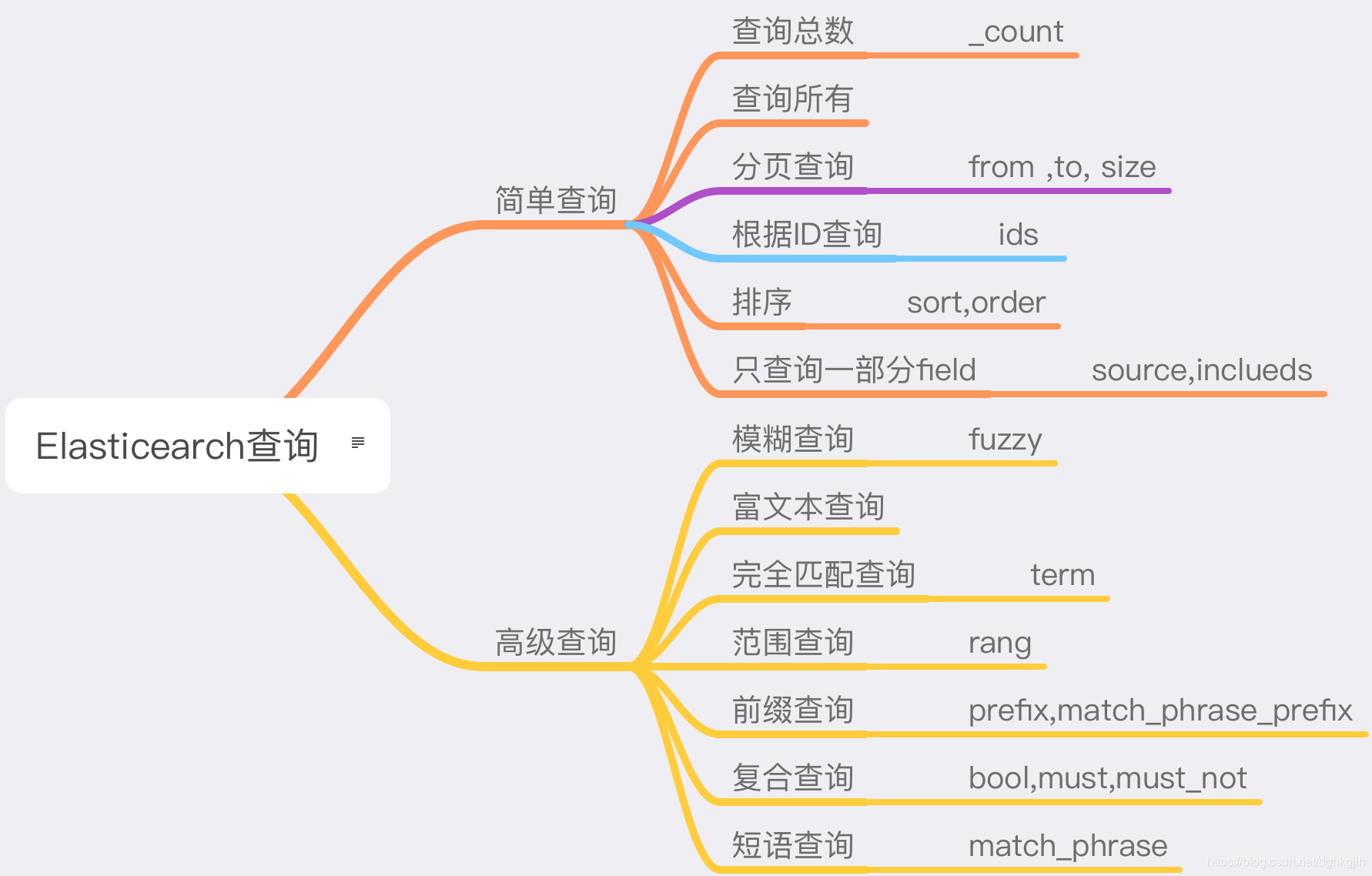
Mind Map
The next article introduces other document operations, such as updating data, deleting data, and changing field types.